UPDATED, 03-02-2012: MOD by powermarcel10: Cover templates and more.. (1 Viewer)

dmcaloney

Portal Member
October 5, 2011
44
2
58
Home Country
Scotland Scotland
Re: RELEASE, 16-01: MOD for movingpictures : Cover templates

Hi, I have installed the mod, but its not working for me?

I dont see the date in any screen. Also I only see the cases when I click on the info for each movie i.e. they dont show in the movie list view (my default) or any other view if I choose them e.g coverflow etc?

Am I doing something wrong? Thanks.

also, can I implement the mod without the certification image changes? I have already got certification icons (banner style) and these are being squeezed up as it thinks I am using the images supplied.

I am not sure which file needs editing to stop this squeezing of images? Thanks.
 

powermarcel10

Retired Team Member
  • Premium Supporter
  • November 30, 2010
    2,836
    899
    38
    Groningen
    Home Country
    Netherlands Netherlands
    Re: RELEASE, 16-01: MOD for movingpictures : Cover templates

    Hi, I have installed the mod, but its not working for me?

    I dont see the date in any screen. Also I only see the cases when I click on the info for each movie i.e. they dont show in the movie list view (my default) or any other view if I choose them e.g coverflow etc?

    Am I doing something wrong? Thanks.

    also, can I implement the mod without the certification image changes? I have already got certification icons (banner style) and these are being squeezed up as it thinks I am using the images supplied.

    I am not sure which file needs editing to stop this squeezing of images? Thanks.

    Hi,

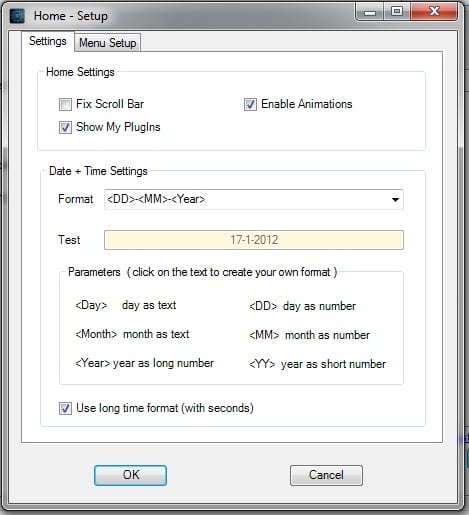
    I will take a look into it soon.. I have also changed the pause osd icon.. It was showing also when rewind and fast forward.. I have fixt that allready.. About the date, could you try this settings in Mediaportal plugins -> Home?

    I will also made a mod for you with the default certification icon.. Will upload them asap..
     

    Attachments

    • Naamloos.jpg
      Naamloos.jpg
      62.4 KB

    dmcaloney

    Portal Member
    October 5, 2011
    44
    2
    58
    Home Country
    Scotland Scotland
    Re: RELEASE, 16-01: MOD for movingpictures : Cover templates

    Hi powermarcel

    tried the settings you suggested, still no dateshown. Only difference now is that the time also shows seconds :)
     

    powermarcel10

    Retired Team Member
  • Premium Supporter
  • November 30, 2010
    2,836
    899
    38
    Groningen
    Home Country
    Netherlands Netherlands
    Re: RELEASE, 16-01: MOD for movingpictures : Cover templates

    Hi powermarcel

    tried the settings you suggested, still no dateshown. Only difference now is that the time also shows seconds :)

    Hmm, and you are shure that common.time.xml and common.date.xml are in C:\ProgramData\Team MediaPortal\MediaPortal\skin\StreamedMP?

    Wich version of MP and StreamedMP are you using BTW?
     

    dmcaloney

    Portal Member
    October 5, 2011
    44
    2
    58
    Home Country
    Scotland Scotland
    Re: RELEASE, 16-01: MOD for movingpictures : Cover templates

    All files are copied as per your instructions, however one thing I did note: You talk about things being in a subdirectory of 'Program Data' but all of my files are in (from memory as I am not at home to check)

    Documents and Settings/All Users/Application Data/TeamMediaPortal/MediPortal (I am running XP)

    but I assumed you meant the same place?

    I am running StreamedMP 1.7.2. I dont want to upgrade as I am happy with the way it is working at the moment and dont wish to tempt fate! :)

    As I said, the only time I see the Cases you provide is when I look at the info for a film. In all other views its not shown.
     

    toutoune290

    Portal Pro
    January 27, 2009
    294
    26
    brest
    Home Country
    France France
    Re: RELEASE, 16-01: MOD for movingpictures : Cover templates

    hi all,
    it works for me but only in .mkv.
    for the dvds (isos ) it's not.
    how can i do ?
     

    powermarcel10

    Retired Team Member
  • Premium Supporter
  • November 30, 2010
    2,836
    899
    38
    Groningen
    Home Country
    Netherlands Netherlands
    Re: RELEASE, 16-01: MOD for movingpictures : Cover templates

    All files are copied as per your instructions, however one thing I did note: You talk about things being in a subdirectory of 'Program Data' but all of my files are in (from memory as I am not at home to check)

    Documents and Settings/All Users/Application Data/TeamMediaPortal/MediPortal (I am running XP)

    but I assumed you meant the same place?

    I am running StreamedMP 1.7.2. I dont want to upgrade as I am happy with the way it is working at the moment and dont wish to tempt fate! :)

    As I said, the only time I see the Cases you provide is when I look at the info for a film. In all other views its not shown.

    Well it can because you are using an old(er) version of StreamedMP but I'm not shure of that.. Will test it on my test system.

    Can you also try maybe to switch between fanart enabled and disabled? (in Mediaportal go to Settings -> Skin -> Movingpictures settings -> Fanart Style

    Also be shure you clear the skin cache!

    Fo XP it's indeed Documents and Settings/All Users/Application Data/TeamMediaPortal/MediPortal

    hi all,
    it works for me but only in .mkv.
    for the dvds (isos ) it's not.
    how can i do ?

    I think because mediainfo.dll can look in iso files to see if it's a dvd, bluray or what ever.. But I will take a look into it.. :) Thanks for you report.. Can you tell me also maybe with version of MP, StreamedMP and Windows you are using?

    MOD updated; see topicstart!

    :D
     

    toutoune290

    Portal Pro
    January 27, 2009
    294
    26
    brest
    Home Country
    France France
    Re: UPDATED, 18-01: MOD for movingpictures : Cover templates and more

    i use MP 1.2.2 and streamedMP 1.7.5.3066 in windows seven x86.
    thanks a lot.
    i'm going to try last version.

    in my test pc it seems to work.
    i'll try in home this evening.
     

    Users who are viewing this thread

    Top Bottom