
You are using an out of date browser. It may not display this or other websites correctly.
You should upgrade or use an alternative browser.
You should upgrade or use an alternative browser.
User experience with AMD 780G and MediaPortal (1 Viewer)
- Thread starter KRA
- Start date
 United States of America
Yes, sorry that link does not include an all in one package - I heard it is better to install the drivers separately anyway, with a restart each time.jo16v, did you use south bridge driver 8.10 as well?
sweet, it works pretty good at the moment!!!! thanks for your help...now is it appropriate to give you a thanks in your profile?
this is probably not the right thread to post this, but i will do this anyways since it is active...
is it just me or is everyone here from europe? i believe i am the only one from the states on this thread???
anyways, my point to this is there anyone out there that can help me with epg data for the US???
i am having the toughest time trying to do the HOW TO on here....i mapped a couple channels and did the manual webepg update and still no data when i go to channels in my tv....
is there some site where i can download something where the channels are already mapped to where i am located??? this is some tidious work!!!
thanks again!
this is probably not the right thread to post this, but i will do this anyways since it is active...
is it just me or is everyone here from europe? i believe i am the only one from the states on this thread???
anyways, my point to this is there anyone out there that can help me with epg data for the US???
i am having the toughest time trying to do the HOW TO on here....i mapped a couple channels and did the manual webepg update and still no data when i go to channels in my tv....
is there some site where i can download something where the channels are already mapped to where i am located??? this is some tidious work!!!
thanks again!

fshgrind
I use the zap2xml program in conjunction with the XMLTV plugin. I followed the below to get it working…
First, follow the directions from the site zap2xml to get a
zap2it account and get the listings to show the 6 hour grid, and then download
the windows binary from the site, then execute it so it extracts the file, and
take this file, zap2xml.exe, and put it in the media portal xmltv folder, then
go to start>programs>accessories>system tools>scheduled tasks, and add a new
task for it using the "add a task" wizard, which should walk you through most
of it. When it asks you for the program you want to run, click browse and go to
file you put in the xmltv folder. Set it up to run however often you want your
guide to be updated. After it is set up, right click the new task you just created,
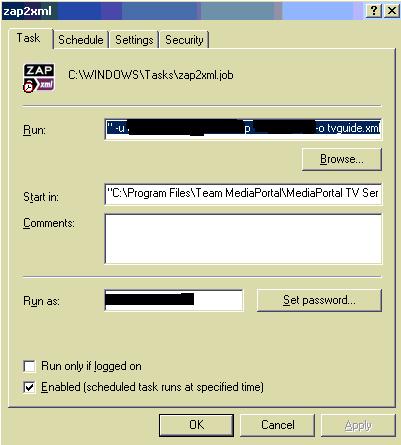
click properties, and make sure you are in the "task" tab, then where it says run,
it will have the location of the directory that you selected, add the following to
the very end of it, after the zap2xml.exe part:
-u YOURZAP2ITLOGIN@EMAIL.COM -p YOURPASSWORD -o tvguide.xml , Replacing the
capitalized letters with the appropriate login and password for zap2it, and when
the schedule executes, your tvguide data should be populated. You may need to set
time zone info in the media portal setup, and media portal may not instantly
update the time zone info. I think that about covers it.
Then the only thing I had to do was create the xmltv.dtd file from a blank txt file (it’s empty) and everything works well.
To go in to more detail, in “C:\Program Files\Team MediaPortal\MediaPortal TV Server\xmltv” I have the below. Xmltvmap.xml was created automatically after I mapped my channels.

Then I have a scheduled job that runs the zap2xml.exe with the proper options. ("C:\Program Files\Team MediaPortal\MediaPortal TV Server\xmltv\zap2xml.exe" -u username@email.com -p password -o tvguide.xml)

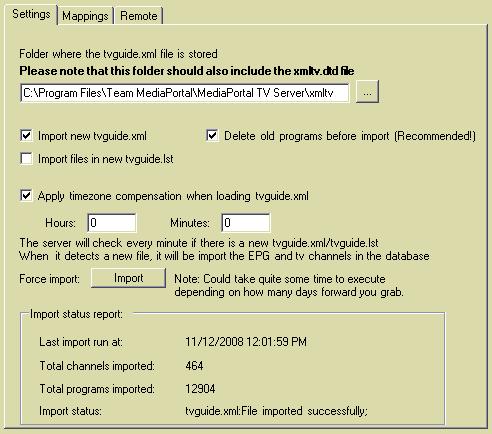
And my XMLTV plugin (included with MP TV Server) is setup like this…

Hope this helps, if you want to PM me for more information I'll be happy to help out.
I use the zap2xml program in conjunction with the XMLTV plugin. I followed the below to get it working…
First, follow the directions from the site zap2xml to get a
zap2it account and get the listings to show the 6 hour grid, and then download
the windows binary from the site, then execute it so it extracts the file, and
take this file, zap2xml.exe, and put it in the media portal xmltv folder, then
go to start>programs>accessories>system tools>scheduled tasks, and add a new
task for it using the "add a task" wizard, which should walk you through most
of it. When it asks you for the program you want to run, click browse and go to
file you put in the xmltv folder. Set it up to run however often you want your
guide to be updated. After it is set up, right click the new task you just created,
click properties, and make sure you are in the "task" tab, then where it says run,
it will have the location of the directory that you selected, add the following to
the very end of it, after the zap2xml.exe part:
-u YOURZAP2ITLOGIN@EMAIL.COM -p YOURPASSWORD -o tvguide.xml , Replacing the
capitalized letters with the appropriate login and password for zap2it, and when
the schedule executes, your tvguide data should be populated. You may need to set
time zone info in the media portal setup, and media portal may not instantly
update the time zone info. I think that about covers it.
Then the only thing I had to do was create the xmltv.dtd file from a blank txt file (it’s empty) and everything works well.
To go in to more detail, in “C:\Program Files\Team MediaPortal\MediaPortal TV Server\xmltv” I have the below. Xmltvmap.xml was created automatically after I mapped my channels.
Then I have a scheduled job that runs the zap2xml.exe with the proper options. ("C:\Program Files\Team MediaPortal\MediaPortal TV Server\xmltv\zap2xml.exe" -u username@email.com -p password -o tvguide.xml)
And my XMLTV plugin (included with MP TV Server) is setup like this…
Hope this helps, if you want to PM me for more information I'll be happy to help out.
Attachments

I won't complain certainly.sweet, it works pretty good at the moment!!!! thanks for your help...now is it appropriate to give you a thanks in your profile?
 I take it you installed all the 8.10 drivers and it's now running smoothly?
Australia and New Zealand in Europe?this is probably not the right thread to post this, but i will do this anyways since it is active...
is it just me or is everyone here from europe? i believe i am the only one from the states on this thread???
It is true there don't seem to have been to many U.S. posters in this thread- could it be that US doesn't use h.264 TV which seems to cause a lot of the issues with this chipset? There are quite a few U.S. posters on the avs forum thread.I can't help much on that as I use DJBlu's plugin for the UK and Italy which uses a different method to webepg. Have you had a look at this and this thread also? You could try posting in the EPG forum if they don't help.anyways, my point to this is there anyone out there that can help me with epg data for the US???
i am having the toughest time trying to do the HOW TO on here....i mapped a couple channels and did the manual webepg update and still no data when i go to channels in my tv....
is there some site where i can download something where the channels are already mapped to where i am located??? this is some tidious work!!!
I wonder if a phenom CPU gives a better movie quality than e X2 dual core ? Any experiences?
yes, if the movie is HD and interlaced (and without dedicated graphic card). Otherwise no benefit for "movie quality".
The only advantage is the better deinterlacing of HDTV (1080i) with onboard graphics with shared memory.
Are you sure about that kszabo? I seem to remember something from the early anantech reviews. I think it was something like due to larger bandwith in HT3.0 the Phenom enabled all of the post-processing in the gpu. And this was for 1080p aswell I think.
Edit found the link:
http://www.anandtech.com/cpuchipsets/showdoc.aspx?i=3258&p=4
But I don't know if this has changed with later drivers tough. But I'm guessing the new X2 7-series will avoid this problem anyhow (x2 CPU based on K10.5 platform.)
Edit found the link:
http://www.anandtech.com/cpuchipsets/showdoc.aspx?i=3258&p=4
But I don't know if this has changed with later drivers tough. But I'm guessing the new X2 7-series will avoid this problem anyhow (x2 CPU based on K10.5 platform.)
Are you sure about that kszabo? ...due to larger bandwith in HT3.0 the Phenom enabled all of the post-processing in the gpu. And this was for 1080p aswell ...
yes, I guess you are right. But I think (and read) that postprocessing like denoise or edge enhancement is not really necessary for HD material. I have all of these options deactivated. A good deinterlacing is much more important.
So for most downloaded material like 720p/1080p MKV's (bluray rips) and DVD rips ; AVI's - as they are "progressive" - there is no difference in picture quality with X2 or X4?
I guess you won't see any difference.
I had a X2 BE-2400 and upgraded because of 1080i HDTV deinterlacing (could not get nice result with it). As far as I remember 1080p was very nice already with the small X2. I have the smallest (cheapest) Phenom X3 8450 now and happy with it.
Users who are viewing this thread
Online now: 2 (members: 0, guests: 2)