Xface Skin Version 1.6 ready for download 09.06.2008 (2 Viewers)

MasterMarc

Portal Pro
June 21, 2007
158
138
36
Bochum & Gelsenkirchen
Home Country
Germany Germany
i did a more testing - not only xface freezes. core - i know it's out dated) - and foofaraw have the same issue with the "slide" effects for the video and music covers. so is this a general bug in mp? can anybody have alook on the concerning code, please? i use the amd 690g chipset for the graphics with latest catalyst drivers (ver. 7.9) on win xp with sp2 and all updates. with my other pc (nvidia 8800gts, vista) i don't have any problems.
marc
 

ronsonol

MP Donator
  • Premium Supporter
  • April 2, 2007
    178
    23
    Kingston
    Home Country
    Canada Canada
    For anyone have trouble seeing the new tv guide I created an 8 row version that is easier on my eyes anyways. Plus the channel icons are much more visible now.

    I couldn't figure out how to center the text for the shows within each row(its slightly to the top) but it looks good as is. I use a 1280x720 res if that makes much of a difference on layout.

    Thank you, it looks good on my 32' TFT, but there are some small failures in. The grafik left of the channel icons is shifted downward, first row is OK but row 8 the grafik is shifted some pixels down.
    Hope you can fix.

    Might be difficult for me to do, it looks right on my screen 42" 1280x720. Maybe it shifts from screen to screen, and this might be why those tabs left to the channel logo were removed in the last release. I had to tweak the one by one in the tvguide.xml so they lined up for me.
     

    DarkWader

    Portal Pro
    October 3, 2006
    270
    6
    48
    Home Country
    Norway Norway
    hi harley
    hätte da auch noch was, schaus dir mal an.
    Habst do eine wiener on das wessen? heh, I have no idea of what I just wrote (just something I think I heard in a movie)
    And also no idea of what you wrote...
    Can you please keep the language in English on this forum? Specially when files are attached :)
     

    GoldenEye

    MP Donator
  • Premium Supporter
  • October 26, 2005
    299
    26
    Switzerland
    Home Country
    Switzerland Switzerland
    i did a more testing - not only xface freezes. core - i know it's out dated) - and foofaraw have the same issue with the "slide" effects for the video and music covers. so is this a general bug in mp? can anybody have alook on the concerning code, please? i use the amd 690g chipset for the graphics with latest catalyst drivers (ver. 7.9) on win xp with sp2 and all updates. with my other pc (nvidia 8800gts, vista) i don't have any problems.
    marc
    Have you tried using Catalyst 7.2? Cf. ::this:: post and the related thread.

    G.
     

    chrisonline

    MP Donator
  • Premium Supporter
  • August 17, 2007
    515
    37
    47
    Tirol/Wörgl
    Home Country
    Austria Austria
    hi harley
    hätte da auch noch was, schaus dir mal an.
    Habst do eine wiener on das wessen? heh, I have no idea of what I just wrote (just something I think I heard in a movie)
    And also no idea of what you wrote...
    Can you please keep the language in English on this forum? Specially when files are attached :)

    Hey DarkWader,

    I have also no idea what you just wrote and I understand german ;-)
    Diskeeper wrote:
    "Hätte da auch noch was, schaus dir mal an" meens "I also have something, look at that"
     

    peque

    Moderator - Spanish Forums
  • Premium Supporter
  • August 4, 2007
    861
    99
    Home Country
    Spain Spain
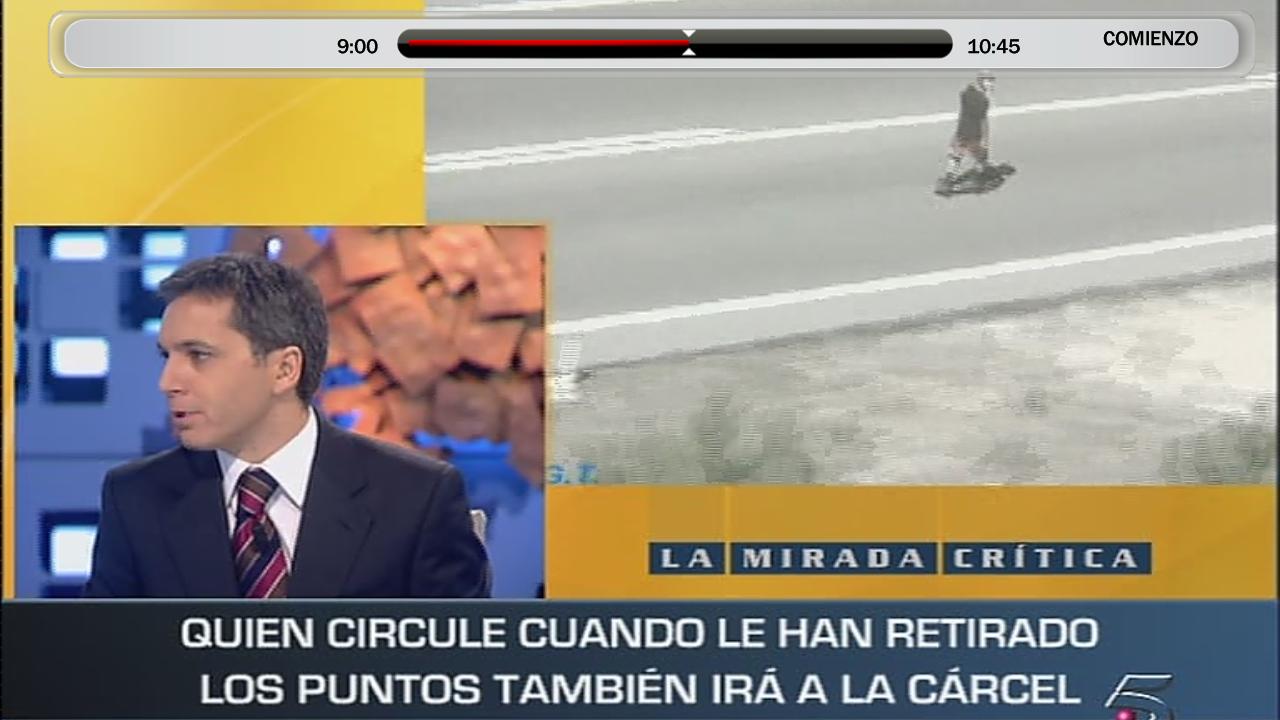
    Skip steps "numbers" (+5, +10, END, etc...) don't appear in the middle of the progress bar (vertically) as the do on video fullscreen. They appear a little bit "up".... Where in the .xml file can I change this or at least play with? I found "skip steps" control into tvfullscreen.xml, but changing x and y labels does nothing (after erasing cache). I tried to put something more than "35" on the posY... but it didn't actually changed anything...

    Go to configuration -> screen calibration. In the last step of the screen size settings (for video and subtitles etc) you get to move the OSD vertically. Here you should be able to move it so it all lines up nicely. I did notice it was a bit off until I went there and changed it a bit.
    Thank you very much for the suggestion... It didn't help anyway. This config only moves "central" OSD box... progressbar is allways in the same place...

    I'll try to take a snapshot and put it here for you to see what it's happening... :(

    @Harley, or someone... could you please tell me something about editing that .xml?

    Thank you very much!

    edit: ok. I managed to take a shot of second issue. I attach it here... Where it says "comienzo"... as you can see, it's not centered vertically... :( The strange thing is that in fullscreen video (not TV) it appears centered.
     

    Attachments

    • shot.JPG
      shot.JPG
      88.3 KB

    grubi

    Portal Pro
    June 16, 2007
    1,207
    87
    127.0.0.1
    Home Country
    Germany Germany
    For anyone have trouble seeing the new tv guide I created an 8 row version that is easier on my eyes anyways. Plus the channel icons are much more visible now.

    I couldn't figure out how to center the text for the shows within each row(its slightly to the top) but it looks good as is. I use a 1280x720 res if that makes much of a difference on layout.

    Thank you, it looks good on my 32' TFT, but there are some small failures in. The grafik left of the channel icons is shifted downward, first row is OK but row 8 the grafik is shifted some pixels down.
    Hope you can fix.

    Might be difficult for me to do, it looks right on my screen 42" 1280x720. Maybe it shifts from screen to screen, and this might be why those tabs left to the channel logo were removed in the last release. I had to tweak the one by one in the tvguide.xml so they lined up for me.

    This depends on the vertical resolution. As the scan engine will resize elements to meet the actual screen resolution you could have rounding errors leading to a one pixel wide shift. That was the reason I removed it from the mod I posted and mabey for the same reason Harley removed it as well from the original release.
     

    grubi

    Portal Pro
    June 16, 2007
    1,207
    87
    127.0.0.1
    Home Country
    Germany Germany
    Skip steps "numbers" (+5, +10, END, etc...) don't appear in the middle of the progress bar (vertically) as the do on video fullscreen. They appear a little bit "up".... Where in the .xml file can I change this or at least play with? I found "skip steps" control into tvfullscreen.xml, but changing x and y labels does nothing (after erasing cache). I tried to put something more than "35" on the posY... but it didn't actually changed anything...

    Go to configuration -> screen calibration. In the last step of the screen size settings (for video and subtitles etc) you get to move the OSD vertically. Here you should be able to move it so it all lines up nicely. I did notice it was a bit off until I went there and changed it a bit.
    Thank you very much for the suggestion... It didn't help anyway. This config only moves "central" OSD box... progressbar is allways in the same place...

    I'll try to take a snapshot and put it here for you to see what it's happening... :(

    @Harley, or someone... could you please tell me something about editing that .xml?

    Thank you very much!

    edit: ok. I managed to take a shot of second issue. I attach it here... Where it says "comienzo"... as you can see, it's not centered vertically... :( The strange thing is that in fullscreen video (not TV) it appears centered.

    Try the file attached.

    grubi
     

    peque

    Moderator - Spanish Forums
  • Premium Supporter
  • August 4, 2007
    861
    99
    Home Country
    Spain Spain
    Try the file attached.
    It did the trick! Thank you very much grubi. So it was just a matter of changing "row 1" position... Ok... I'll play around with them to "learn" a bit about skins... :)

    It would be perfect if I could also make" appear progressbar when changing channel with numbers... I'll try to do it myself... :p

    bye!
     

    Users who are viewing this thread

    Top Bottom