Xface Skin Version 1.6 ready for download 09.06.2008 (3 Viewers)

daHive

Portal Pro
March 1, 2007
109
0
Home Country
Austria Austria
i made some tweaks to the tvseries.xml of this great skin, thought i´d share it...
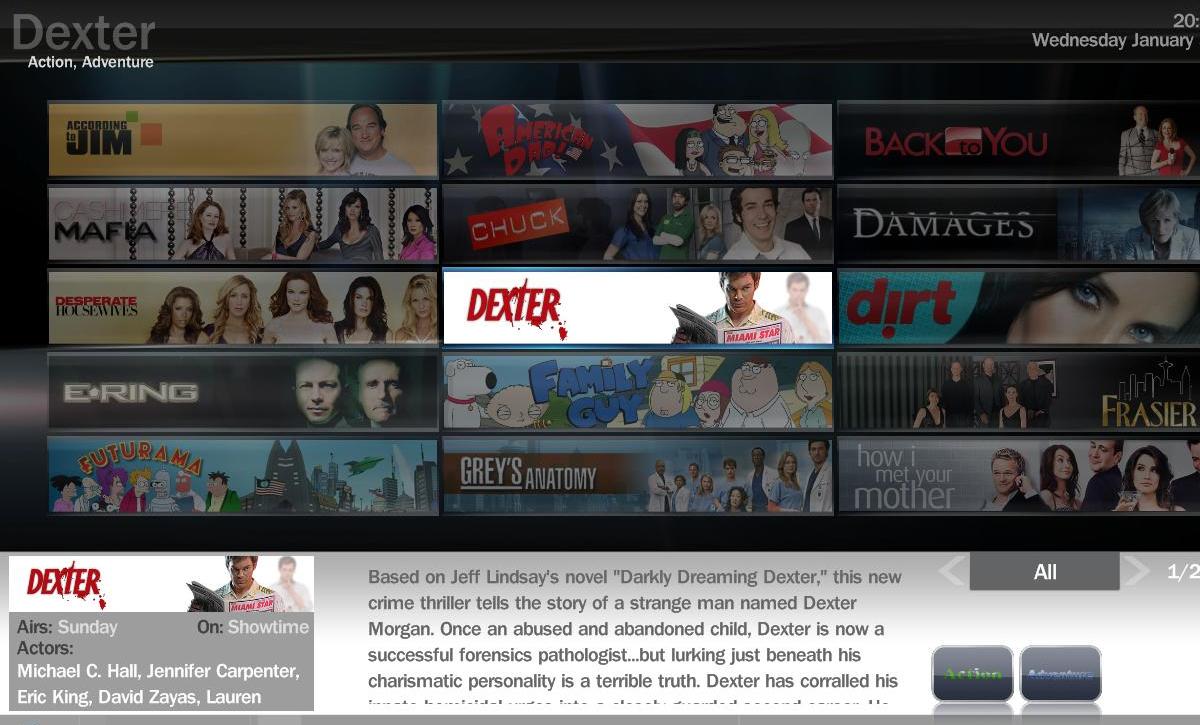
- put the two currentview-switching arrows down next to the textbox(when they were up to the sides of the series-items, i always kind of got the impression that you could just "turn the page" by pressing right or left on the remote).
- on the series overview screen i inserted a box with the currently selected series banner and some series details(airday, channel and actors) which covers up the empty episodethumb background
- on the season select screen i only added the season cover image next to the empty episodethumb so far(i´d like to do more, but dunno what exactly).
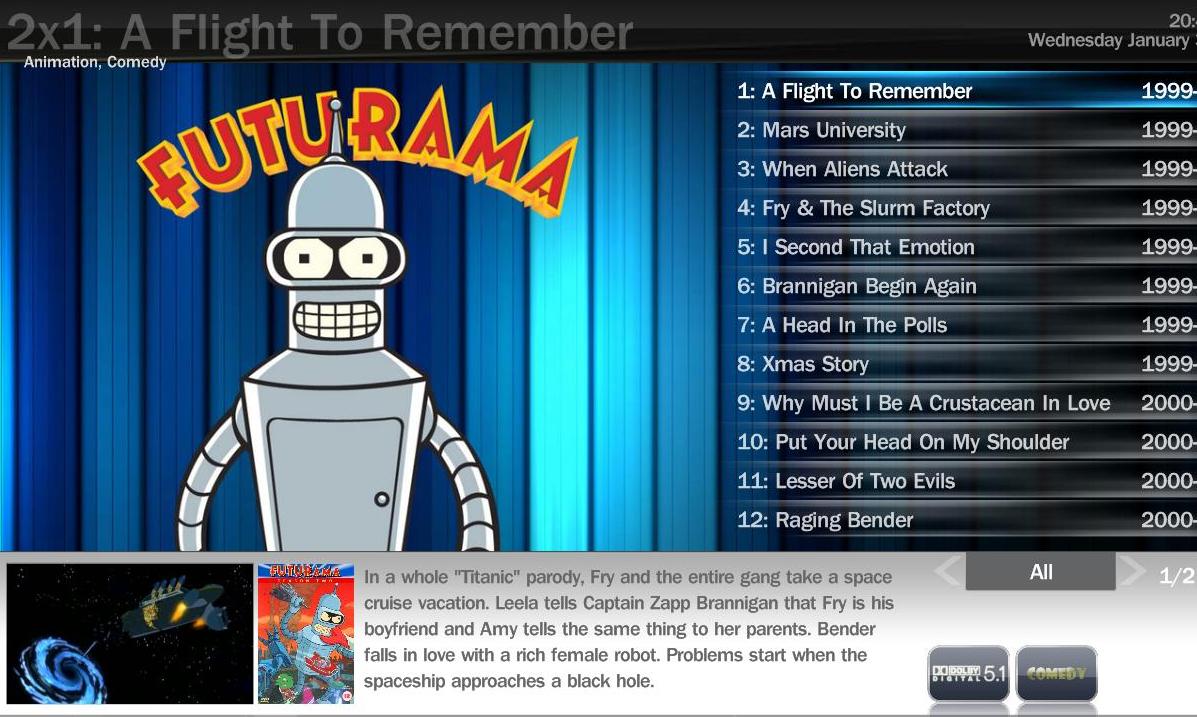
- on the episode select screen the season cover image is displayed along with the episode thumb.

since i´m using fanart i don´t know if this stuff works without fanart too!
to try it, just put the attached tvseries.xml into the skin/xface folder and the tvseries_detailback.png into xface/media folder. and you´ll maybe have to delete the cache folder...

EDIT: it also seems that this only works with SVN versions of the plugin(rev.250 and newer)!
 

Attachments

  • tvseries_detailback.png
    tvseries_detailback.png
    463 bytes
  • tvseries1.jpg
    tvseries1.jpg
    126.8 KB
  • tvseries2.jpg
    tvseries2.jpg
    146.7 KB
  • TVSeries.xml
    30.6 KB

daquint

Portal Pro
November 8, 2006
52
2
Nice work - Dahive - i like it :)

I hope all these nice additions make it into the next release

Attached are the request for the playdvd images. I am using them for the my videos, so you will have to rename them to the DVD naming convention.

Again - i am at work so these are not tested yet.

enjoy.
 

whatisk

Portal Pro
May 21, 2007
242
12
Brisbane
Home Country
Australia Australia
Attached are the request for the playdvd images. I am using them for the my videos, so you will have to rename them to the DVD naming convention.

Again - i am at work so these are not tested yet.

enjoy.

Thanks again :D

I think it would be great if people shared their icon sets for the different plugins that they use. Would give people who aren't graphically gifted (such as myself) more variety to choose from :)
 

daquint

Portal Pro
November 8, 2006
52
2
Attached are the request for the playdvd images. I am using them for the my videos, so you will have to rename them to the DVD naming convention.

Again - i am at work so these are not tested yet.

enjoy.

Thanks again :D

I think it would be great if people shared their icon sets for the different plugins that they use. Would give people who aren't graphically gifted (such as myself) more variety to choose from :)


Exactly - i think thats one of the things that makes media portal such a wonderful app - the community!
 

whatisk

Portal Pro
May 21, 2007
242
12
Brisbane
Home Country
Australia Australia
daHive.

I really like your re-imagining of the TV Series screens!
I downloaded the tvseries.xml and tvseries_detailback.png and copied them to where you said to and deleted the cache for Xface.

It comes up fine except that where it displays 'airs', 'on' and 'actors', all I get is #TVSeries.Series.Actors where the actors should be listed. I get a similar message displayed for 'airs' and 'on' as well. Any ideas on what a fix for this might be? I am using the newest version of the plugin available on the downloads page, not an SVN.

Also, what keys are used to change views from unwatched to all, etc? On the previous XML I was using, just left and right would do the trick, but now that doesn't work with the tiled banners.

Thanks.
 

daHive

Portal Pro
March 1, 2007
109
0
Home Country
Austria Austria
hmm, i´m using a svn version of the plugin, maybe(hopefully) that´s the thing.
as for the currentview changing, for me it works just like before, you navigate left and right with the remote button, pressing left once again when you´re in the left column will change the currentview from "all" to "latest" etc.

anyways, i´ve attached the pluginsvn i´m using, maybe you want to try using that.
 

alopez1986

New Member
January 31, 2008
3
0
Home Country
Spain Spain
Hey Everyone!
First of all just wanted to say this skin is EXCELLENT! I have never seen any skin better than this one, and i really wanted to thank its author ;)

Sayed that, i have just installed Media Portal and Xface Skin, but i am having quite a few problems....

First of all, when i am in coverflow mode, i can go throught all the movies, but i cannot see information about them instantly, i have to right click-->imbd, then i can see what the movie is about. Is it possible to have this information right when you are going through the movies?

Another thing i would like to ask, and dunno if it can be done. When i am going through my movies in coverflow, is there an option to watch the trailer of that specific movie? That would be great, so you can get a preview of the movie before watching it...

I also wanted to ask about the My Series Option. I was blown away by Da Hive Series Skin just a few posts before, but i have downloaded the TvSeries.xml to my HDD and the png, but i don't know how can i upload movies to the database, when i am in the mediaportal config, there is no Series Tab, just Movies, DVD... Do you know how can i do that?

And the last thing, i am using this skin with a 52" Sony Bravia Full HD and with a 100" Projector, and i find that the resolution is not very good, can it be improved? And also the pictures of the movies seem to be blurry... Can they be changed so they get better resolution?

Well... I think thats all for now, sorry about the long post.... :(

i really love this skin, hope it can get better and better!!!

ANDER

Just to respond myself, the Series thing is solved :D
 

Users who are viewing this thread

Top Bottom