Xface Skin Version 1.6 ready for download 09.06.2008 (5 Viewers)

daHive

Portal Pro
March 1, 2007
109
0
Home Country
Austria Austria
alopez1986,
i didn´t do much, i only made some very minor tweaks to the skin-file of mytvseries. Harley and Inker deserve all of the credit for developing the great xface skin and the tv series plugin.
so to get the tv-series plugin go to https://forum.team-mediaportal.com/my_tvseries-f162.html
after installing that you can set up your tv series database and get all the goodies for it...
 

daquint

Portal Pro
November 8, 2006
52
2
Whatisk,

I had the same issue (we must be both using the stable version - not the SVN) - anyway, i fixed it by editng the TVSeries xml file sent over by daHive.
Back it up -
edit it in notepad,
You will see the whole section on *Series Description* (not in front of, double check the section name)
I deleted the whole section, so the only thing that appears in the background box is the small series banner.
 

alopez1986

New Member
January 31, 2008
3
0
Home Country
Spain Spain
Hi daHive,

Thanks for your response. I have finally installed the Series plugin, but i find a few errors i don't know how to solve.

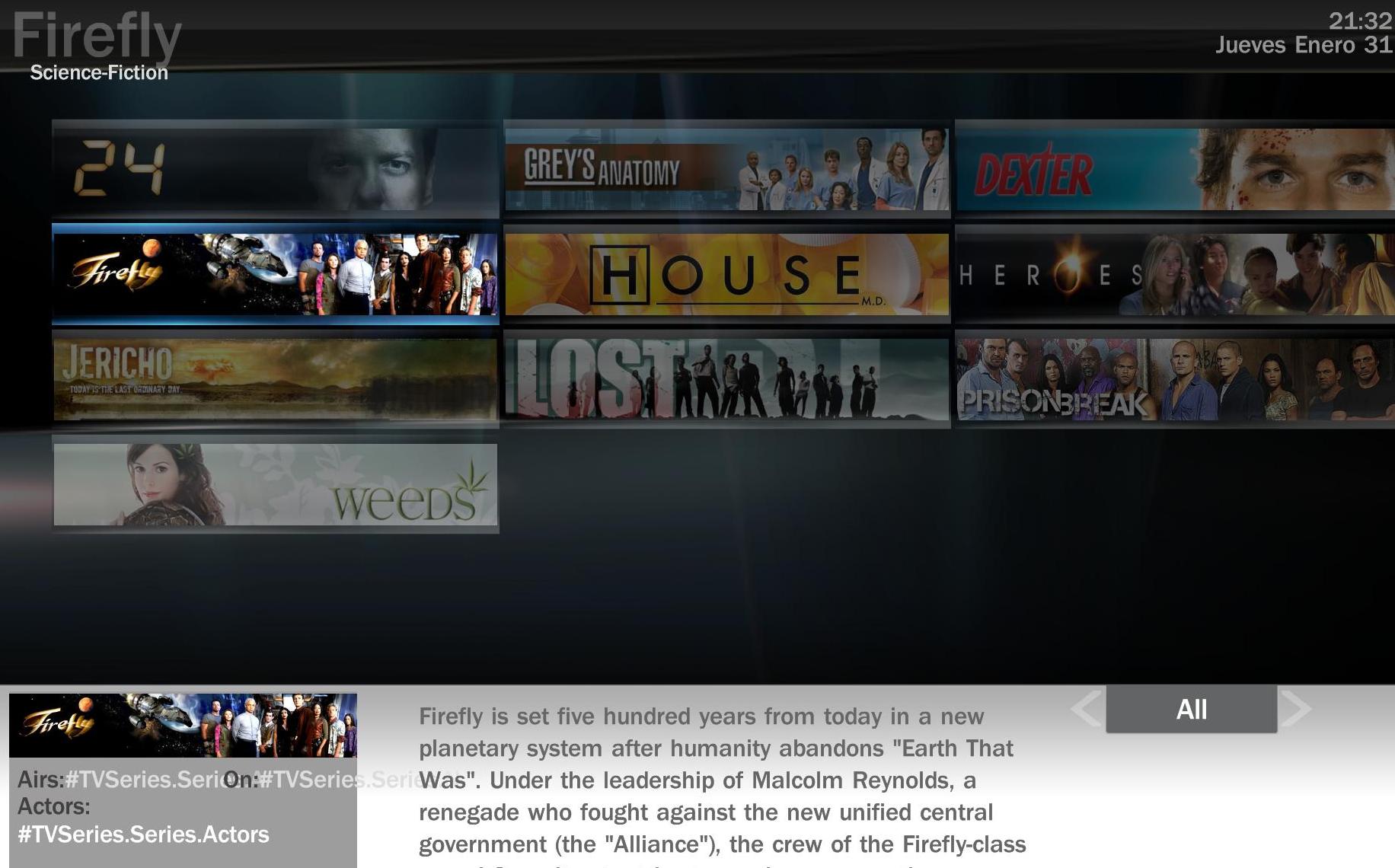
On the bottom left corner, where it says : Airs: On: and Actors: i get #Tv series.series.Actors, as you can see in the first picture. How can i solve that? Daquint sayed something about fixing the tvseries.xml file, but can find how to fix it. BTW, what is the SVN version? I have downloaded the latest version of MP

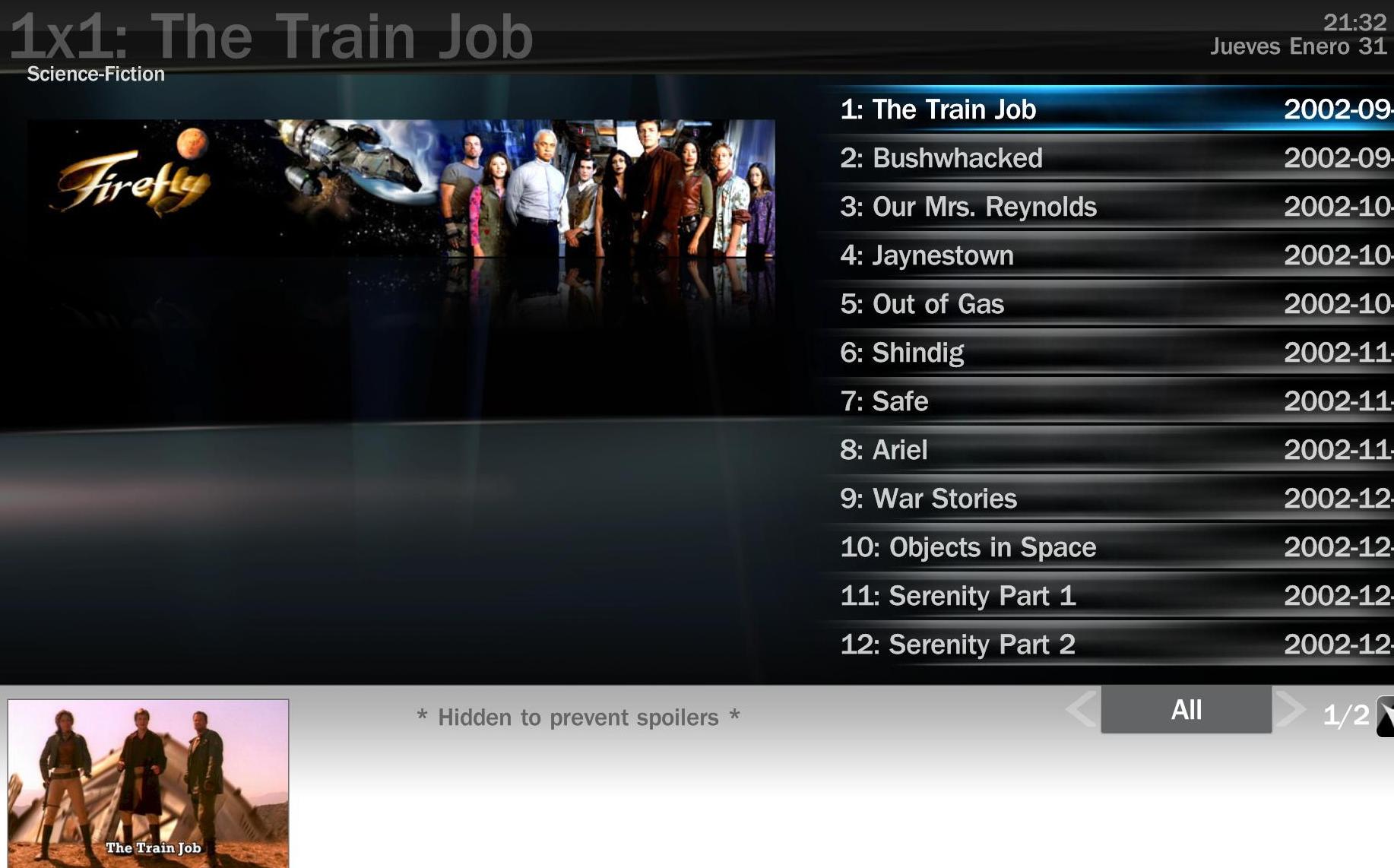
Then another thing is when i am on a series looking for the chapters, i get this error in the bottom of the page, where there should be information about the chapter "Hidden to prevent Spoliers", as you can see in image 2...

Do you know how to fix that?

Thanks!!
 

Attachments

  • Problem 1.jpg
    Problem 1.jpg
    196.4 KB
  • Problem 2.jpg
    Problem 2.jpg
    186.4 KB

daHive

Portal Pro
March 1, 2007
109
0
Home Country
Austria Austria
for the first thing, i think it´s necessary to use a svn version of the plugin(get it there: https://forum.team-mediaportal.com/svn_versions-t22053.html or check post #929 in this thread). just replace the mp-tvseries.dll in the /plugins/window folder.

the second problem can be fixed inside the tvseries-plugin config. look for an option saying "hide info for unwatched episodes" and uncheck it.
 

whatisk

Portal Pro
May 21, 2007
242
12
Brisbane
Home Country
Australia Australia
Hi daHive,

Thanks for your response. I have finally installed the Series plugin, but i find a few errors i don't know how to solve.

On the bottom left corner, where it says : Airs: On: and Actors: i get #Tv series.series.Actors, as you can see in the first picture. How can i solve that? Daquint sayed something about fixing the tvseries.xml file, but can find how to fix it. BTW, what is the SVN version? I have downloaded the latest version of MP

You can fix that by either editing the tvseries.xml file in the skins\xface folder as described by Daquint.
Otherwise daHive a couple of posts back attached the copy of TVSeries that he is using. I downloaded that and copied it over the one in plugins\windows folder and the Airs, etc now shows up fine.

Then another thing is when i am on a series looking for the chapters, i get this error in the bottom of the page, where there should be information about the chapter "Hidden to prevent Spoliers", as you can see in image 2...

Do you know how to fix that?

There is an option in TVSeries configuration for choosing whether to show information or not on shows if they haven't yet been watched. It's on the second last tab (can't remember what it's called sorry). You may need to scroll down a bit to see it. It's called 'hide description for unwatched episodes' or something like that. If you untick that, you will see descriptions for episodes regardless of if you have already watched them or not.
Personally I like to keep it on so nothing is spoiled for me until I watch the episode. Once the episode is watched, the summary appears :)

Edit: beaten by daHive while writing my long-winded response :p

daquint said:
Whatisk,

I had the same issue (we must be both using the stable version - not the SVN) - anyway, i fixed it by editng the TVSeries xml file sent over by daHive.
Back it up -
edit it in notepad,
You will see the whole section on *Series Description* (not in front of, double check the section name)
I deleted the whole section, so the only thing that appears in the background box is the small series banner.

Thanks. That worked. :D

daHive said:
hmm, i´m using a svn version of the plugin, maybe(hopefully) that´s the thing.

That was definitely it. Perhaps some fields names or something changed along the way.

daHive said:
as for the currentview changing, for me it works just like before, you navigate left and right with the remote button, pressing left once again when you´re in the left column will change the current view from "all" to "latest" etc.

Right yet again. I mustn't have tried that... :oops:

daHive,
I was wondering if it is somehow possible when exiting out of viewing a series it can stay on the series you were looking at rather than going back to the first one?

Not sure if it is something to do with my setup, but another thing is that when in the episode screen for a series, if the large episode title at the top of the screen needs to scroll, it flashes on and off as it goes across the top of the screen.
 

daHive

Portal Pro
March 1, 2007
109
0
Home Country
Austria Austria
whatisk said:
That was definitely it. Perhaps some fields names or something changed along the way.

...

daHive,
I was wondering if it is somehow possible when exiting out of viewing a series it can stay on the series you were looking at rather than going back to the first one?

Not sure if it is something to do with my setup, but another thing is that when in the episode screen for a series, if the large episode title at the top of the screen needs to scroll, it flashes on and off as it goes across the top of the screen.

i looked around the svn changelog and i think the issue with the field name was fixed in SVN rev250: "Fix: Some Fields for skins would get assigned but immidiatly cleared again due to a logical error, finally all fields should work directly in skins now"

i´d like to have the focus stay on the last active series as well, but i have no idea if that´s possible and how to do it :oops:

as for the episode title problem, i think you might have the same problem as level20peon (https://forum.team-mediaportal.com/bug_scrolling_text_not_displayed_correctly_clipping-t33566.html).
 

alopez1986

New Member
January 31, 2008
3
0
Home Country
Spain Spain
Thank you Whatisk and Da-Hive, now it works perfectly!!

I just have one more question, how can i add fanart to the series? Is there a list of all the fan arts here? And how can i get them to work? I haven't found any guide over here.. :confused:
 

whatisk

Portal Pro
May 21, 2007
242
12
Brisbane
Home Country
Australia Australia
Thank you Whatisk and Da-Hive, now it works perfectly!!

I just have one more question, how can i add fanart to the series? Is there a list of all the fan arts here? And how can i get them to work? I haven't found any guide over here.. :confused:

For fan art, go to this site http://jossan.visse.nu/~spuck/FanArtVote/index.php
There is a torrent file there to get most of the files in one go. Otherwise you can browse through and just get the ones you want.

The files need to go in thumbs\fan art (you will need to create the folder).
That's all that needs to be done. Fan art should now display!!

daHive said:
i looked around the svn changelog and i think the issue with the field name was fixed in SVN rev250: "Fix: Some Fields for skins would get assigned but immidiatly cleared again due to a logical error, finally all fields should work directly in skins now"

That would explain it then. Do you know off-hand which SVN you are using? I recently tried the latest, but came across a problem with it and clearing files that no longer exist (I have reported this).

daHive said:
i´d like to have the focus stay on the last active series as well, but i have no idea if that´s possible and how to do it

It's definitely possible as the XML I was using before trying yours did it. Hopefully someone might be able to help out with this.

daHive said:
as for the episode title problem, i think you might have the same problem as level20peon (https://forum.team-mediaportal.com/bu...g-t33566.html).

I tried clicking the link but got an error. I'll do a manual search for it and see what I can find. All text appears to scroll smoothly except for the large episode title across the top of the screen in the episodes view.
 

daHive

Portal Pro
March 1, 2007
109
0
Home Country
Austria Austria
i´m not sure exactly which version but my best guess would be rev260 or 261 since the file on my pc is dated 1.1.2008.

you can try the link again, should work now.
 

whatisk

Portal Pro
May 21, 2007
242
12
Brisbane
Home Country
Australia Australia
i´m not sure exactly which version but my best guess would be rev260 or 261 since the file on my pc is dated 1.1.2008.

you can try the link again, should work now.

Link works fine now thanks.
Yep, looking at the video, that's exactly what I'm getting. Hopefully a fix will be found.

Did you want me to post up the original XML I was using that returned you to the series you were viewing? You may be able to find in there on how it's done (I have no idea what I'm looking at/for).

TV-Server Version: tvengine3 Rev16891
MediaPortal Version: 0.2.3.0 Rev16907
MediaPortal Skin: Xface
Windows Version: Windows 2003 R2 SP2
CPU Type: Intel Core2 Duo T5600 1830 MHz
HDD: Samsung HD103UJ 1000GB
Memory: 2x1024 MB Corsair DDR2 667MHz
Motherboard: AOpen i945GTm-VHL
Motherboard Chipset: Intel 945GT / Intel ICH7MDH
Motherboard Bios: R1.05
Video Card: NVIDIA GeForce 6600 LE passive
Video Card Driver: Forceware 163.75
Sound Card: Realtek ALC882D HD Audio (onBoard)
Sound Card AC3: no AC3
Sound Card Driver: R1.82
1. TV Card: FireDTV BDA DVB-C (Floppy DTV)
1. TV Card Type: DVB-C
1. TV Card Driver: 02/04/2007, 4.8.0 BDA Driver
MPEG2 Video Codec: ffdshow / dscaler
MPEG2 Audio Codec: ffdshow / dscaler
Satelite/CableTV Provider: unity digital TV
HTPC Case: Silverstone LC11m silver
Cooling: 120mm Papst 4412F/2GLL / Sharkoon SilentEagle / passive
Power Supply: mCubed EF16 160W external passive cooled
Remote: Gyration GYR3101US
TV: Panasonic TX-26LX50F
TV - HTPC Connection: S-Video


Hey guys,

scrolling text is not displayed properly inside MyTVSeries. See the attached video-clip for details. What could cause this / how can I fix this ?


-level20peon

Confirmed i also have this problem. Think it has something to do with overlayed graphics?

level20peon/lampie,

Did you guys manage to find a solution to this at all?
I have just started using an updated XML and get the same thing that was displayed in level20peon's video. Only happens to the larger text at the top of the screen.
 

Users who are viewing this thread

Top Bottom