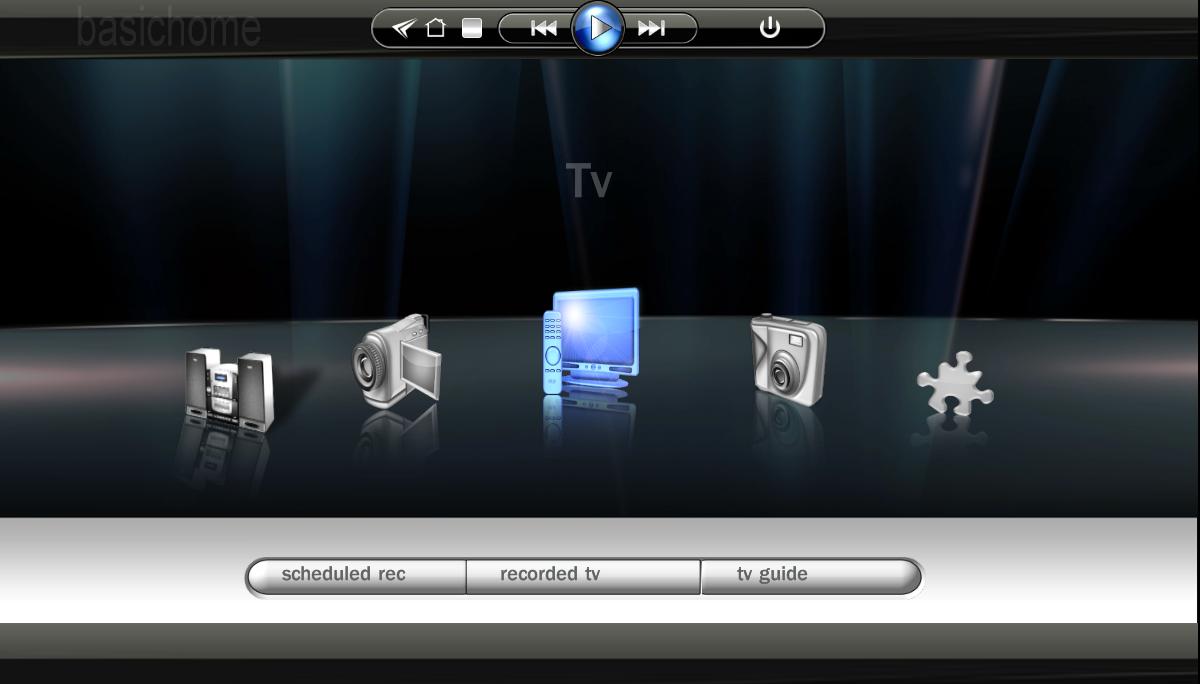
Xface Skin Version 1.6 ready for download 09.06.2008 (372 Viewers)

SpiffBB

Portal Pro
July 18, 2006
89
0
....
The Backroundcolour will be in finalversion be changeable and it will have a smooth animation.

Wow, looking forward for the animated background!!!

As pointed out earlier in the thread the blue button is a bit hard to see on the screen, maybe this also could be animated and then easier to see without having to make it in a mutch brighter color?!

Somewhere in the thread someone suggested integration with mylyrics. I also support this idee. Wouldnt it be nice if you press "ok" it acts as it do now and if you instead pressed "play" you got to a screen showing lyrics instead of the audiscrobler thing showing now. Even if you still want to keep the audiscrobler thing it should probably fit with enough space in the black box in the lower part of the screen. I tried to modify B2W for this but didnt get it to work, the xml-files are not so easy as it first seams...

About the question of release version - maybe it was of if there will be regular beta-releases like other skins now and the get updated?!

The spinning wheel is fantastic. However I would like it a bit bigger - its a bit hard to see the icons.

Anyway - wonderful work!

Regards
Oscar
 

tomtom21000

Retired Team Member
  • Premium Supporter
  • April 22, 2004
    1,226
    120
    Germany
    Hi Harley,

    this skin is really awesome! Just gave it a little try yesterday night. I like a lot of things about it but the most remarkable to me are the sliding menu buttons. Very nice.

    There were a couple of small things I saw in the quick test (with svn 15599):

    1. In the icons view (Ansicht Symbole) - not big icons - you can´t reach page 2 with arrow down on keyboard or down button with mouse. Up does work. Tested with music and pictures.

    2. I read that the thumb zoom is broken at the moment. But I think it might be irritating if every album cover in cover (filmstrip) view has a title beneath its cover but not the cover at the cursor position. (See your thumb #7 for pictures in first post)

    3. Inside a music album I´d like to use the list view for the songs. So you´d have on the right side the list and on the left side on bigger picture of the album cover. This is how it is now. But ... focus is on the first list item. But this is the back item "..". so only a general cd cover thumb is shown. This changes of course when you move down in the list. Is it possible to skip the back entry of the list and put focus on the second item?

    Maybe needs more thinking if it is suitable for all cases.

    4. In weather there is a an empty cd cover at the bottom. This also shows up when no music is played. You can see this on thumb 10 of your first post, too.

    5. When leaving a module, the basic home menu appears but not with the symbol of the module you just left but somthing else. For example I leave music and basichome turns to pictures. Found this somewhat irritating. Might have to do with the things discribed some posts above (deviation picture - text). Didn´t look on that.

    6. in scheduled (tv) the word "timer" is not in the right position

    7. in weather, my location "Stuttgart, Germany" covers part of the menu buttons.

    Great work!

    tomtom
     

    mpfrank

    Portal Pro
    November 6, 2006
    186
    0
    Cologne
    Home Country
    Germany Germany
    Harley was probably tired and forgott to change the texture on a few controls :)
    I updated it for you, I like it also when my tv is the first option.

    EDIT! Oh wait its still wrong.. >_< This basichome is more complex than I first saw...

    Hi DarkWader,

    did you got the chance yet to have a look at basichome screen?

    Thanks in advance & best regards
    mpFrank
     

    DarkWader

    Portal Pro
    October 3, 2006
    270
    6
    48
    Home Country
    Norway Norway
    Harley was probably tired and forgott to change the texture on a few controls :)
    I updated it for you, I like it also when my tv is the first option.

    EDIT! Oh wait its still wrong.. >_< This basichome is more complex than I first saw...

    Hi DarkWader,

    did you got the chance yet to have a look at basichome screen?

    Thanks in advance & best regards
    mpFrank
    Sorry, I have not done anything about it - I simply cant understand what's done, and how it works.
    Harley havent included any helpfull descriptions in the .xml. But, I bet he will at some time though ;)

    Anyway, I dont really like spinning menues like this, so I have made my own "static" homescreen.
    I will include it in this post, but it will not work for you unless some doing:

    1) Copy the hover icons wich are used. (look at the screenshot in this post)
    2) Change the color/brightness of these icons to your likings (these are the ones that will be visible when hightlighed)
    3) Rename each one of the changed icons to originalnamefocus.png (add focus to each one)
    Like hover_my musicfocus.png, hover_my videos1focus.png... etc..
    5) Copy your changed icons to the media folder of the skin.
    6) Delete the skins cachefolder, and start madiaportal.

    If harley say I can post the modified icons, I will. But not before :)
    (they are not final anyway :p)
     

    Attachments

    • basichome.JPG
      basichome.JPG
      54.7 KB
    • BasicHome.xml
      30.6 KB

    The FLow

    New Member
    August 20, 2007
    2
    0
    40
    Home Country
    Netherlands Netherlands
    Where can i get te latest svn? I just downloaded the Xface Skin Preview Beta Version 0.1 but this is the first edition, so are there newer versions? Or is this the latest svn? And I applied the BasicHome.xml common.facade.music2.xml common.facade.pictures.xml common.facade.video.xml ..
     

    FLY

    Portal Pro
    September 5, 2006
    75
    1
    California
    Home Country
    United States of America United States of America
    Harley was probably tired and forgott to change the texture on a few controls :)
    I updated it for you, I like it also when my tv is the first option.

    EDIT! Oh wait its still wrong.. >_< This basichome is more complex than I first saw...

    Hi DarkWader,

    did you got the chance yet to have a look at basichome screen?

    Thanks in advance & best regards
    mpFrank
    Sorry, I have not done anything about it - I simply cant understand what's done, and how it works.
    Harley havent included any helpfull descriptions in the .xml. But, I bet he will at some time though ;)

    Anyway, I dont really like spinning menues like this, so I have made my own "static" homescreen.
    I will include it in this post, but it will not work for you unless some doing:

    1) Copy the hover icons wich are used. (look at the screenshot in this post)
    2) Change the color/brightness of these icons to your likings (these are the ones that will be visible when hightlighed)
    3) Rename each one of the changed icons to originalnamefocus.png (add focus to each one)
    Like hover_my musicfocus.png, hover_my videos1focus.png... etc..
    5) Copy your changed icons to the media folder of the skin.
    6) Delete the skins cachefolder, and start madiaportal.

    If harley say I can post the modified icons, I will. But not before :)
    (they are not final anyway :p)


    I also don't like spinning menues.

    I hope harley makes some setting/option to make them like just what you have done.

    good job DW !!!
     

    ewiles

    Portal Member
    November 6, 2006
    44
    1
    49
    Silicon Valley
    Home Country
    United States of America United States of America
    Does anyone know why I have no reflections under my movies or music cover art? Reflections only appear under the icons at my home screen.
     

    psiebe

    Portal Pro
    March 29, 2007
    93
    1
    54
    Home Country
    Netherlands Netherlands
    Could someone help me with this question? I use the Myfilms plugin myself, which isn't currently supported by the skin. I used the mesfilms part of the Revision skin, which works fine, but the description text is on top of the white bar (see attached) As both are white/light gray, this doesn't allow for easy reading ;)

    Could someone let me know where to start to disable the white bar for these pages just as Darkwader did for the TV Series plugin?


    I have also noticed a small error in the 'regular' startpage. the 'navigation bar' (is it called that way?) doesn't show up properly.


    Thanks,
    Patrick
     

    Users who are viewing this thread

    Top Bottom