Xface Skin Version 1.6 ready for download 09.06.2008 (5 Viewers)

karlake

Portal Pro
October 1, 2006
126
0
Borås
Home Country
Sweden Sweden
Hi!

Great skin. Love it!

There are some small things to make it even more perfect. :)

1. Main menu
- A little more text space on main menu. Most names in swedish tends to be to long and therefor overlap the picture. Even English "My Wikipedia" must be to long.
- This request may be a bit strange but I would like to have a little more logical and clearly identifyable graphics in the menu. Well, it may be good enough for computer screen but it's very hard to make out the icons on a television set. Still have no clue what the My News icon is.
2. My Music/Movies,
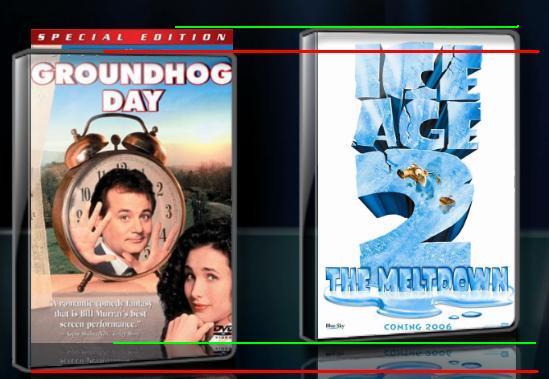
- Scrolling in the new, nice-looking, filmstrip mode tends to sometimes go wrong and cover will not stay inside CD/Dvd box.
- It would be nicer if the cd in focus always is centered (as in itunes). as the name of the cover pic is removed when in fucus, users eyes tends to "hunt" for the name. Feels unnatural and confusing.
- Use the area under the albums more. name of object in fucus could be a bit bigger and current folder would be good. if you don't know that you are in folder e.g "Midsomer Murders" and don't recognize the filenames, you are lost. You could also lose the small version of coverart, not needed and feels wrong to show it. Understand that the two cover concept is a standard in filmstrip but if it's possible to remove, then please.

But still,,,, A very nice skin and I take my hat of to the developers!!!
 

Paranoid Delusion

Moderation Manager
  • Premium Supporter
  • June 13, 2005
    13,052
    2,978
    Cheshire
    Home Country
    United Kingdom United Kingdom
    habj

    If you go to c:programfiles\teammediaportal\mediaportal\thumbs\music\albums

    What is the resolution of the images you find, under properties\details, mine for example are 192H x 189W pixels and these show up fine.

    Check your folder.jpgs size, if they are over this size not a problem, but if smaller then they need to be replaced with higher resolution one's.

    Most probably if the whole lot needs to be done, then rescan your music database might be a option.

    As this is not skin related, you may have to change over to the Music forum and look there for more info on thumbs for cd's and updating db.
     

    habj

    Portal Member
    September 1, 2006
    28
    0
    Thank you PD!
    My jpg:s ar manualy downloaded over som time and i have never used the database scan (is it suposed to replace my jpg:s in the aritst/film folder, what if all my thumbs got replased with wrong ones) This problem of mine are also refered to my movies in filmstrip view (also manualy added jpg:s) is it a god idea to scan that to? (as i sad befor, i am not so familiar with this) Are my jpg:s in the movifolder replased by the new ons if i scan? i have each movie in seperat folders

    Håkan

    PS i will check the Musik forum
     

    Paranoid Delusion

    Moderation Manager
  • Premium Supporter
  • June 13, 2005
    13,052
    2,978
    Cheshire
    Home Country
    United Kingdom United Kingdom
    Just a quick note, if using a widescreen format TV, it must be set to 720 or 1080, otherwise pictures in cases will be incorrect size.

    Just been having a play, wondering why some peoples images are displaying incorrectly, so done a bit of resizing of screen resolution, which shows to be a major culprit for this.
     

    Johnny-D

    Portal Member
    August 11, 2006
    31
    0
    DarkWader: Granted I don't have the latest and greatest machine, but the animations do appear smooth for me.

    It does happen very fast so you might not notice it at first, but once I did I couldn't stop noticing it. The zoom-out effect is more noticeable, but again you have to be looking for it...

    Even given that, the two zoom animations (coverart, dvd case) should be locked together to prevent this happening. Maybe Harley's pushed the envelope further than the devs envisaged? :)

    Johnny

    P.S. Habj: what's your resolution?
     

    rtv

    Retired Team Member
  • Premium Supporter
  • April 7, 2005
    3,622
    301
    Osnabruck
    Home Country
    Germany Germany
    Thats the Problem, but i will ask the Devs to help, so that the code in mp can be rewritten, so that we have the high resolution thumbs also in filmstripview, like it is in music and pictures.

    I fixed some bugs regarding the thumb handling of MyVideos made it similar to the rest of MP and therefore also added the usage of high resolution thumbs for xFace's filmstrip.

    Should be available with the next SVN build ;)

    EDIT: Here it is - please test and report back if everything is working now
     

    Johnny-D

    Portal Member
    August 11, 2006
    31
    0
    Sweet! Thanks rtv.

    With regards to the zooming in\out issue, I think I've identified it.

    When the next item is selected, the dvd case 'jumps down' and then zooms up to the correct position. The opposite happens when zoom out occurs- the case 'jumps up' and then zooms down to end in the correct position.

    As you can see in the attached screenshot, the 'zooming case' is quite significantly below the non-zoomed cases, while the 'zooming coverart' is doing what it should and just getting bigger! (Although not by much- I caught it just after hitting 'right')

    But is it skin or MP related?

    Cheers,

    Johnny

    P.S. rtv: That seems to have done the trick, one full uninstall\reinstall later and hi-res art is there by default, thanks!
     

    Attachments

    • Zoom-in.JPG
      Zoom-in.JPG
      38.7 KB

    j1nx

    Portal Pro
    July 16, 2005
    233
    10
    Just a quick note, if using a widescreen format TV, it must be set to 720 or 1080, otherwise pictures in cases will be incorrect size.

    Just been having a play, wondering why some peoples images are displaying incorrectly, so done a bit of resizing of screen resolution, which shows to be a major culprit for this.

    Finally, now i know why my views were all F%^& upped. Thanks.
     

    Darre

    Portal Pro
    April 21, 2007
    925
    80
    Home Country
    Norway Norway
    Just a quick note, if using a widescreen format TV, it must be set to 720 or 1080, otherwise pictures in cases will be incorrect size.

    Just been having a play, wondering why some peoples images are displaying incorrectly, so done a bit of resizing of screen resolution, which shows to be a major culprit for this.

    Hmm.. i can test that. My thumbs doesnt look 100% as it is now. Sux a bit to go down to 720 as i would loose my 1-1 pixelmaping :( Now its 768 i think.
     

    Users who are viewing this thread

    Top Bottom