Xface Skin Version 1.6 ready for download 09.06.2008 (3 Viewers)

scirocco790

Portal Pro
December 7, 2006
365
10
Home Country
Germany Germany
okay guys. i really want to get your attention to this stuttering thing. i´ve tested nearly every svn of the last 2 or three weeks regarding this issue. i thought it is a bug that appears only on my system, but now i see there are more people who have this problem.
i will try to describe as good as possible what i do to reproduce the stuttering of the skin.
- install actual svn of tve and mp
- install xface v1.2, cachefolder is deleted!
- i have no hd card, only a normal firetdtv dvb/s
- start mp and go to tv
- tv starts, and i get picture and sound but only every 3 or 4 seconds < this IS HEAVY STUTTERING, not only a small "unsmoothness"
- i go back to the home menu (takes some time to react but works) and the tv runs absolute fine and smooth in the small preview window
i have tried several combinations of video/audio codecs, but its the same with all
i really think there is a bug in this wonderful skin.
i have posted my logs in another thread.
https://forum.team-mediaportal.com/showpost.php?p=195051&postcount=7
i think my hardware is strong enough to handle the skin:
p4 2,6Ghz
1,5Gb ram
radeon 9600
drivers of every component are as actual as possible.
 

patricon

Portal Pro
June 16, 2007
543
18
Home Country
Spain Spain
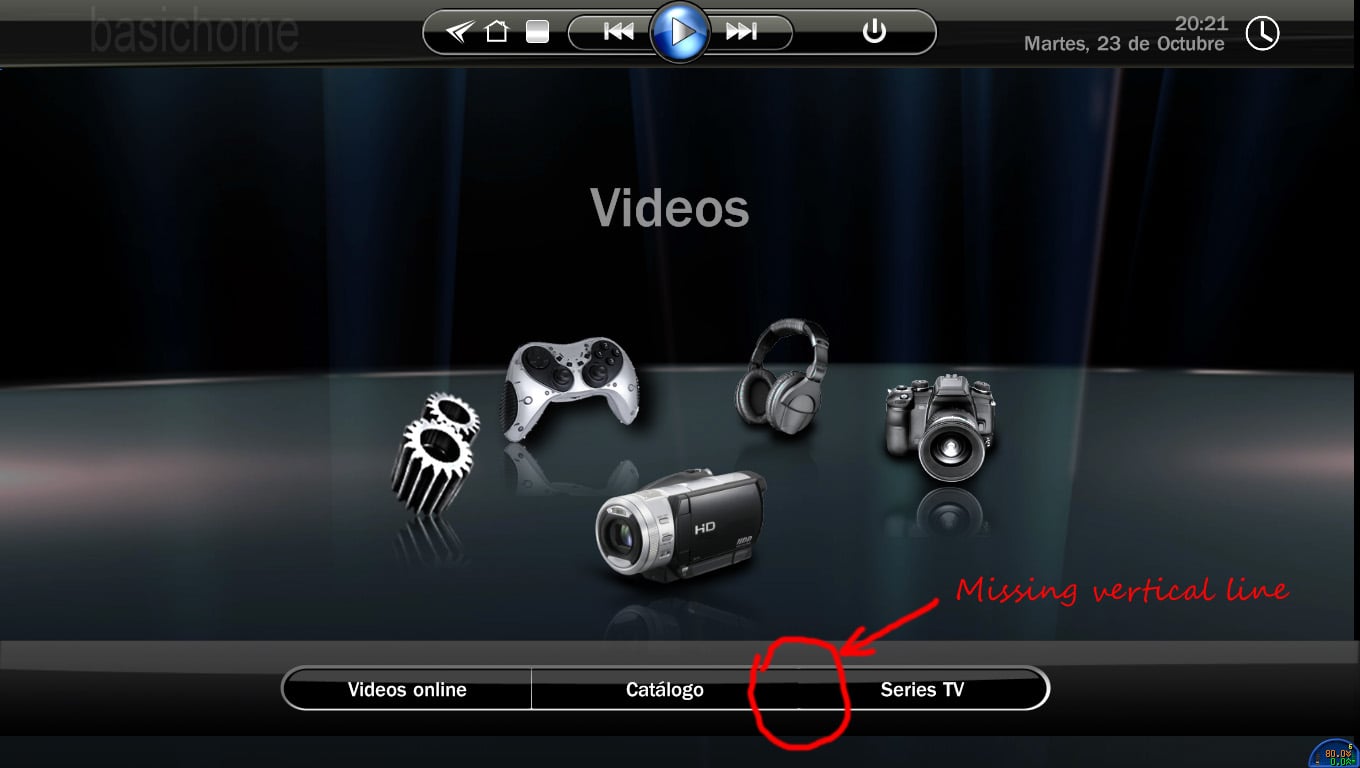
Attached is the screen capture showing the problem in basic home screen...

regards,
 

Attachments

  • shot.jpg
    shot.jpg
    140.4 KB

grubi

Portal Pro
June 16, 2007
1,207
87
127.0.0.1
Home Country
Germany Germany
Hi,
for first i must say that this skin is really great. But i have the same problem with the stutterig TV with it. Thats only happen with this skin, with bluetwo its ok. AND its only happen with HD Channels. I have Update my System with all new Drivers and test some of the latest SVNs/Builds but this problem is still there.

When i change to a HD Channel its works for 2-3 Seconds without stuttering, then its begun. When i press break and play again its again for 2-3 second good, then stuttering again. One other misteriouse thing is, that when my last channel was a HD Channel and i close MP and open again MP will start with this HD Channel. Then its work! But only then.

I hope this problem will be done next time, becouse this skin is the greatest what i ever see!

Very good work!

I fear it will not be fixed in MP iself. As I can see you are using a Radeon. I went through hell with ATI until I got most of the problems fixed. This included to try different grafic cards and all kind of driver releases. Sorry to say but the current hw+sw package ATI offers is crap and full of bugs.

grubi.
 

emphatic

Design Group
  • Team MediaPortal
  • August 25, 2006
    3,758
    1,250
    Alingsås
    Home Country
    Sweden Sweden
    I'm not nearby my MP installation, but if you push the "blue" button using the MCE remote when playing a video or DVD, the osd text for "aspect ratio" /"zoom mode" would produce a black text without a frame or other typical osd graphics, in the upper right corner. But movies are often dark and the text is therefore more or less invisible... the same goes for changing subtitle using the "yellow" button with my MCE remote. You can of course use keyboard shortcuts too... :)

    Yes, this is exactly what I meant as well. And I have deleted the xface folder in my cache folder before running the newest version. I'll try to fix a screenshot later tonight when I get home, Harley if you need it. The thing is that the OSD is working for live TV. Is it possible to copy OSD-xmls for TV to Movies? I will experiment when I've gotten home from work. if krl69 doesn't beat me to the testing of course. ;)

    Emph
     

    DarkWader

    Portal Pro
    October 3, 2006
    270
    6
    48
    Home Country
    Norway Norway
    Attached is the screen capture showing the problem in basic home screen...

    regards,
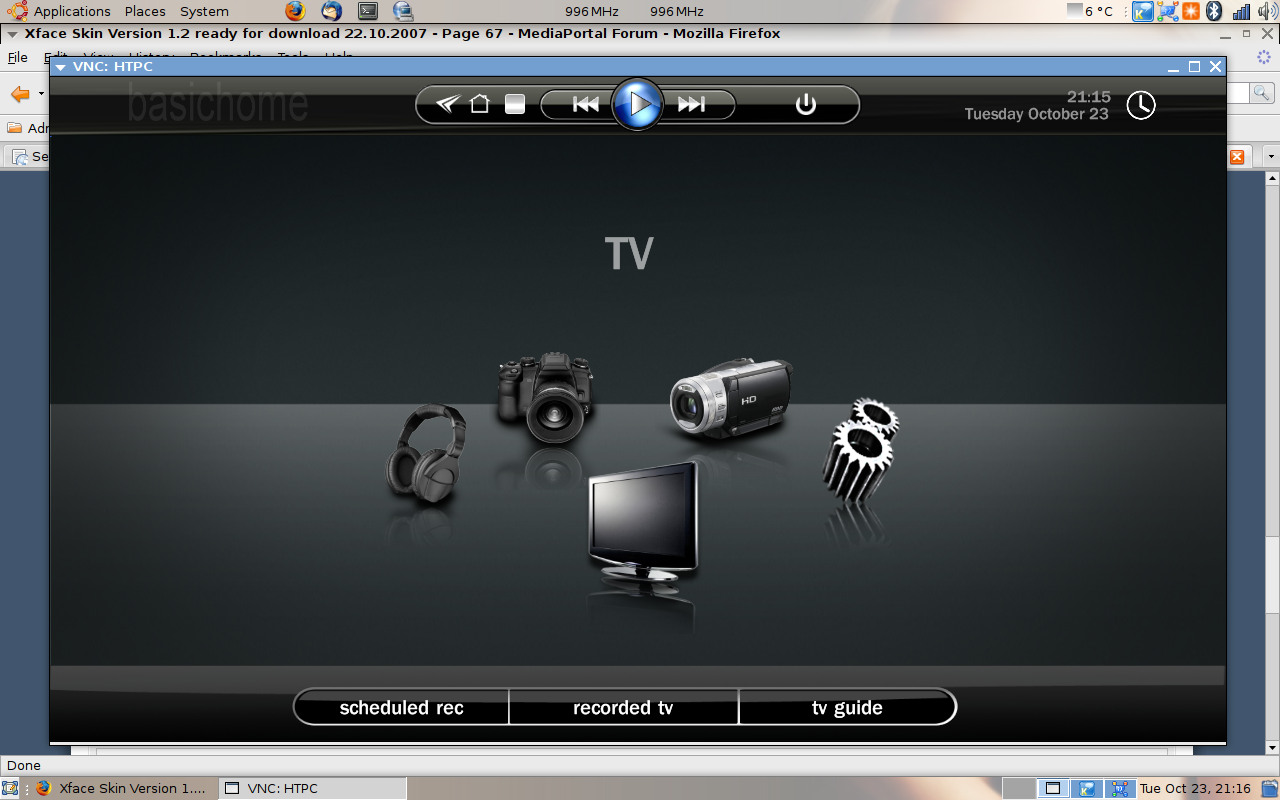
    That is a resolution problem.
    I got the same thing, because my screen is slightly underscanned.

    I made a fix however, wich also includes the menubar to be on the bottom of the screen.
    Let me know, and I'll upload it later.

    EDIT, added the stuff - note that this is made for my underscan, and might not work at all for you.
    (Yes, I changed the background - experimenting) :p
     

    Attachments

    • Screenshot.png
      Screenshot.png
      525.2 KB

    mask

    Portal Member
    May 19, 2007
    13
    0
    Subtitle language/aspect not visible under DVD playback

    Hi,

    Very cool skin!!
    However, if you want to change the aspect ratio or subtitle language during DVD play, the chosen ratio or language name is displayed in black. This makes it most of the time invisible, since most movies have black bars. Maybe you can change the color or put the text in a white box like it is in the MyTV section.

    Keep up the good work!
     

    patricon

    Portal Pro
    June 16, 2007
    543
    18
    Home Country
    Spain Spain
    Attached is the screen capture showing the problem in basic home screen...

    regards,
    That is a resolution problem.
    I got the same thing, because my screen is slightly underscanned.

    I made a fix however, wich also includes the menubar to be on the bottom of the screen.
    Let me know, and I'll upload it later.

    EDIT, added the stuff - note that this is made for my underscan, and might not work at all for you.
    (Yes, I changed the background - experimenting) :p

    Can u post what are the changes that you have made into the file? I'm using a custom basic home screen, and i dont' want to replace the whole file....

    regards,
     

    emphatic

    Design Group
  • Team MediaPortal
  • August 25, 2006
    3,758
    1,250
    Alingsås
    Home Country
    Sweden Sweden
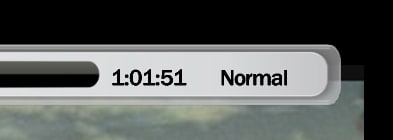
    Harley, here are two screenshots of what is wrong with the Video OSD (when switching Aspect Ratio with remote). I tested the theory of copying the tvosd.xml to videoosd.xml, but that didn't solve this issue (I'm sure you will know what is wrong now that you have screenshots).

    Good OSD:
    https://forum.team-mediaportal.com/attachment.php?attachmentid=12253&stc=1&d=1193194167
    good.osd.jpg
    Bad OSD:
    https://forum.team-mediaportal.com/attachment.php?attachmentid=12254&stc=1&d=1193194167
    bad.osd.jpg

    Emph
     

    Attachments

    • good.osd.jpg
      good.osd.jpg
      16.2 KB

    Users who are viewing this thread

    Top Bottom