
xmltv not automatically importing TVguide.xml (1 Viewer)

VdR

MP Donator
  • Premium Supporter
  • October 17, 2006
    612
    16
    Belgium
    Home Country
    Netherlands Netherlands
    I have been trying and searching for weeks now, but can't get this done.

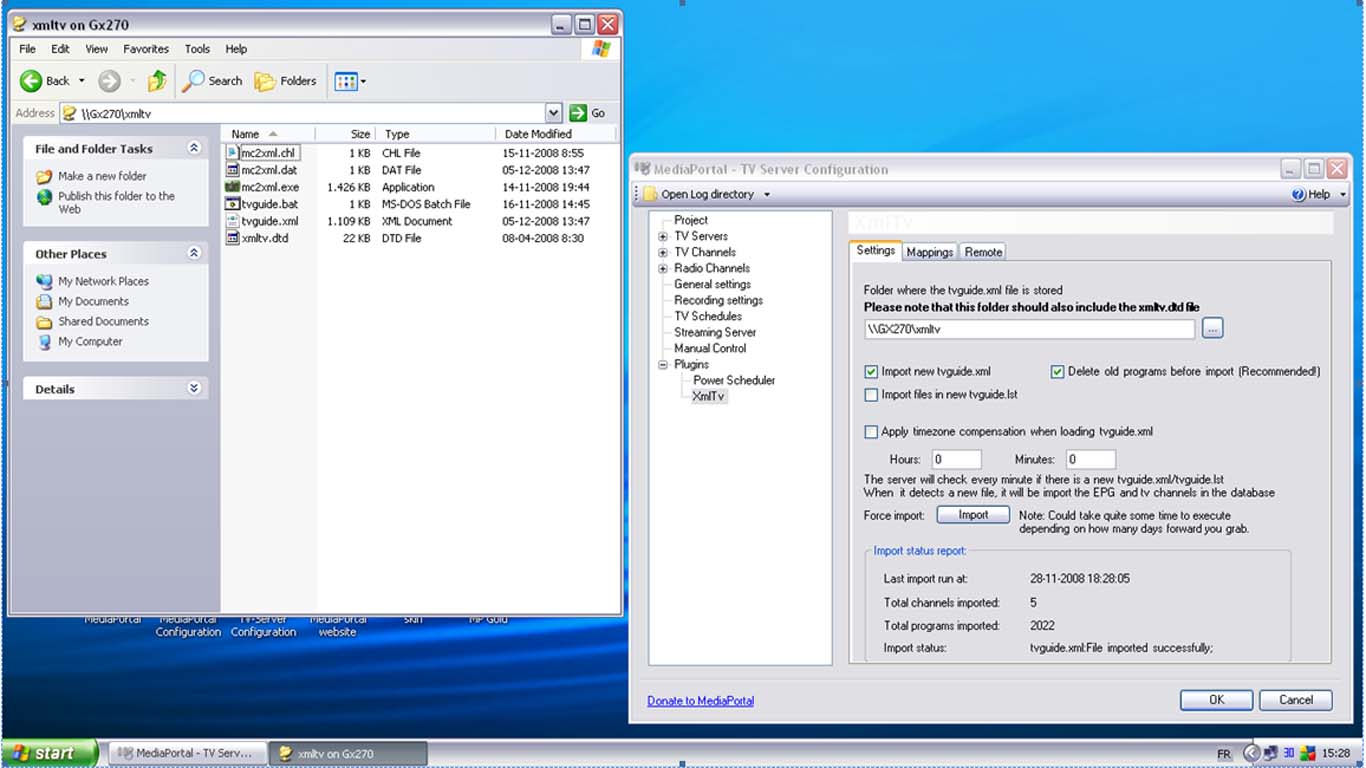
    I generate a new TVguide.xml file every day automatically on my file server. I have the xmltv plugin in the TVserver point to this (network)file. If I press 'import' it imports the file without any issues. But it does not do this automatically!

    The set-up says it will check every minute if the file changed (once a day would be good enough for me).

    See screen shot with set-up and file location. The last import is from 28-11, the current file is from 5-12. After taking the screenshot I pressed the import button and it imported without an issue.

    What am I missing?

    Is there a way to force an import every day?
     

    Attachments

    • xmltv.jpg
      xmltv.jpg
      112.1 KB

    VdR

    MP Donator
  • Premium Supporter
  • October 17, 2006
    612
    16
    Belgium
    Home Country
    Netherlands Netherlands
    Yes I did. I ran into that one before. But if that isn't done it won't import manually either.

    VdR
     

    knight1fox3

    Portal Member
    September 30, 2008
    15
    0
    Home Country
    United States of America United States of America
    In the second tab of XMLTV config, once you hit "Load/Refresh", and all your channels are displayed, why do they have a red indicator next to them? I assume something isn't matching up correctly. This in turn prevents me from clicking "import" in the first tab of XMLTV config. Has anyone else encounterd this? Could it have something to do with the appropriate timezone? I did name all my channels the same as what Zap2It shows (for my zip code location and cable provider). Thanks.

    I'm running RC2 and WinXP.
     

    VdR

    MP Donator
  • Premium Supporter
  • October 17, 2006
    612
    16
    Belgium
    Home Country
    Netherlands Netherlands
    Bug

    Detailed: tvguide.xml is not automatically imported IF the file is on a network drive.

    If I copy the tvguide.xml file to the local HD and change the path in TVserver config it works fine. The problem seems to be that the file is located on a network drive.

    Again; a forced import (import button in TVserver config) from the network drive works fine, so all settings are OK.


    VdR
     

    niblick

    Portal Member
    December 18, 2006
    29
    3
    If you are using a mapped drive for the xmltv directory then try changing it to a unc path (ie. \\servername\sharename\... )

    The tvservice user context won't know about your drive mappings.
     

    VdR

    MP Donator
  • Premium Supporter
  • October 17, 2006
    612
    16
    Belgium
    Home Country
    Netherlands Netherlands
    Moien niblick,

    I'm afraid that's not the issue. The forced download wouldn't work either. The path is set that way. Also the paths to the media stored on the same server, I ran into that before.

    VdR
     

    niblick

    Portal Member
    December 18, 2006
    29
    3
    Moien,

    (thats one of the 4 luxembourgish words I've learnt so far - please don't test me with anything more complicated:oops:)

    If you are using a mapped drive then I think I would expect the 'Force' button to work since the setupTV.exe app runs under your normal login where mappings are probably defined. The tvservice normally runs under the 'local system' account which has a different user context.

    But maybe you're not using mapped drives - I'm not sure what you mean by " ... the paths to the media stored on the same server ... "

    N.
     

    VdR

    MP Donator
  • Premium Supporter
  • October 17, 2006
    612
    16
    Belgium
    Home Country
    Netherlands Netherlands
    I didn't realize the difference there between the TV-configuration and the TV-service. Worth double checking that I indeed did not use the mapped drive reference.

    My media files are on the same server as the TV-guide. For the path settings of the media files I quickly learned that using a mapped drive reference means trouble, so they are referenced using the full path (\\GX270\shared media I\...).

    Vielmolls merci

    VdR
     

    ronilse

    Retired Team Member
  • Premium Supporter
  • July 19, 2005
    4,422
    283
    Moss
    Home Country
    Norway Norway
    Hi,
    Attach tv.log when a import fails, need to see what it says (you do have the xmltv.dtd file in the same as tvguide.xml on network)?

    Regards
    Roy
     

    Users who are viewing this thread

    Top Bottom