
Aeon Menu Generator (3 Viewers)

M

Mr-MarQuez

Guest
Code:
2008-07-12 20:47:41.703800 [ERROR][MPMain]: AllocResources exception:System.IO.DirectoryNotFoundException: 
Kan een gedeelte van het pad 
C:\Program Files\Team MediaPortal\MediaPortal\Skin\Aeon Wide\media\animations\tv series niet vinden.
   bij System.IO.__Error.WinIOError(Int32 errorCode, String maybeFullPath)
   bij System.IO.Directory.InternalGetFileDirectoryNames(String path, String userPathOriginal, String searchPattern,
 Boolean includeFiles, Boolean includeDirs, SearchOption searchOption)
   bij System.IO.Directory.GetFiles(String path, String searchPattern, SearchOption searchOption)
   bij System.IO.Directory.GetFiles(String path)
   bij MediaPortal.GUI.Library.GUIMultiImage.LoadDirectory()
   bij MediaPortal.GUI.Library.GUIMultiImage.AllocResources()
   bij MediaPortal.GUI.Library.GUIWindow.AllocResources()

That's a path error. The folder "C:\Program Files\Team MediaPortal\MediaPortal\Skin\Aeon Wide\media\animations\tv series" does not exist.

I've just uploaded the new version.

Fixed a bug in the generated XML that would cause you to get stuck on the topbar buttons when you selected them.
Added ability to move the menubar.
Expanded options in image generation.
Added an "Open" button for the background folder (now THAT is an exciting addition! :D ).


I'd like to expand this out to be a bit more powerful. One thing I'd like to do is include all the modifications people have done to the different screens (TV-Series, etc) as an easy way to basically interchange mods and build your own version of Aeon without the grind of copying over every xml to see how it looks. This skin was worked on heavily by a few people like spuck and Psycho Reptile and most of the credit goes to them, but a lot of others have made some very nice modifications that tend to get lost in random threads. Any thoughts on that?

when i uploaded the error.log i also saw this and i thought that did would be the problem.. when creating the file i enterd the wrong folder :D

i also downloaded the new version and moving the menu bar works fine.. also good to add the "open" button now you cant make the mistake i made..

only when you start mp you get the buttons at the left off the default button display not properly. as seen as my screen shot. can this be fixed? when you look properly you see 2 times weather through it.

good idea to put all those things together so its possible to easly create most off the screens..
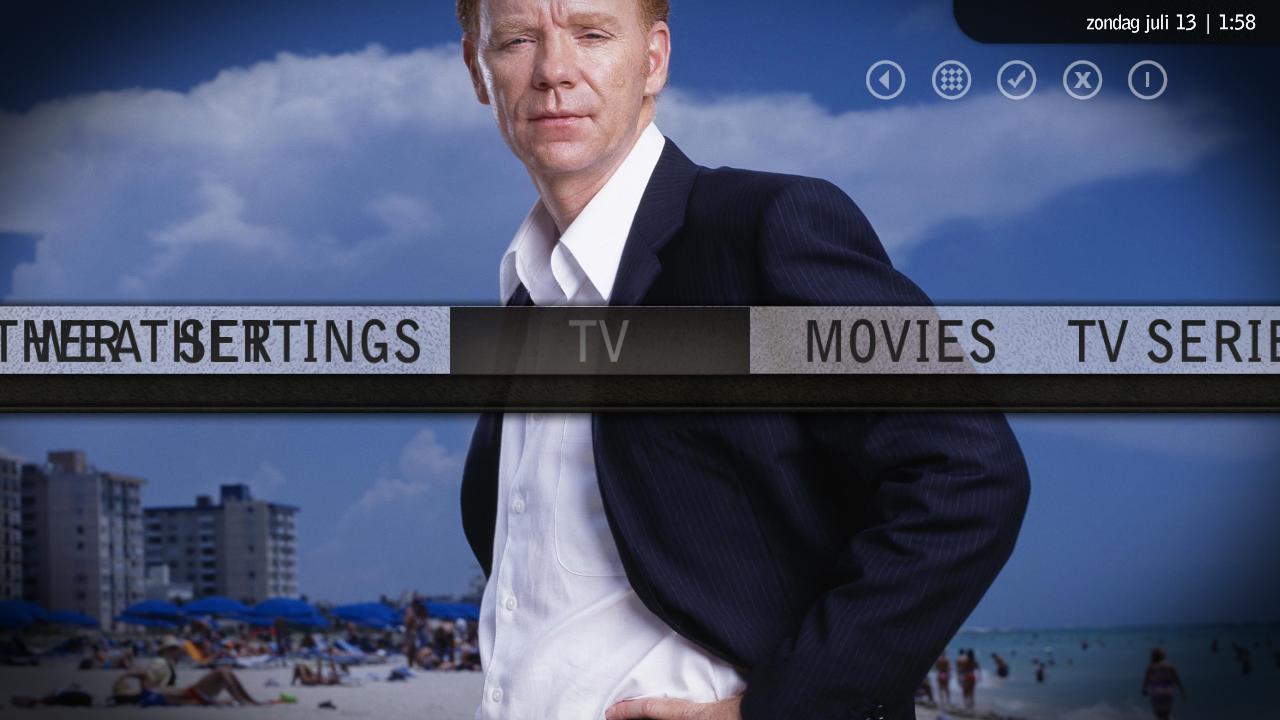
 

Attachments

  • test doorelkaar.jpg
    test doorelkaar.jpg
    79.3 KB

jburnette

Portal Pro
August 24, 2006
758
116
Kentucky
Home Country
United States of America United States of America
A feature request is to add support for the Monochrome skins since the menu creation is based around them. Like a radio button:
Skin to edit: Aeon | Monochrome. But just if you would use this feature yourself.

Emph

I'm probably going to do that next. I'd like to expand it out further to other skins as just a modification tool. Obviously, I'm not looking to write a complete skin editor, but something close to what you've said.

wow all i can say is wow youre new version rocks. if i send you my basic home plus graphics from aeon mod would it be possible to add support...

thanks again

Antony

Thanks. Give me a few days before sending me anything like that. I'd like to think about how to accomplish accommodating all of the different modifications.

when i uploaded the error.log i also saw this and i thought that did would be the problem.. when creating the file i enterd the wrong folder :D

i also downloaded the new version and moving the menu bar works fine.. also good to add the "open" button now you cant make the mistake i made..

only when you start mp you get the buttons at the left off the default button display not properly. as seen as my screen shot. can this be fixed?

Yeah, the addition of the open button was mainly because of your mistake :p

I have no idea what causes that graphic problem. I know why it happens, but I don't know how to fix it. If you read back through the thread it was discussed earlier and has been discussed a lot in the original Aeon Wide thread. It only occurs at startup and when exiting from your default menu item's window back to the menu. I tried for about an hour yesterday to fix it and all I could come up with were hacks that, while they worked, created other smaller problems and didn't do anything to actually fix the root cause of the issue.

If anyone can figure it out, please let us know so we can get it fixed.
 
M

Mr-MarQuez

Guest
Yeah, the addition of the open button was mainly because of your mistake :p

I have no idea what causes that graphic problem. I know why it happens, but I don't know how to fix it. If you read back through the thread it was discussed earlier and has been discussed a lot in the original Aeon Wide thread. It only occurs at startup and when exiting from your default menu item's window back to the menu. I tried for about an hour yesterday to fix it and all I could come up with were hacks that, while they worked, created other smaller problems and didn't do anything to actually fix the root cause of the issue.

If anyone can figure it out, please let us know so we can get it fixed.


I already seen some post of it in the aeon wide thread indeed but nobody has found out how to fix it.
So why does it happens than? and where did you try to fix it?
 

Darre

Portal Pro
April 21, 2007
925
80
Home Country
Norway Norway
The problem is that one of the images that should be offscreen isnt, it doesnt get its correct -x value before after you move left/right in the menu.

You can fix it by forcing MP to jump left/right on launch, and when you exit your default menu item.. This is a dirty fix and I dont think you can do it with skinning, you could add it to MP code but lets face it, thats not a good fix. The best thing would be if you could somehow give that menu item a -x value(or make it invisible) that places it offscreen before you scroll, and let the scrolling override that value afterwards. I don't have time to test this tho, and I'm pretty sure its been tried by lots of people..

I have a couple of feature requests as well:
- A posibility to save my settings, so if I want to make a small change I dont have to start from scratch every time.
- On the same note I would also like to be able to rearrange the menu after Ive added the items, now I gotta plan ahead what to add first, so I get the layout I want. Would be cool if I could just drag the different items up and down the list, or some arrows..
 

jburnette

Portal Pro
August 24, 2006
758
116
Kentucky
Home Country
United States of America United States of America
The only skinning fix I could come up with that worked went a little something like this.

You remove the 8th entry of the 2nd to last menu item. Then, change the PosX of that item's 2nd entry to (I think) 160. Then you have to add a new animation with "WindowOpen" as its condition and slide it over to -160. You also have to adjust the animation of the existing "VisibleChanged" to compensate for the PosX change.

I'm not even really sure why that worked. I think this XML just needs to be rewritten from scratch in order to find the bug.

I have a couple of feature requests as well:
- A posibility to save my settings, so if I want to make a small change I dont have to start from scratch every time.
- On the same note I would also like to be able to rearrange the menu after Ive added the items, now I gotta plan ahead what to add first, so I get the layout I want. Would be cool if I could just drag the different items up and down the list, or some arrows..

Those are both on the todo list. I'm going to clean the whole thing up and expand it out to include other skins and windows as well as deal with the actual xml instead of the dirty StringBuilder I'm using right now. That will allow you to directly reopen your existing XML.
 

GateheaD

Portal Member
April 24, 2007
26
0
39
Home Country
How hard would it be to include Sub Menus?
I've seen it done with Monochrome, It would be great to implement into this, so you can control Menu Functionality (Like in Meedio)
Have it configurable to your desire, I know I would have...

Video
- My Videos
- My TV
- My TV Series
- Online Videos
Audio
- Music
- Radio
- Streams

Etc Etc
 

rekenaar

Retired Team Member
  • Premium Supporter
  • December 17, 2006
    4,421
    805
    Home Country
    South Africa South Africa
    I think the sub menus require an additional plugin-dll file. I don't think it will be very easy for jburnette to include somethink like that, but let's see if he can surprise us?
     

    GateheaD

    Portal Member
    April 24, 2007
    26
    0
    39
    Home Country
    I'm sure the creator of Monochrome, who is working on Aeon-Wide, would share his expertise on the subject.
    I know Monochrome has implemented sub menu dll's already, which are handled as a plugin I believe (calls a plug in, which is just a new menu)
     

    Darre

    Portal Pro
    April 21, 2007
    925
    80
    Home Country
    Norway Norway
    The menu-generator allready lets you create these menus.. when you finish up your menu you can export it as basichome OR game/video/music/extra menu. You just have to get the dll's used in monochrome yourself.
     

    GateheaD

    Portal Member
    April 24, 2007
    26
    0
    39
    Home Country
    I would prefer if it could be done all at once, but this sounds like a decent enough workaround for me to fiddle with now.
    Thanks!
     

    Users who are viewing this thread

    Top Bottom