Always no signal on my videomate s500 dtv tuner (1 Viewer)

mm1352000

Retired Team Member
  • Premium Supporter
  • September 1, 2008
    21,544
    8,236
    Home Country
    New Zealand New Zealand
    I can't seem to find MP v 1.2.b? on the site?
    The download link to the full installer is -->here<--.

    Is the source code only up to 1.1.x then?
    No, SVN head is "above" 1.2.0b now. I don't think 1.2.0b was tagged for some reason - I think it is revision 27815.

    Thanks for the compliments, but I am no expert programmer - maybe a hacker :)
    Hacking shouldn't be necessary if you install 1.2.0b. If you're having fun then update to SVN head and keep hacking. :D

    Could this be a possible problem since the tuner driver is not win7?
    If the driver is not designed for Windows 7 then it is possible that you need to use the DVB-S network provider rather than the generic one. I note that you're already using the DVB-S one - is there a reason you changed from generic?

    S2 is for the HD channels right?
    Yes, usually S2 is used for HD. Technically HD channels could broadcast using regular DVB-S but that would be more expensive for the broadcasters.
     

    gfmoore

    Portal Member
    May 15, 2011
    28
    0
    Stoke-on-Trent
    Home Country
    United Kingdom United Kingdom
    Thanks for that.

    I uninstalled everything, rebooted and installed 1.2.0b. had a few issues getting it to work at first, but a few reboots later everything was okay - it did help when I turned on the external power to the S500 - doh!

    The new parameter setting options are helpful, but still unable to get any signal. I also tried re-updating the list and rescanning from those. I assume they are okay as others with different cards would no doubt have raised issues.

    I now need to
    If you're having fun then update to SVN head and keep hacking

    Problem is I don't know how to do that.

    I am following the procedure as laid out in the wiki: MediaPortal Wiki - MediaPortal Wiki) and using the TortoiseSVN. I suspect I need some new urls. Could you point me in the right direction please.


    For any future visitor to this thread i went off topic for a while and ended up in some other threads trying to get my system to compile.
    Now back to the main issue.


    I'm starting to think that the parameters are fine and that the Compro isn't following the driver spec closely enough. What module reads the actual driver.

    Anyway need to go to work now. Thanks again for the advice.

    Once again I'll repost the logs when I get back this pm.
     

    gfmoore

    Portal Member
    May 15, 2011
    28
    0
    Stoke-on-Trent
    Home Country
    United Kingdom United Kingdom
    For any future visitor to this thread, I'm afraid I went off topic and off thread as I tried to get my development system up and running.

    However, hopefully back to the issue of no signal.

    To recap, I am trying the MP1.2beta install and trying different parameters.
     

    mm1352000

    Retired Team Member
  • Premium Supporter
  • September 1, 2008
    21,544
    8,236
    Home Country
    New Zealand New Zealand
    Hi again Gordon

    Okay, first things first. Dive in to the tuner settings:

    1. Open TV Server config.
    2. Expand the TV Servers node.
    3. Select your TV Server.
    4. Select the digital half of the card and click edit.
    5. Set the pause/stop option to "stop".
    6. Under "network provider" choose the "generic" one.
    7. Click okay.
    8. Untick the analog half of the card (just while we're testing - your tuner looks like it is a hybrid, so technically it should be set up that way).
    9. Go to the third party checks section (TV Server should restart).
    10. Disable the MC services.
    11. Ensure all other tuner software is closed and that there are no background services running that would be using it.
    12. Go to the general section and on the scan tab, bump the tune setting up to 10 seconds.
    13. Go to the manual control section and stop then start TV Server (to clear cached settings).
    14. Expand your TV Server node to see the list of tuners on the left hand side
    15. Select the sat tuner and do a *complete* scan of Astra 28.2 with DiSEqC set to "Simple A" or "AA" and band set to "universal" (no LNB overrides) and see if there is any difference. The scan will likely take quite a long time, so you might want to go for a walk or have a cuppa while you're waiting.

    PS: I would have given you the DLL but I've just arrived at work - timezones are sometimes a pain. ;)
     

    gfmoore

    Portal Member
    May 15, 2011
    28
    0
    Stoke-on-Trent
    Home Country
    United Kingdom United Kingdom
    Many thanks for such detailed instructions.

    Have started the scan. It's late now midnight, so I'm off to bed.

    I'm a bit worried that it's just sitting there at the first channel? Is that because we chose Generic? I chose DVBS before to stop the seeming hang.

    Anyway if I have a hang I'll try the steps again but with DVBS, unless you have further suggestions.

    Have a great day at work. :)
     

    gfmoore

    Portal Member
    May 15, 2011
    28
    0
    Stoke-on-Trent
    Home Country
    United Kingdom United Kingdom
    Okay, as I suspected when i got down this morning the scan was hung at the first line. I had to re-boot. The app would cancel (not the cancel scan), but the device seemed inaccessible.

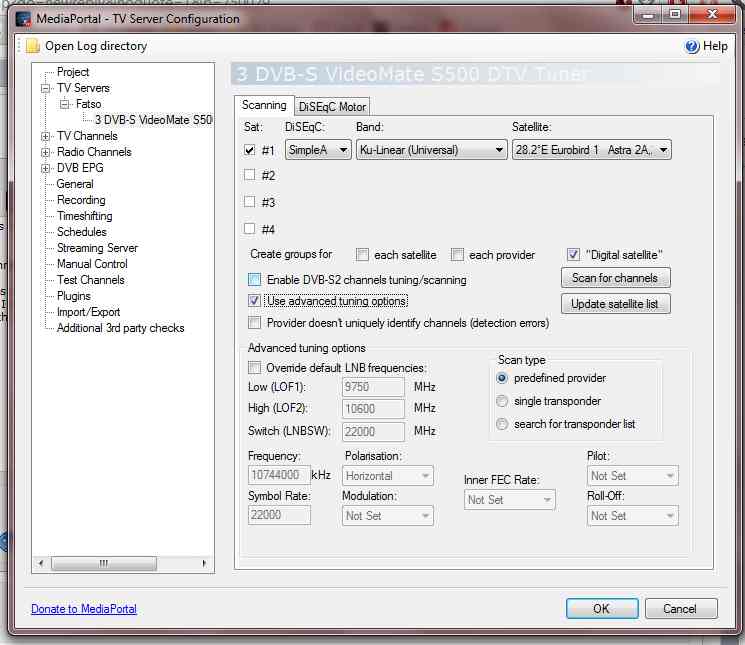
    Tried all your steps again with DVBS instead of Generic. 94 channels scanned, but no signal found on any of them.

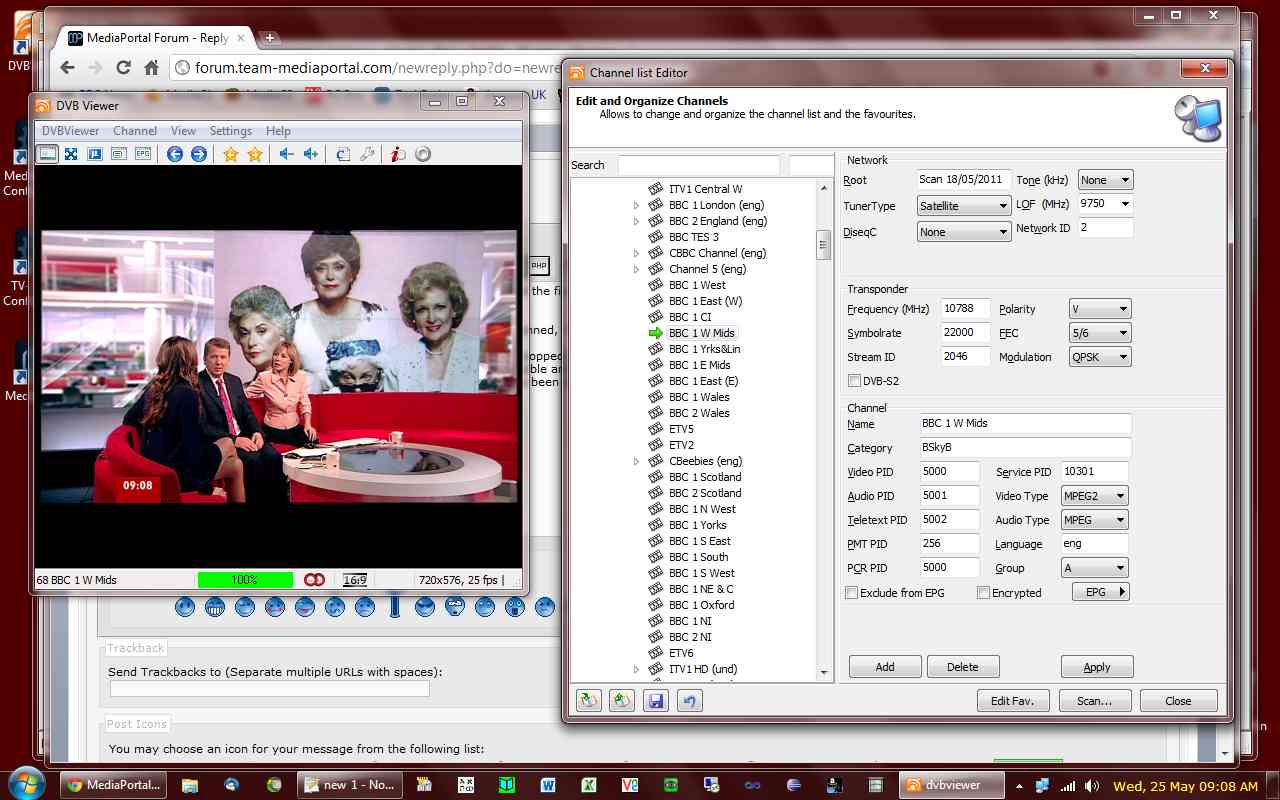
    I did check that no other drivers e.g. the media center processes were stopped (not that I use it on this machine) etc. I rechecked using DVBViewer - after the reboot and scan, that the device was accessible and it was fine. I've attached a jpg of the DVBViewer channel parameters page for the BBC West Midlands channel that I have been working with, just in case it helps.

    I then scanned with DiSEQC set to levelAA, but same result.
     

    Attachments

    • MePoScanPage.jpg
      MePoScanPage.jpg
      49.5 KB
    • DVBViewerChannelParameters.jpg
      DVBViewerChannelParameters.jpg
      109.4 KB

    mm1352000

    Retired Team Member
  • Premium Supporter
  • September 1, 2008
    21,544
    8,236
    Home Country
    New Zealand New Zealand
    Hi again

    Have you got some TV Server logs showing the hanging?
    I'm attaching the debug DLL that I promised:

    1. Stop TV Service.
    2. Take a backup of the TVLibrary.dll in your TV Server install folder.
    3. Download and extract the attached DLL into your TV Server install folder.
    4. Start TV Service.
    5. Scan again.
    6. If nothing is picked up then post new logs.

    If QPSK works with DVBViewer then maybe it is a good idea to try that as well, either by changing all the modulation values in the tuning detail file (C:\ProgramData\Team MediaPortal\MediaPortal TV Server\TuningParameters\dvbs\28.2°E Eurobird 1 Astra 2A,2B,2D.xml) to ModQpsk or by doing a manual scan with the correct parameters for a transponder that you know that you can receive...
     

    Attachments

    • TVLibrary[1.2.0b_debug_signal].zip
      158.9 KB

    gfmoore

    Portal Member
    May 15, 2011
    28
    0
    Stoke-on-Trent
    Home Country
    United Kingdom United Kingdom
    Attached the logs from the previous scans using your instructions

    Will now follow through with your dll. Thanks for your time and effort in this.
     

    gfmoore

    Portal Member
    May 15, 2011
    28
    0
    Stoke-on-Trent
    Home Country
    United Kingdom United Kingdom
    Re-scanned with new dll, without and with Qpsk

    Still no signal. have attached logs again.
     

    mm1352000

    Retired Team Member
  • Premium Supporter
  • September 1, 2008
    21,544
    8,236
    Home Country
    New Zealand New Zealand
    Hi again Gordon

    It looks like I stuffed up the DLL since there is no debug in the logs. I've attached a fixed one. My apologies for the inconvenience. There's no need to do a full rescan scan - a handful of transponders would do fine...
     

    Attachments

    • TVLibrary(v2)[1.2.0b_debug_signal].zip
      159 KB

    Users who are viewing this thread

    Top Bottom