ATSC Closed caption (1 Viewer)

greybox

MP Donator
  • Premium Supporter
  • January 23, 2009
    652
    168
    Home Country
    Canada Canada
    XVFFX:

    MCE is just Windows XP in our case. I use Core CC Parser for post processing - no closed captions. If I use EVR, MP locks up.

    Could you share your configuration? Is it in C:\Documents and Settings\All Users\Application Data\Team MediaPortal\MediaPortal\MediaPortal.xml?
    What version of CCCP do you use?
    Do you use Pass Trough in filter properties?
    Will it show closed captions if I use VMR9
    Where do you set Nvidea/Cyberlink codec?

    Thank you!
     

    xvffx

    Portal Pro
    August 15, 2007
    313
    53
    Home Country
    Canada Canada
    MCE is just Windows XP in our case. I use Core CC Parser for post processing - no closed captions. If I use EVR, MP locks up.

    Could you share your configuration? Is it in C:\Documents and Settings\All Users\Application Data\Team MediaPortal\MediaPortal\MediaPortal.xml?

    sure, when Im done rebuilding the HTPC

    What version of CCCP do you use?

    not sure what version but its the same file thats in the download link

    Do you use Path Trough in filter properties?

    pass through ? are we looking at a graphedit , here's a sample of my old graph
    24001d1218116067-mp-refusing-use-ffdshow-tv-ffdshow-graph-hd.jpg


    Will it show closed captions if I use VMR9

    I 'll have to say yes but might be codec specific

    Where do you set Nvidea/Cyberlink codec?

    if you talking about how to change merit.. I use a few of them.. radlight is one of them, sometimes the codec you select inside mp will not be the codec you want. always use graphedit to verify whats being used while a video is playing.

    Vff
     

    greybox

    MP Donator
  • Premium Supporter
  • January 23, 2009
    652
    168
    Home Country
    Canada Canada
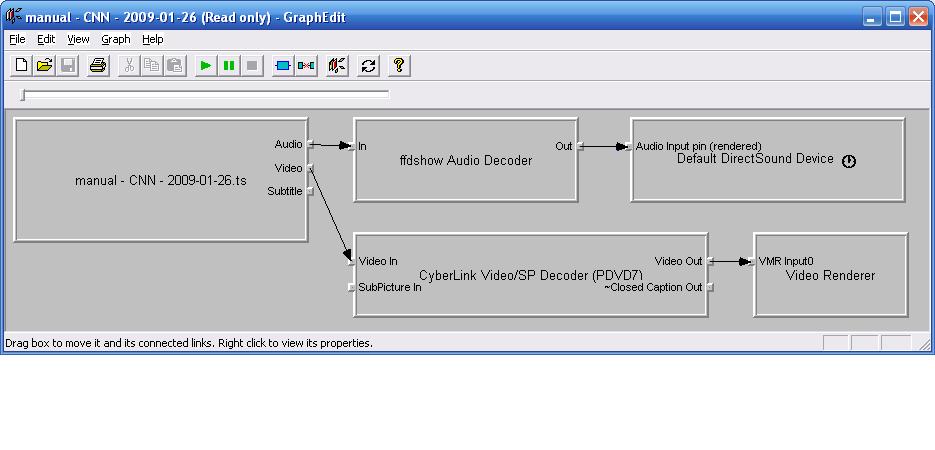
    I loaded my graphedit check and first I am getting the message "Some of the streams in this movie are in unsupported format". Is it compaining about closed captions stream? The movie plays fine in graphedit preview, only the closed captions do not show up. Next I click OK and see the following graph which is different from yours, but I guess I have to somehow force the system to use Core CC parser and Line 21 decoder 2 like in your graph.
     

    Attachments

    • CNN.JPG
      CNN.JPG
      54 KB

    greybox

    MP Donator
  • Premium Supporter
  • January 23, 2009
    652
    168
    Home Country
    Canada Canada
    I think a part of my problem is my new files do not contain CC information. I try to watch/record the channel I know for sure must have closed captions. When I run the CC extractor against my new files, I don't see any closed captions extracted. There is probably something wrong with my server setup.
     

    xvffx

    Portal Pro
    August 15, 2007
    313
    53
    Home Country
    Canada Canada
    a couple things could be going on here

    1: ts doesn t contain cc.. but Im sure even tho theres no cc in the stream.. your graph should show the cc parser.. yours don't

    have you registered the cccp.ax file ?

    note: in my graph, it does show the line 21. I didn't add it add it to the post processing.. I asumed cccp adds it on it's own.

    2: in mp conifig... not the tv server config. you'll need to add the core parser.

    nothing to do with tv server.

    3: we are testing this with MP correct ?

    I have tested with windows media player and cc did show up.

    hope.. we ll get this resolved so you can enjoy the media portal, so don't give up :D

    Vff
     

    greybox

    MP Donator
  • Premium Supporter
  • January 23, 2009
    652
    168
    Home Country
    Canada Canada
    VFF:

    I followed your instructions and noticed a strange thing:

    I have CC only when I use my satellite card (for example, Daystar on Galaxy 18). When I use cable TV on channels I know for sure have CC, there is no CC in the ts file

    CC works fine when I use Windows Media Center which means my signals and hardware is fine. I always thought CC is encoded same way into cable and satellite.

    Another question I would like to ask is you said the CC information shows even in your Windows Media Player. What should I do to make your graph a default for all my system, not just for MediaPortal? Does it have to do something with filter merits?
     

    greybox

    MP Donator
  • Premium Supporter
  • January 23, 2009
    652
    168
    Home Country
    Canada Canada
    VFF:

    You said you tried ffdshow CC version and it didn't work well. What exactly was wrong?
     

    greybox

    MP Donator
  • Premium Supporter
  • January 23, 2009
    652
    168
    Home Country
    Canada Canada
    With this filter the system does show closed captions, but it becomes very unstable: pressing the stop, pause, skip buttons while watching TV or playing back the files locks the system. When the filter is disabled, MediaPortal doesn't hang. If anybody else uses Zodiac’s Core CC Parser, please post your results.
     

    jerryt

    Portal Member
    September 21, 2007
    6
    0
    I found Core cc parser to be impossible to use, except to test a file for CC data.

    Satellite and ATSC have different CC data types.

    Currently I use;
    1) Special build of FFDShow for Satellite CC
    2) Intervideo video codec (WinDVD 9) plus Line 21 decoder 2 for ATSC CC
     

    greybox

    MP Donator
  • Premium Supporter
  • January 23, 2009
    652
    168
    Home Country
    Canada Canada
    I tried that special build of FFDSHOW (ffdshow-20071230-dvbnacc-v1.0-d3xt3rs-lab.exe), and the closed captions looked terrible: junk, missing characters. Core CC parser shows perfect text, but the system locks up constantly.

    How do you test the file for CC data with the Core CC parser? I usually use graphedit for this purpose.

    Do you add Line 21 decoder 2 for ATSC in post processing? Does it work with a regular version of FFDSHOW?

    I ended up using the CCExtractor from Browse ccextractor Files on SourceForge.net. I extract .srt files from the recorded show, and .srt files are easily recognized by MediaPortal. The processing is very fast. Unfortunately, nothing I can do for live video.
     

    Users who are viewing this thread

    Top Bottom