Black Glass Nova Skin 1.0.0 (1 Viewer)

spitjo

Portal Pro
October 23, 2006
144
25
Udine
Home Country
Italy Italy
Hello, how can i enable the RSS Feed under the Screen or the temperature-display in the corner?

Just installing info service 1.5 beta 9 and downloading the updated skin files from the black glass nova bug fixing thread

Any idea where the new Basic Home editor is for this Infoservice 1.5 beta 9 update?

Is not the one on the first post of this thread?
Maybe tgx has just updated that editor, would be pointless to have two separate editors (i think)
It's only a my supposition, i don't use the editor, i like the basic home as is
 

alexchini

MP Donator
  • Premium Supporter
  • May 30, 2006
    154
    20
    Venice
    Home Country
    Italy Italy
    Just installing info service 1.5 beta 9 and downloading the updated skin files from the black glass nova bug fixing thread

    Any idea where the new Basic Home editor is for this Infoservice 1.5 beta 9 update?

    Is not the one on the first post of this thread?
    Maybe tgx has just updated that editor, would be pointless to have two separate editors (i think)
    It's only a my supposition, i don't use the editor, i like the basic home as is

    no i suppose to have try it and its the old one. For sure it will be update next.

    poor Tgx he will get mad with all our posts lol
     

    Tgx

    Retired Team Member
  • Premium Supporter
  • January 22, 2008
    1,560
    1,115
    Home Country
    Italy Italy
    • Thread starter
    • Moderator
    • #93
    Its because, my children also use movingpictures, with there own section `childrens tv etc`
    they browse with the posterview...every time they select movies on the left side,
    this menu pops up, and then they mess up the view settings.
    Thats why i would like to have this one removed.

    `` or maybe give it a delay, before it shows ``
    Just remove the file "movingpictures.hiddenmenu.xml" and it should do the trick.

    Thanks

    Tgx
     

    Tgx

    Retired Team Member
  • Premium Supporter
  • January 22, 2008
    1,560
    1,115
    Home Country
    Italy Italy
    • Thread starter
    • Moderator
    • #94
    Another small bug
    see screenshot

    mp 1.0.2
    This is a bug from Mediaportal. I should delete the line to solve this issue.

    It should start working in the next Mediaportal releases.

    Thanks

    Tgx
     

    Tgx

    Retired Team Member
  • Premium Supporter
  • January 22, 2008
    1,560
    1,115
    Home Country
    Italy Italy
    • Thread starter
    • Moderator
    • #95
    Not a bug but maybe a request for next version.
    i'm using my films plugin as database so i really miss media label and media type fields in the new skin
    (i know that u can see the media label field with the play button but is not so much usefull).

    Thx

    Hi Tgx

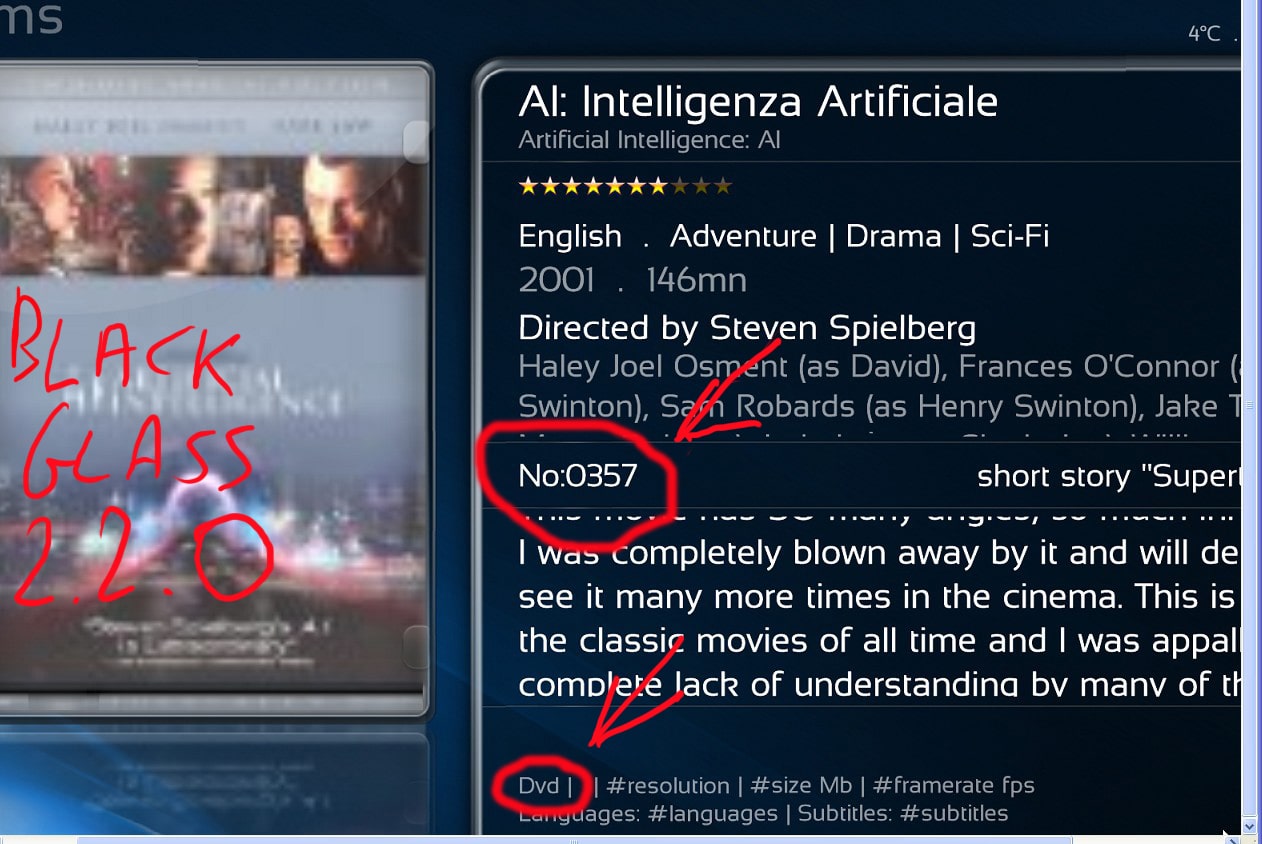
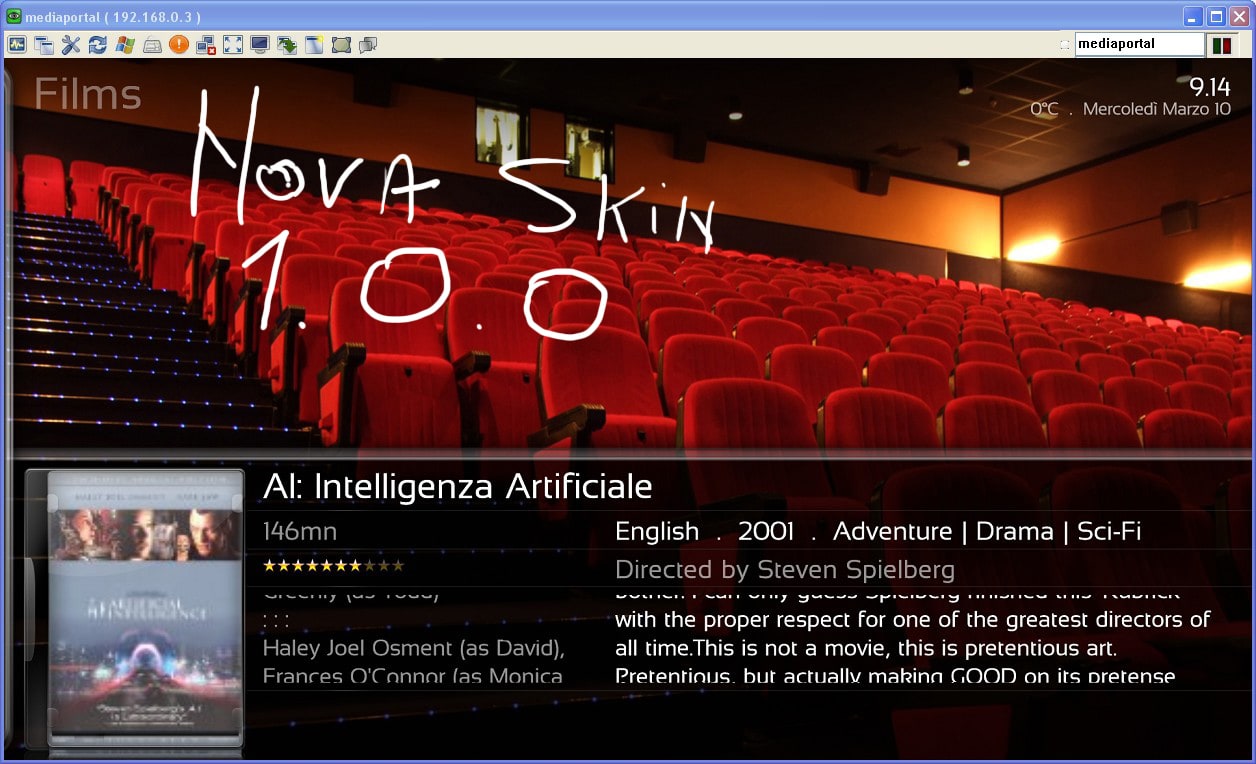
    Probably i didn't explain it right anyway what i mean is here on this 2 pics the first from the Black glass the second from blu wide skin

    Sorry for the misunderstanding!

    Don't you like the position of the infos or are you missing something else?

    Tgx
     

    Tgx

    Retired Team Member
  • Premium Supporter
  • January 22, 2008
    1,560
    1,115
    Home Country
    Italy Italy
    • Thread starter
    • Moderator
    • #96
    Any idea where the new Basic Home editor is for this Infoservice 1.5 beta 9 update?

    I've updated the same file. Since the file has the same name, probably the browser gives you the old file retained in its cache folder. I suggest to clear the browser cache and download it again.

    I have to think a better way of storing the updates on google code, but changing the name means missing the download count.

    Thanks

    Tgx
     

    ysmp

    Design Group
  • Team MediaPortal
  • May 17, 2008
    1,861
    837
    Seoul.
    Home Country
    South Korea South Korea
    HI Tgx !
    i just love Nova skin ....look rally good ...:) was worth the time we wait for it ...:D

    from a qwick look , 1 bug i can see in moving pictures : in icons and big icon and filmstrip views ..

    in icon & big icon view when click down for next line of poster ,it's not flip smoth like use to be in BG 2.20 .

    in filmstrip it more visible the focos when fliping from poster to poster not smoth at all ...(for exsample in tv serise and music filmstrip
    work just fine ...)
    MP 1.1RC1 moving pictures the latest one (v1 rc )

    thanks agin for a great new skin ...

    p.s - please dont forget to add My Trailers Plugin ..
    This is a slugginesh problem with Moving Pictures 1.0 rc and Mediaportal RC1.
    This is not a skin problem. The same occurs with the other skins.

    Thanks

    Tgx

    HI Tgx !
    you corect it's mp bug ...
    for any one that wont a fix ...go her... https://forum.team-mediaportal.com/moving-pictures-284/scrolling-77842/index4.html#post590093
    this fix help alut ..the scrolling is good again ...:)
     

    thesystemera

    Portal Pro
    May 26, 2008
    807
    22
    44
    Auckland
    Home Country
    New Zealand New Zealand
    The stars in the now playing section on the right are not alligned to the text of top album tracks... Just noticed just then... Thanks
     

    ppeterr

    Portal Pro
    July 20, 2008
    136
    5
    Its because, my children also use movingpictures, with there own section `childrens tv etc`
    they browse with the posterview...every time they select movies on the left side,
    this menu pops up, and then they mess up the view settings.
    Thats why i would like to have this one removed.

    `` or maybe give it a delay, before it shows ``
    Just remove the file "movingpictures.hiddenmenu.xml" and it should do the trick.

    Thanks

    Tgx

    ahh yes :D thanks a lot - you have made a wonderfull skin !
     

    alexchini

    MP Donator
  • Premium Supporter
  • May 30, 2006
    154
    20
    Venice
    Home Country
    Italy Italy
    Not a bug but maybe a request for next version.
    i'm using my films plugin as database so i really miss media label and media type fields in the new skin
    (i know that u can see the media label field with the play button but is not so much usefull).

    Thx

    Hi Tgx

    Probably i didn't explain it right anyway what i mean is here on this 2 pics the first from the Black glass the second from blu wide skin

    Sorry for the misunderstanding!

    Don't you like the position of the infos or are you missing something else?

    Tgx
    I m missing the 2 fields i signed in red ( media Type and Media label) in the pictures below.
    The first pic in the attachement is from Black glass skin 2.2.0 and as u can see it have both infos i need.
    The second pic of the same My films plugin page instead is from Nova and the 2 infos, for that i can see, are missed.

    THX
     

    Attachments

    • SS-2010-03-09_16.21.42.jpg
      SS-2010-03-09_16.21.42.jpg
      435.2 KB
    • SS-2010-03-10_09.14.12.jpg
      SS-2010-03-10_09.14.12.jpg
      421.2 KB

    Users who are viewing this thread

    Top Bottom