South Korea
hi Bleazle ! in wich xml i can find this "Selected Item" title ?By "more space", do you mean that selecting the top right icon(s) shouldn't overlap the "Selected Item" title?
Bleazle
thanks
ysmp.

hi Bleazle ! in wich xml i can find this "Selected Item" title ?By "more space", do you mean that selecting the top right icon(s) shouldn't overlap the "Selected Item" title?
Bleazle
I'd like to see the graphic [Headphones Logo + MUSIC] when in the music setting change to [Headphones + MUSIC: Playlists] when in the playlist section of my music.
What font are you using for it?
Dave Ya Beauty
Looks great now - changed the references.xml and the new common.facade.music
Neville
hi Bleazle ! in wich xml i can find this "Selected Item" title ?By "more space", do you mean that selecting the top right icon(s) shouldn't overlap the "Selected Item" title?
Bleazle
thanks
ysmp.
Hi Bleazle,
In which xml file will I find reference to "dialog_information.png"?
Thanks!

Hi Bleazle,
In which xml file will I find reference to "dialog_information.png"?
Thanks!
There's no such file - are you looking for the graphic which does the fade effect when the dialogue appears? If you are it's called midstrip.png and is referred to in the following files:
common.dialog.xml
DialogDateTime.xml
DialogMenu.xml
DialogMenuBottomRight.xml
DialogMultiSelect.xml
DialogNotify.xml
dialogRating.xml
DialogSelect2.xml
DialogText.xml
movingpictures.xml
myteletext.xml
TVSeries.xml
Right, me and the kids are off to ride the motocross bikes in the mud!


I'd like to see the graphic [Headphones Logo + MUSIC] when in the music setting change to [Headphones + MUSIC: Playlists] when in the playlist section of my music.
What font are you using for it?
Not sure of the font - I'll fire up Photoshop over the weekend and have a look. I hear what you're saying, it's a good idea but I think that the word "music" isn't really needed (since the headphones are showing) soI'll just replace "music" with "Playlist"...
...Hope you have a great time with the kids and the mud!
...I don't want to sound like I am unappreciative to your work here as I said before this skin makes me say WOW!
But I did a few edits to your skin like turning all that was green to blue, putting current weather on the home screen...
Maybe you could start a new thread with your "blue" graphics etc attached so that anyone else after the same look could use them?...Anyway I have changed the dialog_information.png image. The only time i see it is when I change to full screen and the Alt/Enter message comes up. I would like to reposition this image, that's all...
I've run a search of ALL files inside the MediaPortal directory for the text "dialog_information.png" and came up with nothing You might have to start a new post in the general MP support part of the forum (or whatever it's called now..) to see if anyone else can help you out....Agreed, i just think it would be good to be able to tell easily whether your editing playlist or viewing music shares
I'll get on to it. Well, it was muddy - I lost my back brake, flew over a jump and nearly landed in a fence/pine trees - great fun
The ability to customise MP to suit your own requirements is one of the best things about it, so no offence taken here!
your image work is well, WOW. I would be ok with sharing the blue edits.OK, I see the image you mean but I don't know out how it's used
....your image work is well, WOW...
....I am not to worried about this, just a perfectionist at times and may ask on the forums. I more just wondered why I could not find the reference to move this image. I opened almost every xml file in the folders and could not find it either.
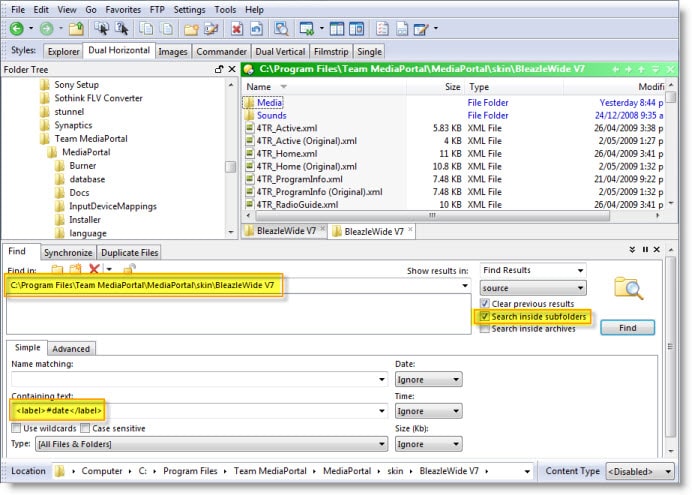
Is there an easy way to do a text search within files without opening them all?...
....One other thing can I relocate and/or change font/color for the Day/Date/Time on the BasicHome screen I can't seem to find it?
I can't take credit for most of the images used - they were either from old skins (mainly Foofaraw) or are from royalty free images on the web which I've just changed to fit in with the skin (like the "hover DVD case" for example). I WISH my graphics skills were that good!!
I can understand why you would want the blue graphic if everything else is blue. With regard to searching XML files I recommend using Directory Opus GPSoftware Main Index - it's a very powerful Windows Explorer replacement tool - makes Windows Explorer look like the "lite" piece of software that it is...
You can edit those settings in the common.time.xml file if you want to change them skin wide. If you only want to change them on the Basic Home screen delete this tag <import>common.time.xml</import> from the BasicHome.xml then paste the following/change the settings as required:
<control>
<description>Date</description>
<type>label</type>
<id>0</id>
<posX>1230</posX>
<posY>37</posY>
<label>#date</label>
<align>right</align>
<font>font101</font>
<textcolor>ffffffff</textcolor>
<animation effect="fade" time="250">WindowOpen</animation>
<animation effect="fade" time="250">WindowClose</animation>
</control>
<control>
<description>Time</description>
<type>label</type>
<id>0</id>
<posX>1230</posX>
<posY>60</posY>
<label>#time</label>
<align>right</align>
<font>font101</font>
<textcolor>ffffffff</textcolor>
<animation effect="fade" time="250">WindowOpen</animation>
<animation effect="fade" time="250">WindowClose</animation>
</control>