BleazleWide V7.1.0 (1 Viewer)

Bleazle

Portal Pro
July 14, 2007
1,122
257
Pukekohe
Home Country
New Zealand New Zealand
  • Thread starter
  • Moderator
  • #61
After spending way too much time trying to work out how to get rid of the []'s I decided the best option was to ask an expert so I PM'd Psycho Reptile, creator of one of the great skins, Monochrome (https://forum.team-mediaportal.com/monochrome-249/monochrome-those-who-like-dark-skins-updated-29566/) to find out how it was done. He told me what to do and now we have a "[]" free BleazleWide :) Talk about service!!!

So a big :D to Psycho Reptile! :D

All you have to do is drop the attached references.xml file into the MediaPortal\skin\BleazleWide V7 directory (overwrite the existing fie). Restart MP (no need to clear the cache). No more []'s :)

I will include this in the "update patch" but I thought some of you might want it sooner rather than later.

Thanks to grabi_2001/Dirk for the push to get this done :) I guess it would be good if someone could translate this post for him?

Bleazle
 

Attachments

  • references.xml
    30.6 KB

Cressari

MP Donator
  • Premium Supporter
  • October 29, 2008
    681
    42
    59
    Konstanz
    Home Country
    Germany Germany
    short translation in german / Kurzübersetzung

    Bleazle hat das Problem mit der Hilfe von Psycho Reptile gelöst.
    Du musst nur die angehängte references.xml (letzter Post von Bleazle) in den BleazleWide V7 Ordner (MediaPortal\skin\BleazleWide V7) kopieren (überschreiben), dann sind die geschweiften Klammern weg. Du musst den Cache nicht leeren. Einfach nach ersetzen der references.xml MP wieder starten.

    :D to Bleazle and Psycho Reptile

    -----------------------------------------------------

    I have two questions in detail, nothing urgent perhaps you have a hint for me.

    1) I have added 2 older and 1 new plugin. I dont get the green bar. The item is highlited but green bar is not visible. MediaPortal Forum - Cressari's Album: Bleazle - Picture

    2) I dont like TV-Preview in moving pictures. I deleted the code and i dont have tv preview in moving pictures in top left as i wished. But now a "default preview" comes bottom left. I have no idea how to prevent this.
    MediaPortal Forum - Cressari's Album: Bleazle - Picture

    If there is a solution i will have a drink on your health :D

    Cheers Stefan
     

    Bleazle

    Portal Pro
    July 14, 2007
    1,122
    257
    Pukekohe
    Home Country
    New Zealand New Zealand
    • Thread starter
    • Moderator
    • #65
    1) I have added 2 older and 1 new plugin. I dont get the green bar. The item is highlited but green bar is not visible. MediaPortal Forum - Cressari's Album: Bleazle - Picture

    Check this out: https://forum.team-mediaportal.com/bleazle-311/how-make-green-selection-bar-unsupported-plugin-60253/

    2) I dont like TV-Preview in moving pictures. I deleted the code and i dont have tv preview in moving pictures in top left as i wished. But now a "default preview" comes bottom left. I have no idea how to prevent this.
    MediaPortal Forum - Cressari's Album: Bleazle - Picture

    Use the attached file - that will get rid of the overlay for ya!

    ..If there is a solution i will have a drink on your health :D

    Cheers Stefan

    Enjoy the drink!! :D

    Dave
     

    Attachments

    • movingpictures.xml
      30.6 KB

    Cressari

    MP Donator
  • Premium Supporter
  • October 29, 2008
    681
    42
    59
    Konstanz
    Home Country
    Germany Germany
    Dave, you are the greatest

    All you wrote functions perfect. I added 3 xmls for unsupported plugins (File Explorer, Online Videos and FANatic Monitor) here: https://forum.team-mediaportal.com/...green-selection-bar-unsupported-plugin-60253/

    Now i have to wait about 8 hours till evening, then i will fill the "Steinkrug" :D

    Thank you very much and Cheers. If you wouldnt live 16.000 kilometers from me, i would send you a box with the world famous beer from black forest ( Brauerei Rothaus - Badische Staatsbrauerei Rothaus ) but transport would cost 100x more than box :( So i only can drink a Rothaus virtual on your health :D

    Stefan
     

    mitschke

    Portal Member
    June 15, 2008
    22
    2
    Aachen
    Home Country
    Germany Germany
    Cheers!!!


    Bleazle, I saw you on the MediaSlayer thread talking about a skin implementation of MediaSlayer in BleazleWide V7, did you do that already, or are you planing it for the next release?
     

    Bleazle

    Portal Pro
    July 14, 2007
    1,122
    257
    Pukekohe
    Home Country
    New Zealand New Zealand
    • Thread starter
    • Moderator
    • #68
    ...So i only can drink a Rothaus virtual on your health :D

    Stefan

    food-smiley-004.gif


    ..Bleazle, I saw you on the MediaSlayer thread talking about a skin implementation of MediaSlayer in BleazleWide V7, did you do that already, or are you planing it for the next release?

    Here you go :) Plus there's a fading hover graphic available for download if you want it here: https://forum.team-mediaportal.com/bleazle-311/animated-fading-hover-images-57443/
     

    Attachments

    • MediaSlayer - BleazleWide V7.zip
      30.7 KB

    kiwijunglist

    Super Moderator
  • Team MediaPortal
  • June 10, 2008
    6,743
    1,754
    New Zealand
    Home Country
    New Zealand New Zealand
    Hey beazle, i've changed over to your skin from indigo. (Currently using v6.12 as i'm using MP 1.0 Final still)
    Have you got a .png for hover music videos (ie mvids plugin)
    If your not using mvids, I really recommend you check it out.
    It scrapes the web to get an image for the artist
    Then it creates a thumb directly from each music video file
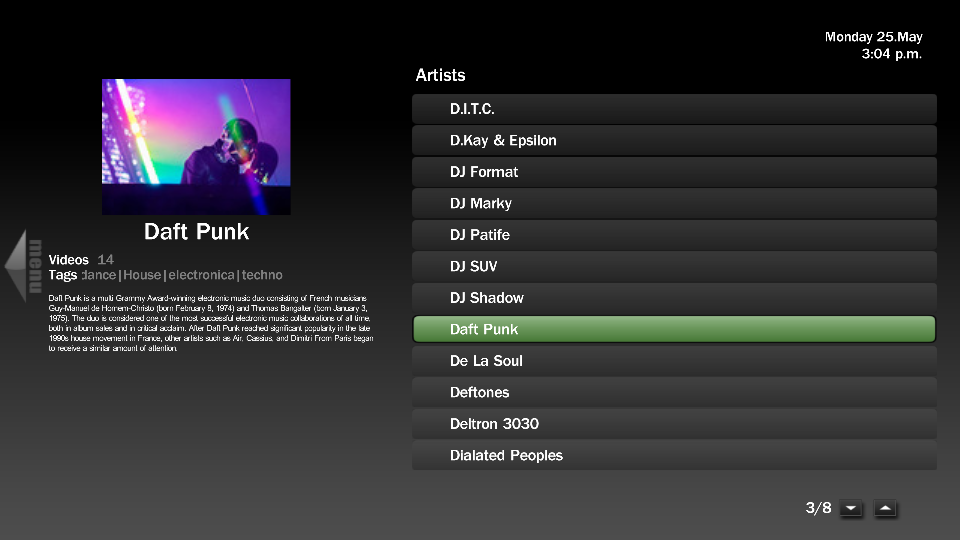
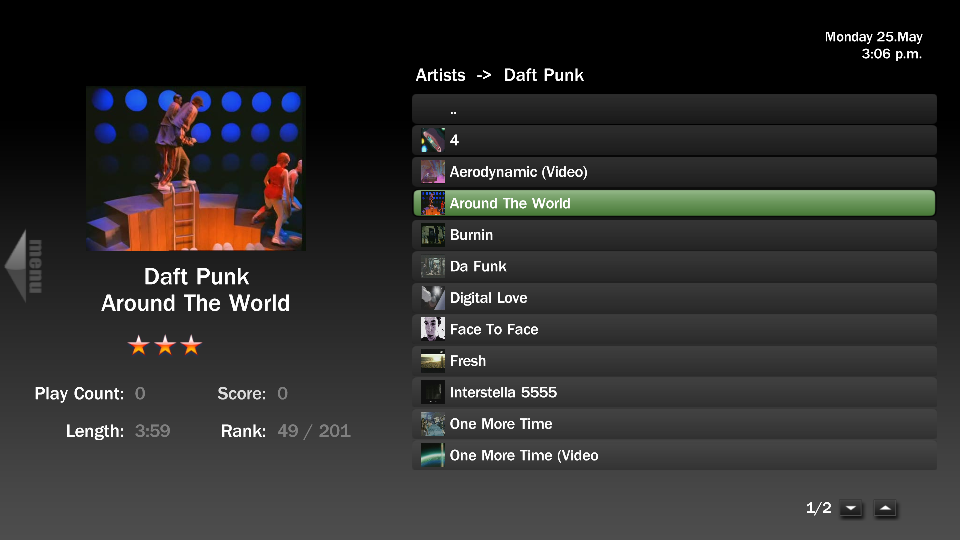
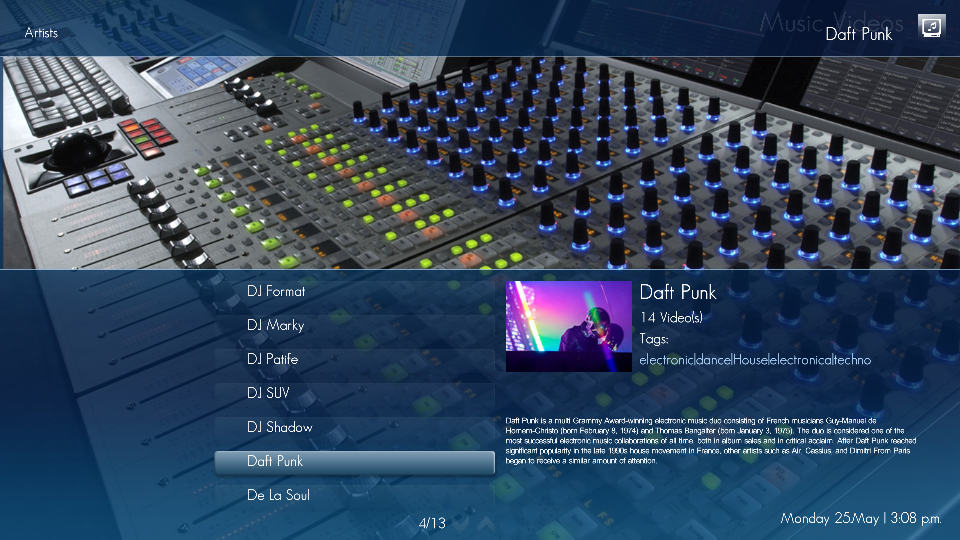
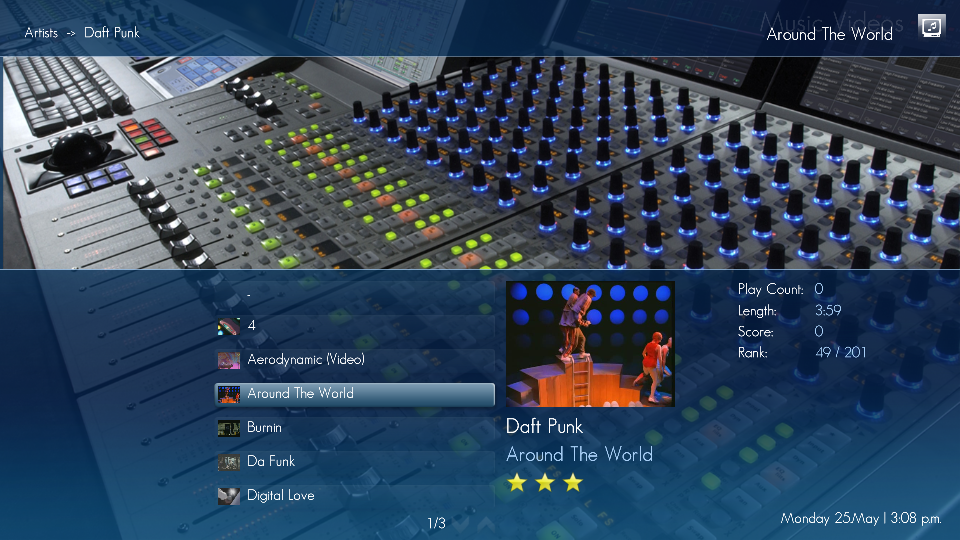
    Here's a preview using blue3wide mvids.xml and indigo's mvids.xml
     

    Attachments

    • beazlemvids1.PNG
      beazlemvids1.PNG
      100.5 KB
    • beazlemvids2.PNG
      beazlemvids2.PNG
      131 KB
    • indigomvids1.PNG
      indigomvids1.PNG
      938.5 KB
    • indigomvids2.PNG
      indigomvids2.PNG
      941.8 KB

    Users who are viewing this thread

    Top Bottom