BleazleWide V7.1.0 (2 Viewers)

kiwijunglist

Super Moderator
  • Team MediaPortal
  • June 10, 2008
    6,743
    1,754
    New Zealand
    Home Country
    New Zealand New Zealand
    How to you navigate from Now Playing window back to playlist.
    I notice that the ability to use the Left arrow while in the now playing window to bring up the diaglog box to choose Current Playlist doesn't work.

    EDIT: Just realised this is a limitation when you enable track suggestions in Music configuration, I added shortcut (skin ID=500) to get around this problem.
     

    Bleazle

    Portal Pro
    July 14, 2007
    1,122
    257
    Pukekohe
    Home Country
    New Zealand New Zealand
    • Thread starter
    • Moderator
    • #72
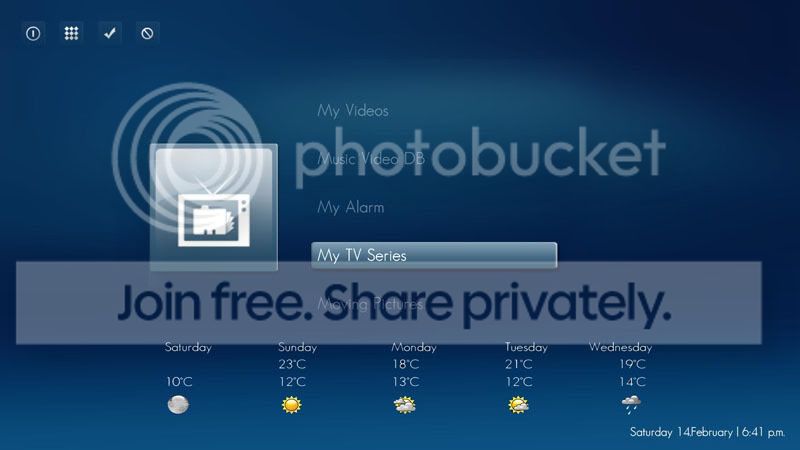
    Hey beazle, i've changed over to your skin from indigo. (Currently using v6.12 as i'm using MP 1.0 Final still)
    Have you got a .png for hover music videos (ie mvids plugin)
    If your not using mvids, I really recommend you check it out.
    It scrapes the web to get an image for the artist
    Then it creates a thumb directly from each music video file
    Here's a preview using blue3wide mvids.xml and indigo's mvids.xml

    I won't have a chance to check it out this week but hopefully I'll get some spare time next weekend so I'll take a look then.

    EDIT: Crude hover_mvids.png added

    :D I can see your thinking behind the hover image, but it kind of looks like "hear no evil" to me :D What about the image below?
    How to you navigate from Now Playing window back to playlist.
    I notice that the ability to use the Left arrow while in the now playing window to bring up the diaglog box to choose Current Playlist doesn't work...

    Just click the "back" button on your remote...
     

    Attachments

    • hover_mvids.png
      hover_mvids.png
      31.7 KB

    mitschke

    Portal Member
    June 15, 2008
    22
    2
    Aachen
    Home Country
    Germany Germany
    :D for the mediaslayer stuff, with that plugin Ive got almost my whole CD collection
    ripped in one day


    a bug, a bug I found a bug in a perfect skin :D:D

    or maybe not? I mean, maybe not a bug, not that I am questioning the point of being perfect! :p

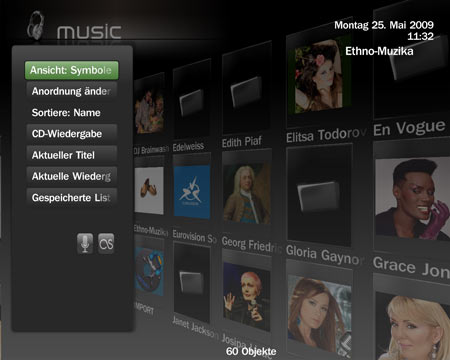
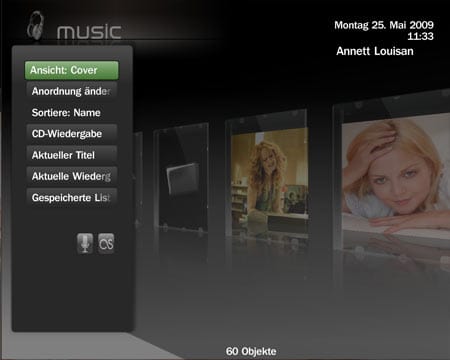
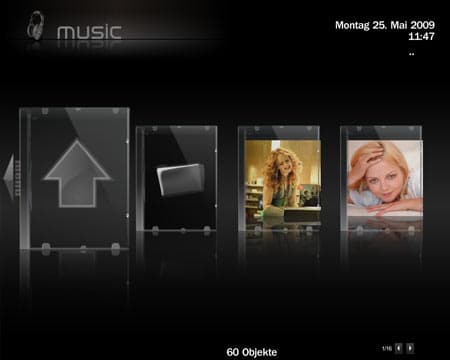
    if you look at the screenshots, you will see that at the cover view (my Music) there is an annoying light gray corner in the bottom left corner, popping up every time when I go to the left side menu, in the symbol view there isn't any light gray corner. Maybe because the cover view has I slightly darker background??

    aaa I forgot to tell, I am using your 16:9 skin on a 4:3 CRT display so the cover art is slightly squeezed.
     

    Attachments

    • symbol.jpg
      symbol.jpg
      25.1 KB
    • cover.jpg
      cover.jpg
      18.3 KB
    • cover2.jpg
      cover2.jpg
      15.6 KB

    Bleazle

    Portal Pro
    July 14, 2007
    1,122
    257
    Pukekohe
    Home Country
    New Zealand New Zealand
    • Thread starter
    • Moderator
    • #74
    Are you using a 4:3 screen? Those CD covers don't look good (not filling the CD cases properly) - that would be a bigger concern for me...

    Re: The light grey edge - have you tried adjusting your screen settings? I think that's all you should need to do...
     

    mitschke

    Portal Member
    June 15, 2008
    22
    2
    Aachen
    Home Country
    Germany Germany
    one more Idea about my music.

    I am not sure if it is a skin or a plugin issue, but is it possible to have following in the "now playing" view:

    at the moment the skin is using the 'folder.jpg' for the CD case and the blank CD as fill in picture, could it bee posible
    to use front.jpg for the case and media.jpg for the blankCD? an then maybe center (vertical and horizontal) the media.jpg
    picture so you could relay use a picture of the round CD media?

    ___________________

    Yes I am using a 4:3 display(still), like I edited it afterwards in my previous post, and Ive got used of some disadvantages of using 16:9 on 4:3 displays (I like the skin too much to change to another one) , but I do not believe it is an display proportion issue, except if the background picture from the icon view is getting zoomed out in the cover view? because it seems that there are the same, or?
     

    kiwijunglist

    Super Moderator
  • Team MediaPortal
  • June 10, 2008
    6,743
    1,754
    New Zealand
    Home Country
    New Zealand New Zealand
    Thanks for the music videos image.

    Just click the "back" button on your remote...

    Can't use back button because i use jump straight to now playing screen when using one button random music and i also have jump to now playing screen in MP config music settings. not a big deal however.
     

    Bleazle

    Portal Pro
    July 14, 2007
    1,122
    257
    Pukekohe
    Home Country
    New Zealand New Zealand
    • Thread starter
    • Moderator
    • #78
    one more Idea about my music.

    I am not sure if it is a skin or a plugin issue, but is it possible to have following in the "now playing" view:

    at the moment the skin is using the 'folder.jpg' for the CD case and the blank CD as fill in picture, could it bee posible
    to use front.jpg for the case and media.jpg for the blankCD? an then maybe center (vertical and horizontal) the media.jpg
    picture so you could relay use a picture of the round CD media?...

    Nice idea but I don't think it can be done :( the music plugin uses <texture>#Play.Current.Thumb</texture>, not front.png etc

    ...I do not believe it is an display proportion issue, except if the background picture from the icon view is getting zoomed out in the cover view? because it seems that there are the same, or?

    Sorry, I misunderstood you. You're right, it's because the Filmstrip view has a darker background and when it rotates the standard background behind shows...

    Thanks for the music videos image...

    No worries. I've uploaded a fading version too.

    ...Can't use back button because i use jump straight to now playing screen when using one button random music and i also have jump to now playing screen in MP config music settings. not a big deal however.

    Aaahh OK, I don't use that plugin...

    Just fyi: 4TheRecord 1.4.0.0 is out :)

    :) Sweet, I'll drop that in tonight :)
     

    kiwijunglist

    Super Moderator
  • Team MediaPortal
  • June 10, 2008
    6,743
    1,754
    New Zealand
    Home Country
    New Zealand New Zealand
    Onebuttonmusic is quite good. Basically if you are on the home menu, you can press play, it will auto load a random 100 track playlist. you can customise eg. autoload top 100 songs, auto load 10 random albums etc.. good if you want to start up some music without turning on your TV. its a MP process plugin.
     

    Users who are viewing this thread

    Top Bottom