
Calling all MP New Zealanders (Both of you!!) (14 Viewers)

dvbkiwi

Portal Pro
November 2, 2009
54
2
Home Country
New Zealand New Zealand
HI Guys,

Im really battling to get consistent results with comskip, Im recording using DVB-S and all my recordings are very good quality but when I run comskip it doesn't detect the adds properly and I have tried to tweak the ini file but so far have not made any significant progress.

What really confuses me is that even though it sometimes detects adds, it will only detect adds in random locations right through the recording and in some cases only mark a part of the add's so it starts the film late or shows some adds before skipping to next chapter. I have had a few recordings that detected properly though, but there arent many of those. It also doesnt look like my problem is limited to any specific channel.

does anyone here have a working ini for NZ Freeview DVB-S setup?

any other advice will also be appreciated.

Thanks
 

mrbunny_nz

Portal Member
November 28, 2008
12
0
Home Country
New Zealand New Zealand
Hey

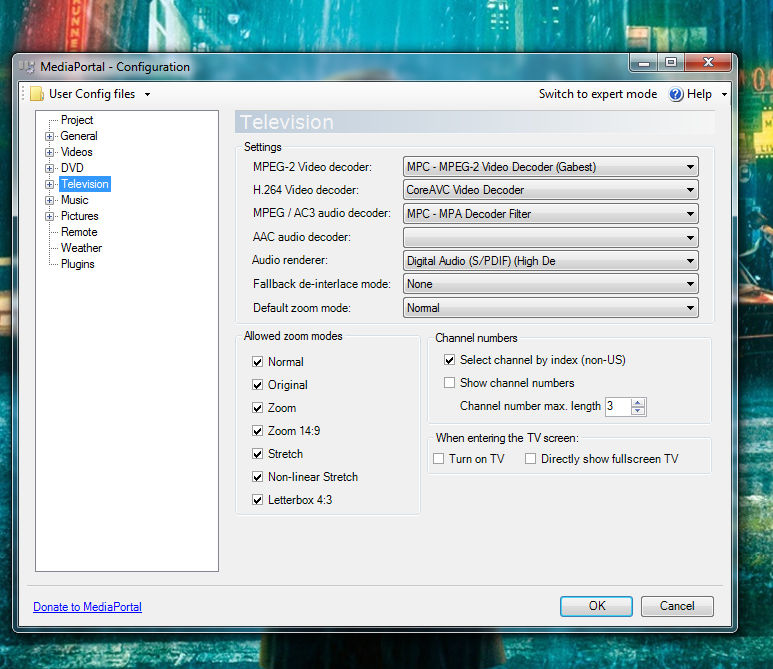
Just trying to get dvb-t tv to work, could someone tell me real quick what decoders they use? I've tried a few different ones and can't get it going.

Using a HVR-4000, I've attached a screenshot of current settings
 

Attachments

  • Untitled.png
    Untitled.png
    344.6 KB

mcraenz

MP Donator
  • Premium Supporter
  • July 28, 2007
    646
    46
    Auckland
    Home Country
    New Zealand New Zealand
    Power DVD8 is my choice at the moment. Do you have a video card capable of decoding h.264 e.g. NVIDIA geforce 8x00 or 9x00?
     

    mrbunny_nz

    Portal Member
    November 28, 2008
    12
    0
    Home Country
    New Zealand New Zealand
    Thanks for your reply

    No I don't think i have support for hardware acceleration. I have a ATI Radeon 4800.

    Hum, I've tried with the h264 decoder from power dvd8, but I still can't get mediaportal to play live TV, MP just freezes when I press the TV on button.

    I know the hardware is capable of playing it, I've had it working on a previous install of windows, just can't remember exactly how it was set up

    Would you be able to put up a screen shot like mine, just so i can see exactly what decoders you are using for everything to make it work? That'd be really helpful

    cheers
     

    mcraenz

    MP Donator
  • Premium Supporter
  • July 28, 2007
    646
    46
    Auckland
    Home Country
    New Zealand New Zealand
    I'm afraid hardware acceleration is really a must for DVB-T. If you have a very grunty dual or quad core CPU then you can probably do it with the CoreAVC codec but really it's not an ideal approach. Can you fill up your system specs in your profile, it will help us support you better. :)
     

    mrbunny_nz

    Portal Member
    November 28, 2008
    12
    0
    Home Country
    New Zealand New Zealand
    Of course, Ive filled out system specs, but I do know that my system is capable of running dvb-t as I've had it working before under Vista. It's just now I've installed windows 7 and the latest version of MP, and I can't remember all the settings for the tv.

    cheers


    Edit: Using ffdshow as the decoder, I've managed to get the first frame to show when I turn on TV in MP, but it never changes to the next frame

    Any ideas?
     

    dvbkiwi

    Portal Pro
    November 2, 2009
    54
    2
    Home Country
    New Zealand New Zealand
    Thanks a lot for this ini file. its way better than what I was able to come up with. so far its detected all the adds perfectly in the recordings where i previously had problems. :)
     

    thesystemera

    Portal Pro
    May 26, 2008
    807
    22
    43
    Auckland
    Home Country
    New Zealand New Zealand
    Your welcome.. It basically only uses logo detection and nothing else, so there are exceptions where it won't work but very few indeed...
     

    Users who are viewing this thread

    Top Bottom