Definitive DTS-MA/DTHD HD Audio in MP thread... Let's do it! (1 Viewer)

WileECoyote

MP Donator
  • Premium Supporter
  • October 14, 2008
    1,156
    220
    Cary, NC
    Home Country
    United States of America United States of America
    Okay, I did some more testing last night and the timelime error starts happening when I play a movie with HD audio (DTS-MA or TrueHD.) I can play as many AC3 videos I want without it happening and when I play the first HD audio movie it plays fine. But if I then go to another video with HD audio or AC3 it will show 0:00 for beginning and end times. For example:

    Movie 1 - AC3 audio (works fine)
    Movie 2 - AC3 audio (works fine)
    Movie 3 - DTS audio (works fine)
    Movie 4 - DTS-MA audio (works fine)
    Movie 5 - AC3 or DTS-MA or TrueHD (broken, timeline shows 0:00 for beginning and end times)

    It seems to have an issue releasing something after I play the first HD audio movie? BMan, so your not having this issue with your ATI card?

    Thanks for any help...
    Wile E.
     

    kaigame

    MP Donator
  • Premium Supporter
  • September 9, 2005
    67
    8
    Home Country
    Great Britain (UK) Great Britain (UK)
    Okay, I did some more testing last night and the timelime error starts happening when I play a movie with HD audio (DTS-MA or TrueHD.) I can play as many AC3 videos I want without it happening and when I play the first HD audio movie it plays fine. But if I then go to another video with HD audio or AC3 it will show 0:00 for beginning and end times. For example:

    Movie 1 - AC3 audio (works fine)
    Movie 2 - AC3 audio (works fine)
    Movie 3 - DTS audio (works fine)
    Movie 4 - DTS-MA audio (works fine)
    Movie 5 - AC3 or DTS-MA or TrueHD (broken, timeline shows 0:00 for beginning and end times)

    It seems to have an issue releasing something after I play the first HD audio movie? @BMan, so your not having this issue with your ATI card?

    Thanks for any help...
    Wile E.

    I have to tune in with all of the SAF believers, it truly does just set everything up apart from a few options(bitsreams and ausio resampling). A major issue i was having before was having haali media splitter installed, which has it's own splitter, not good.

    Clean install, MePo 1.1, SAF 5.00, with a bit of customisation(saf does some settings i don't like), and all is working.

    I'm using the ATI Radeon 5450 as the connection through hdmi, and then with the latest Realtek audio driver, as it has 'immediate mode' in the control panel-audio properties section, immediate mode will only switch audio types when it actually has to, instead of resetting after each playback (helps with skin sounds). still can't skip through some TrueHD audio tracks on mkvs, BluRay rips or discs, but i can live with that.

    I would seriously recommend getting the 5450 if you can fit it, it's a super low end dx11 card, bought mine for £40.

    Oh, one more final and critically important thing, the ATI cards seem to have a problem with some h264 video tracks, disabling h264 acceleration fixes the problem, although that may not be an option if your processor isn't up to the task, i'm using a cheapo pentium dual core @ 2.8Ghz(£50). Full specs are in my profile. Regarding errors in h264 is ranged from severe video corruption to video playback freezing(audio carrys on). All resolved by decoding in software. Although i would love a fix for this, i can live without.
     

    kaigame

    MP Donator
  • Premium Supporter
  • September 9, 2005
    67
    8
    Home Country
    Great Britain (UK) Great Britain (UK)
    Clean install, MePo 1.1, SAF 5.00, with a bit of customisation(saf does some settings i don't like), and all is working.

    Can i ask which one? Anyone can improve SAF, but i need feedback...

    **Bows down to the Dev :) **

    Screenies attached

    Audio Decoder:
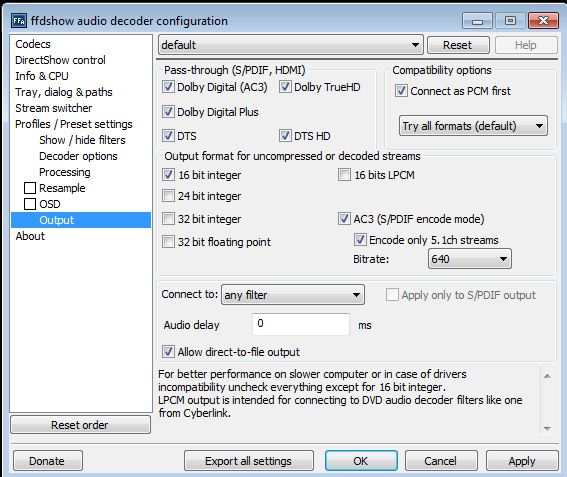
    Codecs left as default, resampling off, all bitstream options selected(as per screenshot), stream switcher on
    **My Thinking behind the audio resampling is that it's best left to my amp, i want MePo to do as little to the audio stream as possible before the amp decodes**

    Also MP needs the tick box to support 5.1 WMV's, HDMI audio(PC control panel) must be set to the amount of speakers attached to the amp, and it will work in multichannel, but not switch to DD/DTS. Then stays on whichever format was last played until the next format is played.

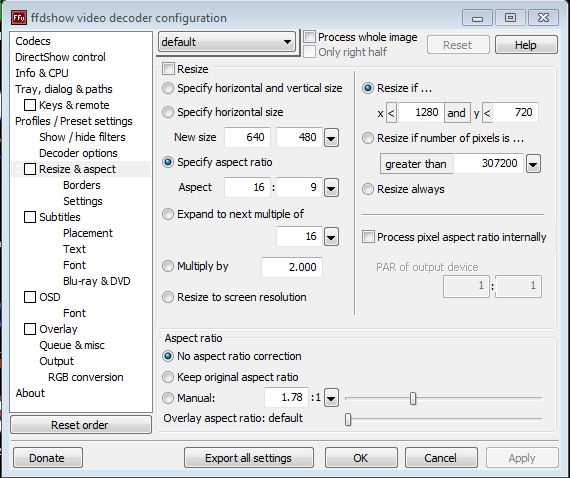
    Video Decoder: Everything off, Codecs as default

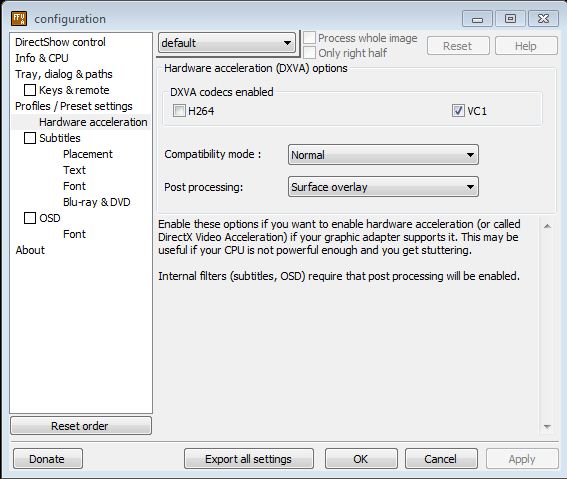
    DXVA Decoder: h264 hardware decode off (issue with ATI apparently, 90% of my video plays with it on).

    With this setup the amp switches to DTS/DD(except for WMVs), TrueHD and DTS-MA.

    Hope that makes sense, all i need now is to be able to skip forward on TrueHD audio tracks and it will be 100% perfect instead of 99% :)
    Also bear in mind that this is(as far as i can tell) the best solution to my particular video card/amp combination - ATI 5450(Cat 10.7) & Onkyo TXNR-1007(latest firmware). The ATI audio driver didn't work out too good for me(mainly the lack of an immediate mode option).

    Tried XBMC yesterday, must not like SAF being installed, but didn't matter, i'm a control freak, i need little control panels for all my options and plugins, way too restricting :)
     

    Attachments

    • dxva.JPG
      dxva.JPG
      53.4 KB
    • video.JPG
      video.JPG
      69 KB
    • audio decoder.JPG
      audio decoder.JPG
      67.6 KB

    hoborg

    Portal Pro
    June 13, 2008
    4,413
    1,644
    Nový Jičín
    Home Country
    Czech Republic Czech Republic
    kaigame:

    I didnt see one reason why to disable h.264 DXVA...
    FFDshow stream switcher is on by default in SAF, isn't it?

    I was thinking about creating FFDshow passthrough profiles like ATI HDMI, nVIDIA HDMI, SPDIF, etc... The problem is i need correct FFDshow setting, becouse i have no chance to test any.
     

    kaigame

    MP Donator
  • Premium Supporter
  • September 9, 2005
    67
    8
    Home Country
    Great Britain (UK) Great Britain (UK)
    @kaigame:
    I didnt see one reason why to disable h.264 DXVA...

    I'd love to enable it, it's a bit weird(mainly an anime issue), Full Metal Alchemist Brotherhood(Eclipse) some files play, for others, the video starts for about 2 seconds and stops, audio continues. Full Metal Alchemist(AHQ) checking later episodes(51) video corruption as in the remnants of previous frames stay behind. Issue is well known about on multiple forums, i'm sure i have some other files which exhibit the issue, happens on all versions of SAF/FFDShow that i've tried.
    FFDshow stream switcher is on by default in SAF, isn't it?
    Yup, was adding what i left on, that is all :)

    I was thinking about creating FFDshow passthrough profiles like ATI HDMI, nVIDIA HDMI, SPDIF, etc... The problem is i need correct FFDshow setting, becouse i have no chance to test any.

    I don't believe that nvidia hdmi can support bitstreaming any of the HD audio formats, whereas the 5XXX series ATI's do. So that would make two options(maybe three):

    1) ATI HDMI(Realtek audio driver) - I think there is an issue with converting stereo audio streams to AC3 with this driver(can test this)
    **configured like my screenshot**
    2) ATI HDMI(ATI audio driver) - don't want to use this as it sends additional mode switching to the amp whenever audio starts(MePo menu skin sounds)
    **configured possibly without the limit on AC3 conversion for stereo audio**
    3) NVIDIA HDMI/SPDIF - would end up the same as the supported formats are no different, i think.
    **no HD formats selected**

    I can see if i can send you some file samples which exhibit the problems with h264 enabled, not sure how, i'm sure there is some easy to use program out there, any suggestions?
     

    hoborg

    Portal Pro
    June 13, 2008
    4,413
    1,644
    Nový Jičín
    Home Country
    Czech Republic Czech Republic
    kaigame:
    This is OT, please move to SAF5 thread.

    About h.264 DXVA with some samples - maybe becouse they are SD?

    Curently i do not have any h.264 HD sample with broken DXVA, blocking, etc...
     

    kaigame

    MP Donator
  • Premium Supporter
  • September 9, 2005
    67
    8
    Home Country
    Great Britain (UK) Great Britain (UK)
    @kaigame:
    This is OT, please move to SAF5 thread.

    About h.264 DXVA with some samples - maybe becouse they are SD?

    Curently i do not have any h.264 HD sample with broken DXVA, blocking, etc...

    The files are SD, but there isn't a way to tell FFDshow to only use H264 on HD formats is there?

    I was just responding to your questions, and hoping to help out a little, i'll continue in the other thread if you prefer that.
     

    hoborg

    Portal Pro
    June 13, 2008
    4,413
    1,644
    Nový Jičín
    Home Country
    Czech Republic Czech Republic
    @kaigame:
    This is OT, please move to SAF5 thread.

    About h.264 DXVA with some samples - maybe becouse they are SD?

    Curently i do not have any h.264 HD sample with broken DXVA, blocking, etc...

    The files are SD, but there isn't a way to tell FFDshow to only use H264 on HD formats is there?

    I was just responding to your questions, and hoping to help out a little, i'll continue in the other thread if you prefer that.

    It is.
    Latest SAF have SD/HD detection, and use DXVA only for HD, SD is decoded using regular FFDShow.
    And yes, please move to SAF5 thread.
     

    BMan

    Portal Member
    August 29, 2008
    19
    7
    Home Country
    United States of America United States of America
    ajamils: I had a similar problem. It was caused by an outdated splitter. The problem should go away if you follow my guide and use the splitter from the MPC-HC standalone filters.

    Wile E: I haven't noticed this issue regarding the time. I will look at it tonight.
     

    Users who are viewing this thread

    Top Bottom