[solved] Delete Media Files via Context Menu (1 Viewer)

krebbi

Portal Member
November 7, 2013
31
1
Freiburg
Home Country
Germany Germany
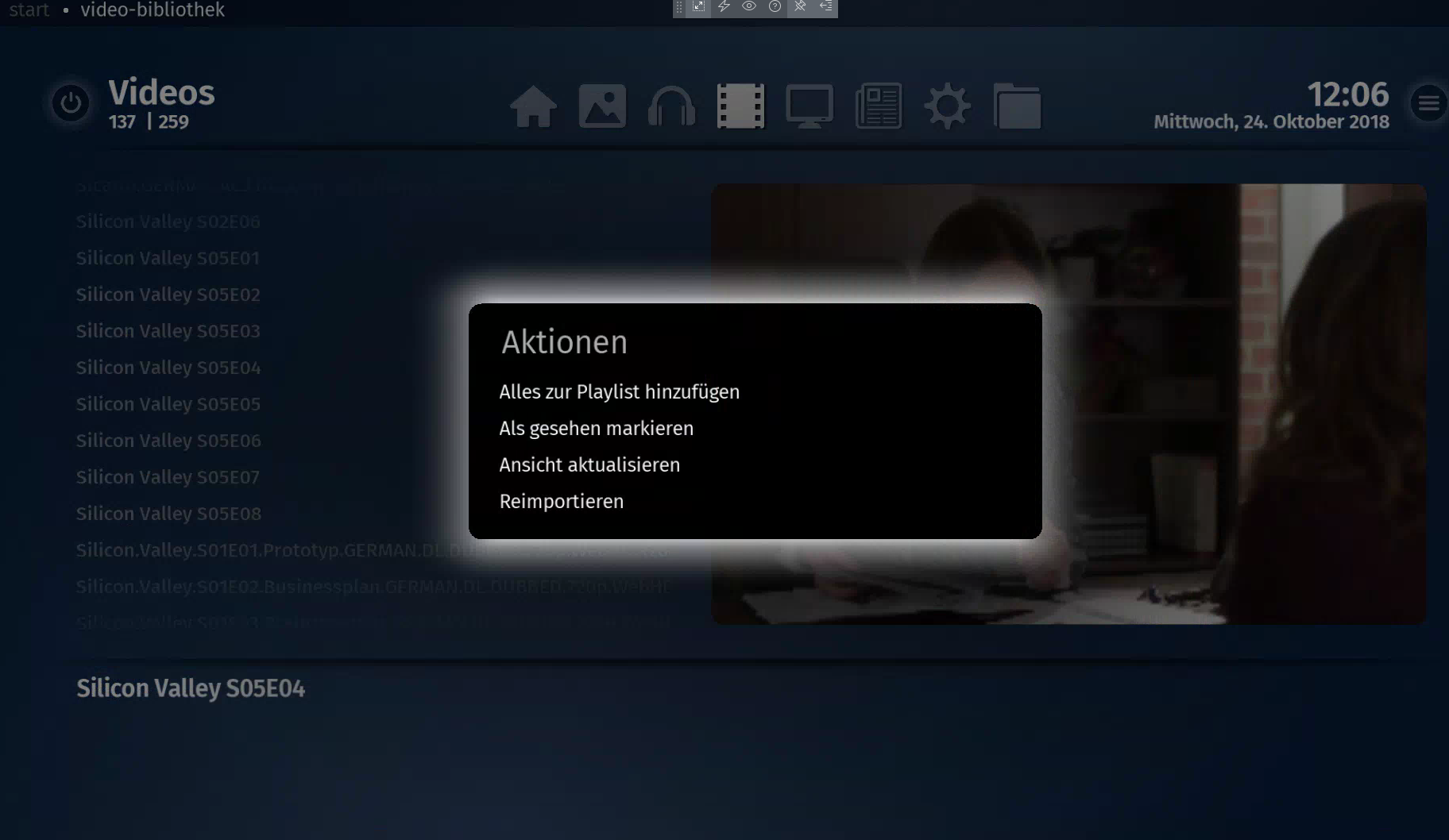
Would be great to be able to delete files via the info-menu.
 

krebbi

Portal Member
November 7, 2013
31
1
Freiburg
Home Country
Germany Germany
No delete option.
 

Attachments

  • Bildschirmfoto 2018-10-24 um 12.06.10.png
    Bildschirmfoto 2018-10-24 um 12.06.10.png
    371.8 KB

HTPCSourcer

Retired Team Member
  • Premium Supporter
  • May 16, 2008
    11,382
    2,369
    Home Country
    Germany Germany
    No delete option.
    Then you haven't defined a user/password in the settings to your network shares. This can be your local user or admin account or a specially created user with limited rights, but sufficient privileges to do a R/W (and delete) access to the shares in question.
     

    krebbi

    Portal Member
    November 7, 2013
    31
    1
    Freiburg
    Home Country
    Germany Germany
    Then you haven't defined a user/password in the settings to your network shares. This can be your local user or admin account or a specially created user with limited rights, but sufficient privileges to do a R/W (and delete) access to the shares in question.

    I did that. Without I wouldnt be able to access the network share.
     

    HTPCSourcer

    Retired Team Member
  • Premium Supporter
  • May 16, 2008
    11,382
    2,369
    Home Country
    Germany Germany
    I did that.
    Your problem can only occur if the credentials for the shares don't provide deletion privileges - or the client is not correctly connected. Sometimes the network re-initialization i not happening correctly after resume (very typical for Intel drivers).

    Please describe your environment a little bit more.
     

    krebbi

    Portal Member
    November 7, 2013
    31
    1
    Freiburg
    Home Country
    Germany Germany
    Its a synology NAS hosting all the media files.
    a special user only for this mediashare has been created with read/write on the media directories.
    these credentials are in use in mediaportal2.
    there is no user who has only read permission. read/write or nothing.
    when mp2 is able to read files with these credentials, it should be able to delete files as well.
     

    HTPCSourcer

    Retired Team Member
  • Premium Supporter
  • May 16, 2008
    11,382
    2,369
    Home Country
    Germany Germany
    when mp2 is able to read files with these credentials, it should be able to delete files as well.
    Only if the shares are accessible in Windows network environment when drilling down from "Network". I assume that you defined your shares all down the way from within MP2's setup this way, correct? A "\\share..." that works in Explorer is not enough.

    Anyway, please set the log level to DEBUG, restart the MP2 Server service and upload the server.log. What is the behavior for TV recordings? Do you see the delete option there?
     

    krebbi

    Portal Member
    November 7, 2013
    31
    1
    Freiburg
    Home Country
    Germany Germany
    After rebooting ALL 5 media computers in the network I'm now able to delete files.
    I don't know how to reproduce the error. :-(
     

    Users who are viewing this thread

    Similar threads

    PS: But maybe the MP2 team will be back tomorrow, and development and bug fixes will continue. Time will tell.
    PS: But maybe the MP2 team will be back tomorrow, and development and bug fixes will continue. Time will tell.
    Hi, Help Please. I've got several FLAC audio files that play OK on my PC, and my HTPC, via: Media Player / Windows Media Player /...
    Replies
    8
    Views
    752
    thanks for the information!
    thanks for the information!
    I watched a recorded program, (that I thought I'd allready watched previously) After watching it (for the second time) I tried to...
    Replies
    2
    Views
    1K
    Fixed, I think. Certainly the vintage MP2 installer that I was using no longer installs the LAV filters. I can only assume that these were never part of the install package itself, but rather downloaded during the install, and that link no longer exists. Shame that the installer doesn't indicate this. Last time when I installed the...
    Fixed, I think. Certainly the vintage MP2 installer that I was using no longer installs the LAV filters. I can only assume that...
    Hi all, I've recently retired my MP2 setup for my main HTPC and gone back to separates, but I wanted to retain the ability to play...
    Replies
    4
    Views
    256
    Hi. I was probably being a bit fast and loose with my terminology. I meant "somewhere within the files that MP2 uses in its database". Anyway, I found a way to do this which was far from automated but relatively low effort. I found what looked like all the images (CD covers, DVD covers, backgrounds etc all lumped together in...
    Hi. I was probably being a bit fast and loose with my terminology. I meant "somewhere within the files that MP2 uses in its...
    I am in the process of setting up a legacy media player (Mede8er) which I happened to have laying around into my home cinema setup...
    Replies
    2
    Views
    434
    I don't know about MP2 but as you said you tried MP1 too, how is the MP music config ? MP(1) will only use LAV if you select "Internal DirectShow player" as music output, but then you lose gapless playback. If you you don't have multichannel music you can choose WASAPI as the output and set the number of speakers to stereo. I have...
    I don't know about MP2 but as you said you tried MP1 too, how is the MP music config ? MP(1) will only use LAV if you select...
    Not sure if this a a bug/config/settings problem. I am running a media portal 2.5 server with 2.41 client but it seems I get the...
    Replies
    1
    Views
    813
    Top Bottom