I too have this issue. It definitely occurred after this latest update. Hopefully I can confirm this. I used a parameter grabbing program to capture this.
When using Mediaportal 1.2.3
-mount 0,Z:\movies\DVD's\24HR_PARTY_PEOPLE_DISC_1.iso
When using Mediaportal 1.3 Alpha
-mount scsi,0,Z:\movies\DVD's\24HR_PARTY_PEOPLE_DISC_1.iso
Seems Daemon tools have change there syntax for mounting ISO's???
Upgrading daemon tools lite may help but I did try this and still had problems.
Please not the line above as you need to point to the new "exe" if you upgrade.
eg. daemon.exe does not exist. you need to point to dtlite.exe in the mediaportal config.
Perhaps someone else can explain?? Hope this helps. (I am also x64 if it matters)
Update.... I swung back to the previous version of MP, found I needed to downgrade my ver of daemon tools also, back to working. I again upgraded MP (1.3a) and daemon tools(4413) both time pointing the correct exe(daemon,dtlite). In 1.3A it is now mounting the ISO but never plays???
I reboot MP with the ISO still mounted and it wont play? I will continue my investigation on the weekend as my girl and work are interfering (friday, errrr)
According to your program, you tried to mount a scsi drive, which would explain the problem.
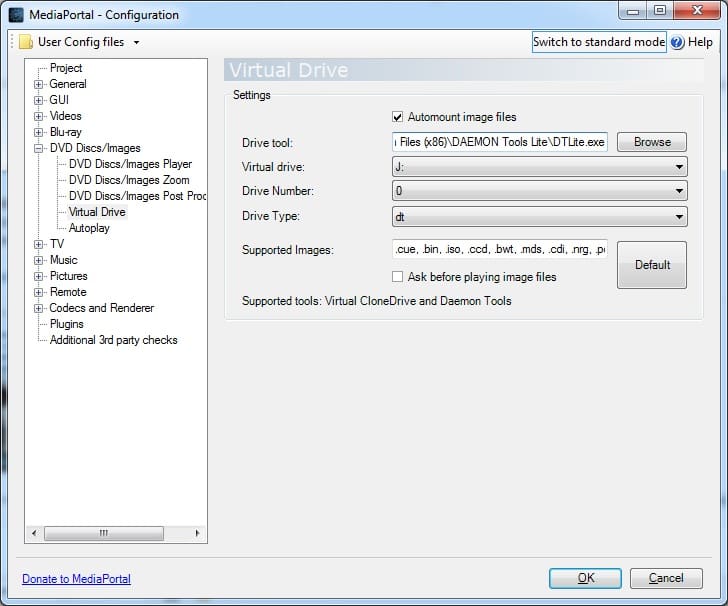
But according to your logs, you seem to have the Virtual Drive Type settings set to 'dt', correct??
Can you manually mount the .iso?
Thanks for the replies, at the time I could mount it manually. Upon looking at this again i found that I had ticked "Use MediaInfo for DVDs" and perhaps I had not been patient enough because I was chopping and changing settings so quickly.
During my investigations I did come across something strange and am curious if anyone else has the same issue.
If I watch the progress of the DVD mounting in Windows Explorer I notice that it Mounts/Unmounts then remounts again and finally plays, this is adding a massive delay before the movie starts. The ISO is from a network share if that counts?
I was having the same issue whereby it was saying a bad syntax... after reading this thread I updated to their latest DT Lite (for my Win 7 x86 machine) and after deleting the scsi drive (since DT created both a scsi drive and a dt drive) and reassigning the drive letter (I use H: on drive 0) MP 1.3.0 ALPHA now mounts, plays and unmounts .iso files just fine!
I'm wondering if the "new" use of the drive type (e.g. scsi, dt, etc) in the command line isn't compatible with earlier DT versions? If this is confirmed a specific minimum version should be noted in the Wiki so folks will know they have to upgrade given the "new" feature allowing drive-types in the MP configutration application.
I switched back to MePo 1 some time ago, and havent really used it that much.
But i wanted to watch some old movies stored as ISO file.
Virtuel Clone drive is installed, and it can mount the ISO file.
However when i try to select it from MePo i only get an error that i cannot mount it.
[2026-06-07 14:56:35,994] [Error ] [MPMain ]...
I switched back to MePo 1 some time ago, and havent really used it that much.
But i wanted to watch some old movies stored as ISO...
I switched back to MePo 1 some time ago, and havent really used it that much.
But i wanted to watch some old movies stored as ISO...
I meant use MP client to try to spot how it's requesting streams for specific channels and then try to do the same with VLC.
TV Server development looks dead so I'm afraid you're going to have to figure that out by yourself if it's even possible.
I meant use MP client to try to spot how it's requesting streams for specific channels and then try to do the same with VLC.
TV...
Hi everyone,
I've set up Mediaportal TV Server on a Windows 11 box, tuner deteced okay, scanned channels, can preview, all seems...
I've just installed the software on a clean device, so no upgrade from 1.38.003. This worked like it should with no error. I cancelled the installation on the device where I got the error message. I will try to update the software later this day and I will update this call with the results. If I get the same error message, I will...
I've just installed the software on a clean device, so no upgrade from 1.38.003. This worked like it should with no error. I...
I've tried to install the latest version (x86 1.39), but the install of the tvengine plugin fails and I must download it manually...
you are right.. I spotted why it's not working. For what ever reason, the 3x recently added / watched for TV series, etc was killing it.. I've removed it for now and it's started working again. I'll have to dig a little deeper as to why it's happened all of a sudden.
you are right.. I spotted why it's not working. For what ever reason, the 3x recently added / watched for TV series, etc was...
Hi Guys... Long time fan. using MP for over 20 years.
Currently running MediaPortal x64 v1.38.3.0 on Win11 with all recent windows...



 Germany