Finally working IP-TV solution for TV Server! (3 Viewers)

Status
Not open for further replies.

charli181

Retired Team Member
  • Premium Supporter
  • August 3, 2007
    800
    111
    Sydney
    Home Country
    Australia Australia
    Have you tried my suggestion from post #301? Run channel in VLC and while running VLC, try to scan channels in TVServer

    Hi,

    Edit:

    I added an @ symbol after rtp:// and it now works in the new VLC fine. However still no signal :(

    I have the answer for you...I did get TPG IPTV to work in my setup. I live in sydney but am connected to the penrith exchange and only have acecss to about 6 channels.

    No matter what you do, you will not be able to do a scan to get IPTV automatically add the channels. You have to manually add the channels through the database ( I run mp1 rc4 and the TV Server manual add GUI did not work. The official GA release mp1.0.0 may have fixed this issue but i cannot confirm this)

    for some reason this plugin does not pick up the required PMT, PID, etc needed to auto add the channels. I started to write a guide and the scripts to run in MSSQL server.

    If you can wait a couple of more days, I can submit these SQL scripts and guide for you to try......let me know
     

    bryanford

    Portal Member
    May 20, 2007
    16
    0
    Home Country
    If you can wait a couple of more days, I can submit these SQL scripts and guide for you to try......let me know

    Mate if you could that would be great. My htpc is so very close to finish and it would be great to be a step closer!

    Many thanks
     

    charli181

    Retired Team Member
  • Premium Supporter
  • August 3, 2007
    800
    111
    Sydney
    Home Country
    Australia Australia
    TPG IPTV Setup GUide

    If you can wait a couple of more days, I can submit these SQL scripts and guide for you to try......let me know
    Mate if you could that would be great. My htpc is so very close to finish and it would be great to be a step closer!

    Many thanks


    try this and let me know how you go. there are 2 files, one is the guide on how to do it and the other is the SQL script needed to add the channels to the DB. I would suggest making a backup of the database first, just incase I have made some big mistakes.

    This scripts only target the tables "channel" and "tuningdetail"
     

    Attachments

    • TPG IPTV Setup.txt
      30.6 KB
    • TPG IPTV SQL Script.txt
      30.7 KB

    shanek

    Portal Member
    May 22, 2006
    15
    0
    Is there any that this could be used to capture the stream from my dreambox so i dont need to use composite cables to a tuner card?
     

    bryanford

    Portal Member
    May 20, 2007
    16
    0
    Home Country
    If you can wait a couple of more days, I can submit these SQL scripts and guide for you to try......let me know

    Mate if you could that would be great. My htpc is so very close to finish and it would be great to be a step closer!

    Many thanks


    try this and let me know how you go. there are 2 files, one is the guide on how to do it and the other is the SQL script needed to add the channels to the DB. I would suggest making a backup of the database first, just incase I have made some big mistakes.

    This scripts only target the tables "channel" and "tuningdetail"


    Hi, Thanks for the script. It added the channels fine (although I have a few more and you have some I dont have, so I'll need to mod it slightly).

    Problem is when I go to watch them, I get sound but no picture :-( I have installed both the elecard MPEG2, and AVC plugins for WMP.

    Same thing happens when I try and do it from the website first

    Any ideas?
     

    smille

    Portal Member
    October 3, 2006
    24
    0
    54
    Home Country
    France France
    Hello all,

    My case may interest some of you. Thanks to all who helped me in the last weeks...
    I was trying to have IP TV working in MP but could not completely succeed; I always had two channels not working until yesterday.

    elecard://232.0.1.17:8200:i=192.168.1.15:t=m2t/rtp is not working neither elecard://232.0.1.17:8200:t=m2t/rtp

    BUT

    elecard://232.0.1.17:8200:i=192..168.1.15:t=m2t/rtp is working (look carrefully, there are 2 dots between 192 and 168)

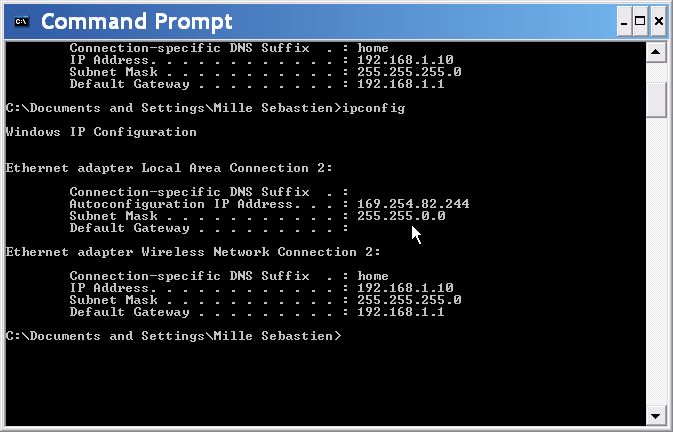
    ipconfig is as attached

    If someone understands I would appreciate any explanations....


    Cheers
     

    Attachments

    • IP.jpg
      IP.jpg
      48.6 KB

    mikeyko

    Retired Team Member
  • Premium Supporter
  • February 14, 2008
    194
    49
    Home Country
    Slovakia Slovakia
    Hello all,

    My case may interest some of you. Thanks to all who helped me in the last weeks...
    I was trying to have IP TV working in MP but could not completely succeed; I always had two channels not working until yesterday.

    elecard://232.0.1.17:8200:i=192.168.1.15:t=m2t/rtp is not working neither elecard://232.0.1.17:8200:t=m2t/rtp

    BUT

    elecard://232.0.1.17:8200:i=192..168.1.15:t=m2t/rtp is working (look carrefully, there are 2 dots between 192 and 168)

    ipconfig is as attached

    If someone understands I would appreciate any explanations....


    Cheers

    why are you using i=192.168.1.15, when you have ip address 192.168.1.10 ? Or I missed something?
    Which network adapter you are using for iptv?
     

    Zeddicius

    Portal Member
    February 28, 2007
    13
    0
    Some channels play nice other not

    I have iptv up and running now, but with some glitches.
    Some channels won't play nicely in mediaportal. Other play perfect.
    It's the same with recording.

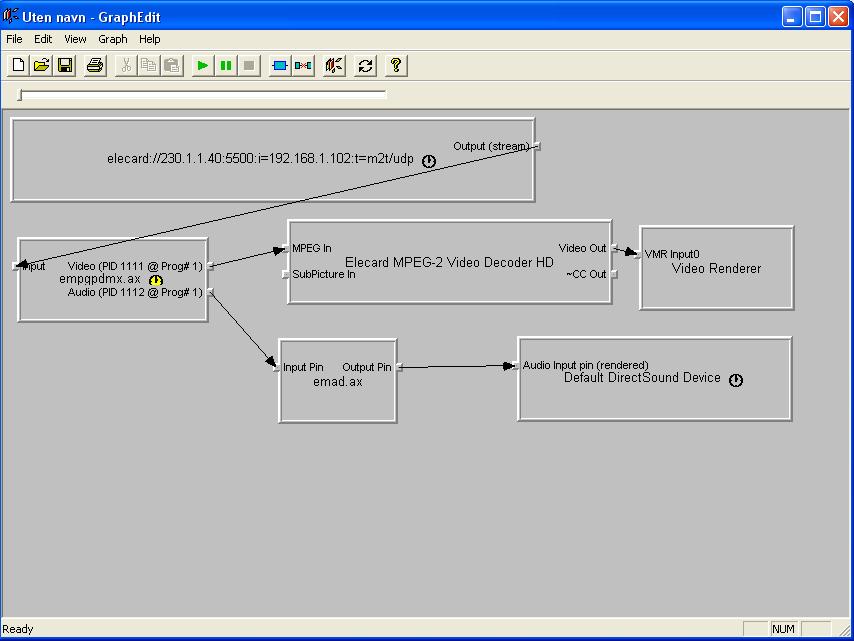
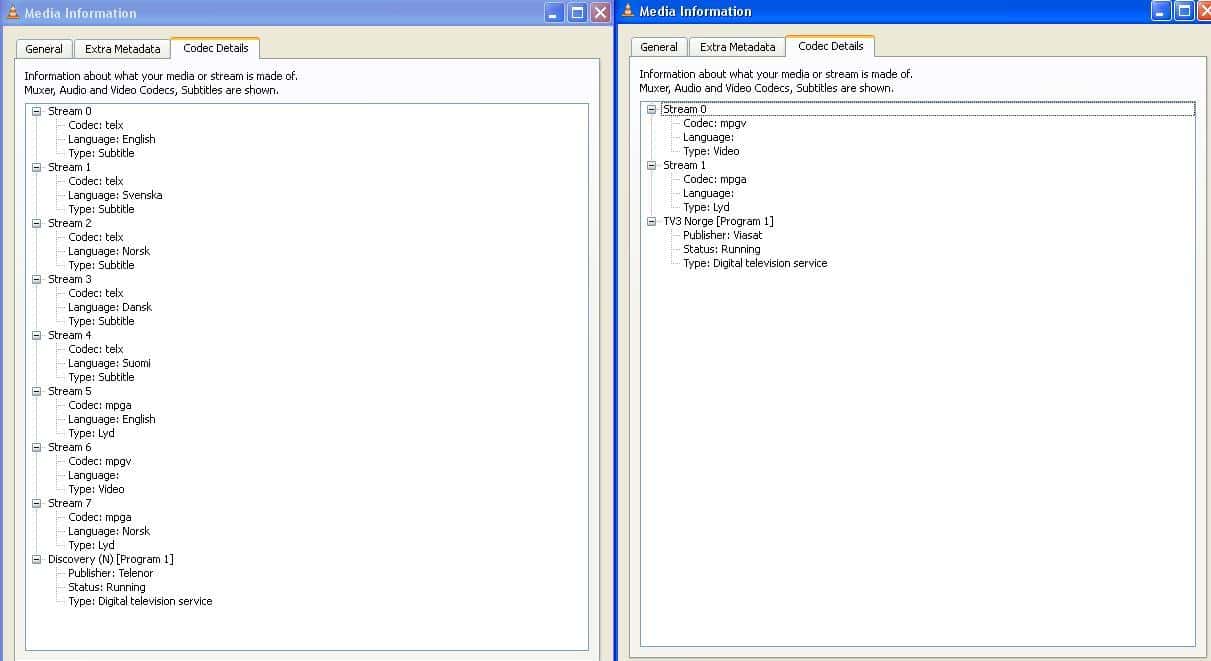
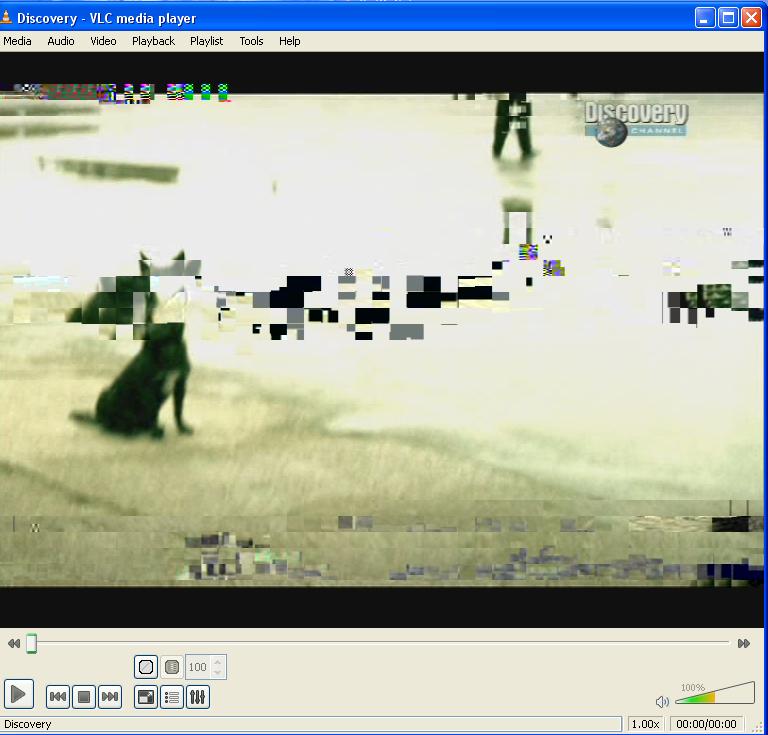
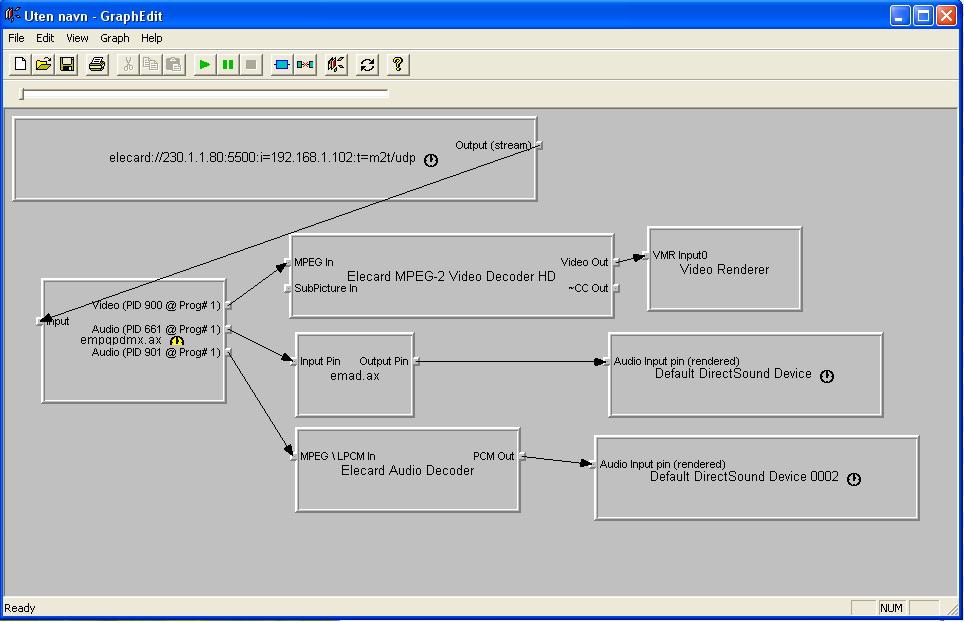
    If you see the attached pictures. Channel 1 is crap, while channel 2 is perfect.
    I've also attached pictures of the graph for both channel, and codec information from vlc for both channels.
    The log is of some short recordings i made to test. Some recordings work perfect in mediaportal and vlc. But some won't show anything but stutter in MP and full of crap in vlc.
    As you see some of the channels have multiple audio and text. Could this be the problem?
     

    Attachments

    • channel 1.JPG
      channel 1.JPG
      63.2 KB
    • Channel 1 graph.JPG
      Channel 1 graph.JPG
      72 KB
    • channel 2.JPG
      channel 2.JPG
      72.2 KB
    • channel 2 graph.JPG
      channel 2 graph.JPG
      58.3 KB
    • Codec details.JPG
      Codec details.JPG
      82.6 KB

    charli181

    Retired Team Member
  • Premium Supporter
  • August 3, 2007
    800
    111
    Sydney
    Home Country
    Australia Australia
    Mate if you could that would be great. My htpc is so very close to finish and it would be great to be a step closer!

    Many thanks


    try this and let me know how you go. there are 2 files, one is the guide on how to do it and the other is the SQL script needed to add the channels to the DB. I would suggest making a backup of the database first, just incase I have made some big mistakes.

    This scripts only target the tables "channel" and "tuningdetail"


    Hi, Thanks for the script. It added the channels fine (although I have a few more and you have some I dont have, so I'll need to mod it slightly).

    Problem is when I go to watch them, I get sound but no picture :-( I have installed both the elecard MPEG2, and AVC plugins for WMP.

    Same thing happens when I try and do it from the website first

    Any ideas?


    this is where you will need to run graph edit where you are trying to watch the stream. This will show which codecs the are used to play the stream. It sounds as though only the audio codec is connecting

    Also, on the website, you must use VLC 0.8.6 I think otherwise you will have problems...TPG are a bit slow on the up take with the later versions.
     

    mikeyko

    Retired Team Member
  • Premium Supporter
  • February 14, 2008
    194
    49
    Home Country
    Slovakia Slovakia
    I have iptv up and running now, but with some glitches.
    Some channels won't play nicely in mediaportal. Other play perfect.
    It's the same with recording.

    If you see the attached pictures. Channel 1 is crap, while channel 2 is perfect.
    I've also attached pictures of the graph for both channel, and codec information from vlc for both channels.
    The log is of some short recordings i made to test. Some recordings work perfect in mediaportal and vlc. But some won't show anything but stutter in MP and full of crap in vlc.
    As you see some of the channels have multiple audio and text. Could this be the problem?

    It looks like your provider problem, can you watch those channels fine in settopbox? In your logs there are some discontinuity errors or packet losses
     
    Status
    Not open for further replies.

    Users who are viewing this thread

    Top Bottom