Flickering Tv-guide and other overlays with EVR enabled (7 Viewers)

bribbon

MP Donator
  • Premium Supporter
  • September 11, 2008
    469
    101
    Home Country
    Switzerland Switzerland
    winxp; nvidia; vmr9 = "flickering MiniGuide"

    Hi all

    I have one machine as well with exactly these issues:
    - Intel Core 2 Duo - E7300 @2.66Ghz
    - Nvidia GeForce 9600 GT with SW vers.2.5.373.05
    - Windows XP pro
    - Codecs: Mpeg2&Mpeg: MPC / h.264: CoreAVC

    - Flickering with VMR9
    - Since MP1.0 and 1.0.1 and 1.0.2 (i'm sure!)
    - Skin: Blue3wide and MediaStream

    My Thread

    Can i help? remote connection to test or so?

    thx bribbon
     

    GeYe

    MP Donator
  • Premium Supporter
  • January 17, 2009
    197
    132
    Home Country
    Germany Germany
    I have the same problem with flickering with an on board ATI HD 3300 + Win 7 RC.

    It seems that with Beta 1.1.0 the flickering remains in tv-guide and in usual tv-view, but it is not flickering (or even rarly) in other views while the small window is playing tv.

    In Alpha 1.1.0 it was flickering in all cases.

    That's a real annoying problem. I will also help to support with logs, if needed.
     

    wouter1971

    MP Donator
  • Premium Supporter
  • November 19, 2008
    910
    143
    Purmerend, Holland
    Home Country
    Netherlands Netherlands
    I can report what looks like the same problem. Flickering screen with HDTV. LiveTV preview and Fullscreen and only with HDTV.
    SD LiveTV is fine.

    OS: Win7 x64 RTM with EVR selected.
    Codec: PowerDVD 9 h.264

    Is ok With VMR9.

    PowerDVD 9 h.264 is the only working codec for HDTV LiveTV.
    Maybe this can be solved if this bug is solved: 0002437: Incompatibility between HDTV and Microsoft DTV-DVD codecs - MediaPortal Bugtracker
    Then we can use Microsoft DTV-DVD codec for LiveTV.
     

    mironicus

    Portal Pro
    March 9, 2008
    688
    44
    I have found another solution for flicker-free TV-watching for ATI-Users (tested with Vista 32 Bit).

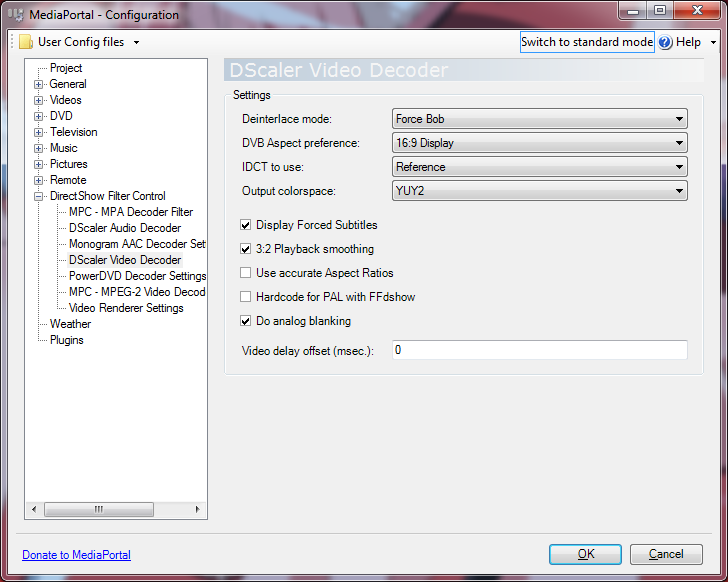
    Install the latest version of DScaler 5 MPEG2 Video Decoder. Then use this settings within MediaPortal (picture).

    For ATI-Users with Radeon 3200/3300 and Phenom processors it is most useful to set the output colorspace to NV12 - you'll get the best deinterlacing quality (Vector Adaptive) only with this colorspace. The Mediaportal settings only allows the selection of YV12 and YUY2 - so Mediaportal is not up to date with the latest filter settings possible within DScaler (should be added to Mantis). You have to set the output color manually - just use the filter properties to do this.

    After that set DScaler as MPEG2-Decoder for TV. DScaler works fine in combination with the Cyberlink H264-codec. No freezes during channel change - and no flicker on Radeon 3200 with the best possible deinterlacing quality available using NV12-output and also with accelerated 50 fps.

    I have tested several other free codecs, like the built in MPEG2-Codec that Mediaportal installs. The MPC MPEG2-decoder has the problem that it does not switch correctly between 4:3 and 16:9 after channel switching. Also on some channels you won't get the full 50fps and it just goes back to 25 fps on german channels like Pro 7 and Sat 1. DScaler does not have this problems and works wonderful - this solution is perfect for me. :)
     

    Attachments

    • DScaler.png
      DScaler.png
      66.8 KB

    mironicus

    Portal Pro
    March 9, 2008
    688
    44
    The setting "Force Bob" activates Hardware deinterlacing and 50fps (DXVA). :)

    So with this you will get the same impression and picture quality as using any other "official" DXVA-enabled codec - but without any flicker.
     

    wouter1971

    MP Donator
  • Premium Supporter
  • November 19, 2008
    910
    143
    Purmerend, Holland
    Home Country
    Netherlands Netherlands
    After that set DScaler as MPEG2-Decoder for TV. DScaler works fine in combination with the Cyberlink H264-codec. No freezes during channel change - and no flicker on Radeon 3200 with the best possible deinterlacing quality available using NV12-output and also with accelerated 50 fps.

    I have tested several other free codecs, like the built in MPEG2-Codec that Mediaportal installs. The MPC MPEG2-decoder has the problem that it does not switch correctly between 4:3 and 16:9 after channel switching. Also on some channels you won't get the full 50fps and it just goes back to 25 fps on german channels like Pro 7 and Sat 1. DScaler does not have this problems and works wonderful - this solution is perfect for me. :)

    I understand you use viewmodeswitcher plugin :) i do too ;) But does HDTV work with EVR then ?
     

    grubi

    Portal Pro
    June 16, 2007
    1,207
    87
    127.0.0.1
    Home Country
    Germany Germany
    The setting "Force Bob" activates Hardware deinterlacing and 50fps (DXVA). :)

    So with this you will get the same impression and picture quality as using any other "official" DXVA-enabled codec - but without any flicker.

    AFAIK you anyhow loose HW decoding support.
    Decoding is done in software mode (no HA) but you get HW deinterlacing preserving full quality when specifying NV12 as colorspace. I use this setup myself. IMHO there is no problem by losing HW decoding as with MPEG2 todays CPUs are not beeing challenged.

    grubi
     

    GeYe

    MP Donator
  • Premium Supporter
  • January 17, 2009
    197
    132
    Home Country
    Germany Germany
    @mironicus
    First of all thanks, my first test shows no flickering.

    You have to set the output color manually - just use the filter properties to do this.

    Where I have to set the color output? I go the filter options in mediaportal configuration under television. Double click on Dscaler Mpeg2 Video Decoder and click on filter options. But I get a exception.


    @Swede
    The problem is that the setting will be for all material played with ffdshow - or?
     

    Users who are viewing this thread

    Top Bottom