 Germany
Right. When i add a game without using Mobygames the value stays at 0 (or whatever i chose from the rating 0-9 dropdown menue) Maybe limiting the value to 1 Digit at the Rating box would help preventing from values over 10, or use a 0-10 dropdown menue as used in the List view.So its not when you add a game manually the grade gets set to a crazy value, its when grab the data from mobygames?

You are using an out of date browser. It may not display this or other websites correctly.
You should upgrade or use an alternative browser.
You should upgrade or use an alternative browser.
(Inofficial) New release major updates - NOW WITH SOURCE CODE :) (1 Viewer)
- Thread starter BadMrFrosty
- Start date
- Thread starter
- #22
Right. When i add a game without using Mobygames the value stays at 0 (or whatever i chose from the rating 0-9 dropdown menue) Maybe limiting the value to 1 Digit at the Rating box would help preventing from values over 10, or use a 0-10 dropdown menue as used in the List view.So its not when you add a game manually the grade gets set to a crazy value, its when grab the data from mobygames?
OK, I'm having a little trouble replicating this problem

1. On a fresh setup, I added a single PC game (Dragon Age Origins)
2. Clicked Apply
3. Clicked on Game Database
4. Clicked on the 'O' button to do a online update for that game
5. Choose the Windows version in the results list.
6. Grade was displayed as 9
7. Choose all of the art I wanted
8. Clicked Save
9. Now back at the game list, the dropdown has 9 selected
Can you tell me if you are doing something different to above and also a example of a couple of games that give you the problem. Moby games has game grades from 1 - 100 so the code already devides the grade by 100 and rounds it to the nearest whole number so it must be that little bit of code getting missed sometimes.
Cheers
I forgot to mention that i updated a SNES (Super Famicom) game database, no PC games.
For Example Act Raiser gets: 78,Act Raiser 2: 72,Aero Fighters: 92 as values and so on and so on.
Nearly every SNES game gets those crazy values. I haven't tried any other Emulator Roms, or PC games yet.
I just added the SNES Emulator and defined the directories
-Then Game Database -> Refresh Game data -> refresh.
After creating the Database of ROM's i clicked O to define via Internet.
That's where the crazy values come from. When I use Button L the Value stays 0 (or whatever value I defined before in the dropdown menue)
My english is not that good, so excuse me if it's not that easy to follow my written thoughts ^^
For Example Act Raiser gets: 78,Act Raiser 2: 72,Aero Fighters: 92 as values and so on and so on.
Nearly every SNES game gets those crazy values. I haven't tried any other Emulator Roms, or PC games yet.
I just added the SNES Emulator and defined the directories
-Then Game Database -> Refresh Game data -> refresh.
After creating the Database of ROM's i clicked O to define via Internet.
That's where the crazy values come from. When I use Button L the Value stays 0 (or whatever value I defined before in the dropdown menue)
My english is not that good, so excuse me if it's not that easy to follow my written thoughts ^^
- Thread starter
- #24
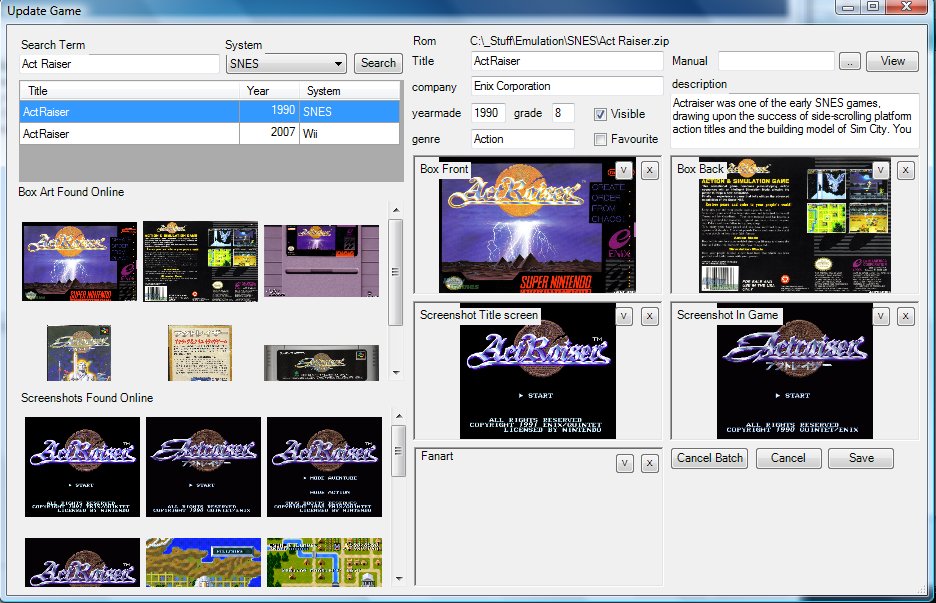
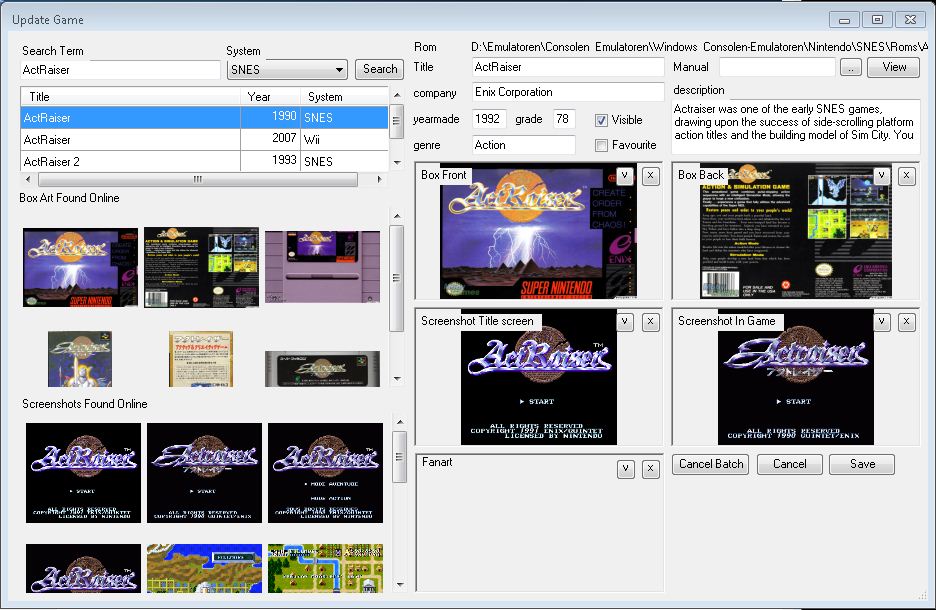

Right. When i add a game without using Mobygames the value stays at 0 (or whatever i chose from the rating 0-9 dropdown menue) Maybe limiting the value to 1 Digit at the Rating box would help preventing from values over 10, or use a 0-10 dropdown menue as used in the List view.So its not when you add a game manually the grade gets set to a crazy value, its when grab the data from mobygames?
OK, I'm having a little trouble replicating this problem
1. On a fresh setup, I added a single PC game (Dragon Age Origins)
2. Clicked Apply
3. Clicked on Game Database
4. Clicked on the 'O' button to do a online update for that game
5. Choose the Windows version in the results list.
6. Grade was displayed as 9
7. Choose all of the art I wanted
8. Clicked Save
9. Now back at the game list, the dropdown has 9 selected
Can you tell me if you are doing something different to above and also a example of a couple of games that give you the problem. Moby games has game grades from 1 - 100 so the code already devides the grade by 100 and rounds it to the nearest whole number so it must be that little bit of code getting missed sometimes.
Cheers
1. install fuel
2. refresh game database
3. Clicked on the 'O' button to do a online update for that game
4. Choose the Windows version in the results list.
5. Grade was displayed as 68
6. Clicked Save
I get the error.
5. Grade changed to 6
6. Clicked Save
Everything is fine.
:sorry:
- Thread starter
- #27
What language do you guys have your operating systems set to?
Mine is English...
also win7 ultimate.
also win7 ultimate.
- Thread starter
- #30
I have updated the download on the first page. Just replace the myemulators.dll file you already have with the one in the zip.
Hopefully it will fix the problem for you
Hopefully it will fix the problem for you
Users who are viewing this thread
Online now: 2 (members: 0, guests: 2)