Intelligent Frame Correction - PlugIn (1 Viewer)

Marvman

Retired Team Member
  • Premium Supporter
  • November 14, 2007
    1,163
    735
    Bavaria
    Home Country
    Germany Germany
    Hi Fred,

    do I guess right, that for the channel "DAS VIERTE" the black bars doesn't crop?

    Maybe your black level max value is to low.

    Your black level settings means.

    Threshold: 0
    Max :25

    Crop all black bars where the median is 0 or lower and where some pixels a have a max brightness of 25 or lower.

    The median can't be lower than 0 (pure black) that's a fact, and a median of 0 is almost improbably.

    Try a value of 20 - 25

    Regards,
    Martin
     

    fredflintstone

    Portal Pro
    November 30, 2004
    241
    2
    okay, I'll thougt that this setting cuts all bars between 0 (black) and 25 (dark grey). I'll try this in the evening, but on pro7 I've just a very big bar with these settings at the moment and on DMAX some small bars.

    It seems that espacially pro7 has some problems with detection of the black bars, with these settings or is this in correlation to the different zoom modes for 4:3 16:9 and 21:9.

    Which zoom modes are confirmed for the specific content?
     

    Marvman

    Retired Team Member
  • Premium Supporter
  • November 14, 2007
    1,163
    735
    Bavaria
    Home Country
    Germany Germany
    Marvman, can you rename the file from IntelligentFrameCorrection.MPE1 to IntelligentFrameCorrection.mpi before you upload your next version into the plugin section?
    Then it should show up in the online list of the extension installer.


    oops i overread your posting, sry.

    Yes of course, thanks for the hint :)
     

    joz

    Portal Pro
    March 17, 2008
    1,353
    306
    Home Country
    Netherlands Netherlands
    I tried this on my main HTPC the other day but I got into some issues.
    The frame rendering rate of MP dropped from ~40 fps to between 10 and 20 FPS (I know the 40 is not that good either, I would rather have it sync with the tvset but can't find a solution to that so far)
    I do not have this problem however on one of my clients, which uses normal desktop monitor.

    To get around this again I had to uninstall the plugin and reboot xp. Without the reboot the problem was still there (so only uninstalling the plug)
     

    alank

    MP Donator
  • Premium Supporter
  • July 28, 2006
    225
    9
    NJ
    Home Country
    United States of America United States of America
    Hi Martin. I am interested to try your plug-in. But after installing/enabling, MP crashes when trying to watch any video. Attached are the logs.
     

    Marvman

    Retired Team Member
  • Premium Supporter
  • November 14, 2007
    1,163
    735
    Bavaria
    Home Country
    Germany Germany
    I tried this on my main HTPC the other day but I got into some issues.
    The frame rendering rate of MP dropped from ~40 fps to between 10 and 20 FPS (I know the 40 is not that good either, I would rather have it sync with the tvset but can't find a solution to that so far)
    I do not have this problem however on one of my clients, which uses normal desktop monitor.

    To get around this again I had to uninstall the plugin and reboot xp. Without the reboot the problem was still there (so only uninstalling the plug)

    The plugin do nothing (realy nothing), until you start the tv or video player.
    Attached some logs, maybe we will see somthing. (Set information level to debug (MP Config))

    Hi Martin. I am interested to try your plug-in. But after installing/enabling, MP crashes when trying to watch any video. Attached are the logs.

    Yeah, i know this Problem on Page 2, first posting, I attached a new version (download), in the next real public version this bug is fixed.
     

    alank

    MP Donator
  • Premium Supporter
  • July 28, 2006
    225
    9
    NJ
    Home Country
    United States of America United States of America
    Hi Martin. I am interested to try your plug-in. But after installing/enabling, MP crashes when trying to watch any video. Attached are the logs.

    Yeah, i know this Problem on Page 2, first posting, I attached a new version (download), in the next real public version this bug is fixed.

    Thank you for pointing that out. I should have looked more closely at the thread. The fix worked. So far this plug-in looks really good. Thank you for creating!
     

    Owlsroost

    Retired Team Member
  • Premium Supporter
  • October 28, 2008
    5,539
    5,038
    Cambridge
    Home Country
    United Kingdom United Kingdom
    HD stutter - high CPU load peaks

    Hi Martin,

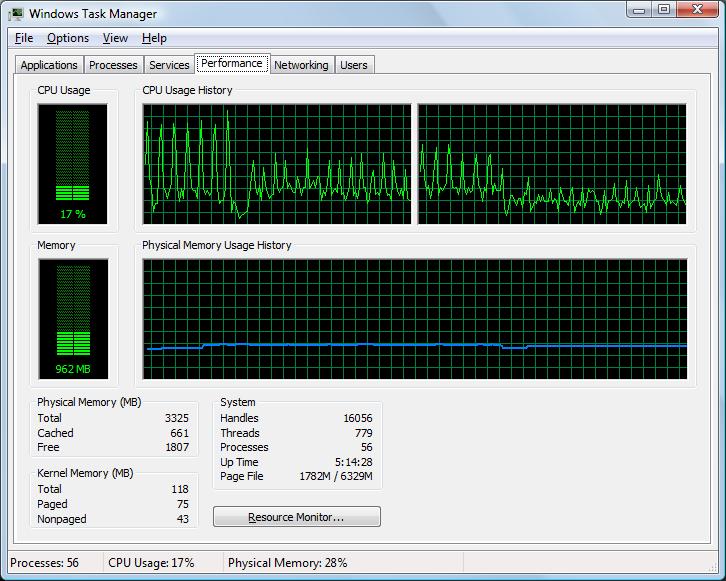
    I've been using the plug-in for SD TV/video and it's been fine. I tried some HD video (1440 x 1080i) last night and I'm getting peaks of very high CPU usage every time it scans, which is causing HD video to jerk and stutter (I have it set to 5 second scan interval, and just 1 x 1 pixel areas to minimise the CPU load).

    The cpu load is peaking from 25% -> 75% on HD, and 20% -> 50% on SD (task manager graph attached, 'HD' spikes on the left, 'SD' spikes on the right).

    Why is the CPU load higher with HD - are you copying whole frames from the video card for processing ?

    Tony
     

    Attachments

    • IFC_cpu1.jpg
      IFC_cpu1.jpg
      95.1 KB

    Marvman

    Retired Team Member
  • Premium Supporter
  • November 14, 2007
    1,163
    735
    Bavaria
    Home Country
    Germany Germany
    Hi Martin,

    I've been using the plug-in for SD TV/video and it's been fine. I tried some HD video (1440 x 1080i) last night and I'm getting peaks of very high CPU usage every time it scans, which is causing HD video to jerk and stutter (I have it set to 5 second scan interval, and just 1 x 1 pixel areas to minimise the CPU load).

    The cpu load is peaking from 25% -> 75% on HD, and 20% -> 50% on SD (task manager graph attached, 'HD' spikes on the left, 'SD' spikes on the right).

    Why is the CPU load higher with HD - are you copying whole frames from the video card for processing ?

    Tony

    hmm, your pc specs are better than mine, and I didn't notice such processing, I tested with full hd vids, but I have to do further tests.
    IFC grabs the full frame, and scans parts of this frame, at the end, IFC scans only small parts. The grabbing self do a part (method) from MP. In the next version, you can turn off the scanning for HD content, and then we will see, whether the spikes come from the scanning or the grabbing.
     

    Owlsroost

    Retired Team Member
  • Premium Supporter
  • October 28, 2008
    5,539
    5,038
    Cambridge
    Home Country
    United Kingdom United Kingdom
    OK - looking forward to the next version :)

    I wonder if this is an XP <-> Vista difference (or VMR9 <-> EVR renderer difference) - I'm running Vista 32 + EVR

    Thanks,

    Tony
     

    Users who are viewing this thread

    Top Bottom