iPhone interface for MediaPortal (iPiMP) - original thread (now closed) (8 Viewers)

Status
Not open for further replies.

cheezey

Community Plugin Dev
August 26, 2004
1,559
312
58
West Yorks, UK
Home Country
United Kingdom United Kingdom
Hi Cheesy,

I can't watch recordings in version 4 (this also did not work for me in version 3.5).

Recordings are immediately transcoded using the deafult settings. The .mp4 video files can be played when I navigate to the folder in which they are stored on my Vista MediaPortal Machine.

When I press WATCH (under a recording's page) I get a new page with the title, date and time. Under that there is a white frame in which the thumnail of the recording is shortly displayed and then that gets replaced by a quicktime 'tile' which has the quicktime logo in the right bottom corner and in the middle there is a play button striped out. Under this frame there is the following text:

Wait until the Quicktime arror appears befoire playing.

Whatevere I do... I can't get the video to play :confused:
(I also tested this in Firefox, same result)

Any idea's?

I have attached the logs.

THANKS!

Luke

Luke Roberts - What iPhone OS are your running? Are you jailbreaked? Can you view other videos in your iPhone QuickTime? Can you upload a sample video somewhere? Can you post your transcode settings? Sorry for all the questions :)

Hi guys,
in wiki:
•Reset your iPiMP database
"Copy the attached uWiMP.db to C:\Program Files\iPiMP\aspx\App_Data\ "
sorry but where uWiMP.db is attached?
thanks!! :)

Castellaneta - Have another look :) (I've just updated the wiki.)
 

chucky2002

Portal Member
November 30, 2008
40
0
Hi,

i own a Palm Pre and I like the Idea to control MediaPortal with this device.

First the positiv thing: I can use the app with all it functions. The installation is quite simple. So thanks for that.

But now the bad thing: I get realy often exceptions on the WebOS Browser, especially if I select the "back" button on the Web-Interface.

The following Informations might be usefull to reproduce the problem:

What steps will reproduce the problem?
1. Use the Browser or the Emulator from a Palm Pre
2. Log in on ipimp as admin:admin
3. go into "TV Program"
4. Klick on the "Back" Button (on the upper left"

What is the expected output? What do you see instead?
I expect that it goes back to the main menu. But I get an error message which you can find in the attachment.

What version of the product are you using? On what operating system?
I use iPiMP Setup 4.0.0.178 on a Windows 7 RC.

Please provide any additional information below.
It seems that the "Back" Button does not work for me on all pages of the
Interface. Therefore I use the "Home" Button, which works in most cases, but not alway.


Thanks for discussing this problem.
 

Attachments

  • browser_page.png
    browser_page.png
    47.7 KB

cheezey

Community Plugin Dev
August 26, 2004
1,559
312
58
West Yorks, UK
Home Country
United Kingdom United Kingdom
Hi,

i own a Palm Pre and I like the Idea to control MediaPortal with this device.

First the positiv thing: I can use the app with all it functions. The installation is quite simple. So thanks for that.

But now the bad thing: I get realy often exceptions on the WebOS Browser, especially if I select the "back" button on the Web-Interface.

The following Informations might be usefull to reproduce the problem:

What steps will reproduce the problem?
1. Use the Browser or the Emulator from a Palm Pre
2. Log in on ipimp as admin:admin
3. go into "TV Program"
4. Klick on the "Back" Button (on the upper left"

What is the expected output? What do you see instead?
I expect that it goes back to the main menu. But I get an error message which you can find in the attachment.

What version of the product are you using? On what operating system?
I use iPiMP Setup 4.0.0.178 on a Windows 7 RC.

Please provide any additional information below.
It seems that the "Back" Button does not work for me on all pages of the
Interface. Therefore I use the "Home" Button, which works in most cases, but not alway.


Thanks for discussing this problem.

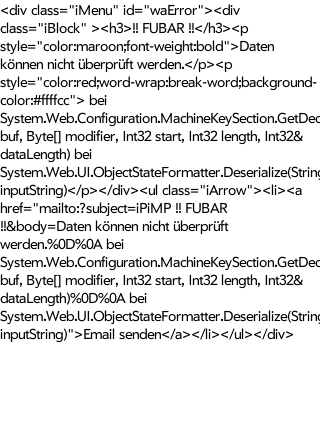
Can you post the text of the error rather than an image of it.
 

cheezey

Community Plugin Dev
August 26, 2004
1,559
312
58
West Yorks, UK
Home Country
United Kingdom United Kingdom
Can you type it in then or translate it?

I cannot read German so am using Google translate to try to translate the error - but my keyboard does not have the German characters so the translation is bad.
 

Luke Roberts

Portal Pro
August 23, 2007
65
7
54
IJmuiden
Home Country
Netherlands Netherlands
Fixed

Luke Roberts - What iPhone OS are your running? Are you jailbreaked? Can you view other videos in your iPhone QuickTime? Can you upload a sample video somewhere? Can you post your transcode settings? Sorry for all the questions :)

Thanks for your quick reply!

OS 3.1.2 - no jailbreak
I can view video's from safari (for instance from dailymotion.com)

I just figured out what is the problem... and now I have got it to work! I am using the outside IP of my router to access iPimp (I have forwarded the port inward to my MP/Tvserver machine), so I can sceudle recordings from anywhere using 3G (also from home using WIFI). Using the outside IP watching recordings does not work. However, using the machine's internal IP number and port DOES WORK.

So, I suppose, the question is:
Is it possible to make this work using the outside IP?
(I have a 1Mbit uplink at home)

I suppose for the moment I will make tewo sortcuts to iPimp (1 to outside IP, 1 to inside IP).

Cheers mate!

Luke

update.. hmmm...
Could it be the fact that during all my config checks I clicked the defaults button for the transcoding settings....? (because now I can watch a freshly recorded tv fragment, using the outside IP:port)
 

Castellaneta

Portal Member
February 1, 2007
37
0
Roma
Home Country
Italy Italy
Grrrr..... It is so strange:
1)If i login by firefox i don't have any problems but if i try to login by my ipod, with "admin" user/password it refresh the login page only
2) i can't use the host name but only the ip address (with ipod)
Have you any idea?

please.... Sorry for my english :)
 

cheezey

Community Plugin Dev
August 26, 2004
1,559
312
58
West Yorks, UK
Home Country
United Kingdom United Kingdom
update.. hmmm...
Could it be the fact that during all my config checks I clicked the defaults button for the transcoding settings....? (because now I can watch a freshly recorded tv fragment, using the outside IP:port)

Luke Roberts - I think so - looking at your logs you had changed the resolution of transcodings to 720x576 which the iPhone probably doesn't like.

Glad it's working for you.

Grrrr..... It is so strange:
1)If i login by firefox i don't have any problems but if i try to login by my ipod, with "admin" user/password it refresh the login page only
2) i can't use the host name but only the ip address (with ipod)
Have you any idea?

please.... Sorry for my english :)

Castellaneta -
1) Does it say 'Login failed' in red when this happens?
2) host name of what? You're PC? iPhone does not know how to resolve your Windows PC hostnames, you'd have to setup external access (as described in the wiki) or edit your HOSTS file on your iPhone (I don't know how to do that).
 

chucky2002

Portal Member
November 30, 2008
40
0
Hi cheezey,

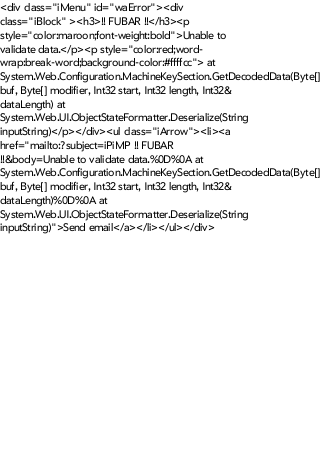
i tried to reproduce the exception in the palm pre emulator which is in english and attached the result to this post.
 

Attachments

  • browser_page.png
    browser_page.png
    37.5 KB

Castellaneta

Portal Member
February 1, 2007
37
0
Roma
Home Country
Italy Italy
update.. hmmm...
Could it be the fact that during all my config checks I clicked the defaults button for the transcoding settings....? (because now I can watch a freshly recorded tv fragment, using the outside IP:port)

Luke Roberts - I think so - looking at your logs you had changed the resolution of transcodings to 720x576 which the iPhone probably doesn't like.

Glad it's working for you.

Grrrr..... It is so strange:
1)If i login by firefox i don't have any problems but if i try to login by my ipod, with "admin" user/password it refresh the login page only
2) i can't use the host name but only the ip address (with ipod)
Have you any idea?

please.... Sorry for my english :)

Castellaneta -
1) Does it say 'Login failed' in red when this happens?
2) host name of what? You're PC? iPhone does not know how to resolve your Windows PC hostnames, you'd have to setup external access (as described in the wiki) or edit your HOSTS file on your iPhone (I don't know how to do that).


1) Unfortunately not....
2) .... you're right .....I'm tired:D
 
Status
Not open for further replies.

Users who are viewing this thread

Top Bottom