iPhone interface for MediaPortal (iPiMP) - original thread (now closed) (5 Viewers)

Status
Not open for further replies.

cheezey

Community Plugin Dev
August 26, 2004
1,559
312
58
West Yorks, UK
Home Country
United Kingdom United Kingdom
I am using iPiMP and Powerscheduler plugins with the Tvserver. I 'd like to know how to prevent Powerscheduler to power down the server while watching a recording on the Ipod Touch. I was thinking of activating a process while a session is open in Ipmpi and indicate this process in the poswerscheduler exeption.
Sorry for my english spoken...

Hmmm - when you view a recording through IPiMP you're just making an HTTP call for an MP4 file, no server side processes are needed for that other than the apache webserver (httpd.exe) which is running constantly. I could perhaps look to add a page to the web interface to start and stop an iPiMP process which you could add to your powerscheduler config. The flow for watching a recording for you would then be - start the iPiMP process, watch your recording, stop the iPiMP process - this is a bit clunky but would probably work.
 

cheezey

Community Plugin Dev
August 26, 2004
1,559
312
58
West Yorks, UK
Home Country
United Kingdom United Kingdom
Just a quick update...

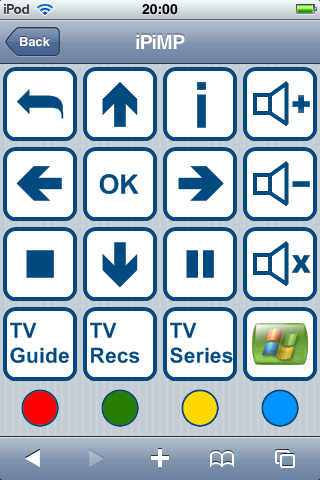
I have been progressing the client side of things and am working on the remote control - mimicking the MCE remote - this will use MP's standard input handling so custom mappings should be OK. The guts of it seems to work fine - I have the basics controls working, there's a still a fair bit of tidying up to do though. This will require a new process plugin to be installed in any MP client you want to control, the client plugin will be included in the installer as an option.

The idea is that there will be a menu of available clients which you navigate through to the remote functions. Once the remote control is running OK I'll look at the music side of things so you can play music on the client by selecting tracks/albums/artists etc on the iPhone.

If anyone has some ideas as to how the remote screen(s) should be laid out please feel free to shout up - my thoughts were to have a screen for the frequently used controls, a screen to jump to a plugin (e.g. music) and maybe some plugin specific screens??? Let me know what your ideas are.

Here's a screenshot of what I have, you'll have to excuse the graphics - my usual graphics artist (16yr old son) has a new girlfriend so doesn't have much time to contribute at the moment :rolleyes:
 

Attachments

  • IMG_0001.PNG
    IMG_0001.PNG
    31.6 KB

joystick

MP Donator
  • Premium Supporter
  • January 26, 2006
    892
    39
    Home Country
    Germany Germany
    Once the remote control is running OK I'll look at the music side of things so you can play music on the client by selecting tracks/albums/artists etc on the iPhone.
    I am actually waiting desperately that someone is developing the UPNP-client side for MP (because of Media Rendering etc.), but this function is another killer once you have it!!
    And I must say, the remote screen-shot you provided looks better and cleaner, than everything (incl. commercial applications) I have seen on the iPhone so far!!

    You really earn yourself a cold german beer....:) :) :)

    Cheers

    joystick
     

    mcraenz

    MP Donator
  • Premium Supporter
  • July 28, 2007
    646
    46
    Auckland
    Home Country
    New Zealand New Zealand
    Hey, this is very cool, I'm just looking at getting an ipod touch. I have a few questions.

    1.Here in NZ we have HD h.264/LATM ACC channels, will the iPimp TV server plug-in transcode these recordings or will only do MPEG2?

    2.Can the recordings be viewed in fullscreen on the ipod touch/

    3.Does the player at the ipod buffer and is it practical and reliable to watch recordings over wifi around the house?

    4.Whats involved in getting live to TV on the ipod? Will current dual core CPUs be able do to this kinda transcoding in real-time. Have you seen badaboom? uses the GPU to do transcoding; would be neat if we could uilize that.

    keep up the good work! :D
     

    allanp81

    Portal Pro
    October 24, 2006
    917
    41
    1) it will transcode h.264 as well as I can get it to transcode my recordings from BBC HD.

    2) yes, as the itouch still has the same quicktime player in it (unless I'm mistaken?).

    3) via wifi will work just fine

    4) live tv needs something that can transcode on the fly to a format that the itouch/iphone can play. at present nothing can do this (that's free anyway).
     

    jonaskp

    Portal Pro
    October 23, 2006
    438
    15
    Home Country
    Denmark Denmark
    Live transcoding is not an issue, regarding to Processing power. VLC can transcode on the fly without trouble (the regular MP Webinterface does this). The problem is transcoding in a way, that the iPhone/iPod can play it. I have not found a way to stream something from VLC that my iPhone even want to talk to. It just lies there, looking at my for a moment and then spits me in the face for even trying something so ridicoulusly :D. I hope that someone will find a way, since LiveTV on my iPhone would be so sweet.
     

    cheezey

    Community Plugin Dev
    August 26, 2004
    1,559
    312
    58
    West Yorks, UK
    Home Country
    United Kingdom United Kingdom
    Ditto - live transcoding isn't the issue - it's transcoding it in a format/container that the iPhone/iTouch can use. Big Kev's interface uses either VLC or VLC activeX components to render the video on the remote PC, we have Quicktime - and the iPhone Quicktime at that.

    Although - I did sign up to Zodttd's beta program and downloaded the iPhone VLC port he's done then used that to watch native TV server RTSP streams. My goal for iPiMP though was to be able to run on non-jailbroken devices so that means a web interface and using native video/audio players.
     

    jonaskp

    Portal Pro
    October 23, 2006
    438
    15
    Home Country
    Denmark Denmark
    My goal for iPiMP though was to be able to run on non-jailbroken devices so that means a web interface and using native video/audio players.
    I would very much like that too. It's a must for me, that I can run it on a non-jailbroken phone, cause I have no intention of Jail-breaking mine any time soon.
    Of course, if it turns out that it's the only way to get it done, this feature might be one of the only things that could actually make me jailbreak my phone :D
     
    Status
    Not open for further replies.

    Users who are viewing this thread

    Top Bottom