iPhone interface for MediaPortal (iPiMP) - original thread (now closed) (3 Viewers)

Status
Not open for further replies.

cheezey

Community Plugin Dev
August 26, 2004
1,559
312
57
West Yorks, UK
Home Country
United Kingdom United Kingdom
Re: iPhone interface for MediaPortal (iPiMP) - 4.1.0

Hi Cheezy, thanks heaps for the awesome plugin. I'm running 4.1.0 just updated from 4.0.1. Everything was working perfectly until i went into iPiMP Settings and changed the Recording Sort Order and applied it. Now i have nothing but Admin and About on the home screen and i get the below error when i attempt to go into iPiMP Settings.

Input string was not in a correct format.
at Microsoft.VisualBasic.CompilerServices.Conversions.ParseDouble(String Value, NumberFormatInfo NumberFormat)
at Microsoft.VisualBasic.CompilerServices.Conversions.ToBoolean(String Value)

Running Win7 X64 and MediaPortal 1.0.2.

MountFestuvious - Can you post your c:\Program Files\iPiMP\Aspx\web.config

Hi Cheezy,

Took a new PC (W7 32B) and installed MP and IPIMP. No additional plug-ins, default sort order, music files on NAS.

Works!!
Great!! :D

Q: do you know processes or settings which can cause the discussed behavior like Adavare, Antispy, or DVBViewer Web Interface (configured to port 8080)

Greetings
Peter
And: what’s about vlc4iphone for TV streaming

gustavson - Were other parts of the MP client plugin working? e.g. MyVideos, Reomte Control etc.?

The goal for iPiMP is not to rely on a jailbroken device so any streaming would have to be done to mobile quicktime or other video renderer in the app store. Also as iPiMP is a web app it's down to how mobile safari supports handles media links, when it receives an application/mp4 mime type it automatically launches mobile quicktime.

Cheezey, here's my DB
View attachment 53756

Cheers

niblet - Can you read the troubleshooting section of the wiki and post some logs also.

If you could add support for the last.fm plugin that would be really cool. Would be very nice to control it, without having the plasma on and by using the keyboard on the iphone instead of the virtual keyboard of mediaportal and the remote control.

DonPat2007 - I shall add it to the list to look at.
 

gustavson

Portal Member
November 25, 2008
46
0
Home Country
Austria Austria
AW: Re: iPhone interface for MediaPortal (iPiMP) - 4.1.0

Hi Cheezy,

On the new W7-PC everything works perfect. On my XP media-PC I still get the Fubar therefore the question about possible blocking processes.
Can it be that IPIM communicates with the dvbviewer webinterface and not with the Apache?

Greetings
Peter
vlc4iphone: understood
 

cheezey

Community Plugin Dev
August 26, 2004
1,559
312
57
West Yorks, UK
Home Country
United Kingdom United Kingdom
Re: AW: Re: iPhone interface for MediaPortal (iPiMP) - 4.1.0

Hi Cheezy,

On the new W7-PC everything works perfect. On my XP media-PC I still get the Fubar therefore the question about possible blocking processes.
Can it be that IPIM communicates with the dvbviewer webinterface and not with the Apache?

Greetings
Peter
vlc4iphone: understood


The way this works is as follows:

iPhone --port 80(*)--> iPiMP --port 55667(*)--> MP Client plugin

(*) - these are the default ports - you can change them if needed

So the iPhone calls the iPiMP application (asp.net hosted in apache) and the iPiMP application calls the iPiMP client plugin running in your MediaPortal client. So as long as the 2 ports above are only in use by these items then you should be OK.

Do you get a Fubar with all items in the MP client menu? Your logs show the iPiMP plugin in your MediaPortal client starting and stopping OK, however it never receives a connection - so could something be blobking it? Another firewall?
 

MountFestuvious

New Member
December 15, 2009
3
1
Home Country
Re: iPhone interface for MediaPortal (iPiMP) - 4.1.0

S'alright, i just re-installed and didn't choose all the settings i wanted at the same time and it seems good now. Thanks again!

On an unrelated note, changing the video bitrate in the transcoding tool doesn't seem to make any difference to what ends up coming out. Is that right?
 

gustavson

Portal Member
November 25, 2008
46
0
Home Country
Austria Austria
AW: Re: iPhone interface for MediaPortal (iPiMP) - 4.1.0

Hi Cheezy,
Yes, I get a fubar on all Music and Video items of the iPiMP plugin, on remote I see the keyboard but no reaction from MP on TV I see the programmed channels (but see below …)

Your explanation continued:
Then the MP plugin calls MP APIs to access the MP databases (correct?).
If the MP plug in starts and stops means that the apache and all ports are OK. If yor plug in does not receive messages form MP means that my problem is located in this communication!?
I installed the TV server although it does not work as the TV card is blocked by dvbviewer. (on my working W7 PC there is no TV server installed). Can it be that your plug in or the MP API crashes as it get no access to the TV server? (Although I only try to access music)

Or something is blocking the commutation between your plug in an MP.
Can we log the messages?

Are these assumptions correct?

Greetings
Peter
 

cheezey

Community Plugin Dev
August 26, 2004
1,559
312
57
West Yorks, UK
Home Country
United Kingdom United Kingdom
Re: iPhone interface for MediaPortal (iPiMP) - 4.1.0

S'alright, i just re-installed and didn't choose all the settings i wanted at the same time and it seems good now. Thanks again!

On an unrelated note, changing the video bitrate in the transcoding tool doesn't seem to make any difference to what ends up coming out. Is that right?

MountFestuvious - It depends on what you're changing it to, if you increase the bitrate it's unlikely you'll see too much of a difference (other than a greater file size), if you reduce the bitrate you probably will see the difference.

Hi Cheezy,
Yes, I get a fubar on all Music and Video items of the iPiMP plugin, on remote I see the keyboard but no reaction from MP on TV I see the programmed channels (but see below …)

Your explanation continued:
Then the MP plugin calls MP APIs to access the MP databases (correct?).
If the MP plug in starts and stops means that the apache and all ports are OK. If yor plug in does not receive messages form MP means that my problem is located in this communication!?
I installed the TV server although it does not work as the TV card is blocked by dvbviewer. (on my working W7 PC there is no TV server installed). Can it be that your plug in or the MP API crashes as it get no access to the TV server? (Although I only try to access music)

Or something is blocking the commutation between your plug in an MP.
Can we log the messages?

Are these assumptions correct?

Greetings
Peter

gustavson - Yes & No ...

Yes - the MP plugin calls MP APIs to access the MP databases.
No - the MP plugin does not use apache. The MP plugin starts a thread inside the MediaPortal process which listens on the port configured (e.g. 55667). All that proves is that nothing else is using that port (otherwise the thread would abort/crash). It does not prove anything about the apache port (e.g. 80) or indeed does not prove that communications to your MP plugin port is being blocked.
No - the MP plugin does not have any interaction with the TV server.

It definately sounds like something is blocking the traffic to the MP client plugin port. What you need to identify is what (if anything) is blocking the TCP communications between the iPiMP apache install and the MP client plugin. You could try to telnet from the PC with apache installed and the PC with the MP plugin running.

Open a command prompt and run:

Code:
TELNET [I]<MP client IP Address>[/I] [I]<MP client port>[/I]

e.g. TELNET 192.168.1.1 55667

And see if you get a cannot connect message. The MP client plugin logs all received messages when your MP client log level is set to Debug, so we should see everything received.
 

gustavson

Portal Member
November 25, 2008
46
0
Home Country
Austria Austria
AW: Re: iPhone interface for MediaPortal (iPiMP) - 4.1.0

Hi Cheezy
Will check with Telnet, portscan or use the process explorer (what the name of the thread listening to 55667?).

But my question was unclear:
I assumed that if I can start and stop the MP plugin and as I can see the IPIMP desktop on my Iphone the apache and its port (80) are OK

Greetings
Peter

Peter
 

cheezey

Community Plugin Dev
August 26, 2004
1,559
312
57
West Yorks, UK
Home Country
United Kingdom United Kingdom
Re: AW: Re: iPhone interface for MediaPortal (iPiMP) - 4.1.0

Hi Cheezy
Will check with Telnet, portscan or use the process explorer (what the name of the thread listening to 55667?).

But my question was unclear:
I assumed that if I can start and stop the MP plugin and as I can see the IPIMP desktop on my Iphone the apache and its port (80) are OK

Greetings
Peter

Peter

The thread listening on 55667 should be owned by mediaportal.exe

The MP plugin is completely separate from the apache install so starting/stopping the plugin is no indication on the health of Apache or any test of port 80. The fact that you can hit the iPiMP web application from your iPhone would indicate that port 80 is OK, it's just the MP client features you cannot use, which is iPiMP trying to connect to your MP plugin over port 55667.

For info, the Apache process is httpd.exe, this should be listening on port 80.
 

Castellaneta

Portal Member
February 1, 2007
37
0
Roma
Home Country
Italy Italy
Re: AW: Re: iPhone interface for MediaPortal (iPiMP) - 4.0.2

Thanks for reply!
the O.S:version is 1.1.5 (4B1) with no add-ons installed
I even tried after the recovery "reset" process ..... but nothing has changed:confused:

Castellaneta - 1.1.5 is 18months old. You'll need to upgrade your iPhone OS to use iPiMP.

You were right!
thanks!!!!
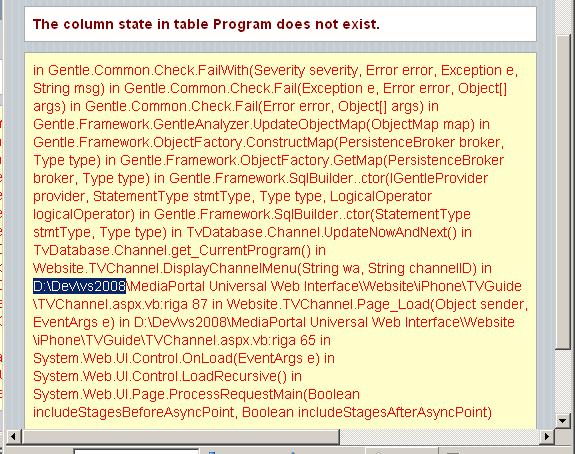
Now when I select a channel from the list for the guide I get this: (attached)
What do you think? About:confused:

Luca
 

Attachments

  • ipmp_err.JPG
    ipmp_err.JPG
    93.7 KB

cheezey

Community Plugin Dev
August 26, 2004
1,559
312
57
West Yorks, UK
Home Country
United Kingdom United Kingdom
Re: AW: Re: iPhone interface for MediaPortal (iPiMP) - 4.0.2

Now when I select a channel from the list for the guide I get this: (attached)
What do you think? About:confused:

Luca

You're using the wrong version of iPiMP. There is a version for MP 1.0.2 and a version for MP 1.1 BETA. Uninstall & reinstall the correct version.
 
Status
Not open for further replies.

Users who are viewing this thread

Top Bottom