IPTV Australia (2 Viewers)

riksmith

Portal Pro
April 18, 2009
1,856
322
Home Country
Netherlands Netherlands
While at home i also checked how you should normally add your DVB-IP Channels.

How it should work is that you add your .m3u file containing the urls to your data folder of TVE (For instance: C:\ProgramData\Team MediaPortal\MediaPortal TV Server\TuningParameters\dvbip) and after that go to the DVB-IP card in the menu here:
TV Servers - MediaPortal Wiki

There you can select the created m3u file and select "Scan for channels". I think however you would first need to have the adapted files from the other thread.
 

Ausdigital

Portal Pro
September 17, 2008
122
5
Home Country
I am getting to the point of just giving up.

The original thread with this info has been closed as infiteloop states claimed it was included in MP 1.1.0 onwards (the IPTV source filter).

But the Australian server channels could not be picked up, so in this same thread by manual info entered by Charli181 discussed here and here and where Charli181 announces he has it working here

I have sent messages to all Australians involved in that thread and no one has gotten back to me in the last few weeks.

So far, I have created the m3u file that has been configured for my ISP data in TuningParameters\dvbip. Also added the channels manually with what I believe to be the correct data. Added the database entry for 35 ISP channels via SQL management as descibed by Charli181 without seeing the results.

Changed the MediaSourceIPTV.ax file to include the RTP data from Stepko's post here and still unable to view the IPTV channels through Media Portal.

I appreciated your help Riksmith, but I have tried all the info I can find without success.
 

riksmith

Portal Pro
April 18, 2009
1,856
322
Home Country
Netherlands Netherlands
Have you tried scanning for scanning via your m3u AFTER you have changed to the new MediaSourceIPTV.ax? That is pretty important, if the default MP can not handle RTP streams it will also not scan for channels.

Also: If scanning still does not work whith the new .ax file, please post your logs.I am not saying we can solve it by that, but perhaps it is something very obvious.

See: Log Files - MediaPortal Wiki
 

riksmith

Portal Pro
April 18, 2009
1,856
322
Home Country
Netherlands Netherlands
Of course you do not need to feel obliged to continue trying to get it to work. To us it is important to know why it won't work, because DVB-IP will most likely have a big future.
 

Ausdigital

Portal Pro
September 17, 2008
122
5
Home Country
I would really like to see this working, so if you are helping to persist... then here are the logs and the m3u file I am using.
 

Attachments

  • TPG-IPTV.rar
    707 bytes

Ausdigital

Portal Pro
September 17, 2008
122
5
Home Country
Playing with other applications today I noticed my ports were closed.... a good thing normally.

Back to the router to check settings and why i another program could not access a normally open port. uPnP was turned on.

Could figure it out, reboot router, changed settings... well the port I use opens when the application is running.

So, I checked Port 1234 which is the one IPTV uses.... it is CLOSED. I has been forwared to my Media Portal server and yet it remains CLOSED. I setup a Port Trigger for Media Portal, so when it scans for IPTV channels it should open Port 1234. NOPE, remains closed.

So, if someone can advise me on how to configure a Port on a Netcomm NB9WMAXX router.... I would like to know 'cos as far as I am concerned the port should be open.

Perhaps there is a connection with Media Portal not picking up IPTV ?!?!?!?!?

Applied workaround to open port 1234 for the IPTV setup.

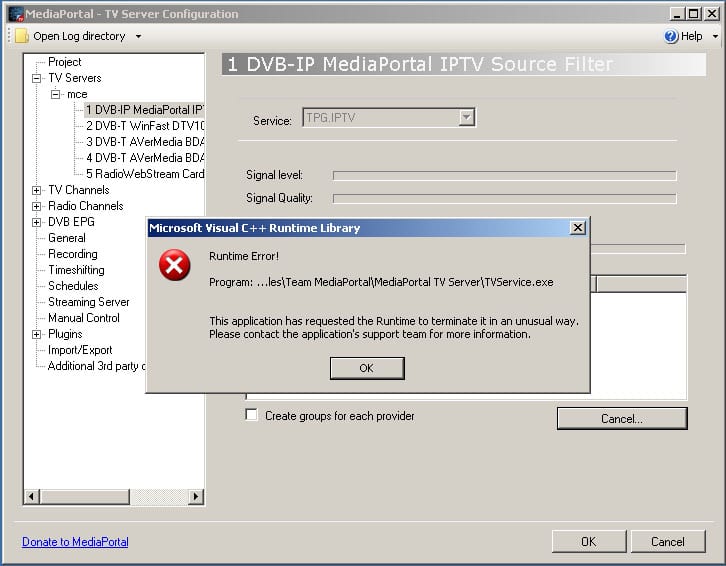
TV server crashed with C++ Runtime Errors. Didn't capture logs I'm afraid as I went straight back to a previous image of Media Centre before thinking about it.

Reinstalled the updated MPIPTVSource.ax file, opened port 1234, added m3u file and tried to scan for channels. NO SIGNAL.

Added channel manually, still unable to view the channel. When selecting preview from the TV Server config it opens a popup window and sits there. No image, no sound.
 

Ausdigital

Portal Pro
September 17, 2008
122
5
Home Country
I have the logs from the attempt before I screwed things in post above. I didn't think to save the logs before restoring image.

I will try to scan channels again or play one of them and post logs tomorrow.
 

Ausdigital

Portal Pro
September 17, 2008
122
5
Home Country
Folowing my system restore, I have
  • added the TPG IPTV m3u file to DVD tuning paramenters
  • replaced the MPIPTVSource.ax file with the modified one
  • created a manual channel for the IPTV stations
  • NOT run the SQL script for the extra 35 channels

I have opened port 1234 for the IPTV.

When trying to preview the manual channel I get the window popup but nothing appears in it- no video and no audio.

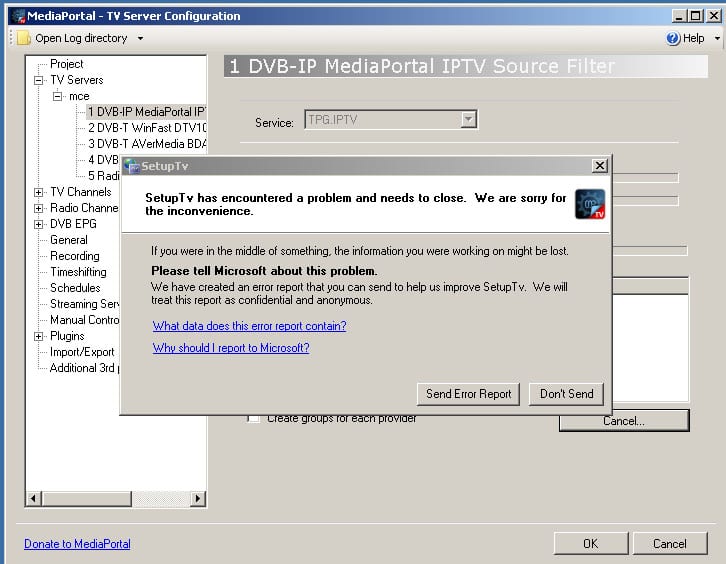
NOW when scanning for IPTV channels the tv server crashes... refer to attached images.

Also attached are the logs.
 

Attachments

  • MP-crash.jpg
    MP-crash.jpg
    118.5 KB
  • MP-crash2.jpg
    MP-crash2.jpg
    123.9 KB

Users who are viewing this thread

Top Bottom