IR Server Suite - Version 1.4.2 Test Build 3158/3281 (2 Viewers)

Status
Not open for further replies.

skoka123

MP Donator
  • Premium Supporter
  • January 8, 2009
    187
    16
    Hyderabad, India
    Home Country
    India India
    I think the experts in this forums would like to see the logs. I suggest that you run MP in debug mode to collect logs.

    Even I have had the error "Failed to start local comms..." with versions other than 1.0.4.1 build 2391. I currently use 1.0.4.1 build 2391 and it works great. I suggest that you uninstall IRSS and install this version. That might get you past the "Failed to start ..." error.

    Let us see where you get to with this version.
     

    KFaust

    Portal Member
    May 12, 2008
    23
    0
    Working quite good

    Hi everybody!!

    I've just tried IR Server Suite with my iMon remote.

    So it took a lot of time but now I have some news.
    I've installed the last build of IRSS 1.4.2
    Then i copied the DLL provided here on the forum (named IMon USB receivers 2nd try)
    I first tried with iMon configured as MCE Remote, don't work, nothing on B, C or D.
    Then I tried in iMon mode, nothing again.
    After that I killed thed Input Service and I used the IRServer, with this one, every buttons works in Debug client:):):)
    The abstract model option don't affect the result, activated or not, every thing is fine

    Here are my logs. As you can see in the logs, IRServer use a 'iMON USB' plugin and Input Service use 'iMon' plugin. perhaps a way to explore ?
     

    evolution2

    Portal Pro
    February 7, 2009
    53
    0
    Home Country
    New Zealand New Zealand
    I think the experts in this forums would like to see the logs. I suggest that you run MP in debug mode to collect logs.

    Even I have had the error "Failed to start local comms..." with versions other than 1.0.4.1 build 2391. I currently use 1.0.4.1 build 2391 and it works great. I suggest that you uninstall IRSS and install this version. That might get you past the "Failed to start ..." error.

    Let us see where you get to with this version.

    I have tried to install version 1.0.4.1 but how and where do I install the TV3 and MCE replacement plugins?
    Do I need to do anything on my bedroom client also?

    Thanks
    Brendon
     

    belcom

    Retired Team Member
  • Premium Supporter
  • February 27, 2009
    154
    42
    45
    Leibnitz
    Home Country
    Austria Austria
    Hi everybody!!

    I've just tried IR Server Suite with my iMon remote.

    So it took a lot of time but now I have some news.
    I've installed the last build of IRSS 1.4.2
    Then i copied the DLL provided here on the forum (named IMon USB receivers 2nd try)
    I first tried with iMon configured as MCE Remote, don't work, nothing on B, C or D.
    Then I tried in iMon mode, nothing again.
    After that I killed thed Input Service and I used the IRServer, with this one, every buttons works in Debug client:):):)
    The abstract model option don't affect the result, activated or not, every thing is fine

    Here are my logs. As you can see in the logs, IRServer use a 'iMON USB' plugin and Input Service use 'iMon' plugin. perhaps a way to explore ?

    Input Service AND IR Server should work if you run XP. If it's Vista, than IR Server is your only option by now.
    Be aware, that you configure Input Service with the program "Input Service Configuration", but IR Server with its build in configuration window, accessible through the IR Server icon in your taskbar.

    Did you configure your remote as MCE? Or only the reciever? My troubleshooting steps only apply to remotes acting as MCE! Despite of that I think you tried it with an iMON remote, which hasn't an option to work as MCE.

    But I like to hear that it works for you ;)

    Yours, belcom.
     

    skoka123

    MP Donator
  • Premium Supporter
  • January 8, 2009
    187
    16
    Hyderabad, India
    Home Country
    India India
    I think the experts in this forums would like to see the logs. I suggest that you run MP in debug mode to collect logs.

    Even I have had the error "Failed to start local comms..." with versions other than 1.0.4.1 build 2391. I currently use 1.0.4.1 build 2391 and it works great. I suggest that you uninstall IRSS and install this version. That might get you past the "Failed to start ..." error.

    Let us see where you get to with this version.

    I have tried to install version 1.0.4.1 but how and where do I install the TV3 and MCE replacement plugins?
    Do I need to do anything on my bedroom client also?

    Thanks
    Brendon

    With IRSS MCE replacement plugin is obsolete. While installing IRSS make sure you select the option to install TV3 plugin. You configure it in TV Server Configuration | Plugin.
     

    evolution2

    Portal Pro
    February 7, 2009
    53
    0
    Home Country
    New Zealand New Zealand
    With IRSS MCE replacement plugin is obsolete. While installing IRSS make sure you select the option to install TV3 plugin. You configure it in TV Server Configuration | Plugin.

    What version of IRSS are you talking about
    By my understanding 1.0.4.1 is the one people use but it needs TV3 plugin and MCE replacement plugin?
    I dont know how or where to install these plugins.

    Would I be better off trying 1.4.2 again

    Thanks
     

    skoka123

    MP Donator
  • Premium Supporter
  • January 8, 2009
    187
    16
    Hyderabad, India
    Home Country
    India India
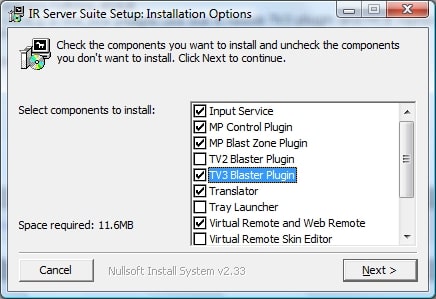
    When installing IRSS 1.0.4.1 build 2391 there is an option to select TV3 plugin. You do not need MCE replacement plugin.

    When you double click on the "IR Server Suite.exe" file to start the installation it comes up with a list of selections as in the attached image. Select TV3 Blaster Plugin.

    After you are done installing IRSS, start IR Server Configuration from the start menu and select your remote as MCE.

    After that, start TV server configuration and click on plugins. Enable TV3 Plugin. After you have enable your plugins, the plugin will have a + sign to the left of it. Click on this sign and then click on TV3 and go ahead with teaching your IR codes etc.

    Do not forget to map your codes to the STB for blasting.

    Let us know how far you get with this.
     

    Attachments

    • IRSS Setup.jpg
      IRSS Setup.jpg
      92.5 KB

    evolution2

    Portal Pro
    February 7, 2009
    53
    0
    Home Country
    New Zealand New Zealand
    I installed IRSS 1.0.4.1 before and ticked TV3 blaster
    I then selected MCE remote in Input configuration. Opened TV server and TV3 blaster. Selected my STB in setup restarted computer now in Mediaportal when i move around it jumps 2 selections at a time, STB isnt changing channel?
     

    skoka123

    MP Donator
  • Premium Supporter
  • January 8, 2009
    187
    16
    Hyderabad, India
    Home Country
    India India
    I installed IRSS 1.0.4.1 before and ticked TV3 blaster
    I then selected MCE remote in Input configuration. Opened TV server and TV3 blaster. Selected my STB in setup restarted computer now in Mediaportal when i move around it jumps 2 selections at a time, STB isnt changing channel?

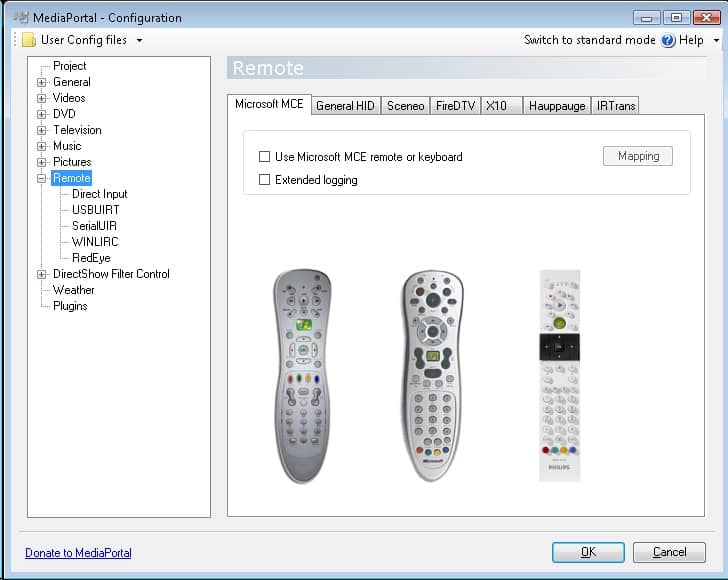
    For the double jumps, deselect MCE remote from the Media Portal Configuration | Remotes as in the attached picture Remote_Setup.jpg.

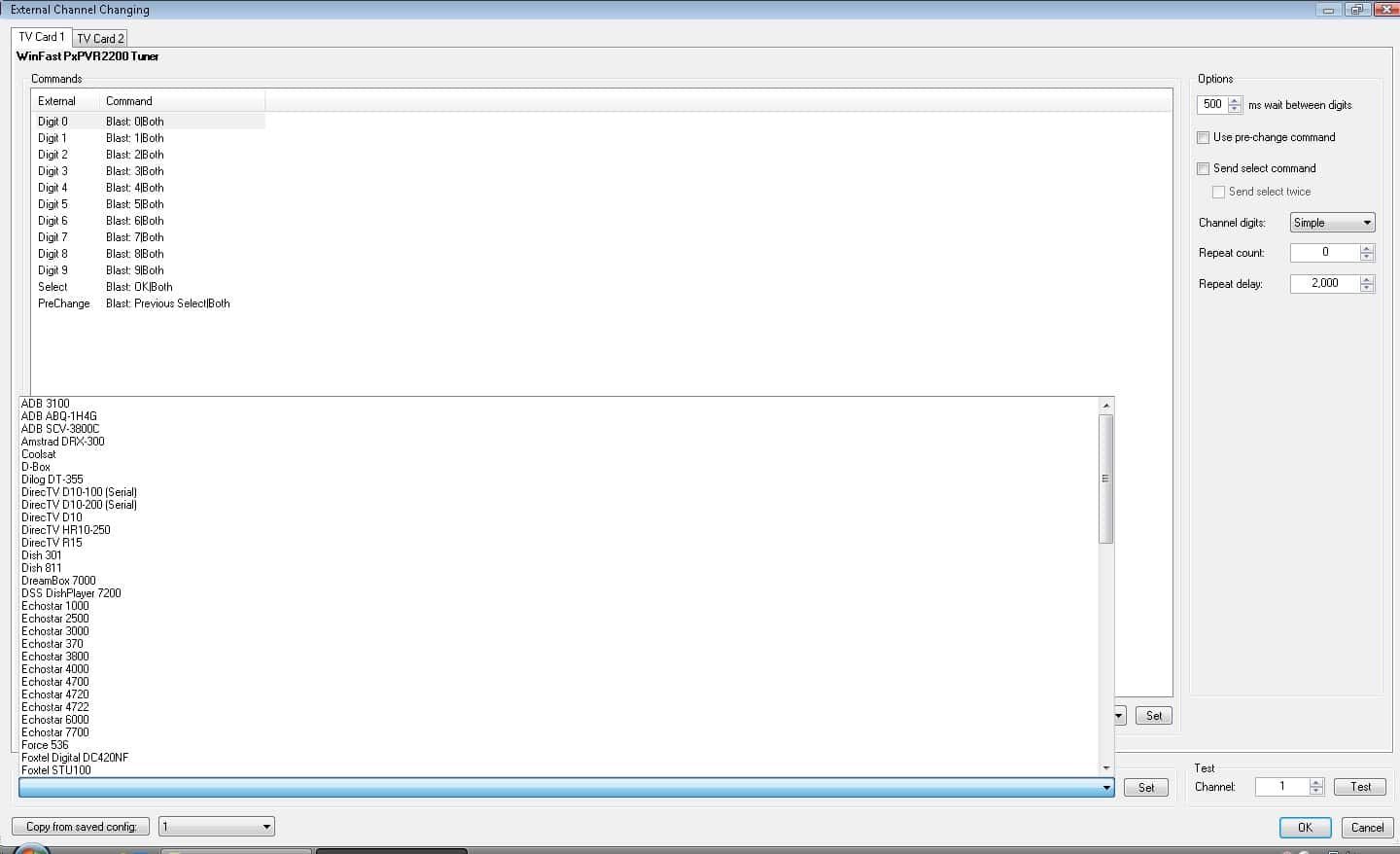
    In TV Server Configuration | TV3 Blaster Plugin for IRSS click on the STB Setup. If your STB is one the supported ones then select it from "Quick Setup" and click on "Set". In case your STB is not supported (like mine ) then you would have to first setup the IR Commands. TV Server Configuration | TV3 Blaster Plugin | Select IR Commands Tab. Here create an IR Command for each of the digits (0 to 9) and other buttons if required. Teach the IR Command for each of the digits from your STB remote.

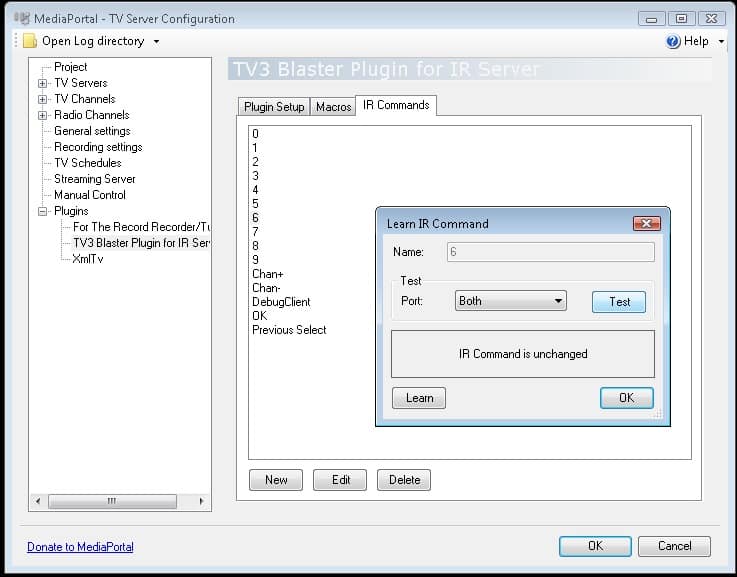
    In my case at times even though the IR commands are learnt from STB remote they might not work. In order to ensure that they are properly learnt, click on the test button (see: IR_Test.jpg). If the LED on your STB blinks then the command has been properly learnt. Do this for all the digits that you have created.

    So far you have taught IRSS the STB IR codes. Now you would have to tell IRSS that it needs to blast those codes. If your STB is unsupported then you would have taught the IR codes of your STB to the IRSSS as described above. Now for each of the external Digits (0 to 9) assign it to the digits that you have created earlier from the drop down below. (See: STB_Setup.jpg)

    Now you have completed the setup required for blasting to the STB.

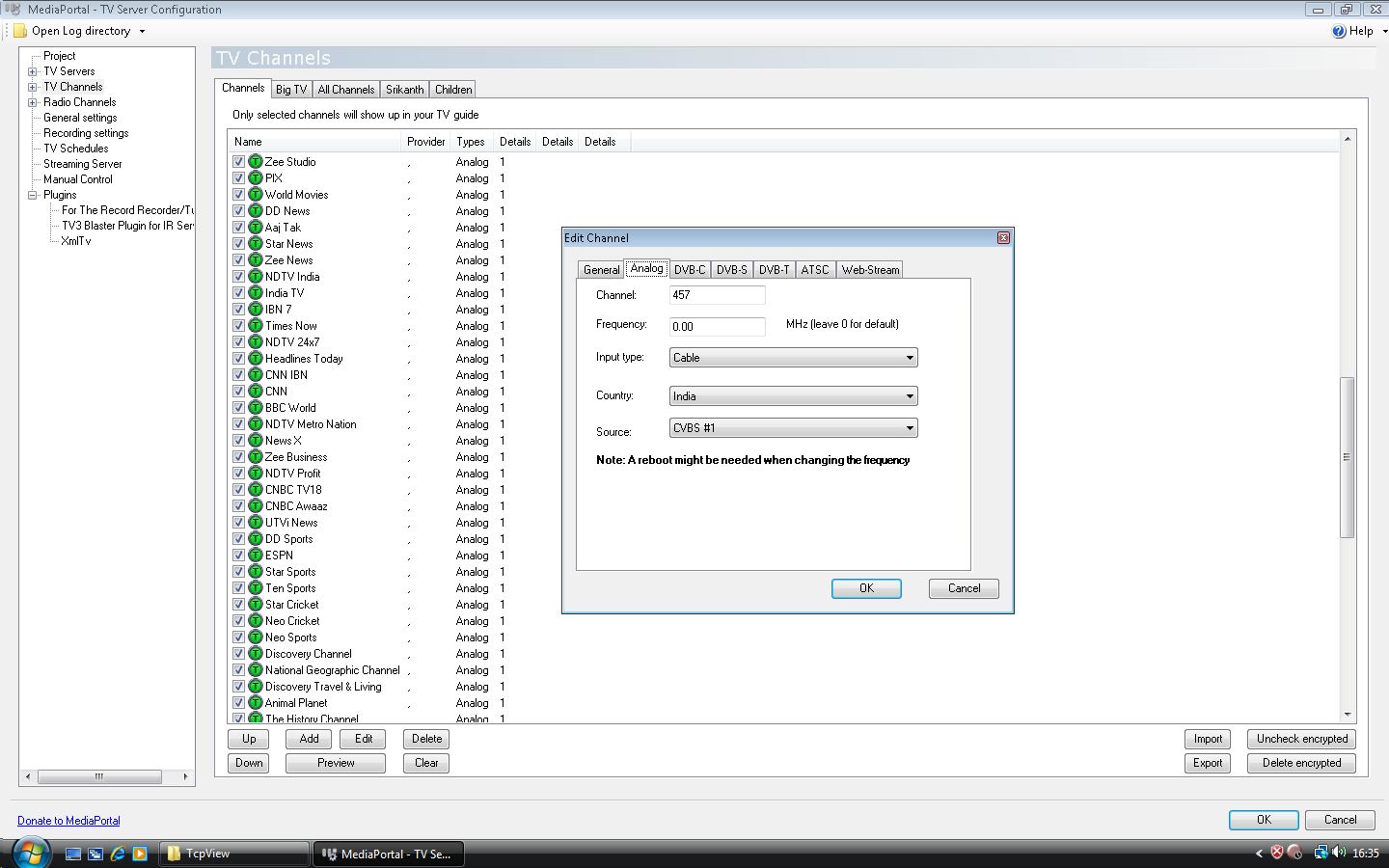
    I am assuming you have assigned the proper channel numbers for each of your channels. If not do so as in Channel_Setup.jpg. If you have assigned the channel numbers properly then select a channel and then click on the preview button. This should result in the blasting of IR codes to the STB and preview of the selected channel.

    Let us know how far you go with this information.
     

    Attachments

    • Remote_Setup.jpg
      Remote_Setup.jpg
      84.2 KB
    • STB_Setup.jpg
      STB_Setup.jpg
      152.5 KB
    • IR_Test.jpg
      IR_Test.jpg
      84.4 KB
    • Channel_Setup.jpg
      Channel_Setup.jpg
      159 KB

    evolution2

    Portal Pro
    February 7, 2009
    53
    0
    Home Country
    New Zealand New Zealand
    I did turn off MCE remote in mediaportal setup before I installed IRSS but still double jump

    how come you say I dont have to install extra patches but says on fisrt page:

    "Edited by Rekenaar; 2009-01-30. Reason: Attach 1.0.4.1 patch files here
    If you are still using V1.0.4.1, please install the following 2 patches.
    You must disable the input service (start menu, run, services.msc, find the input server and stop it) before you can update the files.
    Microsoft MCE Transceiver 1.0.4.1 - SP1
    TV3BlasterPlugin - 1.0.4.1 2008-01-13"

    This is bloody annoying why I cant get this to work
    I had the blasting sorted a few months back for 1 day then in the morning it started double jumping
    I have since reinstalled windows and Mediaportal many times trying to figure this crap out

    Brendon
     
    Status
    Not open for further replies.

    Users who are viewing this thread

    Top Bottom