IR Server Suite - Version 1.4.2 Test Build 3158/3281 (4 Viewers)

Status
Not open for further replies.

eggi

Portal Member
May 29, 2009
11
1
I am attempting to set this program up to read in commands from the VL system M-play blast IR receiver. I can't seem to figure out the correct options to set up in IR server suite to read the commands. I know that the commands are coming in on COM3, but no settings I've tried have been successful. When I use the auto-detect option it only detects "Windows Messages" as being available as a receiver but I can't seem to actually use this to read in any commands. I'd like to set up a generic HID device or one of the other options to read in the commands, if possible. I just dont know how to go about setting it up.

Does anyone have a VL system M-play series VFD/IR receiver and if so could you walk me through the appropriate setup? The remote works fine in mediaportal using the minidisplay plugin and the vl system/LIS2 driver, but i have not figured out a way to get the remote to work outside of mediaportal.

Thanks!
 

bxr

Portal Member
June 8, 2009
41
0
I installed the media portal on windows 7 with MCE ir transceiver and remote.
The internal ir plugin doesn't work with the MCE remote.
I installed the suite and the MP control plugin does recognize the button presses (same as the already made MCE remote there) BUT ther media portal doesn't react to the buttons (except arrows and enter of course)!
I searched here but nothing.
It is the latest media portal (1.0.2.0).

I installed the new build 1.4.2 2627 and it works.

Thanks in advance,
bxr
 

jingoro

New Member
July 11, 2007
3
0
Home Country
United States of America United States of America
Great job on the plugin, I love it!

I am anxiously awaiting the next version update since I am having an issue with the input service stalling after s3 sleep (Vista x64, MP 1.0.2, IRSS 2627)

I am very impressed with the time and effort you put into development and replying in the forums. Thanks so much!

I was trying to set up a different remote use an MCE receiver with translator the other day, but it wouldn't pick up the signal from my remote (Motorolla Moxi). It worked fine if I tried to "learn" for blasting, though. Anyone have any thoughts?
 

DreamMaster

Portal Member
June 9, 2009
25
0
Home Country
South Africa South Africa
Well done on an awesome plugin!

i am running mediaportal 1.0.2.0 with IR Server Suite version 1.4.2.2627 and if i go to the "MP Control Plugin for IR Server" (i have the "Microsoft MCE" remote selected ) and click on "Map Buttons" if i try and assign the action "Blast IR / Macro" to any button, it assigns without a problem but when in mediaportal the button does not blast (i am tring to blast to my STB)? Also, if i go back into the map buttons page and go to the button i just edited, inthe tree view on the left it still shows the blast command that i specified but the action dropdown on the right is blank (should this not still be defaulted to the blast command hat i had selected previously)?
Just one other thing, when selecting the condition "window" in the "map buttons" screen, it gives a long list of all the different "windows" that a condition can be linked to, is there a help file that shows a picture for each of the "windows" listed in this drop down because sometimes i am not sure if i am linking to the correct "window".

cheers
 

DreamMaster

Portal Member
June 9, 2009
25
0
Home Country
South Africa South Africa
Hi there :)

Do you use TVServer or the old inbuilt TV engine (TV2)?

(Please consider updating you system details)

Hi rekenaar,

i use the new TVServer.
what i have found out so far is that, on the "map buttons" page, the conditions for a button are evaluated from top to bottom so if you have 2 conditions for "TV", only the first one gets performed???
In Mediaportal, when in MyTV, if i press the channel up button how do i get the it to change the channel in Mediaportal (which it has always done) but also get it to blast to the STB (DSTV) to change the channel at the same time? Do i need to create a Macro? If i do need to create a macro, when i select the "Send Mediaportal Action" command it pops up a box with "Action Type" which i set to "ACTION_NEXT_CHANNEL", what do i put in the float1 and float2?

Thanks for the help
 

rekenaar

Retired Team Member
  • Premium Supporter
  • December 17, 2006
    4,421
    805
    Home Country
    South Africa South Africa
    TVServer will blast channel change to STB, not MP.

    In MP Configuration, you can use the MP Control Plugin for IR Server to control your MP Client. When the client request a tv channel, or channel change, it just gives the request to TVServer.

    In TVServer you will use te TV3 Blaster plugin to send the channel change to STB.
    My TV3 Blaser pluging STB configuration is set on Panasat.

    No extra macros needed.
    Channel in TV Server must for example be set on 202 (cricket fan are you?) and that is the codes blasted.

    Try it and let us know if you struggle.
    I am taking the boss to the movies now and then church after that, so I will look out for you after that.
     

    DreamMaster

    Portal Member
    June 9, 2009
    25
    0
    Home Country
    South Africa South Africa
    TVServer will blast channel change to STB, not MP.

    In MP Configuration, you can use the MP Control Plugin for IR Server to control your MP Client. When the client request a tv channel, or channel change, it just gives the request to TVServer.
    okay, so i shouldn't be trying to change the MP Control Plugin in MP Configuration to blast to the stb?

    In TVServer you will use te TV3 Blaster plugin to send the channel change to STB.
    My TV3 Blaser pluging STB configuration is set on Panasat.
    The TV3 Blaster Plugin has always been setup to use the panasat commands, i can also test from here and it works.

    No extra macros needed.
    Channel in TV Server must for example be set on 202 (cricket fan are you?) and that is the codes blasted.
    If i understand what you are saying; i am in tvserver config. if i go to TVChannels and select any one of them and click the preview button, it will blast the correct channel to the stb and the preview will show the correct channel.


    Try it and let us know if you struggle.
    I am taking the boss to the movies now and then church after that, so I will look out for you after that.
    Hope you and the "boss" enjoyed the movies and church. :)
    My TVServer setup seems to work but when i have mediaportal open on MYTV (tv options down the left with tv preview on the right) and i click the channel up or down button, mediaportal changes the channel description etc below the preview but it doesn't blast? this also doesn't work in full screen? this is why i was trying to get it to work with the MP Control Plugin for IR Server.

    when changing channels in mediaportal is it automatically supposed to blast a channel change to the stb just by setting up TV3 Blaser plugin?

    i am running a single seat setup, would this cause issues?

    Something else i am not sure would cause this problem.
    When i first installed Mediaportal i wasn't getting any picture on the MP frontend after setting up the channels in TVServer (the preview in TVServer worked). So i ended up editing the TV Channels in Mediaportal Config and making them external. This at least showed a picture and not snow.


    :D for the help
     

    rekenaar

    Retired Team Member
  • Premium Supporter
  • December 17, 2006
    4,421
    805
    Home Country
    South Africa South Africa
    Back :)

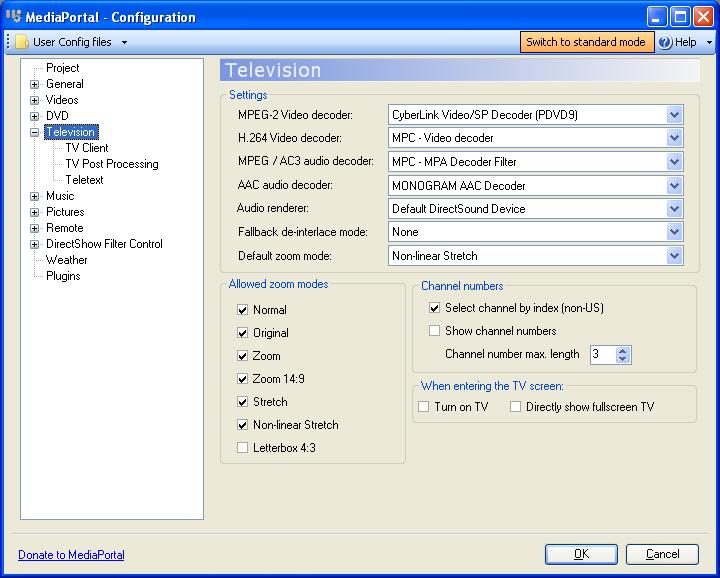
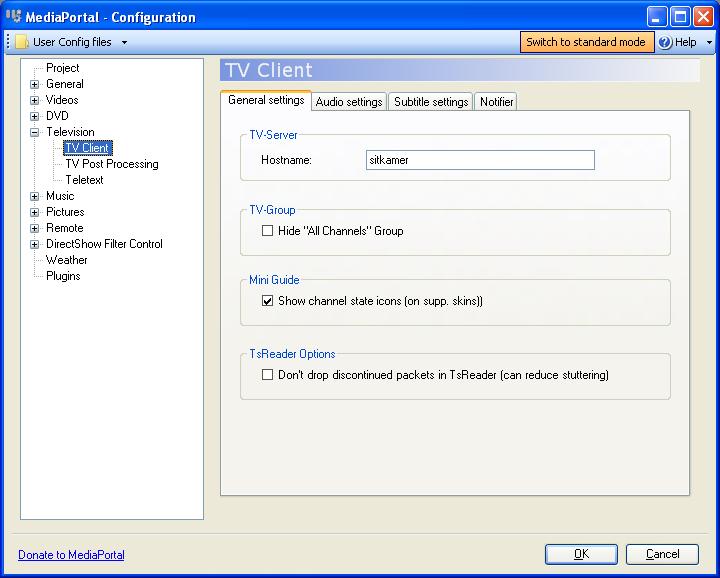
    If you can edit TV channels in MP Config, then you somehow got the old TV engine still installed. TV Channels should ONLY be configured in TV Server.

    In MP Config, you should just specify the TVServer hostname. See my 2 screenshots.
     

    Attachments

    • tv1.JPG
      tv1.JPG
      68.5 KB
    • tv2.JPG
      tv2.JPG
      55.7 KB

    DreamMaster

    Portal Member
    June 9, 2009
    25
    0
    Home Country
    South Africa South Africa
    yip, thats where my problem is!!! i have 7 sub menus under Television and no such thing as TVServer Hostname?
    i have tried re-installing just the mediaportal portion not tvserver and that didn't help?

    when i did the original installation (offline install) it kept prompting to connect to the internet to get a directory xml file (something like that) and i read in the forums that i could just run the installs seperately (TVServer install and Mediaportal Install)? would this have caused all my issues?
    is there a dll that i can copy and paste? if it is that?

    thanks for the help ... especially on a Sunday!

    Yeehaaaaa Paranoid Delusion suggested that i re-install TVServer again as you have to install TVServer after MEdiaportal client. that did it, it all works now!
    thanks for all your help
     
    Status
    Not open for further replies.

    Users who are viewing this thread

    Top Bottom