
You are using an out of date browser. It may not display this or other websites correctly.
You should upgrade or use an alternative browser.
You should upgrade or use an alternative browser.
[WiP] madVR support in MP1 (32 Viewers)
- Thread starter Sebastiii
- Start date
yep, tried v297 - sometimes its just funny but mostly it fits correctlybut sometimes i need to do a X key to have the OSD displayed correctly lol.


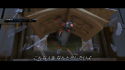
and i stumbled upon an old bug i had completely forgotten.
the usage of dxva downscale will trigger some processing errors if any mepo osd should come up for instance the big epg or back to videolist view or directly open playlists...

it seems to happen only with madvr downscaling algo set to dxva, thats all nothing special...
should be easy reproduceable (at least I hope so - on my side it was happening on 3 different clients)
maybe this is somehow connected with other osd display problems, because the madvr settings at downscaling are the ones that will be enabled with all osd ads madvr supposed to render
crash report happened while resizing
Attachments
Last edited:

- March 4, 2008
- 2,114
- 1,176
- Home Country
-
 Netherlands
Seb,
I gave it (Core_V297_WIP_Planescene_OSD_resize.zip) a try through RDP. Still the same issue using apollo skin.
I will post log this evening. (kid is using TV now)
Q: what would you like me to test? altgr enter a couple of times? screenshots or X a number of times? Certain skins?
If you point me in the right direction with what to test, I will be most useful for you
Greetz
I gave it (Core_V297_WIP_Planescene_OSD_resize.zip) a try through RDP. Still the same issue using apollo skin.
I will post log this evening. (kid is using TV now)
Q: what would you like me to test? altgr enter a couple of times? screenshots or X a number of times? Certain skins?
If you point me in the right direction with what to test, I will be most useful for you
Greetz
- March 4, 2008
- 2,114
- 1,176
- Home Country
-
Netherlands
Regarding the GUI flickering on 2nd screen. There has been an issue similar like this
[WiP] - madVR support in MP1
Could it be related to refresh rate changing as described in post?
Around and after page 280 this has been discussed.
[WiP] - madVR support in MP1
Could it be related to refresh rate changing as described in post?
Around and after page 280 this has been discussed.
- March 4, 2008
- 2,114
- 1,176
- Home Country
-
Netherlands
Ok
1:: Here are the logs.
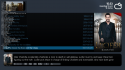
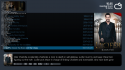
2:: Subs are still underneath mini view. This is with both internal and external subs. (see screenshots)
3:: Could you look at the logs and check dropped/late frames and compare OSD CTRL+J enabled and disabled.
I notice perfect playback when CTRL+J is shown, and jerky playback when its NOT shown. (weird) it doesnt seem visible in osd stats.
Screens with external subs

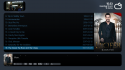
Screens with internal subs

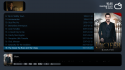
1:: Here are the logs.
2:: Subs are still underneath mini view. This is with both internal and external subs. (see screenshots)
3:: Could you look at the logs and check dropped/late frames and compare OSD CTRL+J enabled and disabled.
I notice perfect playback when CTRL+J is shown, and jerky playback when its NOT shown. (weird) it doesnt seem visible in osd stats.
Screens with external subs
Screens with internal subs
Regarding the GUI flickering on 2nd screen. There has been an issue similar like this
I don't think so. I do not use rate changing neither in madVR nor in MP. Moreover, flickering appears whenever madVR is NOT running.
But I appreciate your effort to remember and look it up for me, thank you.

- Thread starter
- Moderator
- #3,637
Regarding the GUI flickering on 2nd screen. There has been an issue similar like this
[WiP] - madVR support in MP1
Could it be related to refresh rate changing as described in post?
Around and after page 280 this has been discussed.
Yep it can happen but only when Video is started/played
If non video source are running then, it should not happen.
- Thread starter
- Moderator
- #3,638
Ok
1:: Here are the logs.
2:: Subs are still underneath mini view. This is with both internal and external subs. (see screenshots)
3:: Could you look at the logs and check dropped/late frames and compare OSD CTRL+J enabled and disabled.
I notice perfect playback when CTRL+J is shown, and jerky playback when its NOT shown. (weird) it doesnt seem visible in osd stats.
Screens with external subs
View attachment 190874 View attachment 190875 View attachment 190876
Screens with internal subs
View attachment 190877 View attachment 190878 View attachment 190879
Not sure why jerky playback is happening with stats is OFF, i didn't see anything wrong in log.
Yes i can confirm sub underneath and not sure why
(and i'm not sure if i can fix it too )
- Thread starter
- Moderator
- #3,639
I don't think so. I do not use rate changing neither in madVR nor in MP. Moreover, flickering appears whenever madVR is NOT running.
But I appreciate your effort to remember and look it up for me, thank you.
It seems that i didn't saw any log about your issue ?
So can you try watchdog tools with the first option to collect log.
If video is not running then the issue is something else and shouldn't related to madVR change itself
Thanks.
- Thread starter
- Moderator
- #3,640
yep, tried v297 - sometimes its just funny but mostly it fits correctly
View attachment 190859 View attachment 190860
and i stumbled upon an old bug i had completely forgotten.
the usage of dxva downscale will trigger some processing errors if any mepo osd should come up for instance the big epg or back to videolist view or directly open playlists...
View attachment 190861
it seems to happen only with madvr downscaling algo set to dxva, thats all nothing special...
should be easy reproduceable (at least I hope so - on my side it was happening on 3 different clients)
maybe this is somehow connected with other osd display problems, because the madvr settings at downscaling are the ones that will be enabled with all osd ads madvr supposed to render
crash report happened while resizing
Yep this old bug is always present and i think i will not able to fix it lol, it's for sure related to timing when resizing video etc.
About the funny OSD, does 'X' key twice press correct the OSD ?
Last edited:
Users who are viewing this thread
Online now: 33 (members: 0, guests: 33)