
You are using an out of date browser. It may not display this or other websites correctly.
You should upgrade or use an alternative browser.
You should upgrade or use an alternative browser.
MediaStream by pilehave - upd. 22/08/09 (1 Viewer)
- Thread starter pilehave
- Start date

 United Kingdom

Raytestrak, have you tried changing 0.9.4.0 to 0.9.2.0 or 0.9.3.0?
Yeah, no change. The new Monochrome which requires RC4 shows the same error, but I can't find errors in my logs.

- January 2, 2006
- 1,484
- 114
Very strange but it seems that the new RC4 need a version 0.9.2.0 i the reference.xml fileRaytestrak, have you tried changing 0.9.4.0 to 0.9.2.0 or 0.9.3.0?
Yeah, no change. The new Monochrome which requires RC4 shows the same error, but I can't find errors in my logs.

Take a look on the reference.xml file of Blue3 skin delivered....
No problem.Here is MyFilms modified@joz,
I just tried your optimized *.xml files for the MyFilms Plugin. They work a lot better. Thanks for sharing !
i assume it is by desgin, that there is no description text on the main page anymore, isn't it ?
On the details page the text is correct now.
It is great that you guys discuss the issues. I really hope that you can sort the problems out, as it is an awesome skin and an awesome plugin !
Marcus
:sorry:
Had no idea that it could be done.
Anyway I got some problems with your skin :
- some media files aren't included in your package (Films_prior_focus.png, Films_first_(no)focus.png, Films_next_(no)focus.png, Films_last_(no)focus.png)
- I cann't see my plugin in the home menu. I have to change the hyperlink value into the MyHome.xml Movies section to 7986 (ID MyFilms) to work ....
- the focus didn't work when entering into MP

- Thread starter
- Moderator
- #264
Anyway I got some problems with your skin :
- some media files aren't included in your package (Films_prior_focus.png, Films_first_(no)focus.png, Films_next_(no)focus.png, Films_last_(no)focus.png)
- I cann't see my plugin in the home menu. I have to change the hyperlink value into the MyHome.xml Movies section to 7986 (ID MyFilms) to work ....
- the focus didn't work when entering into MP
I just updated the skin to use standard-buttons instead of the png-files used in the "normal" skin. So, no need for the png's anymore.
To get the menu to work, you should use the menu-generator to create your own, or edit the XML just the way you did
The problem with the missing focus was introduced with RC4. The only working solution at the moment is to use the new skin (v4). I have just uploaded it to http://cm3.dk/mediastream/
Do you have to generate a new MyHome.xml for v4? If not, the focus bug is still there
When you go back from any item, the focus on the menubar is lost, or is that not the focusbug you're talking about?
p.s. The download link still points to v3
When you go back from any item, the focus on the menubar is lost, or is that not the focusbug you're talking about?
p.s. The download link still points to v3

- August 20, 2007
- 2,159
- 750
- Moderator
- #266
I just updated the skin to use standard-buttons instead of the png-files used in the "normal" skin. So, no need for the png's anymore.
To get the menu to work, you should use the menu-generator to create your own, or edit the XML just the way you did
The problem with the missing focus was introduced with RC4. The only working solution at the moment is to use the new skin (v4). I have just uploaded it to Untitled
... When starting with V4, I see the Homescreen is build, but then the screen becomes almost black - I still hear the sound of the remote. What change is required where to fix that for me?
Thanks, Guzzi
- Thread starter
- Moderator
- #267
Do you have to generate a new MyHome.xml for v4? If not, the focus bug is still there
When you go back from any item, the focus on the menubar is lost, or is that not the focusbug you're talking about?
p.s. The download link still points to v3
Actually you should be able to modify your existing menu, and just change <defaultcontrol></defaultcontrol> to <defaultcontrol>90001</defaultcontrol> (or whatever item you want to be the default). The MediaStream.dll doesn't work in RC4, so if you're on RC4 just delete it.
On RC3 everything should be the same, but then again, you will have to remove the ID in <defaultcontrol>90001</defaultcontrol>.
I know, it ain't easy
Actually you should be able to modify your existing menu, and just change <defaultcontrol></defaultcontrol> to <defaultcontrol>90001</defaultcontrol> (or whatever item you want to be the default). The MediaStream.dll doesn't work in RC4, so if you're on RC4 just delete it.
On RC3 everything should be the same, but then again, you will have to remove the ID in <defaultcontrol>90001</defaultcontrol>.
I know, it ain't easy
I get what you mean now. By setting the default control, you always go to that control (default kinda says it all ...
). Still have another question though, I've entered a default control but now MediaPortal doesn't show a background image for that default menu item. Can I add this? I've made MovingPictures my default (94001 in my case, although it was the first item I entered in the generator) and it does startup with this item and goes to this item whenever I go back to the main menu, but when it enters the main menu, the background stays black. If I move up and down, the background does appear.
pilehave,
The new version looks great. One thing, though. You left out the fanart control in the mVids skin. Here's the xml for it. The plugin controls it directly (no property is set for it) so the id has to stay the same.
<control>
<description>Fan Art</description>
<type>image</type>
<id>49</id>
<posX>0</posX>
<posY>0</posY>
<width>1280</width>
<height>720</height>
<texture>-</texture>
<visible>false</visible>
</control>
Again, thanks for this great skin!
The new version looks great. One thing, though. You left out the fanart control in the mVids skin. Here's the xml for it. The plugin controls it directly (no property is set for it) so the id has to stay the same.
<control>
<description>Fan Art</description>
<type>image</type>
<id>49</id>
<posX>0</posX>
<posY>0</posY>
<width>1280</width>
<height>720</height>
<texture>-</texture>
<visible>false</visible>
</control>
Again, thanks for this great skin!
Hi Pilehave,
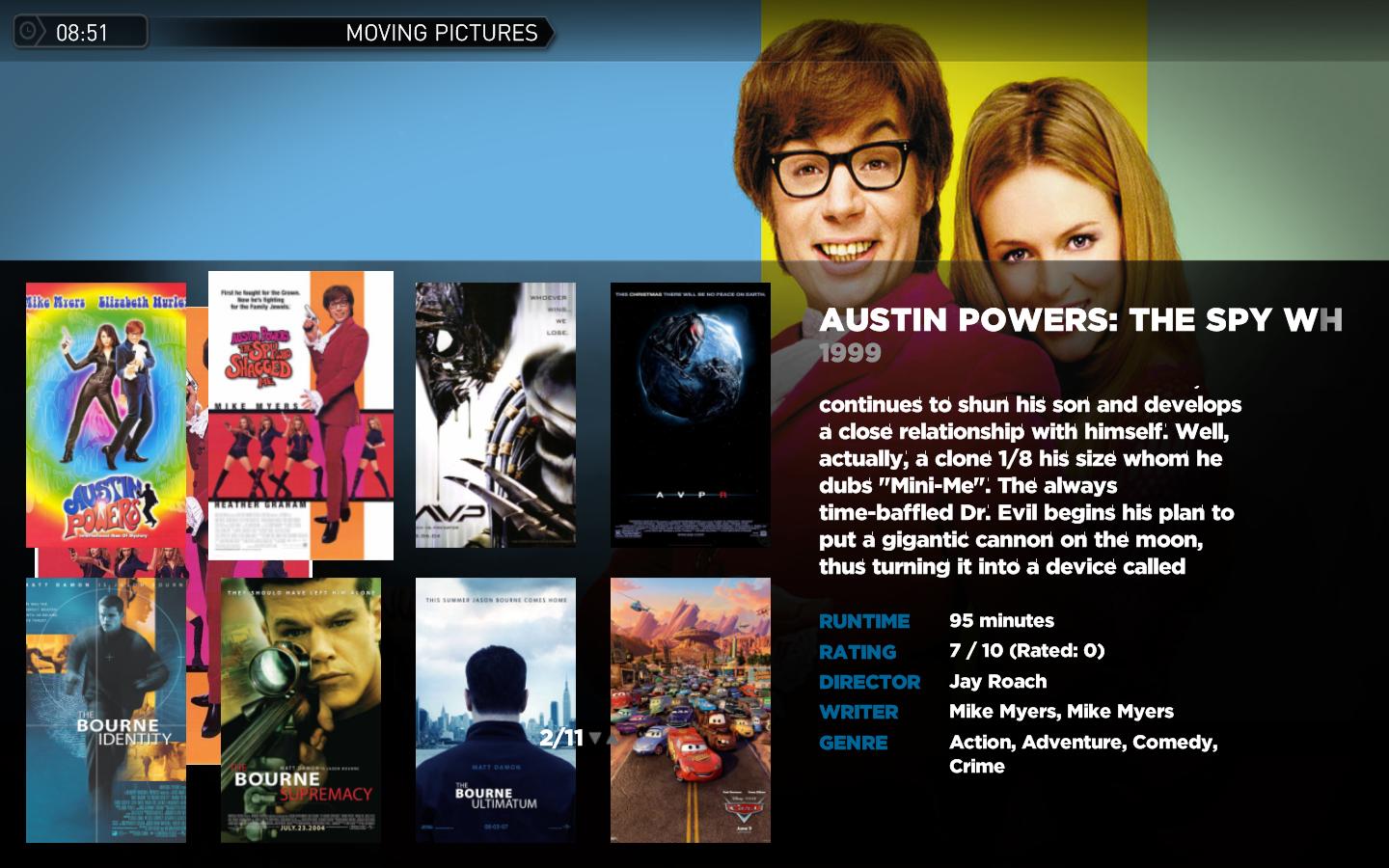
thanks for the new release! Couple of questions though, in my moving pictures screen below you can see that the dvd cover is hidden by the icon view, should the cover be moved somewhere visable? Also although the movie description scrolls the movie title doesn't. Finally not sure if it's only me that has this problem but if you look carefully the font has tiny artifacts on it that make it look a bit strange, this only happens in the detail view in Moving Pictures and TV Series. Any ideas?
Thanks
thanks for the new release! Couple of questions though, in my moving pictures screen below you can see that the dvd cover is hidden by the icon view, should the cover be moved somewhere visable? Also although the movie description scrolls the movie title doesn't. Finally not sure if it's only me that has this problem but if you look carefully the font has tiny artifacts on it that make it look a bit strange, this only happens in the detail view in Moving Pictures and TV Series. Any ideas?
Thanks
Attachments
Users who are viewing this thread
Online now: 2 (members: 0, guests: 2)