MediaStream by pilehave - upd. 22/08/09 (3 Viewers)

mobius1980

Portal Member
January 26, 2009
38
0
Home Country
I presume you mean in the skinning manual?

I thought I would be able to simple create a new image and overwrite the original without having to script anything. I am a bit of a nuff nuff when it comes to playing with virtually any form of script.

If not, I'm sure I will manage.
 

pilehave

Community Skin Designer
  • Premium Supporter
  • April 2, 2008
    2,566
    521
    Hornslet
    Home Country
    Denmark Denmark
    Which logos are we talking about :)

    I am toalking about moving pictures and TVSeries logos for HD, sound etc.... I am sorry but i dont really feel that your current logos go with the rest of the skin. That s why i ask if it s possible to have another version

    This isn't perfect, and it requires you to have StreamedMP installed as well (it points to those logos), but it works. Mediastream has a wider format support + Network logos (still working in the attached .xml).

    Backup your current .xml before using this.
    Emph

    There are some difference between MediaStream (this subforum) and StreamedMP (your skin, another subforum).

    One of these differences is how to change the background :)
     

    emphatic

    Design Group
  • Team MediaPortal
  • August 25, 2006
    3,758
    1,250
    Alingsås
    Home Country
    Sweden Sweden
    There are some difference between MediaStream (this subforum) and StreamedMP (your skin, another subforum).

    One of these differences is how to change the background :)

    Are you referring to my post+.xml, Pilehave? Because I just altered the paths/filenames in your .xml so it would show the logos from StreamedMP. I really like them too, but I don't want to manually create all the missing ones that you have support for in your skin. So I just use the ones you've supplied. It's mostly eye candy after all, right? :D

    Emph
     

    mobius1980

    Portal Member
    January 26, 2009
    38
    0
    Home Country
    Thank you soooo much for your help... Got it organised now.

    Thank you again for taking the time to help with such a silly question. :D
     

    pilehave

    Community Skin Designer
  • Premium Supporter
  • April 2, 2008
    2,566
    521
    Hornslet
    Home Country
    Denmark Denmark
    There are some difference between MediaStream (this subforum) and StreamedMP (your skin, another subforum).

    One of these differences is how to change the background :)

    Are you referring to my post+.xml, Pilehave? Because I just altered the paths/filenames in your .xml so it would show the logos from StreamedMP. I really like them too, but I don't want to manually create all the missing ones that you have support for in your skin. So I just use the ones you've supplied. It's mostly eye candy after all, right? :D

    Emph

    No no, I was refering to mobius1980 that posted a StreamedMP screenshot Edit: Haha...now I realize that I quoted you and not mobius1980...doh!

    But your example will work just fine :cool:

    :D:D:D
     

    Nato

    Portal Pro
    April 18, 2006
    156
    4
    Christchurch
    Home Country
    New Zealand New Zealand
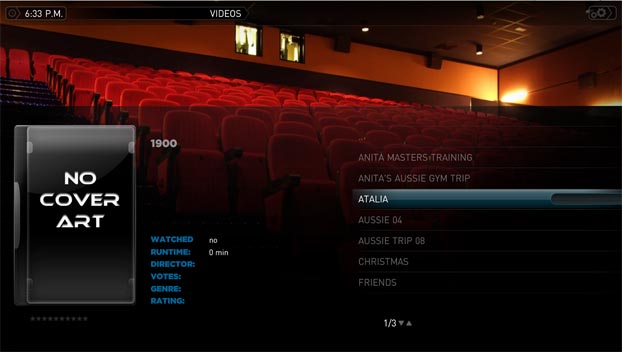
    Not sure if you wish to use it but I created a no cover art image for meedio a while ago and I just added it to mediastream skin as i never really liked the default one (no offence). I have attached the png and a screenshot of it
     

    Attachments

    • No Cover Logo.jpg
      No Cover Logo.jpg
      43.6 KB
    • missing_coverart.png
      missing_coverart.png
      88.5 KB

    rsbrux

    Documentation Group
  • Team MediaPortal
  • April 15, 2007
    1,225
    187
    Home Country
    Switzerland Switzerland
    Minor question as to font installation

    The readme for 0.11 says:
    "Copy the three font-files to your Windows font-catalog. You'll find this catalog in your Windows Controlpanel."
    However, there is now a 4th font, CustomCaps.ttf, in the zipfile's font directory.
    Despite several attempts to copy it into the Windows fonts directory, it still doesn't appear there.
    Ther is no error message when I copy, but when I sort the fonts in the Windows font directory by filename, I don't see it.
    What could explain this?
    How serious is it?

    BTW, this thread is getting quite long. Doesn't Pilehave deserve a separate section for this masterpiece?
     

    explodedk

    Portal Pro
    December 27, 2008
    265
    20
    Copenhagen
    Home Country
    Denmark Denmark
    The readme for 0.11 says:
    "Copy the three font-files to your Windows font-catalog. You'll find this catalog in your Windows Controlpanel."
    However, there is now a 4th font, CustomCaps.ttf, in the zipfile's font directory.
    Despite several attempts to copy it into the Windows fonts directory, it still doesn't appear there.
    Ther is no error message when I copy, but when I sort the fonts in the Windows font directory by filename, I don't see it.
    What could explain this?
    he has his own place in hot skins. :) what fonts do you have in your fonts ? you should be aware that it changed the name when you install. the customcaps.ttf will be named fluid Body Caps Custom.


    i have 4 fonts in my /fonts/ named :
    Fluid Body (true type)
    Fluid Body Caps (true type)
    Fluid Body Custom Caps (true type)
    Fluid Title Caps

    Not sure if you wish to use it but I created a no cover art image for meedio a while ago and I just added it to mediastream skin as i never really liked the default one (no offence). I have attached the png and a screenshot of it

    looks good. dont you have the psd file for it. Think its of no use if the font is off the rest of the layout. no offence;)
     

    rsbrux

    Documentation Group
  • Team MediaPortal
  • April 15, 2007
    1,225
    187
    Home Country
    Switzerland Switzerland
    excludedk,
    I noticed that the font names are different from the filenames. That's why I sorted by filename to look for it. Looking at font names, I only found 3 "Fluid" fonts. The new font "Fluid Body Custom Caps (true type)" was missing.
    Meanwhile I have solved the problem. Windows evidently supports neither simple copying of font files into the fonts directory, nor installation via drag 'n' drop.
    However, after unpacking the files and then adding the new font using the file menu entry in the Windows fonts view, the new font now appears.
    Thanks for responding!
     

    explodedk

    Portal Pro
    December 27, 2008
    265
    20
    Copenhagen
    Home Country
    Denmark Denmark
    excludedk,
    I noticed that the font names are different from the filenames. That's why I sorted by filename to look for it. Looking at font names, I only found 3 "Fluid" fonts. The new font "Fluid Body Custom Caps (true type)" was missing.
    Meanwhile I have solved the problem. Windows evidently supports neither simple copying of font files into the fonts directory, nor installation via drag 'n' drop.
    However, after unpacking the files and then adding the new font using the file menu entry in the Windows fonts view, the new font now appears.
    Thanks for responding!

    u welcome. glad you got it fixed. what os has that fucked up installation ? :D since my vista i can install via the drop down menu, and xp i can just drag and drop it
     

    Users who are viewing this thread

    Top Bottom