
[no Bug] MKV Stuttering with dual monitor and Windows 7 aero theme enabled (1 Viewer)

greybox

MP Donator
  • Premium Supporter
  • January 23, 2009
    652
    168
    Home Country
    Canada Canada
    Re: MKV Stuttering with Windows 7 aero theme enabled

    V-sync problems? Is this like a vertical jitter we used to see sometimes in older CRT TV sets? I don't know how this tearing should look like, but I don't see any problems with aero disabled. Only with aero enabled I can see stuttering which looks like a lot of missing frames.

    Can you take a look at the screenshots in post #3? Does this tearing manifest itself somehow on the basic (aero disabled) screenshot?
     

    tourettes

    Retired Team Member
  • Premium Supporter
  • January 7, 2005
    17,301
    4,800
    Re: MKV Stuttering with Windows 7 aero theme enabled

    V-sync problems? Is this like a vertical jitter we used to see sometimes in older CRT TV sets? I don't know how this tearing should look like, but I don't see any problems with aero disabled. Only with aero enabled I can see stuttering which looks like a lot of missing frames.

    Screen tearing - Wikipedia, the free encyclopedia

    Can you take a look at the screenshots in post #3? Does this tearing manifest itself somehow on the basic (aero disabled) screenshot?

    Tearing wont be visible from a screenshot since it will happen later in the video chain.
     

    Andrew H

    MP Donator
  • Premium Supporter
  • September 8, 2007
    574
    42
    Alabama
    Home Country
    United States of America United States of America
    Re: MKV Stuttering with Windows 7 aero theme enabled

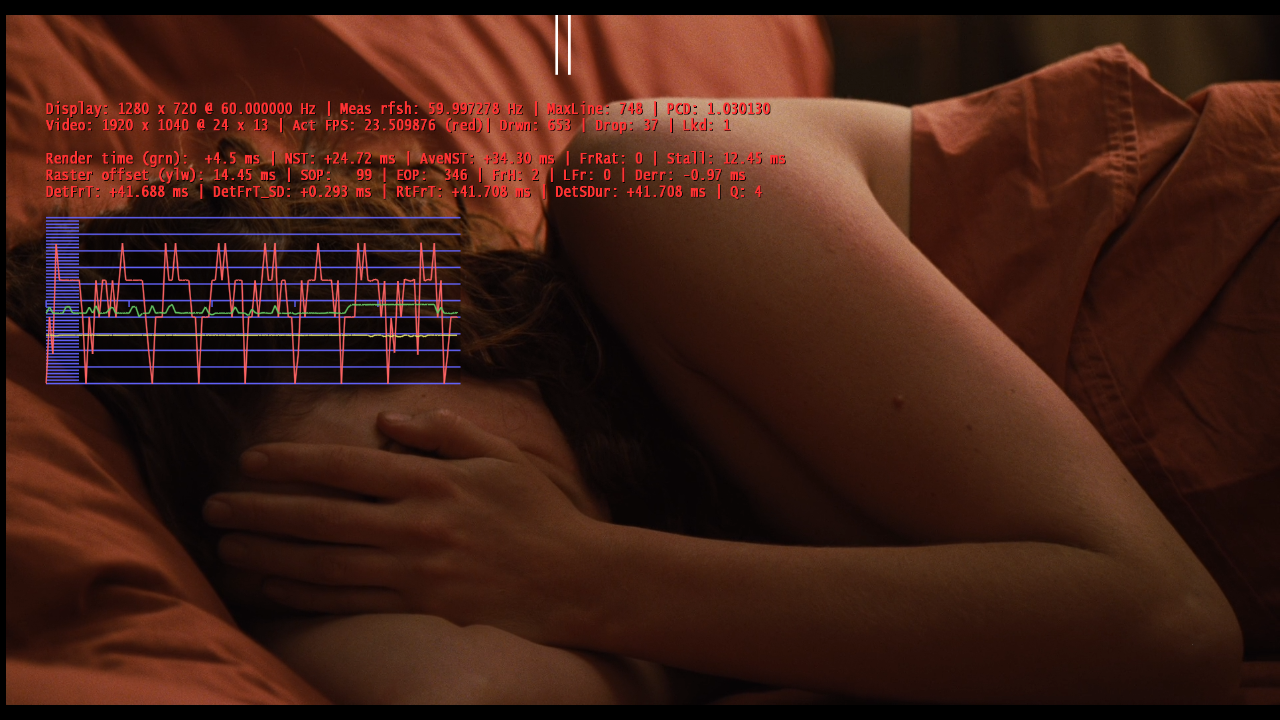
    I'm not at home and have no logs to post but I just noticed the same issue (over the weekend) when I'm playing back an .mkv 23.9xx fps using DivX codec and SPDIFer under 1.2 Beta that had been playing just fine under 1.1.3 -- for me this is the first time I've had unsteady video playback of .264 material. (If I play the same file under MPC-HC it plays rock solid.) I see the jittery Red line as shown in the screenshot as well as a timebase variation where the video seems to speed up/slow down and you can see this in the double white bar as it progresses from left to right it's not a constant motion. I don't know what to try so I tried the Framerate setting in the config - to set to 24 fps for cinema - even though my PJ supports 1080p at 24Hz this wasn't the answer. I unset the option and am just now seeking help on the forums. I can post logs later tonight to illustrate my point. And I use a single monitor at a time - switching between a PJ and a WS monitor when the PJ is powered off.
     

    Owlsroost

    Retired Team Member
  • Premium Supporter
  • October 28, 2008
    5,539
    5,038
    Cambridge
    Home Country
    United Kingdom United Kingdom
    Hi Andrew - a screen cap of the render stats screen to go with the logs would be useful too.

    Could you do logs and render stats for the 24Hz projector situation as well please ?

    Tony
     

    Andrew H

    MP Donator
  • Premium Supporter
  • September 8, 2007
    574
    42
    Alabama
    Home Country
    United States of America United States of America
    Here's a log and a screenshot. I'd already unchecked the refresh rate utility in CONFIGURATION though. I can get you more, let me know.
     

    Attachments

    • 21-49-56.png
      21-49-56.png
      974.2 KB

    greybox

    MP Donator
  • Premium Supporter
  • January 23, 2009
    652
    168
    Home Country
    Canada Canada
    Re: MKV Stuttering with Windows 7 aero theme enabled

    Screen tearing - Wikipedia, the free encyclopedia

    Tearing wont be visible from a screenshot since it will happen later in the video chain.

    Now I know what to look for, but nope, I checked again and I can't see any tearing with aero disabled. Good news, but against the theory, right?

    Refresh rate has been same @60Hz on both monitors. Doesn't help with stuttering problem when aero enabled.
    By the way, classic media player - smooth playback in both aero and basic mode.
     

    Owlsroost

    Retired Team Member
  • Premium Supporter
  • October 28, 2008
    5,539
    5,038
    Cambridge
    Home Country
    United Kingdom United Kingdom
    Here's a log and a screenshot. I'd already unchecked the refresh rate utility in CONFIGURATION though. I can get you more, let me know.

    Hi Andrew,

    Your problem looks quite different to greybox's - your red line is all over the place (rather than having the regular sawtooth profile I'd expect with 24Hz-on-a-60Hz monitor).

    Have you tried a different h.264 decoder ?

    Does 60Hz material play OK ?

    Tony

    (I do test MP quite a lot with 24Hz-on-a-60Hz monitor - the laptop I use for development runs at 60Hz, and it plays OK)
     

    Owlsroost

    Retired Team Member
  • Premium Supporter
  • October 28, 2008
    5,539
    5,038
    Cambridge
    Home Country
    United Kingdom United Kingdom
    Re: MKV Stuttering with Windows 7 aero theme enabled

    Screen tearing - Wikipedia, the free encyclopedia

    Tearing wont be visible from a screenshot since it will happen later in the video chain.

    Now I know what to look for, but nope, I checked again and I can't see any tearing with aero disabled. Good news, but against the theory, right?

    Refresh rate has been same @60Hz on both monitors. Doesn't help with stuttering problem when aero enabled.
    By the way, classic media player - smooth playback in both aero and basic mode.

    Another possibility is that the video card is running out of performance when driving two monitors - if you disconnect one of them so it's running as a single-screen system, does it play smoothly ?

    EDIT: Another thought - I notice you are running nVidia drivers 267.24 - might be worth going back to 258.96 to see if it improves things. nVidia changed something in the 260 and newer drivers which can cause stutter/pauses in video playback on some cards/systems - particularly when using Aero and rendering video to 3D surfaces (as is the case with MP). It was quite bad with some 'Fermi' based cards (I run a GT430) - I don't know if it affects the older cards.

    Tony
     

    greybox

    MP Donator
  • Premium Supporter
  • January 23, 2009
    652
    168
    Home Country
    Canada Canada
    1. Upgraded the video driver 270.61 (the latest one) - same problem.
    2. Downgraded the video driver to 258.96 - same problem
    3. Disconnected the LCD monitor - problem gone.

    Since "no aero" theme does't seem to cause any problems, I will just use basic no-aero theme with the latest video driver for now.

    The question still remains: I tried all sorts of video formats and why I don't have any tearing problems with aero off?
     

    Owlsroost

    Retired Team Member
  • Premium Supporter
  • October 28, 2008
    5,539
    5,038
    Cambridge
    Home Country
    United Kingdom United Kingdom
    Actually, I don't get tearing with Aero turned off (but I get some other issues - on Vista - so I prefer to have Aero on).

    If it's working fine, don't worry about it :)

    Tony
     

    Users who are viewing this thread

    Top Bottom