
You are using an out of date browser. It may not display this or other websites correctly.
You should upgrade or use an alternative browser.
You should upgrade or use an alternative browser.
MP-TVSeries v4.3.6 Release [2020-01-24] (22 Viewers)
- Thread starter ltfearme
- Start date

- March 23, 2012
- 614
- 745
- 59
- Home Country
-
 Germany
Have found a problem concerning season artwork. Just did a test with the Series "Limitless". A good test case, as it has only one season (very sad that they have discontinnued it  ),
),
The poster/banner for the series get imported,
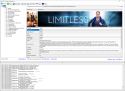
but the season remains emtpy...
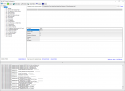
Any clue what's going wrong?
),The poster/banner for the series get imported,
but the season remains emtpy...
Any clue what's going wrong?
- March 23, 2012
- 614
- 745
- 59
- Home Country
-
Germany
Thank you for the info , so I have to wait. Yes they take really long to resolve their problems after switching to V3.
Looks like they didn't spend not too much time in testing before switching to V3, as the most bugs are really obvious...
, so I have to wait. Yes they take really long to resolve their problems after switching to V3.Looks like they didn't spend not too much time in testing before switching to V3, as the most bugs are really obvious
...
- Thread starter
- Moderator
- #305
@RoChess, I had a quick look at the search API, the plugin tries to get all languages like so:
https://www.thetvdb.com/api/GetSeries.php?seriesname=titans+2018&language=all
You will notice that all the series are returned with <language>all</language> instead of their corresponding language e.g "en" now! This is important to how we found the best match previously.
It's hard to say whether they will bother fixing this (they must not think 'all' is valid anymore). What I could do is tweak the search such I first search for the selected online language e.g. language=fr and if 0 results, try with "en"...and also tweak the way we find the best result.
https://www.thetvdb.com/api/GetSeries.php?seriesname=titans+2018&language=all
You will notice that all the series are returned with <language>all</language> instead of their corresponding language e.g "en" now! This is important to how we found the best match previously.
It's hard to say whether they will bother fixing this (they must not think 'all' is valid anymore). What I could do is tweak the search such I first search for the selected online language e.g. language=fr and if 0 results, try with "en"...and also tweak the way we find the best result.
Last edited:
- Thread starter
- Moderator
- #307
I have just made some very risky changes to the series matching logic, fixed a few bugs along the way too. I also added a new experimental feature to match the series using the folder name:
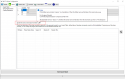
It's disabled by default, if it works as expected then I may make default if agreed upon.
It's disabled by default, if it works as expected then I may make default if agreed upon.
- Thread starter
- Moderator
- #308
New build, as mentioned above this build is about improving the way series name matching works.
Please ensure if you are reporting a series match not working correctly, then attach a debug log of the event:
1. Ensure Debug logging is enabled. From MediaPortal Configuration->General->Log Verbosity=Debug;
2. Enter MP-TVSeries configuration;
3. Run Import (ensuring that it does a scan of the file(s) that are having problems).
NB: I did not make any changes to the way files are parsed locally except for series names being retrieved from local folder name, the main changes are how the series names are being matching online.
The best way to help confirm whether this is working well or not is too to start fresh, you don't need to throw away your database, just back it up so you can revert back after testing:
1. Backup your database;
2. Delete your database;
3. Start MP-TVSeries configuration;
4. Add your import paths;
5. Set your online language (if needed);
6. Optionally enable "Set series name basis folder name";
7. Run Import.
Hopefully the series matching is much better. If it's not, please upload a log and detail the issue so I can improve it.
Please ensure if you are reporting a series match not working correctly, then attach a debug log of the event:
1. Ensure Debug logging is enabled. From MediaPortal Configuration->General->Log Verbosity=Debug;
2. Enter MP-TVSeries configuration;
3. Run Import (ensuring that it does a scan of the file(s) that are having problems).
NB: I did not make any changes to the way files are parsed locally except for series names being retrieved from local folder name, the main changes are how the series names are being matching online.
The best way to help confirm whether this is working well or not is too to start fresh, you don't need to throw away your database, just back it up so you can revert back after testing:
1. Backup your database;
2. Delete your database;
3. Start MP-TVSeries configuration;
4. Add your import paths;
5. Set your online language (if needed);
6. Optionally enable "Set series name basis folder name";
7. Run Import.
Hopefully the series matching is much better. If it's not, please upload a log and detail the issue so I can improve it.
Attachments

- Moderator
- #309
Great, Will try, in fact, removed the DB and testing currently, Sonarr create the folder with a dot inside like :
Star.Trek.Discovery
Then with the new option, it didn't match, I need to remove the dots like:
Star Trek Discovery
So maybe it can be improved? or not lol
Star.Trek.Discovery
Then with the new option, it didn't match, I need to remove the dots like:
Star Trek Discovery
So
maybe it can be improved? or not lol
- Thread starter
- Moderator
- #310
Silly Sonar I could do some processing on the folder name but I figured if you have dots in them, then you might want it...I will have a think about it.
How did the rest go when the folder name was right?
I could do some processing on the folder name but I figured if you have dots in them, then you might want it...I will have a think about it.How did the rest go when the folder name was right?
Last edited: