
My Films 5.1 released (19.09.2011) - V5.1.0.1468 (MP 1.2.0) (2 Viewers)

pellegj

Portal Pro
May 7, 2009
106
32
Home Country
Sweden Sweden
Re: AW: Re: My Films 5.1 released (19.09.2011) - V5.1.0.1468 (MP 1.2.0)

No, did not work on the other machine either.
Nothing in logs.
Attaching xml-file if that will help.
Hi pellegj,
I can confirm, that the xml you posted cannot be imported by the filter (missing base fields).
It is due to missing fields - can you try to set the export fields in MovingPicturesXML to "all fields"?
Note: I did not get the error message, you posted before - just a message of MyFilms that an exception ocurred due to missing fields.

Tried that, still got the same.
New file attached.
Am i using the correct version of MovingPicturesXML? 1.1.6? Running MP 1.2.0 RC atm.
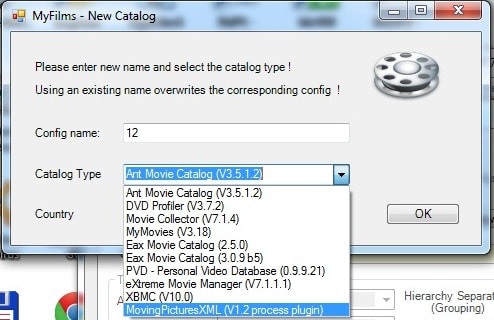
As you can see in xml1 the option is available when clicking the NEW button or using the wizard.
In xml2 you can see that the option don't exist anymore, which i think is what causes the exception to happen on my systems.
 

Attachments

  • xml1.jpg
    xml1.jpg
    57.7 KB
  • xml2.jpg
    xml2.jpg
    60 KB
  • Moving-PicturesXML.zip
    153.5 KB

Guzzi

Retired Team Member
  • Premium Supporter
  • August 20, 2007
    2,159
    750
    AW: Re: AW: Re: My Films 5.1 released (19.09.2011) - V5.1.0.1468 (MP 1.2.0)

    No, did not work on the other machine either.
    Nothing in logs.
    Attaching xml-file if that will help.
    Hi pellegj,
    I can confirm, that the xml you posted cannot be imported by the filter (missing base fields).
    It is due to missing fields - can you try to set the export fields in MovingPicturesXML to "all fields"?
    Note: I did not get the error message, you posted before - just a message of MyFilms that an exception ocurred due to missing fields.

    Tried that, still got the same.
    New file attached.
    Am i using the correct version of MovingPicturesXML? 1.6? Running MP 1.2.0 RC atm.

    Hi pellegj,
    this one imports fine here with 331 movies - all seems fine and I can use it in MyFilms GUI..
    So to "hunt your exception" I would need logs and config (at least MyFilms.log, error.log from logdirectory and myfilms.xml from MP data directory).

    Your version of MoPiXML should be fine - also running on MP1.2RC should be no problem.
     

    Guzzi

    Retired Team Member
  • Premium Supporter
  • August 20, 2007
    2,159
    750
    AW: Re: AW: Re: My Films 5.1 released (19.09.2011) - V5.1.0.1468 (MP 1.2.0)

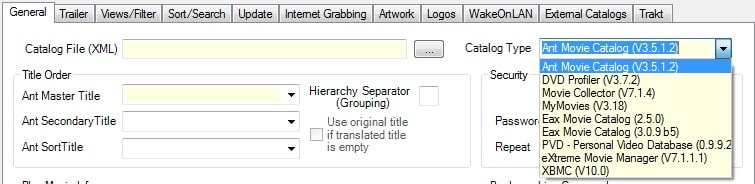
    As you can see in xml1 the option is available when clicking the NEW button or using the wizard.
    In xml2 you can see that the option don't exist anymore, which i think is what causes the exception to happen on my systems.
    Gotcha ... you are right - and I couldn't reproduce the error here as I was running in a "test mode".
    After changing to normal mode, I can reproduce the behaviour you got.
    This is caused by a function not being unlocked for "normal mode".
    Fix will be included in next version (V5.1.1) - If you'd like to have a fix before, I can send you a link via PM.
     

    pellegj

    Portal Pro
    May 7, 2009
    106
    32
    Home Country
    Sweden Sweden
    Re: AW: Re: AW: Re: My Films 5.1 released (19.09.2011) - V5.1.0.1468 (MP 1.2.0)

    As you can see in xml1 the option is available when clicking the NEW button or using the wizard.
    In xml2 you can see that the option don't exist anymore, which i think is what causes the exception to happen on my systems.
    Gotcha ... you are right - and I couldn't reproduce the error here as I was running in a "test mode".
    After changing to normal mode, I can reproduce the behaviour you got.
    This is caused by a function not being unlocked for "normal mode".
    Fix will be included in next version (V5.1.1) - If you'd like to have a fix before, I can send you a link via PM.

    Ah thx, thought it was my systems :)
    Yes please, I'd like the fix.
     

    ap90033

    MP Donator
  • Premium Supporter
  • March 24, 2011
    198
    10
    Home Country
    United States of America United States of America
    Re: [Blog] My Films 5 - the future is here!

    I am new to this, and what you have looks awesome. I installed and pointed to my films which is on a NAS setup as my Y drive. However, My films only sees one film and not the others. Can someone tell me what I am doing wrong?
     

    TLD

    Portal Pro
    October 26, 2007
    985
    428
    Rainy Washington
    Home Country
    United States of America United States of America
    Re: [Blog] My Films 5 - the future is here!

    Just taking a guess here but MyFilms is set by default to expect that each movie is in it's own folder with the movie name and is seeing the folder that all your movies are in, if your movies are individual files like "movie.avi" then you need to change the default behavior to look for files instead of folders at the bottom of the "internet grabbing" tab in MyFilms configuration.
     

    ap90033

    MP Donator
  • Premium Supporter
  • March 24, 2011
    198
    10
    Home Country
    United States of America United States of America
    Re: [Blog] My Films 5 - the future is here!

    Just taking a guess here but MyFilms is set by default to expect that each movie is in it's own folder with the movie name and is seeing the folder that all your movies are in, if your movies are individual files like "movie.avi" then you need to change the default behavior to look for files instead of folders at the bottom of the "internet grabbing" tab in MyFilms configuration.

    I have each movie in a seperate folder. They are on my NAS which is a mapped network drive. It seems to see the first folder/movie and thats it.
     

    Dadeo

    Docs Group Manager
  • Premium Supporter
  • November 26, 2006
    5,340
    3,321
    Himalayas, India
    Home Country
    Canada Canada
    Re: [Blog] My Films 5 - the future is here!

    hi ap90033 how did you set up My Films? As you said you are new, I am guessing you used the Setup Wizard to set up the Sample Movies DB to give My Films a try?

    If you installed the SampleMovies database, then the DB will be empty until you add data, and artwork, see the Wiki page Sample Movies DB to learn how to import data for first time.
     

    doveman

    Portal Pro
    February 12, 2008
    2,326
    178
    Home Country
    United Kingdom United Kingdom
    I'm not having much luck getting My Films working :(

    When I run the Setup Wizard it all seems to go fine, but after clicking Save and unticking "Display Always Configuration Menu", the fields get emptied! It still shows the name I selected "My Films" in the Configuration Name box. After Quitting the config and re-opening it, even that box is empty and clicking the dropdown there is nothing to choose from :confused:
     

    Users who are viewing this thread

    Top Bottom