My Films 6.0 beta released ! (19.10.2012) - V6.0.0.2616 (MP 1.2.x & 1.3 alpha) (2 Viewers)

Status
Not open for further replies.

Guzzi

Retired Team Member
  • Premium Supporter
  • August 20, 2007
    2,159
    750
    • Thread starter
    • Moderator
    • #61
    Yes, it is - it acts the sasme, asw the grabber engine works later. Would you prefer to search non casesensitive? That might be confusing, if the grabber afterwards does not find it !?
    When searching words and strings in the code of a web to create/edit a grabber, I think it's better case insensitive
    Can you please add issue to tracker, will see if that can be changed. I personally also prefer that, as it makes the "workflow" easier ;-)
     

    totopsgr

    MP Donator
  • Premium Supporter
  • August 15, 2011
    108
    13
    52
    Abu Dhabi, UAE
    Home Country
    Greece Greece
    Hi Guys,

    I just updated to the latest StreamedMP skin that supports myfilms 6. Then I installed myfilms 6. When I start Myfilms I get the message that I need to update myfilms skin to 1.0 from 0.0 that I have now. What am I missing?
     

    vrm42

    Portal Pro
    April 24, 2007
    131
    28
    Home Country
    Hungary Hungary
    Funny, it looks like it's random whether import will be successfull or not...
    I deleted all files except those 5 above, plus 3 (randomly selected), and I got 3 errors.
    Next time I got 4. Next time no errors...

    But Eclipse is always a trailer.
     

    Guzzi

    Retired Team Member
  • Premium Supporter
  • August 20, 2007
    2,159
    750
    • Thread starter
    • Moderator
    • #64
    Hi Guys,

    I just updated to the latest StreamedMP skin that supports myfilms 6. Then I installed myfilms 6. When I start Myfilms I get the message that I need to update myfilms skin to 1.0 from 0.0 that I have now. What am I missing?
    It seems, the updated MyFilms 6 skin files didn't make it into the streamedMP release (I just installed and tested).
    The skin files posted for testing are ok and compatible - the ones in the StreamedMP package not.
    Please report to SMP team, so they can fix it for next release.
     

    Guzzi

    Retired Team Member
  • Premium Supporter
  • August 20, 2007
    2,159
    750
    • Thread starter
    • Moderator
    • #65
    Funny, it looks like it's random whether import will be successfull or not...
    I deleted all files except those 5 above, plus 3 (randomly selected), and I got 3 errors.
    Next time I got 4. Next time no errors...

    But Eclipse is always a trailer.
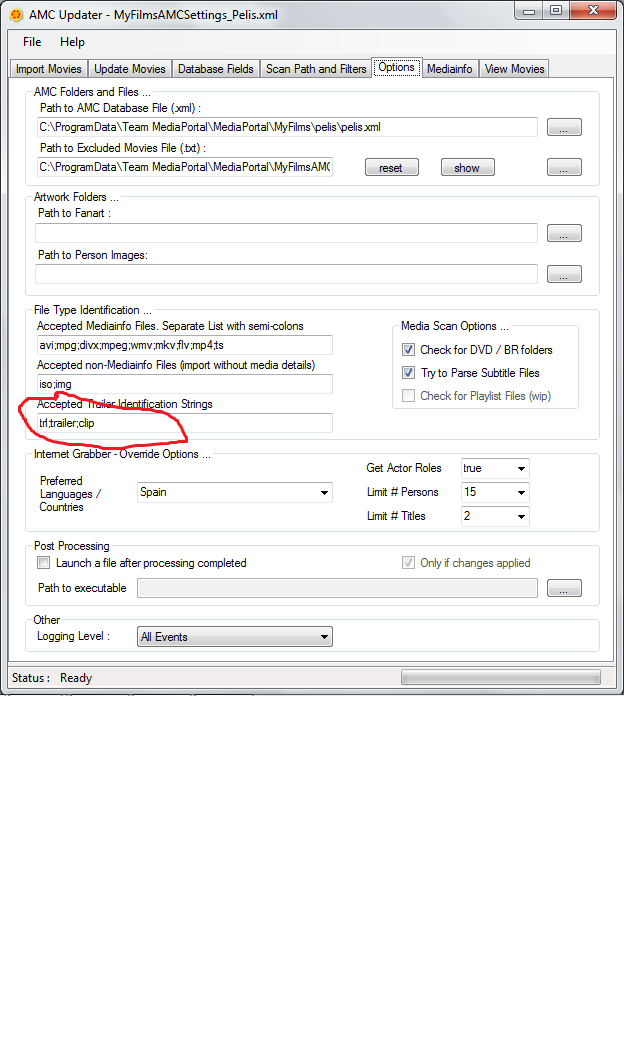
    For sure Eclipse has the signature for trailer detection somewhere in the filename - e.g. "trl".
    Re other random errors: Difficult to investigate, as it is not really reproducable. Once you find something that is, I am happy to debug.
     

    z3us

    Portal Pro
    December 4, 2007
    1,047
    123
    46
    Home Country
    Spain Spain

    Attachments

    • mf.png
      mf.png
      62.9 KB

    z3us

    Portal Pro
    December 4, 2007
    1,047
    123
    46
    Home Country
    Spain Spain
    Funny, it looks like it's random whether import will be successfull or not...
    I deleted all files except those 5 above, plus 3 (randomly selected), and I got 3 errors.
    Next time I got 4. Next time no errors...

    But Eclipse is always a trailer.
    For sure Eclipse has the signature for trailer detection somewhere in the filename - e.g. "trl".
    Re other random errors: Difficult to investigate, as it is not really reproducable. Once you find something that is, I am happy to debug.
    The film "A knight's tale". The url of details is the right one, but for any reason, it don´t charge the code.
     

    Guzzi

    Retired Team Member
  • Premium Supporter
  • August 20, 2007
    2,159
    750
    • Thread starter
    • Moderator
    • #69
    But Eclipse is always a trailer.
    Look here

    Thanks, I thought it was hard-coded. I cleared this field since I don't have any trailers.
    No problem for now - but remember that, when you use MyFilms 6.1 - it does contain automatic trailer download - and then this setting is required to avoid those are detected as films - so it also works as "exclusion".
     

    Dadeo

    Docs Group Manager
  • Premium Supporter
  • November 26, 2006
    5,340
    3,321
    Himalayas, India
    Home Country
    Canada Canada
    Gonna sound really thick here but does anyone have a step by step guide to setting this up?
    Here's the 'quick' version ;)

    If you have a movie catalog already My Films is designed to let you use it.
    1. Run the Setup Wizard - answer 3 questions
    2. Point My Films to your existing catalog
    3. You're ready to go
    Ofc you may want to customize a bit more, like where you want to store covers, fanart, person images etc, what views you might want to add, etc. that's why the wiki is so huge - because you can setup My Films however you like - depending what types of media you have, how you want to store them, or 'group' them, if you have a network and prefer centralized data and configuration to deploy on clients, where you store local trailers etc. But you can always add those features as you learn more. You can just start with the default presets and they should work for you.

    If you don't have a movie catalog already it's pretty much the same as above except in the Wizard you select new, empty database. Then the wizard will open the Import Tool (AMC Updater) at the end, to scan and import your films.

    The 'problem' is that until you learn just how much flexibility My Films offers, you don't necessarily know how to decide which options/methods to use. That's why My Films provides a Sample Database for you to play around with - so you can learn the features and then decide how you want to set up everything for your own needs - multiple databases, multiple users, different configs/settings for different users or databases, etc.

    Does that help?
     
    Last edited:
    Status
    Not open for further replies.

    Users who are viewing this thread

    Top Bottom