My small contribution I call - StreamTV (1 Viewer)

Valk

Portal Pro
February 25, 2006
302
108
Home Country
Australia Australia
A special update.

Since it has been a while and a few people have shown keen interest in transcoding I thought I might just throw this little update out there.

This build has my initial efforts at transcoding running. To try it you just have to change the file extension from .ts to .mpg and it will use mencoder to transcode the video.

I'm only putting this build in a post and not on the main page because it's a debug build and is definitely not ready for mainstream use.

That said it shouldn't cause any issues.

Also the installation is a tad harder so I don't want to support everyone for a half complete feature.

Anyway to install: copy all the files in the archive into your TvServer folder.
go to your ProgramData folder for mediaportal (normally located: C:\ProgramData\Team MediaPortal\MediaPortal TV Server) and copy Gentle.config into your TvServer folder. If you can't find your programdata folder you can always start up the TvServer config tool and go to the logs folder, if you go up one directory from there you should see Gentle.config.

To use this build you need to run ConsoleTestTool.exe as administrator otherwise it will crash.

When you tune to a channel for the first time it might not play, if that is the case just hit any key while having the ConsoleTestTool window highlighted and it will quit. Start up the test tool again and tune to the same channel, 2nd time should work.

The debug build will only run on port 9000, if you overwrite StreamTv.dll and the plugin still runs normally (haven't tested) any changes to the port will be ignored.

This build also removes case sensitivity (Except the query string, which still is).

If you don't want to overwrite files in the TvServer folder and have the console test tool you can put it in a new folder but it will require the following files copied from the TvServer placed in the new folder.

Gentle.Common.dll
Gentle.Framework.dll
Gentle.Provider.MySQL.dll
Gentle.Provider.SQLServer.dll
log4net.dll
MySql.Data.dll
TvBusinessLayer.dll
TvControl.dll
TVDatabase.dll
TvLibrary.Interfaces.dll

and Gentle.config will be required also.
 

Attachments

  • Special Build.zip
    30.6 KB

nicx

Portal Pro
February 1, 2006
387
12
Stuttgart
Home Country
Germany Germany
hi valk,

your special version isnt even starting on my system, the configured port is not listening. i copied all content to my tvserver folder, even the gentle.config file. i restarted my server but with no luck. any hints?

thanks,
nicx...
 

Valk

Portal Pro
February 25, 2006
302
108
Home Country
Australia Australia
I guess I'll go over the main points:

- This is a debug build, it isn't for mainstream use and isn't ready for use to stream over the internet. It is just a proof of concept release.
- The debug build forces the port to 9000 regardless of what is configured. e.g. http://localhost:9000/TvServer/ChannelList.rss
- The TvServer service still needs to be running while this build is in use.
- You might have to tune into the channel twice before you will be able to watch the stream.
- MEncoder won't release the tv tuner so even after you close the stream it won't release the tuner. Restart the TvServer service.
- The transcoding parameters are just something I found on the internet and statically set, you can't change them (yet).
- To use the transcoder you only need to change the file extension from .ts to .mpg e.g. http://localhost:9000/TvServer/TimeShift.mpg?ChannelId=5
- Read my previous post, it isn't the clearest post but the information needed is there.
- The special build does work.

If you have trouble don't worry about this build, wait for an offical release.
 

nicx

Portal Pro
February 1, 2006
387
12
Stuttgart
Home Country
Germany Germany
hi valk,

thanks for your detailed explanation, now its clear to me :) the transcoding works fine so far with this build, can't wait for the stable release ;)
nicx...
 

el-Dia

MP Donator
  • Premium Supporter
  • July 27, 2009
    28
    4
    Home Country
    Norway Norway
    First and most important, thanks a lot for this great plugin and all your work.
    I've been trying a previous version (before streamtv 2) for a while with great success over the internet. Adding the .rss link into VLC podcast configuration, listed all channels in the VLC playlist.

    My challenge was opening the .rss from inside a M.P. client. Tested the Online videos plugin, and got the channel list. But could never configure a combination of container and codec that could be played inside M.P. client (Checked VLC’s compatibility chart of codecs & containers)
    Just tested both your latest (worked great without transcoding and VLC .rss podcast playlist gave error)
    But the special build, couldn't get it to work. :(
    Wanted to reinstall the latest pre-streamtv 2 version but I can't seem to find any previous versions (0.1.8.62 ?) (And also test this with the IPTV plugin)
    Is this available somewhere?
    Looking forward to test the final release of your special build.
    Thank you very much!
     

    Valk

    Portal Pro
    February 25, 2006
    302
    108
    Home Country
    Australia Australia
    Interesting el-Dia, I didn't expect the old version was worth saving. That said I horde things so I have a copy still, hopefully the version attached to this post is what you were after.

    If your looking for transcoding hold off on the test build but you might want to start thinking about the parameters you want to use with mencoder (hint).

    If your having trouble with vlc listing as a podcast you can edit the xslt file yourself (StreamTv\Transform\ChannelList.rss.xslt) to fix the issue though it works fine for me.

    Good luck with the old version, hopefully you can move over to StreamTv2 soon (though it will be renamed back once i'm happy with it).

    Also if you want RTSP support like the old version you should be able to add onto the query string RTSP=true and it should work like the old version did.

    If you want the RSS feed to generate with that in the query string by default you probably want to edit the sections with:
    Code:
    <link>
      <xsl:value-of select="link" />
    </link>

    and change it to:
    Code:
    <link>
      <xsl:value-of select="link" />&RTSP=true
    </link>

    That is a guess off the top of my head but it might work.

    I imagine you want the old version for VLC so you can transcode though so i'll leave that up to you.
     

    Attachments

    • StreamTv.zip
      30.6 KB

    andri

    Portal Member
    July 16, 2009
    13
    0
    Home Country
    Iceland Iceland
    tryed the debug version and it seems to work fine.
    though I'm puzzled by the transcoding parameters, what are they? I don't see a lot of difference between the two?
    does the server fall back to .ts format if the transcoding fails?

    I also tried the rtsp and just get an error in vlc when trying to play
    Your input can't be opened:
    VLC is unable to open the MRL 'rtsp://mediaportalTEST/stream1.0'
     

    Valk

    Portal Pro
    February 25, 2006
    302
    108
    Home Country
    Australia Australia
    It should work fine, there isn't that much code changed.

    I'm surprised you don't notice much, when I tried it I couldn't even read text (I was converting a 1080i stream). I took the mencoder command line from something someone posted in the ps3mediaserver forum and did a few changes to suit StreamTv.

    parameters.AppendFormat("{0} -quiet -cache 8192 -oac lavc -of lavf -lavfopts format=dvd -ovc lavc -lavcopts vcodec=mpeg2video:vbitrate=4096:threads=2:acodec=ac3:abitrate=128 -ofps 24000/1001 -o {1}", input, output);

    {0} and {1} are the input / output buffers (named pipes i'm using atm).

    I doesn't have any fallback, what would be the point, if you can't handle the transcoded stream how could you handle the original bitrate.

    The RTSP link is what mediaportal gives out to the tv client plugin. All I do is tune the channel and tell the tvserver the connection is still alive so it doesn't cut the stream off, sadly there is no way to monitor the RTSP stream so I don't know when to kick the client off.
     

    andri

    Portal Member
    July 16, 2009
    13
    0
    Home Country
    Iceland Iceland
    there seems to be some codec/transcoding error, the only difference I see is the aspect ratio.

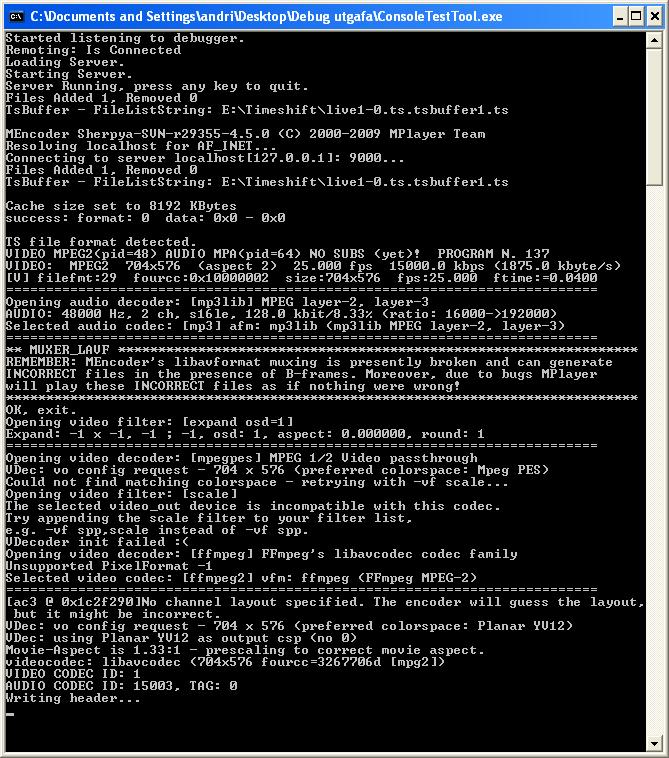
    attached is a snapshot from both streams and the server debug log.

    I also notice when turning off the server it prints a lot of Error while writing frame messages...
     

    Attachments

    • ts.png
      ts.png
      541.1 KB
    • mpg.png
      mpg.png
      448.9 KB
    • server.JPG
      server.JPG
      150.6 KB

    Valk

    Portal Pro
    February 25, 2006
    302
    108
    Home Country
    Australia Australia
    Well it was only to prove that transcoding is possible (which even a change in aspect ratio proves). I have put no research into the parameters used except to the point where they work. If the bitrate didn't change well that isn't important for now.

    That bit at the end is mencoder closing off and flushing out its cache, whatever it prints out at that point isn't important, won't cause any issues and should be ignored.

    Also in the release build you won't see that output (there is no point). I might add a debug option where it outputs mencoder to a log file or something later so people can test there custom parameters but hopefully for the normal user there will be presets which suit their needs.
     

    Users who are viewing this thread

    Top Bottom