Native Bluray, dropped frames with full subtitles (3 Viewers)

crown2999

Portal Member
February 28, 2012
24
18
42
Home Country
Spain Spain
MediaPortal Version: 1.6.0

Description
Good morning, I don't know if I have got a bug or configuration error. I try explain the case.

When I try see a bluray with full subtitles in the internal player, I've got some drop frames, if I play the same bluray without subtitles, I haven't got any drop frames. I test with diferents codecs, ffdshow, microsoft, LAV... My configuration is with LAV filter (v 0.60) with DVXA native and A/V sync in LAV Audio Codec (I try copy-back too, but it don't work well for my), with this configuration, I've got minus drop frames. I don't use MP Audio Render.

In the first reproduction I have got minus drop frames, when I stop and play again I have got more drop frames.

Sometimes, the film reproduction stop and drop frames, because the bluray unit start read quickly the disk for a moment.

This problems occurs with film The Hobbit: Unspected Journey, this evening I try with others blurays.

The rest of my configuration is, windows x64, last ATI drivers (Catalist 13.12), graphics card ATI HDRadeon 6570 and AnyDVD HD (last version). I deactivate all plugins (IFC, InfoService, ViewModeSwitcher...) when I test.

I attch Mediaportal logs.

I see too MP1-2417 bug and I see that I don't intalled Hiper-V and I've got disabled AMD's secured virtual machine in Bios.

Thanks for your support.

P.D: I don't know if it's important or no, but in AnyDVD HD I have enabled speed control and I set "slow & quiet" value for all optical drives.

Steps to Reproduce:
Start Mediaportal
Play the film and wait for drop frames.
 
Last edited:

crown2999

Portal Member
February 28, 2012
24
18
42
Home Country
Spain Spain
I attach new logs, the film is Harry Potter and the Deathly Hallows: Part II. The Mediaportal log is in INFO level, if it's necesary DEBUG say me please. In this log there are drop frames and repeat frames.

I observe a strange behavior with the optical drive. When drop or have some problem in play, the velocity of optical drive is high. I try explain, noise for a normal reproducction is low, but when drop or repeat frames the noise increases, reading isn't fluid. With other comercial reproductors, XBMC I don't have this behavior the noise is always low, reading is fluid.

Thansk.
 

Attachments

  • Mediaportal-Log-1.zip
    122.8 KB

HomeY

Test Group
  • Team MediaPortal
  • February 23, 2008
    6,418
    4,717
    51
    ::1
    Home Country
    Netherlands Netherlands

    crown2999

    Portal Member
    February 28, 2012
    24
    18
    42
    Home Country
    Spain Spain
    Hi HomeY and thanks for your response,

    I attach logs collected with WatchDog and I complete my System Specs too. If you need more details tell me please. There are 2 logs for Harry Potter (22:32 and 22:58 hours) film and 1 log for The Hobbit (23:13 hours).

    Thanks for your support.
     

    HomeY

    Test Group
  • Team MediaPortal
  • February 23, 2008
    6,418
    4,717
    51
    ::1
    Home Country
    Netherlands Netherlands
    Thanks for the logs.

    First The Hobbit (on start):
    [2014-01-17 23:03:05,566] [15033fe8] [1798] - Render stats : Display-to-video FPS ratio = 1.0001(FRR 0)| Frames dropped 0, drawn 0, repeated 0 | MPAR clk adj 0
    Then when you enable the stats:
    [2014-01-17 23:03:10,260] [15033fe8] [ dfc] - Stats enabled
    [2014-01-17 23:05:53,856] [15033fe8] [ dfc] - Dropping frame, nextSampleTime -7.92 ms, last sleep 12.09 ms, last pres -70.00 ms, paint 59.02 ms, queue count 4, SOP 175, EOP 643, RawFRRatio 1, dropped 7, drawn 4023
    [2014-01-17 23:11:51,857] [15033fe8] [ dfc] - Dropping frame, nextSampleTime -11.90 ms, last sleep 7.92 ms, last pres -74.00 ms, paint 67.31 ms, queue count 4, SOP 175, EOP 867, RawFRRatio 1, dropped 8, drawn 12606
    [2014-01-17 23:12:41,849] [15033fe8] [ dfc] - Dropping frame, nextSampleTime -40.88 ms, last sleep 0.00 ms, last pres -104.00 ms, paint 103.83 ms, queue count 3, SOP 176, EOP 727, RawFRRatio 1, dropped 9, drawn 13803
    [2014-01-17 23:12:41,859] [15033fe8] [ dfc] - Dropping frame, nextSampleTime -8.48 ms, last sleep 9.68 ms, last pres -113.00 ms, paint 103.83 ms, queue count 4, SOP 176, EOP 727, RawFRRatio 1, dropped 10, drawn 13803
    [2014-01-17 23:13:33,579] [15033fe8] [1798] - OnClockPause: 81800.803
    [2014-01-17 23:13:34,123] [15033fe8] [1798] - Render stats : Display-to-video FPS ratio = 1.0001(FRR 1)| Frames dropped 10, drawn 15043, repeated 0 | MPAR clk adj 0
    Which is caused by the Stats overlay (we know this can happen). I think those can be ignored.

    End then when the stream is ended:
    [2014-01-17 23:13:42,194] [15033fe8] [1798] - ProcessMessage MFVP_MESSAGE_ENDSTREAMING
    [2014-01-17 23:13:42,194] [15033fe8] [1798] - Render stats : Display-to-video FPS ratio = 2.0856(FRR 0)| Frames dropped 1, drawn 1, repeated 0 | MPAR clk adj 0
    1 drop ;) so that's looking good

    Now the 22:32 log from Harry Potter. This 1 is a lot weirder, since it starts with:
    [2014-01-17 22:14:18,158] [16733f90] [1170] - Render stats : Display-to-video FPS ratio = 0.0000(FRR 0)| Frames dropped 768, drawn 196608, repeated 50331651 | MPAR clk adj 0

    A bit later the streaming starts:
    [2014-01-17 22:14:19,021] [16733f90] [1170] - ProcessMessage MFVP_MESSAGE_BEGINSTREAMING
    [2014-01-17 22:14:19,021] [16733f90] [1170] - Render stats : Display-to-video FPS ratio = 1.0001(FRR 0)| Frames dropped 0, drawn 0, repeated 0 | MPAR clk adj 0
    And it's reset.

    As soon as you enable the stats again, it starts to drop frames:
    [2014-01-17 22:14:25,182] [16733f90] [ 9d0] - Stats enabled
    [2014-01-17 22:19:54,774] [16733f90] [ 9d0] - Dropping frame, nextSampleTime -12.24 ms, last sleep 0.00 ms, last pres -77.00 ms, paint 2.82 ms, queue count 4, SOP 175, EOP 251, RawFRRatio 1, dropped 7, drawn 8034
    [2014-01-17 22:19:54,816] [16733f90] [ 9d0] - Dropping frame, nextSampleTime -8.78 ms, last sleep 0.00 ms, last pres -119.00 ms, paint 2.82 ms, queue count 3, SOP 175, EOP 251, RawFRRatio 1, dropped 8, drawn 8034
    [2014-01-17 22:19:54,822] [16733f90] [1348] - ProcessMessage MFVP_MESSAGE_FLUSH
    [2014-01-17 22:19:54,850] [16733f90] [ 9d0] - Flushing: size=4
    [2014-01-17 22:20:39,612] [16733f90] [1348] - ProcessMessage MFVP_MESSAGE_FLUSH
    [2014-01-17 22:20:39,612] [16733f90] [ 9d0] - Flushing: size=5
    [2014-01-17 22:20:40,656] [16733f90] [ 9d0] - Dropping frame, nextSampleTime -5.01 ms, last sleep 0.53 ms, last pres -40.00 ms, paint 6.91 ms, queue count 4, SOP 175, EOP 363, RawFRRatio 1, dropped 9, drawn 9096
    [2014-01-17 22:27:37,376] [16733f90] [1348] - ProcessMessage MFVP_MESSAGE_FLUSH
    [2014-01-17 22:27:37,432] [16733f90] [ 9d0] - Flushing: size=4
    [2014-01-17 22:28:46,393] [16733f90] [ 9d0] - Dropping frame, nextSampleTime -11.93 ms, last sleep 0.00 ms, last pres -77.00 ms, paint 2.66 ms, queue count 4, SOP 175, EOP 247, RawFRRatio 1, dropped 10, drawn 20725
    [2014-01-17 22:28:46,402] [16733f90] [1348] - ProcessMessage MFVP_MESSAGE_FLUSH
    [2014-01-17 22:28:46,427] [16733f90] [ 9d0] - Flushing: size=4
    [2014-01-17 22:29:45,619] [16733f90] [1348] - ProcessMessage MFVP_MESSAGE_FLUSH
    [2014-01-17 22:29:45,619] [16733f90] [ 9d0] - Flushing: size=5
    [2014-01-17 22:29:52,848] [16733f90] [ 9d0] - Dropping frame, nextSampleTime -32.52 ms, last sleep 0.00 ms, last pres -95.00 ms, paint 94.96 ms, queue count 3, SOP 175, EOP 487, RawFRRatio 1, dropped 11, drawn 22276
    [2014-01-17 22:30:54,350] [16733f90] [1348] - ProcessMessage MFVP_MESSAGE_FLUSH
    [2014-01-17 22:30:54,350] [16733f90] [ 9d0] - Flushing: size=5
    [2014-01-17 22:32:24,079] [16733f90] [1170] - OnClockPause: 79331.135
    [2014-01-17 22:32:34,921] [16733f90] [1170] - Starting to estimate display refresh timings

    And on stream stop
    [2014-01-17 22:32:35,630] [16733f90] [1170] - ProcessMessage MFVP_MESSAGE_ENDSTREAMING
    [2014-01-17 22:32:35,630] [16733f90] [1170] - Render stats : Display-to-video FPS ratio = 2.0856(FRR 1)| Frames dropped 11, drawn 25882, repeated 82 | MPAR clk adj 0
    it shows 11 dropped frames, which is harmless, but (if i'm correct) evr only logs dropped frames with stats enabled.

    The start value it showed of 768 dropped frames doesn't look good.
    @Owlsroost any thoughts?
     

    crown2999

    Portal Member
    February 28, 2012
    24
    18
    42
    Home Country
    Spain Spain
    Hi and thanls for your response,

    I stop films with some frame is dropped, aleatory, now I try generate log for complete view un the films without stats, only show stats to start and to end forma take values.

    Thanks.
     

    HomeY

    Test Group
  • Team MediaPortal
  • February 23, 2008
    6,418
    4,717
    51
    ::1
    Home Country
    Netherlands Netherlands
    Can you post full debug lost after playing a Blu-ray for about 5 minutes with the stats open? That should give us more info when the frames are being dropped.
     

    crown2999

    Portal Member
    February 28, 2012
    24
    18
    42
    Home Country
    Spain Spain
    Hello, I upload new logs,

    - Harry Potter: 00:31 (5 minutes and 2 drop frames) and 00:43 (10 minutes, 3 or 4 drop frames and repeat frames)
    - The Hobbit: 01:51 (10 minutes and 3 drop frames) and 02:57 (30 minutes and 8 drop frames)

    Thanks.
     

    HomeY

    Test Group
  • Team MediaPortal
  • February 23, 2008
    6,418
    4,717
    51
    ::1
    Home Country
    Netherlands Netherlands
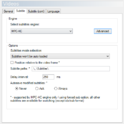
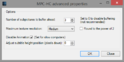
    What subtitle settings do you use?
    SubtitleSettings.PNG AdvancedSubtitleSettings.PNG
    Especially the Advanced setting for subitle buffering.

    Please disable the MiniDisplay plugin for testing, since that throws an error.

    As an alternative it would be nice to know if this problem occurs when you use the LAVSplitter (instead of BDReader).
    To test with LAVSplitter, open MP Config >> Blu-ray >> and uncheck 'Use internal Blu-ray menu player' on the bottom.
     

    Owlsroost

    Retired Team Member
  • Premium Supporter
  • October 28, 2008
    5,539
    5,038
    Cambridge
    Home Country
    United Kingdom United Kingdom
    @Owlsroost any thoughts?

    These evr.log lines

    Code:
    [2014-01-19 02:38:10,849] [15783f90] [1608] - Dropping frame, nextSampleTime -9.12 ms, last sleep 0.00 ms, last pres -71.00 ms, paint 71.47 ms, queue count 3, SOP 176, EOP 979, RawFRRatio 1, dropped 3, drawn 16599
    [2014-01-19 02:39:06,849] [15783f90] [1608] - Dropping frame, nextSampleTime -40.75 ms, last sleep 0.00 ms, last pres -103.00 ms, paint 103.13 ms, queue count 3, SOP 175, EOP 708, RawFRRatio 1, dropped 4, drawn 17940
    [2014-01-19 02:39:06,859] [15783f90] [1608] - Dropping frame, nextSampleTime -8.91 ms, last sleep 10.10 ms, last pres -113.00 ms, paint 103.13 ms, queue count 4, SOP 175, EOP 708, RawFRRatio 1, dropped 5, drawn 17940
    [2014-01-19 02:41:54,851] [15783f90] [1608] - Dropping frame, nextSampleTime -13.08 ms, last sleep 0.00 ms, last pres -75.00 ms, paint 75.18 ms, queue count 3, SOP 175, EOP 1079, RawFRRatio 1, dropped 6, drawn 21967
    [2014-01-19 02:42:06,857] [15783f90] [1608] - Dropping frame, nextSampleTime -7.21 ms, last sleep 10.88 ms, last pres -70.00 ms, paint 60.11 ms, queue count 4, SOP 175, EOP 672, RawFRRatio 1, dropped 7, drawn 22254
    [2014-01-19 02:47:44,854] [15783f90] [1608] - Dropping frame, nextSampleTime -24.17 ms, last sleep 0.00 ms, last pres -87.00 ms, paint 87.16 ms, queue count 3, SOP 175, EOP 277, RawFRRatio 1, dropped 8, drawn 30357
    [2014-01-19 02:53:26,862] [15783f90] [1608] - Dropping frame, nextSampleTime -9.22 ms, last sleep 10.70 ms, last pres -71.00 ms, paint 61.66 ms, queue count 4, SOP 178, EOP 717, RawFRRatio 1, dropped 9, drawn 38557
    [2014-01-19 02:55:36,860] [15783f90] [1608] - Dropping frame, nextSampleTime -11.15 ms, last sleep 8.57 ms, last pres -73.00 ms, paint 65.99 ms, queue count 4, SOP 176, EOP 831, RawFRRatio 1, dropped 10, drawn 41673

    ....just suggest that (very occasionally) the rendering in MP is taking a long time (paint time > frame period). No idea why, but it's probably due to the subtitle rendering.

    You could try enabling DWM queued mode - it's a registry setting in "HKEY_CURRENT_USER\Software\Team MediaPortal\EVR Presenter" - change 'EnableDWMQueuedMode' to 1.
     

    Users who are viewing this thread

    Top Bottom