ORIGINAL THREAD (OLD): About the X-Factor Skin (1 Viewer)

Status
Not open for further replies.

GrinRoth

Portal Member
January 2, 2009
36
0
Home Country
Netherlands Netherlands
Cul8er, great work again with the patch.
Showtimes look awesome now!

Could you also add official support for the tvgemist plugin?
Attached to this post you'll find skin files for it made by jpschouten and me. Please have a look at it and see if it's good enough for your release :)
Or else maybe you could use these files as a base for your version.

Another question though,
Would it be possible to create an option to alter the menu tiles in basichome?
I tried with your menu editor (which creates an xfactor.xml in programdata) and it doesn't seem to change the menu's itself.
I can add items to the menus and all, that works fine. But when i want to change the photos and images menu to photos and videos for instance it just doesn't do it.
I also tried manually editing basichome.xml and that doesn't work also :confused:

Problem is that most plugins i use are video related (mytrailers, online videos, showtimes, tvgemist etc) and there isn't a good menu available for it or i should be adding all of those to tv and movies which isn't the desired situation (1 menu with a LOT of items) and others with only 2 or 3 items in it.
You know a good solution for that?
 

Attachments

  • tvgemist.rar
    30.6 KB

Nephilim

Extension Developer
February 8, 2007
805
499
Home Country
Italy Italy
Hi,
* Supports two new plugins (Shoutcast Directory and Showtimes)

Thank you cul8er for the Showtimes Plugin skin, great work!

But, i found some minor inaccuracies:
- the selected theater isn't showed anymore
- the movie title (in details view) isn't showed if the string exceed the screen width (1360px for me)
- the Next Refresh label is showed over other text (in details view or in the Main View in List mode).

I've fixed the first 2 behaviours... But i need an help for the Next Refresh problem.

Anyway, try the file in attach and tell me if you like it...

Thank you again.

Bye,
Nephilim


EDIT: Found a bug... Sorry... Download it again...
 

Attachments

  • ShowTimesGUI.xml
    30.6 KB

bushbrother

Portal Pro
February 14, 2008
192
15
UK
Home Country
United Kingdom United Kingdom
OK tried the skin, looks great, I like the basic home screen (I normally dont use basic home with streamedMP) and I like the large covers, however I think it distracts a little from the fanart, I can hardly see it unless I goto filmstrip view.

Would it not be possible to have the transparency in the background a little more faded toward the top so that the fanart is more visible?

Great work though and I will definately be watching the skin for progress :D
 

cul8er

Retired Team Member
  • Premium Supporter
  • August 31, 2006
    2,159
    2,679
    Home Country
    Sweden Sweden
    Hi,

    Nephilim;
    * Thank you for your help. I have added your changes and it will be included in the next release.

    GrinRoth and jpschouten;
    * I will look at your skin files tonight. Big thank you for your contribution. I will include TVGemist in the next release.
    * It sounds like something is wrong with the menu editor in that case. You should be able to edit the main menu texts. I will check later today.

    bushbrother;
    Thank you for your feedback. But I don't think I will change the list view and make it more transparent. I want a distinct difference between the filmstrip view and the list view. Those who likes fanart can choose the filmstrip and those who not (and belive me there a quite a few) can choose the listview. Hope this does not make you put this skin away.

    cheers
    cul8er
     

    ToXIc

    MP Donator
  • Premium Supporter
  • April 3, 2009
    161
    1
    Home Country
    ^^

    dude i love you..... no homo..lol

    you're super quick on the updates... another reason to love this skin is the great support it has...:D
     

    cul8er

    Retired Team Member
  • Premium Supporter
  • August 31, 2006
    2,159
    2,679
    Home Country
    Sweden Sweden
    Hi,

    camoura;
    I have added more lines to TVSeries wide banners in the next version. Thank you for your feedback.

    ***********************************************************************************'

    New version of the menu editor (included in the attached xfactor.rar file)!

    Current features;
    * Five main menu items no more no less
    * You can change the text and caption for these five main menu items as you like. Change language or split TV and Movies or what ever you like
    * You can change the main menu picture of the five menu items (for example: menu one is named Movie and you can then chose a PNG file that you want on this main menu)
    * You can change the main menu picture folder of the five menu items (for example: menu one is named TV and you can then point to folder TV and when you select this TV main menu it will cycle the images in this folder)
    * You can add or remove sub menu items. Max number of submenu items per menu are 15.
    * You can edit the text and set a folder for pictures per submenu item

    In short: the menu editor is now a lot more flexible.

    Instructions:
    Text On Menu 1 - 5
    * Prefix: The prefix on menu item 1 (is View in the default basichome)
    * Text: The menu text on menu item 1 (is Photo & Images in the default basichome)
    * Image Name: The name of a .PNG file that will be the image on menu item 1 (is menu_pictures.png, an image of a camera in the default basichome)
    * Image Path: The name of a folder that contains images that will cycle when you have selected the menu (is pictures in the default basichome)

    Available Modules
    * contain all supported plugins that you can add as submenu items in this skin

    Add Module To Menu
    * When you select an item in the Available Modules list it will populate these fields.
    * Window ID: This is the plugin ID (in most cases you cannot change this)
    * Name: This is the text on the submenu as it will be in the basichome. You can edit this text before adding it to a submenu. For example: choose Moving Pictures in the Available Modules list and before pressing the >> button you can set this field to Movies. And Movies is then the text on the submenu in basichome.
    * Image Path: The name of a folder that contains images that will cycle when you have selected the submenu item. You will get a default folder for every available module but this can be changed and you can also create your own folders in the media\Animation folder and use these.
    * Add To Module: Select what menu (1 to 5) that the new submenu item should be added to.

    Save Button
    This button saves your new menu layout so that the next time you use the menu editor you do not have to start all from scratch.

    Generate New BasicHome Button
    This button generates a new basichome.xml from all the options you have made in the menu editor. REMEMBER that pressing this button only generates a new basichome.xml, it DOES NOT save your layout for next session with the menu editor. You must use the Save button to save...

    best regards
    cul8er
     

    Attachments

    • XFactor.rar
      30.6 KB

    Harmani

    MP Donator
  • Premium Supporter
  • October 13, 2008
    97
    5
    Home Country
    Netherlands Netherlands
    Could you also add official support for the tvgemist plugin?
    Attached to this post you'll find skin files for it made by jpschouten and me. Please have a look at it and see if it's good enough for your release :)
    Or else maybe you could use these files as a base for your version.

    How can i add the TVgemist plugin tot he basic home screen manually? It is not yet listed in the Menu Editor :(
     

    cul8er

    Retired Team Member
  • Premium Supporter
  • August 31, 2006
    2,159
    2,679
    Home Country
    Sweden Sweden
    Hi Harmani,

    TVGemist is currently not supported by this skin. But GrinRoth and jpschoute have helped by creating skin files for this plugin and as soon as I have had time to look at what they have done I will include it in the skin. There are a few other plugins that I have skinned and these will also be included. In the mean time you can set the TVGemist to show in Plugins (in MP Configuration). Then add plugins to the menu and it is available.

    Please be patient. This skin currently supports over 40 plugins and more is on its way :)

    best regards
    cul8er
     

    cul8er

    Retired Team Member
  • Premium Supporter
  • August 31, 2006
    2,159
    2,679
    Home Country
    Sweden Sweden
    Hi,

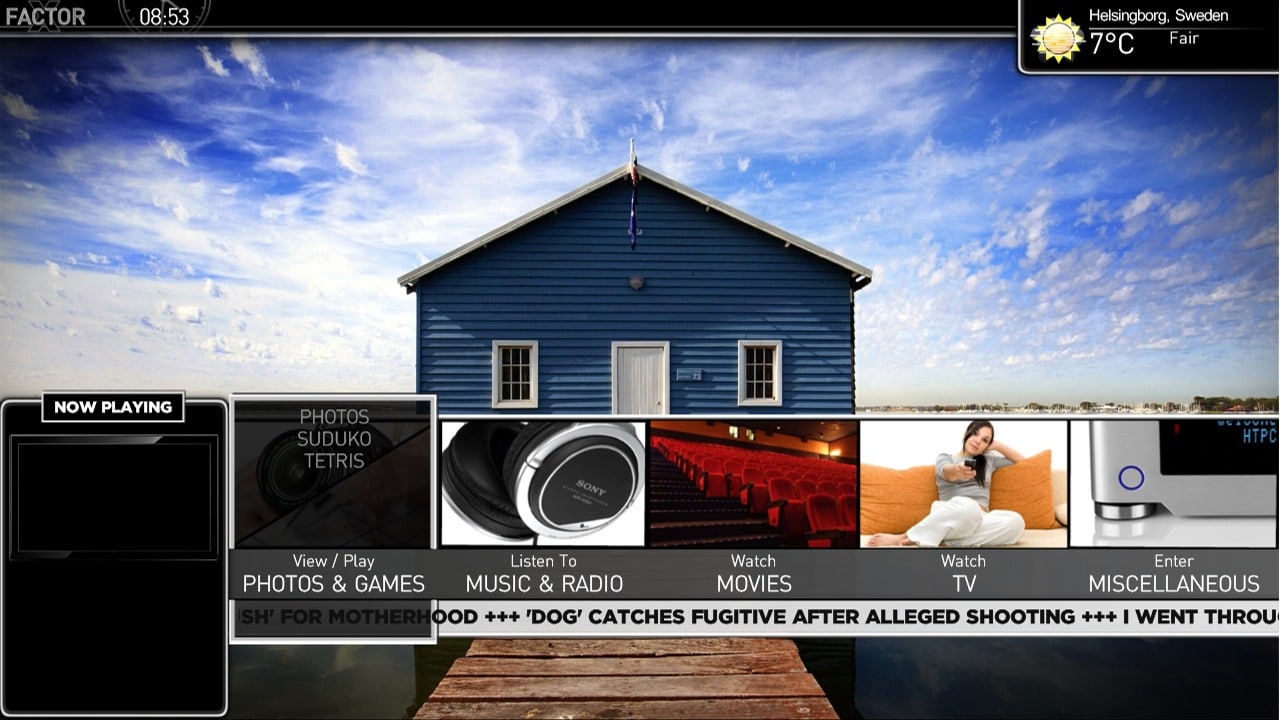
    To give you a view of what you could do with the new menu editor I attach a picture here.

    The picture show;
    * I have split TV and Movie menu to two separate main menus
    * I have combined Photos & Games
    * I have replaced the menu picture for the combined Photo & Games menu
    * I have added a new menu picture for the TV menu
    * I have moved submenues according to the new main menu structure

    cheers
    cul8er
     

    Attachments

    • tmp1.jpg
      tmp1.jpg
      213.9 KB
    Status
    Not open for further replies.

    Users who are viewing this thread

    Top Bottom