PureVisionHD 1080 (17 Viewers)

MaddinM

Portal Member
October 22, 2008
23
1
Home Country
Germany Germany
Hi,
I got a little problem with Thumbs VIew in Moving Pictures. Many movies don't show the right background, but the standard background as if there was no background available. If i switch to another movie the right background appears for a short time and then changes to the current movie.
(Example: Movie A is marked, the background of A is shown for a moment. Then it changes to standard background. I switch to Movie B, the background of A appears again and is then replaced by background B.)
In List or Cover view there's no problem. With other skins it doesn't appear, too.
This happened also in last version of PVHDX and I hoped the new Version would fix it.
I got MP 1.0.1 and Moving Pictures 0.7.3.623.
 

catavolt

Design Group Manager
  • Team MediaPortal
  • August 13, 2007
    14,896
    11,786
    Königstein (Taunus)
    Home Country
    Germany Germany
    Hi,
    I got a little problem with Thumbs VIew in Moving Pictures. Many movies don't show the right background, but the standard background as if there was no background available. If i switch to another movie the right background appears for a short time and then changes to the current movie.
    (Example: Movie A is marked, the background of A is shown for a moment. Then it changes to standard background. I switch to Movie B, the background of A appears again and is then replaced by background B.)
    In List or Cover view there's no problem. With other skins it doesn't appear, too.
    This happened also in last version of PVHDX and I hoped the new Version would fix it.
    I got MP 1.0.1 and Moving Pictures 0.7.3.623.

    Hi MaddinM and all victims of this bug!
    Please find enclosed the bugfixed xml. I´m sorry for the inconvenience :oops:
     

    Attachments

    • movingpictures.xml
      30.6 KB

    MaddinM

    Portal Member
    October 22, 2008
    23
    1
    Home Country
    Germany Germany
    BIG Thanks, großes Dankeschön.
    Now i got another Question.( I can be really annoying, no? :D)
    Is it possible to show the channel names when switching channels in MyTV.
    If I type a number the number and channel name are shown upper right on the screen.
    If I just switch channels up and down I only see the current and next show, but no info about channel number or name.
    In the skin my sister uses ("amped 2.0" 4:3) the name and number are shown left of the programm info.
    Is it possible to get those information shown while zapping?
     

    catavolt

    Design Group Manager
  • Team MediaPortal
  • August 13, 2007
    14,896
    11,786
    Königstein (Taunus)
    Home Country
    Germany Germany
    Hi MaddinM,
    when you zap channels the logo of the new channel is shown. Thought that should be enough...
     

    MaddinM

    Portal Member
    October 22, 2008
    23
    1
    Home Country
    Germany Germany
    HI, thank you for your answer.
    A logo would be enough for me too. But unfortunately i dont get any logo shown. Neither the popular channels nor the small and unknown ones.
    Do I have to download the necessary icons or activate something in the options menu?

    Edit:

    Ok, I found and installed the german tv logos and it works fine.
    But if there would be a way to show the number of the program, this would be great.

    Thanks
     

    catavolt

    Design Group Manager
  • Team MediaPortal
  • August 13, 2007
    14,896
    11,786
    Königstein (Taunus)
    Home Country
    Germany Germany
    ServicePack 1 for PureVisionHDX 2.3

    Hi to all,

    due to changes in different plugins (especially latest OnlineVideos 0.9.0, TVGemist 3.1 and others) I decided to release a "ServicePack" for PureVisionHDX 2.3.
    This SP includes changes to the screens, optimized background sizes (now using .jpg instead of .png for backgrounds) and much more.

    With the latest version of OnlineVideos 0.9.0 the bug is fixed which prevented the display of descriptions in MyFilms, TVGemist and others.

    Please copy (overwrite when asked) the content of the ZIP file into your existing PureVisionHDX folder, CLEAR THE CACHE and restart MP.

    Be aware to use the latest plugin versions!

    And of course: ENJOY!
     

    Attachments

    • PureVisionHDX 2.3 SP1.rar
      30.7 KB

    catavolt

    Design Group Manager
  • Team MediaPortal
  • August 13, 2007
    14,896
    11,786
    Königstein (Taunus)
    Home Country
    Germany Germany
    :D catavolt

    Do you also plan to update the PureVisionHD skin?

    At the moment I´m thinking about to maintain only ONE wide screen skin.

    For me the release of PureVisionHDX was a test of a new design for PureVisionHD.

    So the next release of PureVisionHD will be with the new design of the actual PureVisionHDX.
    After that the PureVisionHDX is no longer needed and we will continue with the well known name and quality of PureVisionHD.

    BTW: The next release of the PureVision 4:3 skin will also be in HDX design.
     

    Sligh Fox

    New Member
    June 3, 2009
    3
    0
    Home Country
    United Kingdom United Kingdom
    First off let me say how much i like your skins catavolt. especialy PureVisionHDX.
    But i have a couple of probs with it .
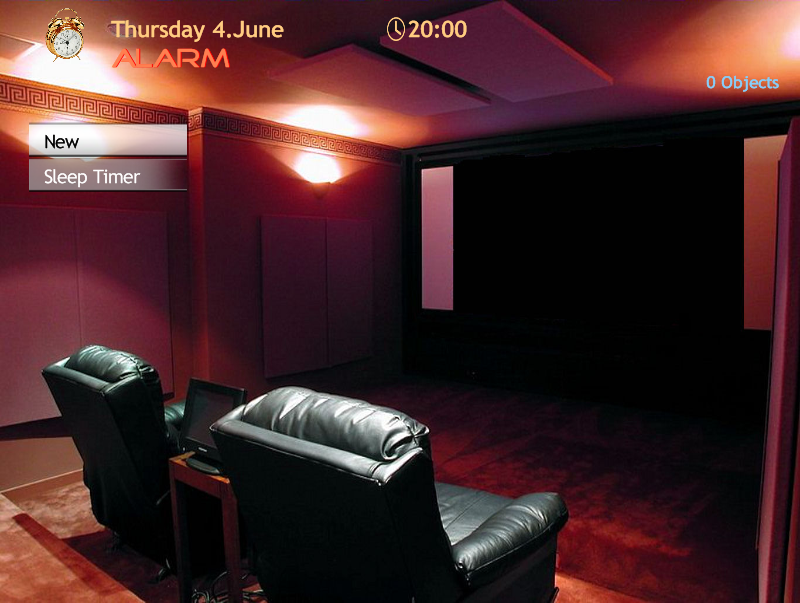
    In alarm It wont show my saved alarms (should be 4 objects)

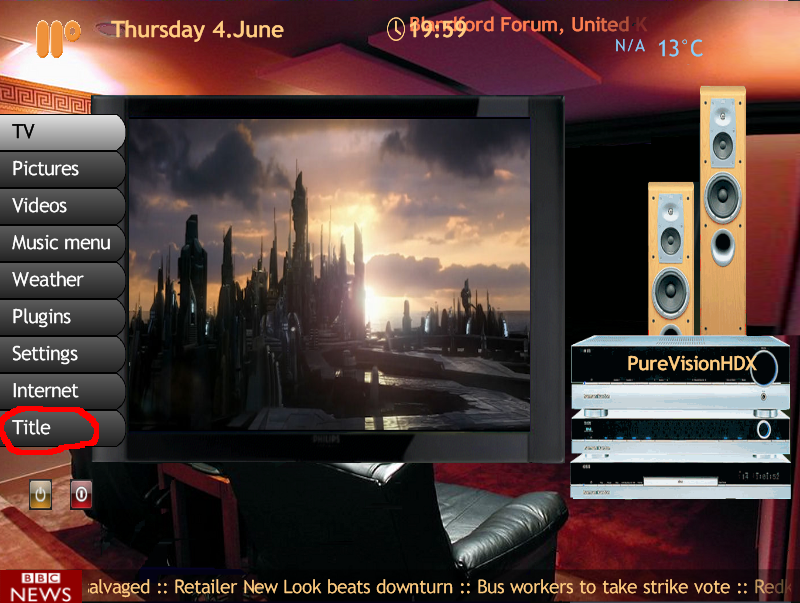
    And on basic home get Title (circled in red) instead of game menu
     

    Attachments

    • 20-00-08.png
      20-00-08.png
      482.9 KB
    • 19-59-21.png
      19-59-21.png
      802.5 KB

    catavolt

    Design Group Manager
  • Team MediaPortal
  • August 13, 2007
    14,896
    11,786
    Königstein (Taunus)
    Home Country
    Germany Germany
    PureVisionHDX is dead - Long Live PureVisionHD...

    Hi to all,

    the new version of PureVisionHD 2.3 is online!

    DL: MEDIAPORTAL - free media center - PureVisionHD 2.3

    PureVisionHD now incorporates the style of PureVisionHDX, so PureVisionHDX is no longer needed. Therefore the DL for PureVisionHDX was disabled.

    The new PureVisionHD supports nearly all actual plugin versions (see DL page). So I strongly recommend to install these versions for a smooth functioning of PureVisionHD.

    Hope you are satisfied with this new version. I made a lot of GFX and layout changes which should further improve the readability and information level of the skin.

    PLEASE NOTE: PureVisionHD now only supports the RSS and weather plugin MPInfoService (because the MP-RSSTicker has problems with MP 1.0.2 AND MPInfoService is more versatile). You may change the RSS feed by clicking on the RSS image, and you will also see the 5-day-weater forecast on BasicHome if you scroll to the Weather button.

    Hope you´ll find all you need within the new PureVisionHD 2.3!

    As always: Enjoy!
     

    Sligh Fox

    New Member
    June 3, 2009
    3
    0
    Home Country
    United Kingdom United Kingdom
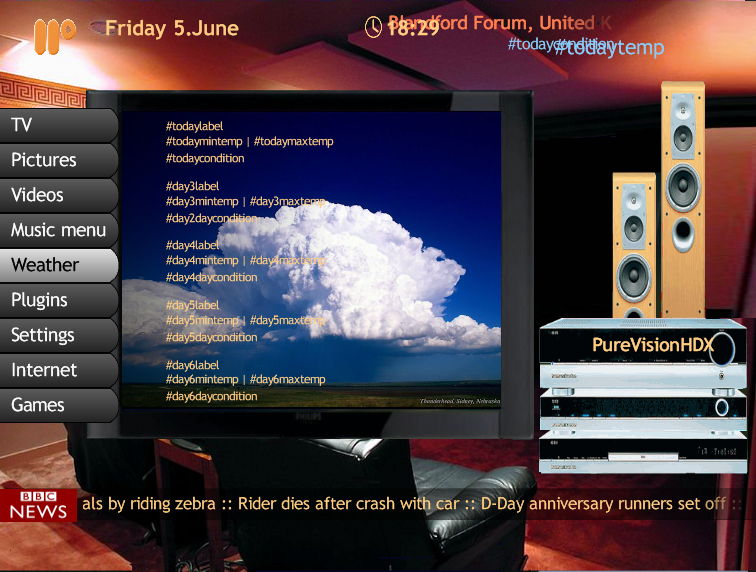
    i dont know why but i am not getting the weather in basic home or the 5-day-weater forecast on the Weather button. i just get the place labels
     

    Attachments

    • 18-29-06.png
      18-29-06.png
      504.1 KB

    Users who are viewing this thread

    Top Bottom