
You are using an out of date browser. It may not display this or other websites correctly.
You should upgrade or use an alternative browser.
You should upgrade or use an alternative browser.
SAF v4.00 ''stable'' (StandAlone Filters) - DXVA ready (H.264 and VC-1). (38 Viewers)
- Thread starter hoborg
- Start date

- Thread starter
- #1,682
well, it plays without stutter, so i think its ok. and it also seems to have DXVA because the cpu only uses about 20%....
DXVA on Intel 450GMA? No way. Maybe on GMA X4500HD (G45), but only under vista.
Check Atom CPU usage.
- September 5, 2005
- 51
- 0
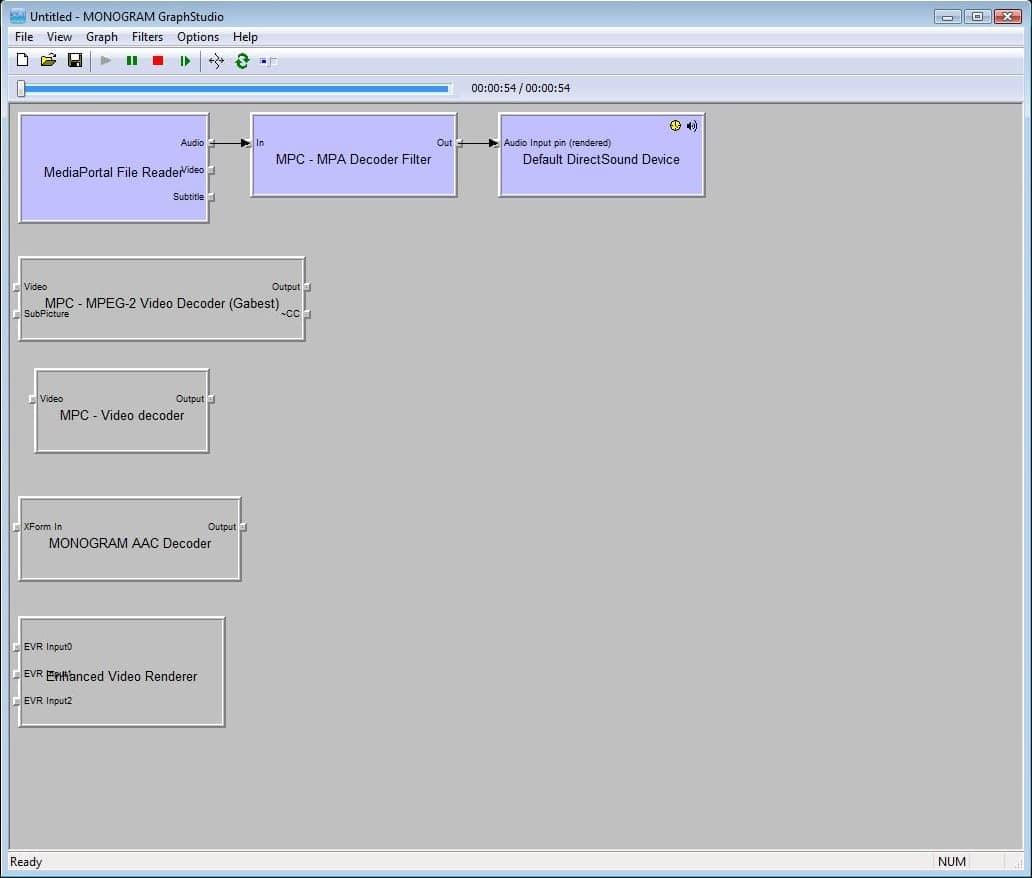
I think I know the answer to my own question but I just want to double check. I've installed SAF and everything seems to working pretty ok except for H.264/HDTV streams. When inspecting the graph the video stream just doesn't seem to get connected to the MPC Video decoder. Is this the famous "MP internal TS splitter and MPC-HC decoder"-issue?
Is there any workaround? Install a different H.264 codec just for HDTV? Any suggestions on which one?
I've attached an image of the graph when trying to view a H.264/HDTV stream (Eurosport HD)
Is there any workaround? Install a different H.264 codec just for HDTV? Any suggestions on which one?
I've attached an image of the graph when trying to view a H.264/HDTV stream (Eurosport HD)
Attachments

scrappy.doo - I recommend and use PDVD8 Build 2217aU for HDTV (H264), the very latest versions (builds) of pdvd8/9 wont work with ts reader.
I think I know the answer to my own question but I just want to double check. I've installed SAF and everything seems to working pretty ok except for H.264/HDTV streams. When inspecting the graph the video stream just doesn't seem to get connected to the MPC Video decoder. Is this the famous "MP internal TS splitter and MPC-HC decoder"-issue?
MPC and TsReader aren't compatible (TsReader issue). 0002069: TsReader is not working properly with some H264 codecs - MediaPortal Bugtracker
Not just a small issue to be fixed, so hopefully someone finds time to fix it for 1.1.0.

- January 26, 2006
- 892
- 39
- Home Country
-
 Germany
well, it plays without stutter, so i think its ok. and it also seems to have DXVA because the cpu only uses about 20%....
DXVA on Intel 450GMA? No way. Maybe on GMA X4500HD (G45), but only under vista.
Check Atom CPU usage.
well, like I said around 20%, I got the same cpu load for SD btw. That was why I came to the conclusion to have DXVA, however, even if it doesn't have it, the movies still play fine except for the sound lagging.
I'll try to play around with some other codecs (maybe ac3) and Sound settings, and report back.
- January 26, 2006
- 892
- 39
- Home Country
-
Germany
ok, seems to be fixed. I reinstalled SAF plus the latest (!) PDVD 8 filter, and I setup my soundcard as Audio renderer (not the default Directx device)now everything is running really great.
Before I had the PDVD 7.3 Ultra files installed, maybe those were the problems....
cheers + thanks!
joystick
Before I had the PDVD 7.3 Ultra files installed, maybe those were the problems....
cheers + thanks!
joystick
hoborg
Can you explain it better? Subtitles block DXVA? Internal(MKV embedded)/external subtitles?
Thanks
Yes, exactly.
All subtitles kill DXVA until MPC-HC subtitle engine will be integratet in to MP.
So lets wait.
Hi
The new Mediaportal version solve this issue?
Thanks
MR

- March 4, 2008
- 2,114
- 1,176
- Home Country
-
Netherlands
No, currently not.
But there is a kind of a patch to do this. Its still being developed, but for me it is working perfectly. No guarranties though.
You can find it in the following thread. Read it well, before you try it.
https://forum.team-mediaportal.com/...48/integration-mpc-hc-subtitles-engine-54130/
But there is a kind of a patch to do this. Its still being developed, but for me it is working perfectly. No guarranties though.
You can find it in the following thread. Read it well, before you try it.
https://forum.team-mediaportal.com/...48/integration-mpc-hc-subtitles-engine-54130/
- September 30, 2008
- 90
- 4
- Home Country
-
United States of America
OK, I seem to have an issue with MKV files. For instance, last night i watched the movie "21" and from the start it was fine, then the audio got off sync with the video (up to 5s off at some points) - later it was back in sync, then went back out again.
Question is, is this a known issue with a known fix, or no? If not I'll get logs, etc. and add them in. ISO DVD's play fine, so this is not all codecs.
Thanks!
Added: Setup is Vista x64, Enhanced (not VMR9), nVidia 8800 GTX, dual core AMD FX60, 1080p/i to Panasonic Plasma, 4gb Ram. SAF is setup to these instructions, 1.0.2 installed and SAF reinstalled after the upgrade. Just not sure where to lstart on this. I used FFDSHOW for all my video in the past, and recently went with SAF.
Question is, is this a known issue with a known fix, or no? If not I'll get logs, etc. and add them in. ISO DVD's play fine, so this is not all codecs.
Thanks!
Added: Setup is Vista x64, Enhanced (not VMR9), nVidia 8800 GTX, dual core AMD FX60, 1080p/i to Panasonic Plasma, 4gb Ram. SAF is setup to these instructions, 1.0.2 installed and SAF reinstalled after the upgrade. Just not sure where to lstart on this. I used FFDSHOW for all my video in the past, and recently went with SAF.
Users who are viewing this thread
Online now: 38 (members: 0, guests: 38)