SAF v4.00 ''stable'' (StandAlone Filters) - DXVA ready (H.264 and VC-1). (6 Viewers)

Should i integrate FFDshow in to SAF?

  • Yes

    Votes: 406 85.5%
  • No

    Votes: 69 14.5%

  • Total voters
    475

jo16v

Portal Pro
August 23, 2008
263
8
Home Country
United Kingdom United Kingdom
And what about this VC-1 video:https://forum.team-mediaportal.com/1-0-rc3-svn-builds-288/vc-1-playback-fullscreen-47468/

Are you able to play it correctly under XP with Catalyst 8.6+?
I wasn't.
I think this is a problem caused by mediaportal, not ati drivers or MPC-HC. VC-1 works fine for me in fullscreen on MPC-HC player and using the standalone filters in DVBViewer (though it doesn't work for TV).

I just installed 8.11 and that seems to be working fine. I have 6 movies that need to be re-encoded and the same 6 movies don't do dvxa in 8.11 versus 8.5. Everything else seems to play fine with dvxa in 8.11. cool! I don't think I have anything with VC1 video though.

I will also add that I tested my setup with the 8.10 hotfix drivers and dvxa DID NOT work. Thanks.
Can you say what are the videos that don't do DXVA in 8.11 vs 8.5- can you upload a sample (not re-encoded)? Here's a VC-1 file to test - Dark Knight trailer.
 

akajester

Portal Pro
October 13, 2008
318
17
Home Country
United States of America United States of America
And what about this VC-1 video:https://forum.team-mediaportal.com/1-0-rc3-svn-builds-288/vc-1-playback-fullscreen-47468/

Are you able to play it correctly under XP with Catalyst 8.6+?
I wasn't.
I think this is a problem caused by mediaportal, not ati drivers or MPC-HC. VC-1 works fine for me in fullscreen on MPC-HC player and using the standalone filters in DVBViewer (though it doesn't work for TV).

I just installed 8.11 and that seems to be working fine. I have 6 movies that need to be re-encoded and the same 6 movies don't do dvxa in 8.11 versus 8.5. Everything else seems to play fine with dvxa in 8.11. cool! I don't think I have anything with VC1 video though.

I will also add that I tested my setup with the 8.10 hotfix drivers and dvxa DID NOT work. Thanks.
Can you say what are the videos that don't do DXVA in 8.11 vs 8.5- can you upload a sample (not re-encoded)? Here's a VC-1 file to test - Dark Knight trailer.

Sure, here's a few samples of the most recent files; I'll try to test the VC1 file tonight. Hoborg, do these look like encoding errors to you? Thanks!

I'll mention again that these videos didn't do dxva in both 8.5 and 8.11.
 

jo16v

Portal Pro
August 23, 2008
263
8
Home Country
United Kingdom United Kingdom
Sure, here's a few samples of the most recent files; I'll try to test the VC1 file tonight. Hoborg, do these look like encoding errors to you? Thanks!

I'll mention again that these videos didn't do dxva in both 8.5 and 8.11.

OK, -I thought you meant they worked under 8.5 but not 8.11- not surprisingly they don't use DXVA under 8.10 either. Can you clarify that you have DXVA working OK in mediaportal? Are you using RC3, RC2 or an svn?
 

akajester

Portal Pro
October 13, 2008
318
17
Home Country
United States of America United States of America
Sure, here's a few samples of the most recent files; I'll try to test the VC1 file tonight. Hoborg, do these look like encoding errors to you? Thanks!

I'll mention again that these videos didn't do dxva in both 8.5 and 8.11.

OK, -I thought you meant they worked under 8.5 but not 8.11- not surprisingly they don't use DXVA under 8.10 either. Can you clarify that you have DXVA working OK in mediaportal? Are you using RC3, RC2 or an svn?

All my testing I do in Media Portal, the only files that aren't working are the newly downloaded files that need re-encoding. So, for me, 8.11 is working the same as 8.5. I'll test that VC1 file tonight. I have another test machine without MP on it but can't for the life of me get DXVA working AT ALL! wtf. It's an ATI 2400 Pro, and every time it goes to turn on DXVA MPC-HC quits on me. any suggestions? I reinstalled the 8.5 drivers, haali, SAF, etc. no go.
 

jo16v

Portal Pro
August 23, 2008
263
8
Home Country
United Kingdom United Kingdom
All my testing I do in Media Portal, the only files that aren't working are the newly downloaded files that need re-encoding. So, for me, 8.11 is working the same as 8.5. I'll test that VC1 file tonight. I have another test machine without MP on it but can't for the life of me get DXVA working AT ALL! wtf. It's an ATI 2400 Pro, and every time it goes to turn on DXVA MPC-HC quits on me. any suggestions? I reinstalled the 8.5 drivers, haali, SAF, etc. no go.
There is a registry tweaker with a lot of specific tweaks for the 2400 here. Apparently a lot of those tweaks aren't needed with newer drivers though (i.e. 8.:cool: so a newer driver might fix it also.
 

akajester

Portal Pro
October 13, 2008
318
17
Home Country
United States of America United States of America
All my testing I do in Media Portal, the only files that aren't working are the newly downloaded files that need re-encoding. So, for me, 8.11 is working the same as 8.5. I'll test that VC1 file tonight. I have another test machine without MP on it but can't for the life of me get DXVA working AT ALL! wtf. It's an ATI 2400 Pro, and every time it goes to turn on DXVA MPC-HC quits on me. any suggestions? I reinstalled the 8.5 drivers, haali, SAF, etc. no go.
There is a registry tweaker with a lot of specific tweaks for the 2400 here. Apparently a lot of those tweaks aren't needed with newer drivers though (i.e. 8.:cool: so a newer driver might fix it also.

the ati reghack posted here fixed it. strange! Thanks.
 

akajester

Portal Pro
October 13, 2008
318
17
Home Country
United States of America United States of America
Here's a VC-1 file to test - Dark Knight trailer.

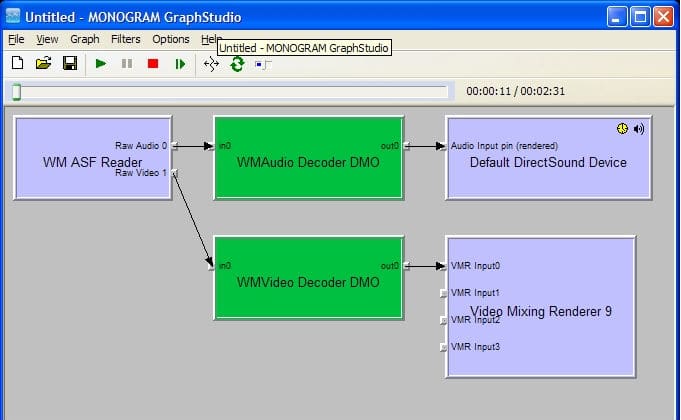
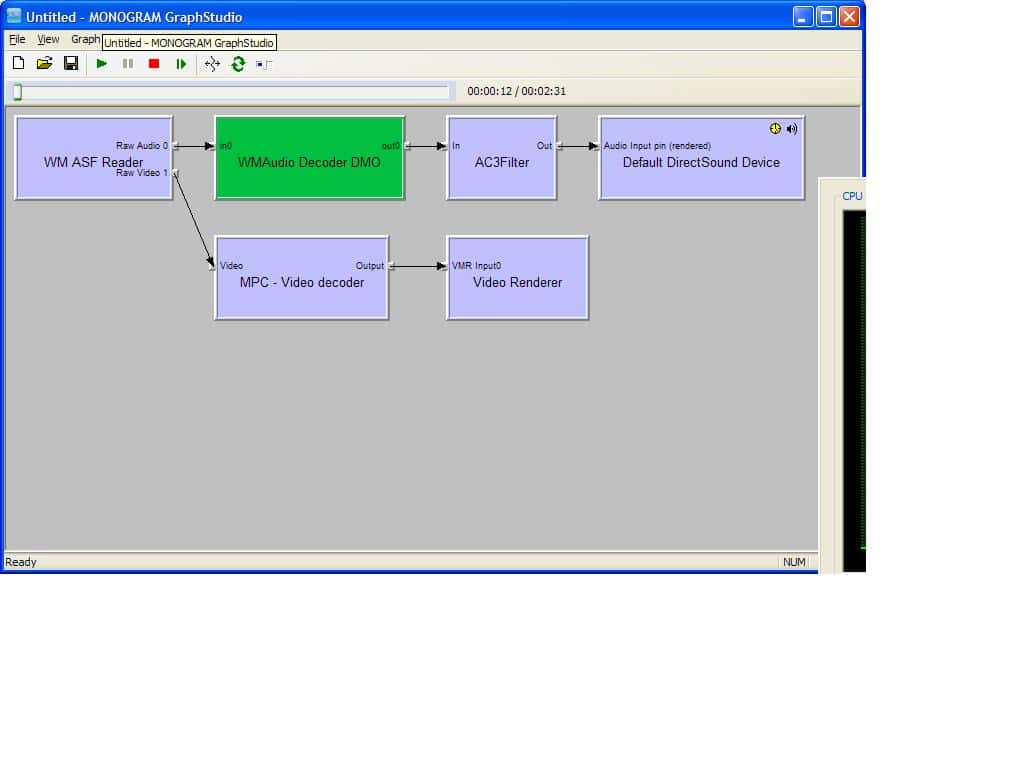
Ok, so I put the trailer into MP and it played fine. I had about 35% cpu on my P4 2.8ghz htpc. Here's a screenshot of what the graph looked like while playing. Hope that helps you out!

When I play it directly in MPC it plays with only 4% cpu and the MPC filter properties say: VC-1 Bitstream decoder, so that's accelerating it fine. How do I get MP to use the right filters?
 

Attachments

  • 1227581178348.jpg
    1227581178348.jpg
    53.1 KB
  • MPC.jpg
    MPC.jpg
    56.3 KB

hoborg

Portal Pro
June 13, 2008
4,413
1,644
Nový Jičín
Home Country
Czech Republic Czech Republic
Here's a VC-1 file to test - Dark Knight trailer.

Ok, so I put the trailer into MP and it played fine. I had about 35% cpu on my P4 2.8ghz htpc. Here's a screenshot of what the graph looked like while playing. Hope that helps you out!

When I play it directly in MPC it plays with only 4% cpu and the MPC filter properties say: VC-1 Bitstream decoder, so that's accelerating it fine. How do I get MP to use the right filters?

Acording to your screens, your video is in ASF/WMV format.
SAF is build for MKV/AVI...
 

MrOrsh

Portal Member
November 3, 2008
45
0
Thanks for a great guide hoborg. Had problems with DVXA not working properly, showing artifacts and some files won´t play at all.
I´ve now followed your guide and the problem remains :/ I´ve uninstalled my old (new) catalyst 8.11 drivers and installed the 8.5 as described, then installed the codec pack as described. Now DVD:s does not work at all (just shows a white picture, sound working thou) and MKV:s (not all, but some) still has the pixly issue and some only sound is working. What could possibly be wrong?


hoborg

Portal Pro
June 13, 2008
4,413
1,644
Nový Jičín
Home Country
Czech Republic Czech Republic
SAF 3.10 out!
- Updated MPC-HC filters to v.1.1.901.0
- SAF will automaticly remove old PowerDVD stuff instaled by old SAF
- added routine to install PowerDVD MPEG2 decoder automaticly (CLVsd.ax) - file is not included in SAF. If you want to use it, place ''CLVsd.ax'' on C:\ root, and reinstall SAF 3.10+. PowerDVD will be used instead of MPC-HC MPEG2 decoder.
More info on first page of this thread.


Thanks for a great guide hoborg. Had problems with DVXA not working properly, showing artifacts and some files won´t play at all.
I´ve now followed your guide and the problem remains :/ I´ve uninstalled my old (new) catalyst 8.11 drivers and installed the 8.5 as described, then installed the codec pack as described. Now DVD:s does not work at all (just shows a white picture, sound working thou) and MKV:s (not all, but some) still has the pixly issue and some only sound is working. What could possibly be wrong?


Hello.
First of all, fill your system specification in your "User CP"!
Try to play your problematics DVD/videos and connect Graphstudio to check if graphs are created corectly (if corect filters are in use).
Post small example of problematic video, so i can check it.

DVD's should be working just fine...
 

Users who are viewing this thread

Top Bottom