
SAF v4.00 ''stable'' (StandAlone Filters) - DXVA ready (H.264 and VC-1). (10 Viewers)

Should i integrate FFDshow in to SAF?

  • Yes

    Votes: 406 85.5%
  • No

    Votes: 69 14.5%

  • Total voters
    475

hoborg

Portal Pro
June 13, 2008
4,413
1,644
Nový Jičín
Home Country
Czech Republic Czech Republic
Hello

I have a problem with most of my MKV.
If I start it then nothing happens a few seconds (~20).
Then I hear the sound but my screen is totally green.
I made everything as written in the manual at the first page here.

If I deactivate DXVA then I can watch all MKV.

And my second problem.....I have tearing in all my movies.
Resolution 720p@50Hz + VSYNC

Windows Vista
ATI Radeon 3500 with driver 9.10

SAF-Log.txt

SAF log is ok. Please chceck graphstudio is HMP-HC decoder is realy in use durning MKV playback.


MPC is in use.

Try to disable DXVA - START - SAF - MPC-HC - disable DXVA
 

Mouch.net

Portal Pro
July 6, 2007
163
12
La Calamine
Home Country
Belgium Belgium
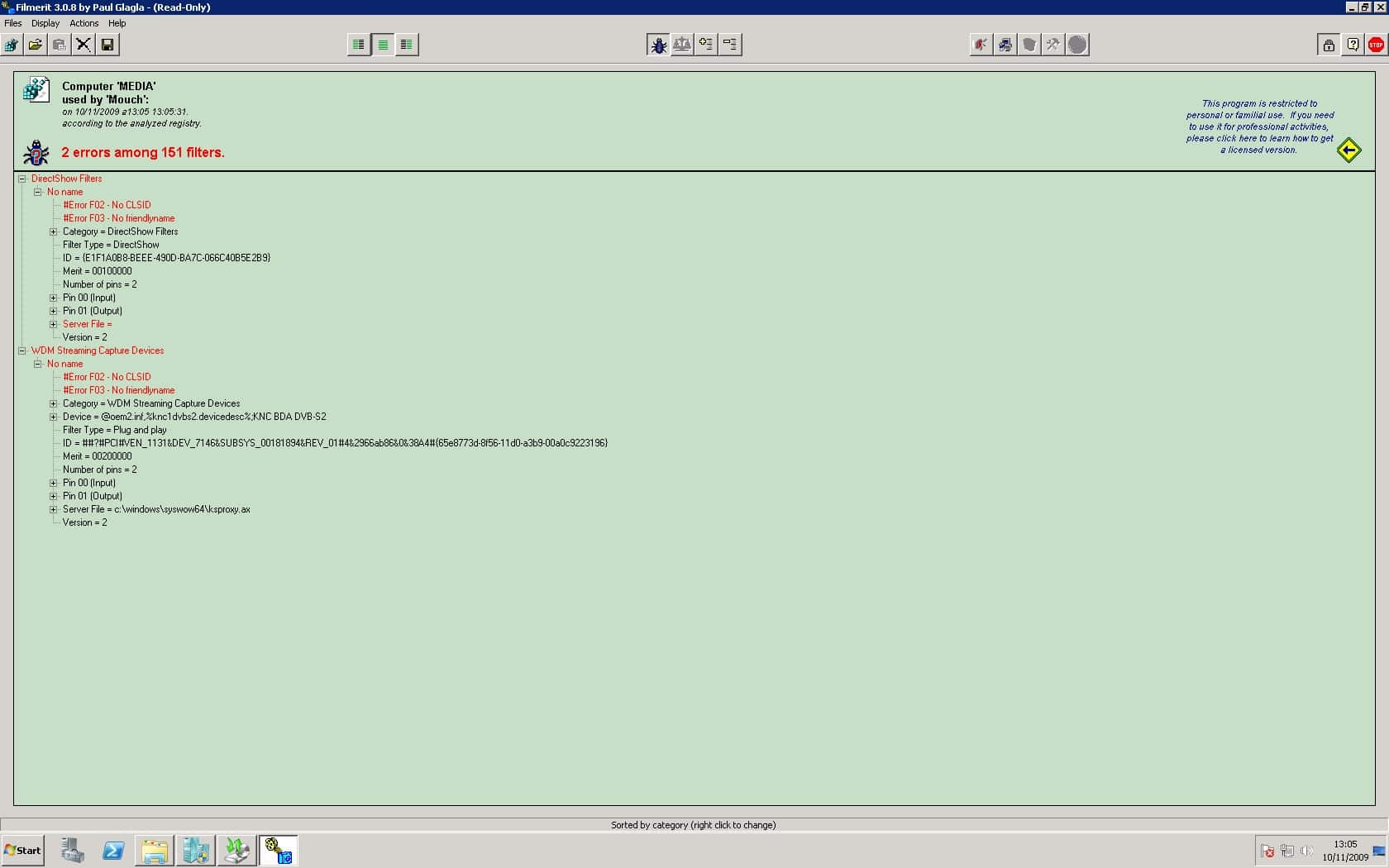
Strange I dindn't look at filmerit log file before...
Filmerit it self only shows me 2 errors in standard mode (117 only if I check "display inactive Plug and Play filters")
ksproxy.ax seems to be related to my KNC One DVB-S2 card, which was installed before and didn't make any problems.

The Strange thing to me is that uninstalling SAF didn't fix the problem.
Can only rely on 2 things.
SAF 4.00 beta 20 OR *unlocked*

SAF 4.00rc1 standard was installed before and didn't have any problem...

I'll just playback my Image and try again with SAF 4.00 rc1 *unlocked*

So what are the 2 problems? Whole Filmerit logs is too long to locate them. Just make screenshot and post it here so i can look.

attached, hope it helped
 

Attachments

  • filmerit.jpg
    filmerit.jpg
    182.7 KB

hoborg

Portal Pro
June 13, 2008
4,413
1,644
Nový Jičín
Home Country
Czech Republic Czech Republic
Strange I dindn't look at filmerit log file before...
Filmerit it self only shows me 2 errors in standard mode (117 only if I check "display inactive Plug and Play filters")
ksproxy.ax seems to be related to my KNC One DVB-S2 card, which was installed before and didn't make any problems.

The Strange thing to me is that uninstalling SAF didn't fix the problem.
Can only rely on 2 things.
SAF 4.00 beta 20 OR *unlocked*

SAF 4.00rc1 standard was installed before and didn't have any problem...

I'll just playback my Image and try again with SAF 4.00 rc1 *unlocked*

So what are the 2 problems? Whole Filmerit logs is too long to locate them. Just make screenshot and post it here so i can look.

attached, hope it helped

Good, now open regedit.exe and serch for "E1F1A0B8-BEEE-490D-BA7C-066C40B5E2B9". If you found it, export this keys and post here :)
 

Karup

Portal Member
December 14, 2008
44
1
Home Country
Germany Germany
SAF log is ok. Please chceck graphstudio is HMP-HC decoder is realy in use durning MKV playback.


MPC is in use.

Try to disable DXVA - START - SAF - MPC-HC - disable DXVA
I disabled it and then I can watch all MKV.
But I want to use the hardware acceleration ;)

And any Idea about the tearing?
I used bevore the MP1.02 and SAF the MP 1.0.0.RC4 + "Vista Codec Package" and had no tearing.
 

hoborg

Portal Pro
June 13, 2008
4,413
1,644
Nový Jičín
Home Country
Czech Republic Czech Republic


MPC is in use.

Try to disable DXVA - START - SAF - MPC-HC - disable DXVA

I disabled it and then I can watch all MKV.
But I want to use the hardware acceleration ;)

And any Idea about the tearing?
With MP 1.0.0.RC4 and the "Vista Codec Package" everything works fine.

Looks like drivers DXVA bug to me - try different drivers (complete ATI uninstall, restart, install new one)
Teraing - make sure you have enabled Aero and you enable VSYNC in CCC.
 

Mouch.net

Portal Pro
July 6, 2007
163
12
La Calamine
Home Country
Belgium Belgium

Attachments

  • reg.zip
    30.6 KB

Karup

Portal Member
December 14, 2008
44
1
Home Country
Germany Germany
Try to disable DXVA - START - SAF - MPC-HC - disable DXVA

I disabled it and then I can watch all MKV.
But I want to use the hardware acceleration ;)

And any Idea about the tearing?
With MP 1.0.0.RC4 and the "Vista Codec Package" everything works fine.

Looks like drivers DXVA bug to me - try different drivers (complete ATI uninstall, restart, install new one)
Teraing - make sure you have enabled Aero and you enable VSYNC in CCC.

Ok, thanks!
Will do that this evening.
I can´t enable AERO, tried regedit and all other hints I found in web about that.
 

hoborg

Portal Pro
June 13, 2008
4,413
1,644
Nový Jičín
Home Country
Czech Republic Czech Republic
Ok, thanks!
Will do that this evening.
I can´t enable AERO, tried regedit and all other hints I found in web about that.

Sorry, you must enable aero to fix Tearing.

attached, hope it helped

Good, now open regedit.exe and serch for "E1F1A0B8-BEEE-490D-BA7C-066C40B5E2B9". If you found it, export this keys and post here :)


3 Keys found and some String Values

OK, re-download latest SAF and try again. Looks lite OS failed to unregister one filter correctly and leave mess in registry.

Too bad MP is not capable to ignore these errors and contune instead of crash...
 

Users who are viewing this thread

Top Bottom