SAF v4.00 ''stable'' (StandAlone Filters) - DXVA ready (H.264 and VC-1). (13 Viewers)

Should i integrate FFDshow in to SAF?

  • Yes

    Votes: 406 85.5%
  • No

    Votes: 69 14.5%

  • Total voters
    475

Cojun

Portal Pro
March 27, 2007
110
4
59
Home Country
Germany Germany
Hey,

I have reinstalled my HTPC with WinXP SP3, All Updates, Board-Drivers, ATI-Drivers for GA-MA78GM-SH2.
After them I installed MySQL, MP, Haali Media Splitter and SAF as written by hoborg.
Then I configured MP and TV-Server right now.

But If a would like to play live TV, there comes an error message: "Abspielen nicht möglich: live1-0.ts.tsbuffer - Audio codec:"
This means in EN: "Playing not possible: live1-0......"

No codec is named here. If I try it again, there comes the following error: "Could not start timeshift. No Video/Audio can be found"

If I start the timeshifting manually in TV-Server Configuration, all works find with good signal and quality. Also the .ts file is located in my Timeshift-Folder. I can play that file with SAFs included media player.
But I cannot watch live-tv in MP.

Error log of MP says:

2009-11-22 12:36:49.687500 [ERROR][MPMain]: TSReaderPlayer:exception while creating DShow graph Creating an instance of the COM component with CLSID {51B4ABF3-748F-4E3B-A276-C828330E926A} from the IClassFactory failed due to the following error: 80040273. at MediaPortal.Player.VMR9Util.AddVMR9(IGraphBuilder graphBuilder)
at MediaPortal.Player.TSReaderPlayer.GetInterfaces(String filename)
2009-11-22 12:36:49.687500 [ERROR][MPMain]: TSReaderPlayer:GetInterfaces() failed

If I try to play AVI Videos in MP, this does not work. The error "Could not play: FILMNAME.avi - Video codec: XVID - Audio codec: AC3"

If I play the same video in Media Player Classic, I get no audio.
Is there a problem with XVID and AC3 audio?

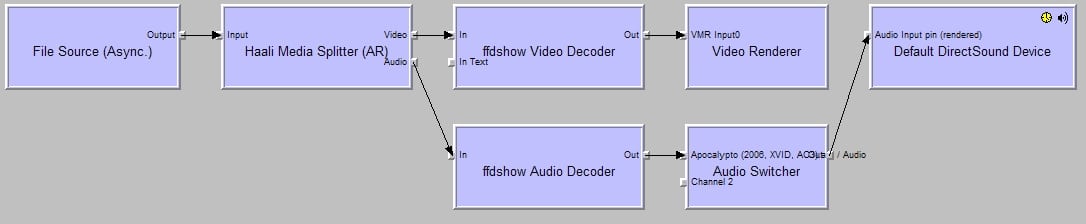
Attached, you will see the GraphStudio of such an AVI file and SAF Install log.

I don´t understand what happens here. Can anyone assist me to get SAF working?

Thank you very much

Daniel

If you can play AVI sample in GraphStudio (and acording to your screenshot you can) then all codec are OK. This must be something in MP...

You enabled passthrough - try use analog connection first.

Hi hoborg,

okay. I was a little bit unsure with passthrough through the installation process of SAF. I have clicked so it should be used.
If your answer means, that the better way is to disable passthrough, do I have to re-install SAF now? Or is there a configuration option wich I can disable passthrough?

Daniel
 

S_Behn

Portal Pro
September 12, 2009
81
2
Home Country
Germany Germany
Yes, Adding MPC-HC subtitle binaries to MP 1.0.2 makes embeded mkv subtitles play with dxva

Would you mind to go into a little more detail or provide me with a link for that? I would really like to do that. Because i have my bluray rips already prepared for that as a mkv with subtitles but cant show them ;)

https://forum.team-mediaportal.com/...48/integration-mpc-hc-subtitles-engine-54130/

Overwrite existing files with files contained in this archieve
mpc-subs-engine-binaries-mp-1.0.2.rar
You should back up the originals in case you have problems.

Thanks! I Will try that soon! :)
 

hoborg

Portal Pro
June 13, 2008
4,413
1,644
Nový Jičín
Home Country
Czech Republic Czech Republic
Hi hoborg,

okay. I was a little bit unsure with passthrough through the installation process of SAF. I have clicked so it should be used.
If your answer means, that the better way is to disable passthrough, do I have to re-install SAF now? Or is there a configuration option wich I can disable passthrough?

Daniel

Reinstall SAF.
 

csapollo

Portal Pro
May 17, 2007
217
13
40
Sydney, Australia
Home Country
TV Line Issue

Hi Hoborg/SAF Family.

I've been having this issue for quite some time, it's only minor but I've finally been motivated to get your thoughts on it. This was happening on a DTV1000T/DTV1000S and now I've got a HVR2200 it's still occurring so I thought I would post.. (happening to a friend using MP too).

It depends on the channel, different for HD or SD, and some it doesn't even happen.. and these were taken a few seconds apart on each channel so you can see with 7HD one might it was fine, the next it had the dotted line..

9HD Black Line Bottom Right

7HD Dotted Line Top Left
7HD No issue

Ten SD Dotted Line Bottom Left

Another SD Channel OK

Any ideas?
 

hoborg

Portal Pro
June 13, 2008
4,413
1,644
Nový Jičín
Home Country
Czech Republic Czech Republic
Hi Hoborg/SAF Family.

I've been having this issue for quite some time, it's only minor but I've finally been motivated to get your thoughts on it. This was happening on a DTV1000T/DTV1000S and now I've got a HVR2200 it's still occurring so I thought I would post.. (happening to a friend using MP too).

It depends on the channel, different for HD or SD, and some it doesn't even happen.. and these were taken a few seconds apart on each channel so you can see with 7HD one might it was fine, the next it had the dotted line..

9HD Black Line Bottom Right

7HD Dotted Line Top Left
7HD No issue

Ten SD Dotted Line Bottom Left

Another SD Channel OK

Any ideas?

Yes, i can notice it to on Czech HD channal:
livevc.jpg


This is part of video stream, no idea why.
 

mascot

Portal Pro
November 20, 2007
182
6
Home Country
Sweden Sweden
What's the difference between EVR custom and VMR9 renderless? I got terrible audio delay with VMR9 renderless. Played around abit and changed to EVR custom and it' gone. I also get the feeling that image quality got up a notch... I got some tearing on some .mkvs and ticked alternative vync and now it's gone to...

Some files are unplayable though... error msg saying "audio codec:"
 

hoborg

Portal Pro
June 13, 2008
4,413
1,644
Nový Jičín
Home Country
Czech Republic Czech Republic
What's the difference between EVR custom and VMR9 renderless? I got terrible audio delay with VMR9 renderless. Played around abit and changed to EVR custom and it' gone. I also get the feeling that image quality got up a notch... I got some tearing on some .mkvs and ticked alternative vync and now it's gone to...

Some files are unplayable though... error msg saying "audio codec:"

Rule:
WinXP: VMR9
Vista/Vin7: EVR
 

junkiepilot

Portal Member
May 11, 2007
38
0
48
Home Country
United Kingdom United Kingdom
Hi Hoborg/SAF Family.

I've been having this issue for quite some time, it's only minor but I've finally been motivated to get your thoughts on it. This was happening on a DTV1000T/DTV1000S and now I've got a HVR2200 it's still occurring so I thought I would post.. (happening to a friend using MP too).

It depends on the channel, different for HD or SD, and some it doesn't even happen.. and these were taken a few seconds apart on each channel so you can see with 7HD one might it was fine, the next it had the dotted line..

9HD Black Line Bottom Right

7HD Dotted Line Top Left
7HD No issue

Ten SD Dotted Line Bottom Left

Another SD Channel OK

Any ideas?

This happens on lots of channels. Just edit your "crop" settings. i have all of mine set to "5" and this has solved the issue.
 

Cojun

Portal Pro
March 27, 2007
110
4
59
Home Country
Germany Germany
Hi hoborg,

okay. I was a little bit unsure with passthrough through the installation process of SAF. I have clicked so it should be used.
If your answer means, that the better way is to disable passthrough, do I have to re-install SAF now? Or is there a configuration option wich I can disable passthrough?

Daniel

Reinstall SAF.

Done!
Have installed SAF again without passthrough.
Then I tried to play an AVI in MPC-HC and it works like a charm. Sound, Video. All is fine. See attached Graph from MPC-HC.
After that, I open Mediaportal and try to play the same video. Nothing happens.
My MP error log tells me:

2009-11-23 12:36:08.796875 [ERROR][MPMain]: VideoPlayer9:exception while creating DShow graph Creating an instance of the COM component with CLSID {51B4ABF3-748F-4E3B-A276-C828330E926A} from the IClassFactory failed due to the following error: 80040273. at MediaPortal.Player.VMR9Util.AddVMR9(IGraphBuilder graphBuilder)
at MediaPortal.Player.VideoPlayerVMR9.GetInterfaces()
2009-11-23 12:36:08.796875 [ERROR][MPMain]: VideoPlayerVMR9: Exception while cleanuping DShow graph - Object reference not set to an instance of an object. at MediaPortal.Player.VideoPlayerVMR9.Cleanup()
2009-11-23 12:36:08.906250 [ERROR][MPMain]: PlaylistPlayer: *** unable to play - \\192.168.0.218\Videos\Apocalypto (2006, XVID, AC3).avi - skipping track!

In MP log I notice the following:

2009-11-23 12:36:08.703125 [Info.][MPMain]: MediaInfoWrapper.MediaInfoWrapper: inspecting media : \\192.168.0.218\Videos\Apocalypto (2006, XVID, AC3).avi
2009-11-23 12:36:08.703125 [Info.][MPMain]: MediaInfoWrapper.MediaInfoWrapper: FrameRate : 25
2009-11-23 12:36:08.703125 [Info.][MPMain]: MediaInfoWrapper.MediaInfoWrapper: VideoCodec : xvid
2009-11-23 12:36:08.703125 [Info.][MPMain]: MediaInfoWrapper.MediaInfoWrapper: IsXVID: True
2009-11-23 12:36:08.703125 [Info.][MPMain]: MediaInfoWrapper.MediaInfoWrapper: HasSubtitles : False
2009-11-23 12:36:08.703125 [Info.][MPMain]: MediaInfoWrapper.MediaInfoWrapper: NumSubtitles : 0
2009-11-23 12:36:08.703125 [Info.][MPMain]: MediaInfoWrapper.MediaInfoWrapper: Scan type : progressive
2009-11-23 12:36:08.703125 [Info.][MPMain]: MediaInfoWrapper.MediaInfoWrapper: IsInterlaced: False
2009-11-23 12:36:08.703125 [Info.][MPMain]: MediaInfoWrapper.MediaInfoWrapper: Width : 656
2009-11-23 12:36:08.703125 [Info.][MPMain]: MediaInfoWrapper.MediaInfoWrapper: Height : 352
2009-11-23 12:36:08.703125 [Info.][MPMain]: MediaInfoWrapper.MediaInfoWrapper: Audiochannels : 6
2009-11-23 12:36:08.703125 [Info.][MPMain]: MediaInfoWrapper.MediaInfoWrapper: Audiorate : 48000
2009-11-23 12:36:08.703125 [Info.][MPMain]: MediaInfoWrapper.MediaInfoWrapper: AspectRatio : 1.864
2009-11-23 12:36:08.703125 [Info.][MPMain]: MediaInfoWrapper.MediaInfoWrapper: AudioCodec : ac3
2009-11-23 12:36:08.703125 [Info.][MPMain]: MediaInfoWrapper.MediaInfoWrapper: IsAC3 : True
2009-11-23 12:36:08.703125 [Info.][MPMain]: RefreshRateChanger.AdaptRefreshRate: 'auto refreshrate changer' disabled
2009-11-23 12:36:08.703125 [Info.][MPMain]: VideoPlayer:play \\192.168.0.218\Videos\Apocalypto (2006, XVID, AC3).avi
2009-11-23 12:36:08.734375 [Info.][MPMain]: VideoPlayerVMR9: Enabling DX9 exclusive mode
2009-11-23 12:36:08.796875 [Info.][MPMain]: VideoPlayer9:exception while creating DShow graph Creating an instance of the COM component with CLSID {51B4ABF3-748F-4E3B-A276-C828330E926A} from the IClassFactory failed due to the following error: 80040273. at MediaPortal.Player.VMR9Util.AddVMR9(IGraphBuilder graphBuilder)
at MediaPortal.Player.VideoPlayerVMR9.GetInterfaces()
2009-11-23 12:36:08.796875 [Info.][MPMain]: VideoPlayer9:cleanup DShow graph
2009-11-23 12:36:08.796875 [Info.][MPMain]: VideoPlayerVMR9: Exception while cleanuping DShow graph - Object reference not set to an instance of an object. at MediaPortal.Player.VideoPlayerVMR9.Cleanup()
2009-11-23 12:36:08.796875 [Info.][MPMain]: VideoPlayerVMR9: Disabling DX9 exclusive mode
2009-11-23 12:36:08.890625 [Info.][MPMain]: MediaInfoWrapper.MediaInfoWrapper: inspecting media : \\192.168.0.218\Videos\Apocalypto (2006, XVID, AC3).avi
2009-11-23 12:36:08.890625 [Info.][MPMain]: MediaInfoWrapper.MediaInfoWrapper: FrameRate : 25
2009-11-23 12:36:08.890625 [Info.][MPMain]: MediaInfoWrapper.MediaInfoWrapper: VideoCodec : xvid
2009-11-23 12:36:08.890625 [Info.][MPMain]: MediaInfoWrapper.MediaInfoWrapper: IsXVID: True
2009-11-23 12:36:08.890625 [Info.][MPMain]: MediaInfoWrapper.MediaInfoWrapper: HasSubtitles : False
2009-11-23 12:36:08.890625 [Info.][MPMain]: MediaInfoWrapper.MediaInfoWrapper: NumSubtitles : 0
2009-11-23 12:36:08.890625 [Info.][MPMain]: MediaInfoWrapper.MediaInfoWrapper: Scan type : progressive
2009-11-23 12:36:08.890625 [Info.][MPMain]: MediaInfoWrapper.MediaInfoWrapper: IsInterlaced: False
2009-11-23 12:36:08.890625 [Info.][MPMain]: MediaInfoWrapper.MediaInfoWrapper: Width : 656
2009-11-23 12:36:08.890625 [Info.][MPMain]: MediaInfoWrapper.MediaInfoWrapper: Height : 352
2009-11-23 12:36:08.890625 [Info.][MPMain]: MediaInfoWrapper.MediaInfoWrapper: Audiochannels : 6
2009-11-23 12:36:08.890625 [Info.][MPMain]: MediaInfoWrapper.MediaInfoWrapper: Audiorate : 48000
2009-11-23 12:36:08.890625 [Info.][MPMain]: MediaInfoWrapper.MediaInfoWrapper: AspectRatio : 1.864
2009-11-23 12:36:08.890625 [Info.][MPMain]: MediaInfoWrapper.MediaInfoWrapper: AudioCodec : ac3
2009-11-23 12:36:08.890625 [Info.][MPMain]: MediaInfoWrapper.MediaInfoWrapper: IsAC3 : True
2009-11-23 12:36:08.890625 [Info.][MPMain]: PlaylistPlayer: *** unable to play - \\192.168.0.218\Videos\Apocalypto (2006, XVID, AC3).avi - skipping track!

I am absolutely unsure in this case.
What I noticed is, that WMP11 is not on my PC. I have installed it before installation of MP and SAF. But now its not longer on my PC. Can this cause the error? Does SAF uninstall WMP11? Do I need WMP11 on the PC?

A lots of questions. Hope, you can assist.

Daniel
 

Attachments

  • graphstudio2.jpg
    graphstudio2.jpg
    70.1 KB

Users who are viewing this thread

Top Bottom