SAF v4.00 ''stable'' (StandAlone Filters) - DXVA ready (H.264 and VC-1). (5 Viewers)

Should i integrate FFDshow in to SAF?

  • Yes

    Votes: 406 85.5%
  • No

    Votes: 69 14.5%

  • Total voters
    475

hoborg

Portal Pro
June 13, 2008
4,413
1,644
Nový Jičín
Home Country
Czech Republic Czech Republic
Hi. My MediaPortal is failing when I try to play some mkv .h264 videofiles. Only a single frame image is showed in the upper left corner of the MP.

I attach mediainfo of some files:
These mkv fails to reproduce: ko.rar
These mkv are played sucessly: ok.rar


Thanks

Post SAF and MediaPortal logs.
 

S_Behn

Portal Pro
September 12, 2009
81
2
Home Country
Germany Germany
Yes, Adding MPC-HC subtitle binaries to MP 1.0.2 makes embeded mkv subtitles play with dxva

Would you mind to go into a little more detail or provide me with a link for that? I would really like to do that. Because i have my bluray rips already prepared for that as a mkv with subtitles but cant show them ;)
 

etheesdad

Retired Team Member
  • Premium Supporter
  • November 8, 2008
    831
    139
    Adelaide
    Hi Hoborg

    Im using W7 x86 and just installed SAF400B2

    The installer chokes in install saying I need to update directx. The redists are all older than dx11. Is this a bug?

    Jim
     

    Cojun

    Portal Pro
    March 27, 2007
    110
    4
    59
    Home Country
    Germany Germany
    Hey,

    I have reinstalled my HTPC with WinXP SP3, All Updates, Board-Drivers, ATI-Drivers for GA-MA78GM-SH2.
    After them I installed MySQL, MP, Haali Media Splitter and SAF as written by hoborg.
    Then I configured MP and TV-Server right now.

    But If a would like to play live TV, there comes an error message: "Abspielen nicht möglich: live1-0.ts.tsbuffer - Audio codec:"
    This means in EN: "Playing not possible: live1-0......"

    No codec is named here. If I try it again, there comes the following error: "Could not start timeshift. No Video/Audio can be found"

    If I start the timeshifting manually in TV-Server Configuration, all works find with good signal and quality. Also the .ts file is located in my Timeshift-Folder. I can play that file with SAFs included media player.
    But I cannot watch live-tv in MP.

    Error log of MP says:

    2009-11-22 12:36:49.687500 [ERROR][MPMain]: TSReaderPlayer:exception while creating DShow graph Creating an instance of the COM component with CLSID {51B4ABF3-748F-4E3B-A276-C828330E926A} from the IClassFactory failed due to the following error: 80040273. at MediaPortal.Player.VMR9Util.AddVMR9(IGraphBuilder graphBuilder)
    at MediaPortal.Player.TSReaderPlayer.GetInterfaces(String filename)
    2009-11-22 12:36:49.687500 [ERROR][MPMain]: TSReaderPlayer:GetInterfaces() failed

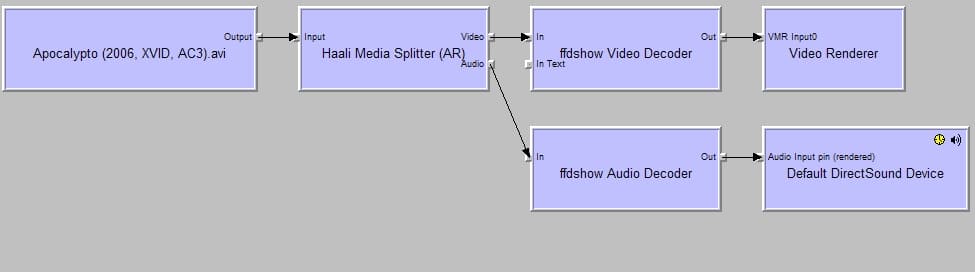
    If I try to play AVI Videos in MP, this does not work. The error "Could not play: FILMNAME.avi - Video codec: XVID - Audio codec: AC3"

    If I play the same video in Media Player Classic, I get no audio.
    Is there a problem with XVID and AC3 audio?

    Attached, you will see the GraphStudio of such an AVI file and SAF Install log.

    I don´t understand what happens here. Can anyone assist me to get SAF working?

    Thank you very much

    Daniel
     

    Attachments

    • graphstudio.jpg
      graphstudio.jpg
      62.9 KB

    tourettes

    Retired Team Member
  • Premium Supporter
  • January 7, 2005
    17,301
    4,800
    Hi Hoborg

    Im using W7 x86 and just installed SAF400B2

    The installer chokes in install saying I need to update directx. The redists are all older than dx11. Is this a bug?

    Redist are a different thing than the DirectX itself. A library that applications use to talk to the DirectX.
     

    tourettes

    Retired Team Member
  • Premium Supporter
  • January 7, 2005
    17,301
    4,800
    2009-11-22 12:36:49.687500 [ERROR][MPMain]: TSReaderPlayer:exception while creating DShow graph Creating an instance of the COM component with CLSID {51B4ABF3-748F-4E3B-A276-C828330E926A} from the IClassFactory failed due to the following error: 80040273. at MediaPortal.Player.VMR9Util.AddVMR9(IGraphBuilder graphBuilder)
    at MediaPortal.Player.TSReaderPlayer.GetInterfaces(String filename)
    2009-11-22 12:36:49.687500 [ERROR][MPMain]: TSReaderPlayer:GetInterfaces() failed

    Video renderer (VMR9 - 51B4ABF3-748F-4E3B-A276-C828330E926A) fails to load:

    HRESULT: 0x80040273 (2147746419)
    Name: VFW_E_DDRAW_CAPS_NOT_SUITABLE
    Description: Either DirectDraw has not been installed or the Video Card capabilities are not suitable. Make sure the display is not in 16 color mode.
    Severity code: Failed
    Facility Code: FACILITY_ITF (4)
    Error Code: 0x0273 (627)
     

    mascot

    Portal Pro
    November 20, 2007
    182
    6
    Home Country
    Sweden Sweden
    Catalyst 9.5 drivers ATi HD3200 on Gigabyte GA-MA78GM-SH2 motherboard upgraded to F11 latest BIOS
    AMD Athlon 64 X2 5000+ Black Edition CPU
    2 GB of ram
    Windows XP Home SP3, .NET framework 2.0, 3.5 etc installed (I installed 3.5 but Catalyst drivers says 2.0 wich also is wierd) aswell as latest Direct X
    Mediaportal 1.02 with SAF-plugin
    My display is Pioneer plasma 1920x1080@24 hz connected through HDMI straight from Gigabyte motherboard

    DXVA worked fine, then all of a sudden I can't get it to work. I tried both SAF beta20 and beta21. MPC-HC sets up to VMR9
    I read somewhere that encode must be L4.1 for ATI graphics...??

    I watched a .mkv coded x264, 2pass, L4.1 - DXVA don't work and audio goes crazy out of sync after about 15 mins (like 2-3 seconds out of sync) (23.976 framerate movie file and display set to 24 hz update frequency)

    Should SAF set up EVR custom or VMR9 ??

    I'm so happy with the plugin because I used to mess with external players and shit and the plugin itself is lovely. I have anough CPU power and dont really need DVXA how can I turn it off for good but still use the plugin as it is with directvobsub?
     

    Cojun

    Portal Pro
    March 27, 2007
    110
    4
    59
    Home Country
    Germany Germany
    2009-11-22 12:36:49.687500 [ERROR][MPMain]: TSReaderPlayer:exception while creating DShow graph Creating an instance of the COM component with CLSID {51B4ABF3-748F-4E3B-A276-C828330E926A} from the IClassFactory failed due to the following error: 80040273. at MediaPortal.Player.VMR9Util.AddVMR9(IGraphBuilder graphBuilder)
    at MediaPortal.Player.TSReaderPlayer.GetInterfaces(String filename)
    2009-11-22 12:36:49.687500 [ERROR][MPMain]: TSReaderPlayer:GetInterfaces() failed

    Video renderer (VMR9 - 51B4ABF3-748F-4E3B-A276-C828330E926A) fails to load:

    HRESULT: 0x80040273 (2147746419)
    Name: VFW_E_DDRAW_CAPS_NOT_SUITABLE
    Description: Either DirectDraw has not been installed or the Video Card capabilities are not suitable. Make sure the display is not in 16 color mode.
    Severity code: Failed
    Facility Code: FACILITY_ITF (4)
    Error Code: 0x0273 (627)

    Hmmmmm.
    This is strong. I installed all as written on the first site of this thread.
    What can I do to re-install VMR9. Has this something to do with my graphic cards driver or with MP itself?
    So far as I know, on my mainboard GA-MA78GM-S2H is a Ati Radeon 3200 working.
    I installed the latest driver from Gigabyte.

    A few minutes ago, I switched to EVR but this will not work. Flickering and so on.

    So what is to do in this case (re-installing VMR9)?

    Thank you so much for your support

    Daniel
     

    hoborg

    Portal Pro
    June 13, 2008
    4,413
    1,644
    Nový Jičín
    Home Country
    Czech Republic Czech Republic
    Hey,

    I have reinstalled my HTPC with WinXP SP3, All Updates, Board-Drivers, ATI-Drivers for GA-MA78GM-SH2.
    After them I installed MySQL, MP, Haali Media Splitter and SAF as written by hoborg.
    Then I configured MP and TV-Server right now.

    But If a would like to play live TV, there comes an error message: "Abspielen nicht möglich: live1-0.ts.tsbuffer - Audio codec:"
    This means in EN: "Playing not possible: live1-0......"

    No codec is named here. If I try it again, there comes the following error: "Could not start timeshift. No Video/Audio can be found"

    If I start the timeshifting manually in TV-Server Configuration, all works find with good signal and quality. Also the .ts file is located in my Timeshift-Folder. I can play that file with SAFs included media player.
    But I cannot watch live-tv in MP.

    Error log of MP says:

    2009-11-22 12:36:49.687500 [ERROR][MPMain]: TSReaderPlayer:exception while creating DShow graph Creating an instance of the COM component with CLSID {51B4ABF3-748F-4E3B-A276-C828330E926A} from the IClassFactory failed due to the following error: 80040273. at MediaPortal.Player.VMR9Util.AddVMR9(IGraphBuilder graphBuilder)
    at MediaPortal.Player.TSReaderPlayer.GetInterfaces(String filename)
    2009-11-22 12:36:49.687500 [ERROR][MPMain]: TSReaderPlayer:GetInterfaces() failed

    If I try to play AVI Videos in MP, this does not work. The error "Could not play: FILMNAME.avi - Video codec: XVID - Audio codec: AC3"

    If I play the same video in Media Player Classic, I get no audio.
    Is there a problem with XVID and AC3 audio?

    Attached, you will see the GraphStudio of such an AVI file and SAF Install log.

    I don´t understand what happens here. Can anyone assist me to get SAF working?

    Thank you very much

    Daniel

    If you can play AVI sample in GraphStudio (and acording to your screenshot you can) then all codec are OK. This must be something in MP...

    You enabled passthrough - try use analog connection first.
     

    kiwijunglist

    Super Moderator
  • Team MediaPortal
  • June 10, 2008
    6,743
    1,754
    New Zealand
    Home Country
    New Zealand New Zealand
    Yes, Adding MPC-HC subtitle binaries to MP 1.0.2 makes embeded mkv subtitles play with dxva

    Would you mind to go into a little more detail or provide me with a link for that? I would really like to do that. Because i have my bluray rips already prepared for that as a mkv with subtitles but cant show them ;)

    https://forum.team-mediaportal.com/...48/integration-mpc-hc-subtitles-engine-54130/

    Overwrite existing files with files contained in this archieve
    mpc-subs-engine-binaries-mp-1.0.2.rar
    You should back up the originals in case you have problems.
     

    Users who are viewing this thread

    Top Bottom