SAF v4.00 ''stable'' (StandAlone Filters) - DXVA ready (H.264 and VC-1). (30 Viewers)

Should i integrate FFDshow in to SAF?

  • Yes

    Votes: 406 85.5%
  • No

    Votes: 69 14.5%

  • Total voters
    475

mascot

Portal Pro
November 20, 2007
182
6
Home Country
Sweden Sweden
Mediaportal styled (with red on/off styled button in upper right corner) error msg...

"Unable to play: FILENAME

Video codec: V_MPEG4/ISO/AVC
Audio codec: AC3"
 

caprica13

MP Donator
  • Premium Supporter
  • August 18, 2008
    33
    0
    Home Country
    Canada Canada
    caprica13 - how did you generate that graph?

    thx manidave

    using GraphStudio (included in the SAF package).

    1. Make sure Media Portal is either in a window mode (as in opposite to Full screen) or on a Secondary display (then it doesn't matter if its in Full Screen ; this is what I have)
    2. Start a playback of something in Media Portal
    3. Run GraphStudio and select Connect to a Remote Graph from its menu to generate the graph
     

    mascot

    Portal Pro
    November 20, 2007
    182
    6
    Home Country
    Sweden Sweden
    All of a sudden SAF don't work 100% with the refreshrate changer. All changes except > 24 hz works. Not container related since 25 fps .mkv works (changes to 25 hz as it should on my setup)

    Get the error msg I described a few posts ago.
     

    maindave

    Portal Member
    November 17, 2009
    22
    0
    Home Country
    United States of America United States of America
    caprica13 - how did you generate that graph?

    thx manidave

    using GraphStudio (included in the SAF package).

    1. Make sure Media Portal is either in a window mode (as in opposite to Full screen) or on a Secondary display (then it doesn't matter if its in Full Screen ; this is what I have)
    2. Start a playback of something in Media Portal
    3. Run GraphStudio and select Connect to a Remote Graph from its menu to generate the graph


    Ok..I'm nueb!!! How do you start MP in window Mode?
    Thx:mad:
     

    pilehave

    Community Skin Designer
  • Premium Supporter
  • April 2, 2008
    2,566
    521
    Hornslet
    Home Country
    Denmark Denmark
    caprica13 - how did you generate that graph?

    thx manidave

    using GraphStudio (included in the SAF package).

    1. Make sure Media Portal is either in a window mode (as in opposite to Full screen) or on a Secondary display (then it doesn't matter if its in Full Screen ; this is what I have)
    2. Start a playback of something in Media Portal
    3. Run GraphStudio and select Connect to a Remote Graph from its menu to generate the graph


    Ok..I'm nueb!!! How do you start MP in window Mode?
    Thx:mad:

    Run MP Configuration -> General -> Uncheck "Start MediaPortal in fullscreen mode"
     

    caprica13

    MP Donator
  • Premium Supporter
  • August 18, 2008
    33
    0
    Home Country
    Canada Canada
    I just wanted to let everyone know that after 8 years I have switched from Windows XP to Windows 7 64bit while successfully ignoring and skipping Windows Vista over the years.
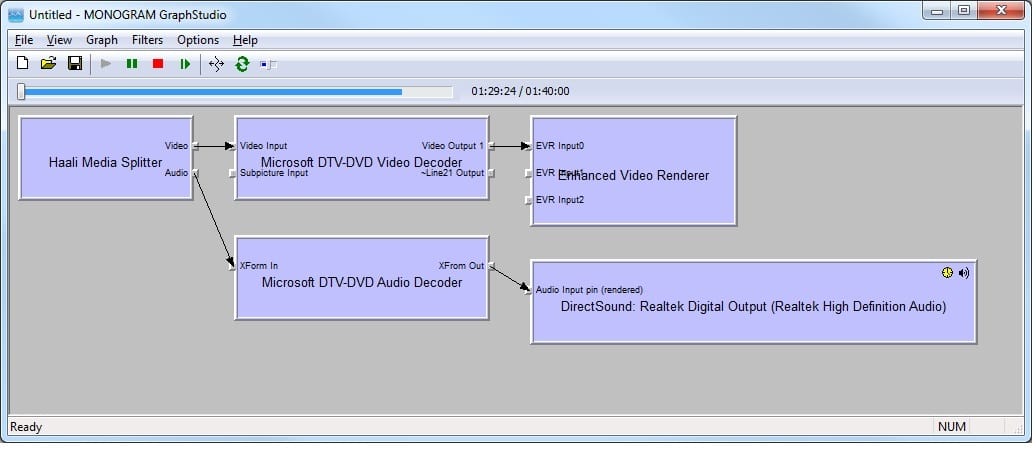
    It turns out it was the best thing that ever happened to my Media Portal experience. ALL of the rendering issues I was experiencing with Windows XP are gone. It just works. Haven't had a single twitch or glitch yet (2 days)
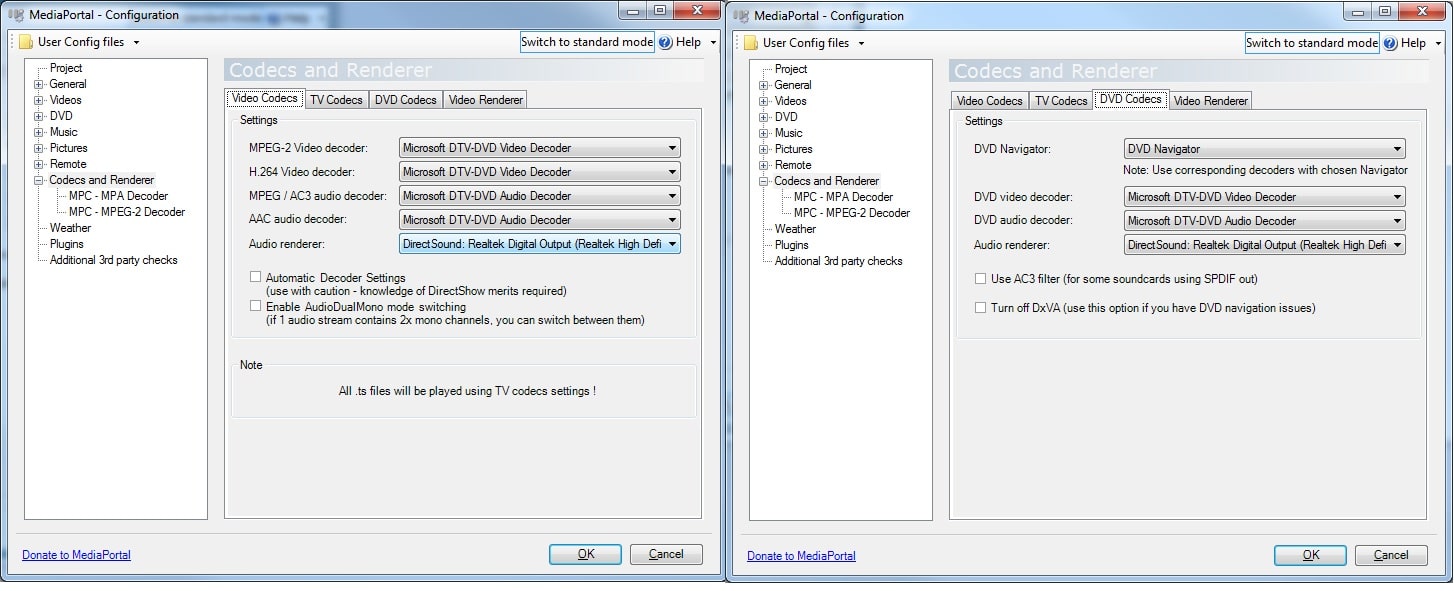
    Also the included Microsoft DTV-DVD decoders are pretty awesome. They works great for me for AVC/H.264, XVID, DIVX, DVD, MPEG2, DTS, AC3 and MP3.

    I don't use Media Portal for TV Viewing, so none of that concerns me ... also I am assuming something installed with SAF takes care of .MOV files (because it just works too)

    Check out the attached graph and decoder setting screen shots. As simple as it should be.
    Just sharing my 2 cents
     

    Attachments

    • w7graph.jpg
      w7graph.jpg
      93.1 KB
    • w7codecs.jpg
      w7codecs.jpg
      215.3 KB

    Users who are viewing this thread

    Top Bottom
