
SAF v4.00 ''stable'' (StandAlone Filters) - DXVA ready (H.264 and VC-1). (12 Viewers)

Should i integrate FFDshow in to SAF?

  • Yes

    Votes: 406 85.5%
  • No

    Votes: 69 14.5%

  • Total voters
    475

hoborg

Portal Pro
June 13, 2008
4,413
1,644
Nový Jičín
Home Country
Czech Republic Czech Republic
@hoborg
i've installed beta03 (happens also with beta02) but when i try to configure FFSShow i get an error:
Error while loading ffdshow.ax
The module was not found.

Message was in german i translated the message myself to english. (I'm using windows vista 64bit)

EDIT:
OK this problem is related to the link you create under programs:
Is´t has to be C:\Windows\SysWOW64\ instead of C:\Windows\system32\

Tha is something a didn't understand. ffdshow.ax is 32bit aplication and should be in system32 folder :/

Hmm, it look like i finaly found a way how to fully "suports" MOV files. New and modern MOV (with h.264) is not problem, but problems are MOV from digital cameras with not standart audio/video, like i-law audio format, etc... Another problem was to not broke MOV DXVA support. Now all is solved (at last all MOV examples i have is working) and will be added to next SAF version. This need more software combination (SAF+QT alternative+MediaLook QT source).

So this makes SAF more complex, not a easy solution i think. I order to get everything playing well you need a hell lot of codecs. So we need to install to more codec packs, hmm. Is this really the solution to mov files? :( Most things worked fine in 3.xx, now ffdshow is added, but also to more codecs are needed...

Thank you veyr much for making this.

QuickTime was/is basicaly used on Mac. There are simply no existed direct show decoders for all quicktime audio/video codecs.
 

dlarge500

Extension Designer
  • Premium Supporter
  • May 21, 2009
    1,491
    400
    46
    NRW
    Home Country
    Germany Germany
    Zitat:
    Zitat von disaster123 Beitrag anzeigen
    hoborg
    i've installed beta03 (happens also with beta02) but when i try to configure FFSShow i get an error:
    Error while loading ffdshow.ax
    The module was not found.

    Message was in german i translated the message myself to english. (I'm using windows vista 64bit)

    EDIT:
    OK this problem is related to the link you create under programs:
    Is´t has to be C:\Windows\SysWOW64\ instead of C:\Windows\system32\
    Tha is something a didn't understand. ffdshow.ax is 32bit aplication and should be in system32 folder :/

    I have this same problem on my PC with Win7 64Bit on all other Machines with 32Bit OS is already OK.

    greetz dlarge
     

    tourettes

    Retired Team Member
  • Premium Supporter
  • January 7, 2005
    17,301
    4,800
    OK this problem is related to the link you create under programs:
    Is´t has to be C:\Windows\SysWOW64\ instead of C:\Windows\system32\

    Tha is something a didn't understand. ffdshow.ax is 32bit aplication and should be in system32 folder :/

    That dir is actually the place where 32 bit system DLLs are located in 64 bit systems:

    x64: Starting Out in 64-Bit Windows Systems with Visual C++

    "File activity from a Win32 process that would normally go to the System32 directory instead goes to a directory named SysWow64."


    QuickTime was/is basicaly used on Mac. There are simply no existed direct show decoders for all quicktime audio/video codecs.

    Windows 7 has native support for QuickTime codecs.
     

    joz

    Portal Pro
    March 17, 2008
    1,353
    306
    Home Country
    Netherlands Netherlands
    Hey hoborg,

    I just installed the latest beta and can confirm for me flash is now recognized, :D a lot!
    However I still have issues;

    Now first off, you say in your starting post that the latest beta's are compatible with MP 1.10 alpha. I'm running 1.02 final so if that's the cause I get it (can't really see why that would be the case though).

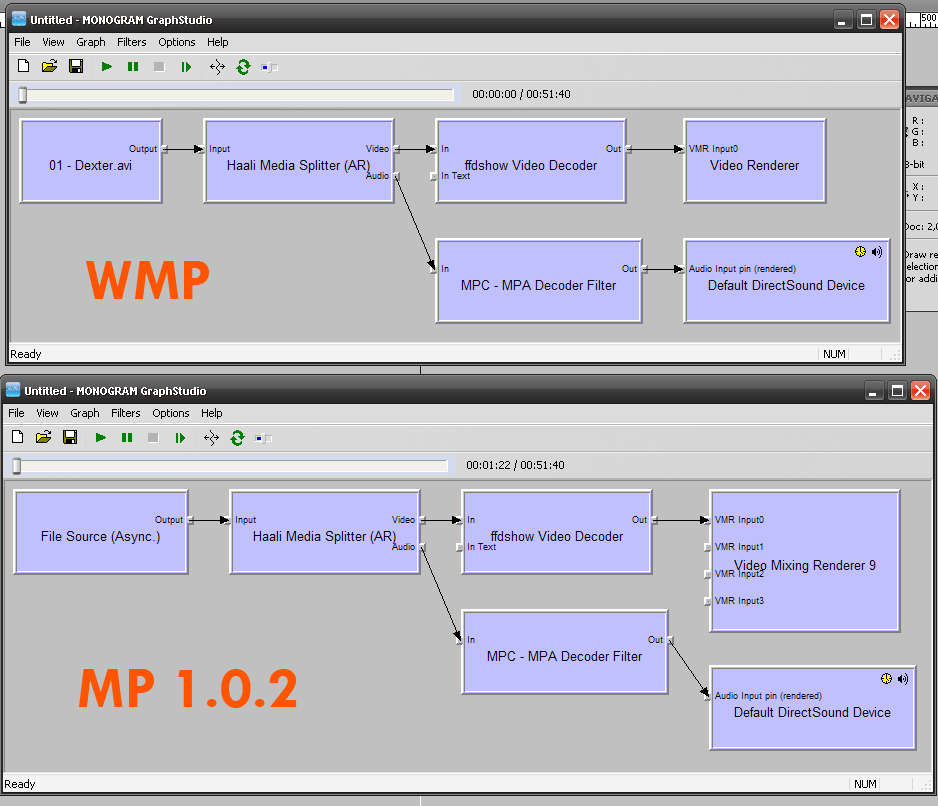
    I have now issues on xvid playback. I attached my logs as you requested and also toyed around a bit with graphstudio.
    The thing is that MP is not handling the video part of xvid correctly (a garbled image but there's sound) but WMP is on the other hand.
    So I guess after all it has to do with something specifics within MP. Attached also 2 graphs I created. I double checked the video player part of MP config is like you show in your starting post. Also tried switching MPG2 to ffdshow, no diff.

    Any help with all this would be greatfuly appreciated.
    If the latest beta's just don't work with MP 1.0.2 then how am I supposed to downgrade to 4.37?
     

    Attachments

    • graphs.gif
      graphs.gif
      45.2 KB

    hoborg

    Portal Pro
    June 13, 2008
    4,413
    1,644
    Nový Jičín
    Home Country
    Czech Republic Czech Republic
    Zitat:
    Zitat von disaster123 Beitrag anzeigen
    @hoborg
    i've installed beta03 (happens also with beta02) but when i try to configure FFSShow i get an error:
    Error while loading ffdshow.ax
    The module was not found.

    Message was in german i translated the message myself to english. (I'm using windows vista 64bit)

    EDIT:
    OK this problem is related to the link you create under programs:
    Is´t has to be C:\Windows\SysWOW64\ instead of C:\Windows\system32\
    Tha is something a didn't understand. ffdshow.ax is 32bit aplication and should be in system32 folder :/

    I have this same problem on my PC with Win7 64Bit on all other Machines with 32Bit OS is already OK.

    greetz dlarge

    I will fix it, but first i need my repaired SSD back :(

    OK this problem is related to the link you create under programs:
    Is´t has to be C:\Windows\SysWOW64\ instead of C:\Windows\system32\

    Tha is something a didn't understand. ffdshow.ax is 32bit aplication and should be in system32 folder :/

    That dir is actually the place where 32 bit system DLLs are located in 64 bit systems:

    x64: Starting Out in 64-Bit Windows Systems with Visual C++

    "File activity from a Win32 process that would normally go to the System32 directory instead goes to a directory named SysWow64."


    QuickTime was/is basicaly used on Mac. There are simply no existed direct show decoders for all quicktime audio/video codecs.
    Windows 7 has native support for QuickTime codecs.

    Thanks for info.

    Hey hoborg,

    I just installed the latest beta and can confirm for me flash is now recognized, :D a lot!
    However I still have issues;

    Now first off, you say in your starting post that the latest beta's are compatible with MP 1.10 alpha. I'm running 1.02 final so if that's the cause I get it (can't really see why that would be the case though).

    I have now issues on xvid playback. I attached my logs as you requested and also toyed around a bit with graphstudio.
    The thing is that MP is not handling the video part of xvid correctly (a garbled image but there's sound) but WMP is on the other hand.
    So I guess after all it has to do with something specifics within MP. Attached also 2 graphs I created. I double checked the video player part of MP config is like you show in your starting post. Also tried switching MPG2 to ffdshow, no diff.

    Any help with all this would be greatfuly appreciated.
    If the latest beta's just don't work with MP 1.0.2 then how am I supposed to downgrade to 4.37?

    Firstly try update ati drivers. Do complete uninstall ati stuff, restart, then install catalyst 9.8 and restart. I had some pictures problem too, 9.8 fixed it. May be related to new WMR9 renderer, wich microsoft released few weeks ago, who knows?
    You can try to switch to EVR too (for test only).
     

    joz

    Portal Pro
    March 17, 2008
    1,353
    306
    Home Country
    Netherlands Netherlands
    :D again hoborg for the awesome support you're giving us!

    I will try as you suggested (currently running 9.7). Did they release a new wmr9 renderer? I guess I missed that news :)
    EVR is only available on Vista right? I run XP SP3

    -----EDIT----

    Hoborg man, you rock solid! That just fixed my issue :)
     

    hoborg

    Portal Pro
    June 13, 2008
    4,413
    1,644
    Nový Jičín
    Home Country
    Czech Republic Czech Republic
    :D again hoborg for the awesome support you're giving us!

    I will try as you suggested (currently running 9.7). Did they release a new wmr9 renderer? I guess I missed that news :)
    EVR is only available on Vista right? I run XP SP3

    -----EDIT----

    Hoborg man, you rock solid! That just fixed my issue :)

    Drivers update or EVR ? :)
     

    felldin

    Portal Member
    August 3, 2009
    19
    0
    Home Country
    Sweden Sweden
    First of all, thank you hoborg for a great work! SAF is running nice on my machine.

    I have one question. I have searched this thread with no success. Is it possible to use saf and play HD-TV from DVB-T? With my current setup it wont work. But can I install coreAVC to decode the HD-TV?
     

    hulkhaugen

    Portal Pro
    November 9, 2008
    450
    58
    Arendal
    Home Country
    Norway Norway
    I just installed SAF 3.49b24 as recommended in the first post, is there any reason for not using the latest 4.0 beta? I've also installed GraphStudio, but didn't figure out how to set it up for detecting MP codecs. Anywhere i can find a guide on that?

    And how do i register PDVD9 h264 codec? which file(s) should be extracted from the PDVD-exe file? Really need it, and the famous PM-method doesn't work for me :(
     

    Users who are viewing this thread

    Top Bottom