SAF v4.00 ''stable'' (StandAlone Filters) - DXVA ready (H.264 and VC-1). (5 Viewers)

Should i integrate FFDshow in to SAF?

  • Yes

    Votes: 406 85.5%
  • No

    Votes: 69 14.5%

  • Total voters
    475

edterbak

Portal Pro
March 4, 2008
2,114
1,176
Home Country
Netherlands Netherlands
BTW, i found small bug in SAF beta18+ - start menu was not deleted after uninstall, i will fix it as soon as possible.

This bug is only there if you dont uninstall beta18 with the beta18.exe itself.
 

hoborg

Portal Pro
June 13, 2008
4,413
1,644
Nový Jičín
Home Country
Czech Republic Czech Republic
Right, two files.
One is half-way uploaded (10 min left), another will start after that and will take about 30 minutes.
link 1 - http://files.gusev.fm/TSSplit.1.ts (50mb)
link 2 - http://files.gusev.fm/TSSplit.2.mkv (100mb)

upload speed is 50kb!!!! So please wait. Download should be your maximum speed.

EDIT2: the first file is ready, the second is uploading now. Files are from two different movies that both do not work anywhere except powerdvd.

No problem with yout first sample - universal logo - (it is progresive), DXVA is ON for me, second not available yet.
 

hoborg

Portal Pro
June 13, 2008
4,413
1,644
Nový Jičín
Home Country
Czech Republic Czech Republic

igor_uk

Portal Pro
February 16, 2009
63
1
If you configure MP to use Cyberlink decoder instead of MPC video decoder for h.264 - will it work?

BTW, second sample - no problem here :)

these are my settings: http://files.gusev.fm/mp_settings2.jpg

...and its a problem for me, that they work at your end!

EDIT:
also, i do not know if this helps at all, but sometmes files will work (if you try 10-20 times in a row), but the playback will stop after 10 seconds or so. I think I have seen this once, but maybe I got it wrong... PowerDVD works - this annoys me the most.
 

hoborg

Portal Pro
June 13, 2008
4,413
1,644
Nový Jičín
Home Country
Czech Republic Czech Republic
If you configure MP to use Cyberlink decoder instead of MPC video decoder for h.264 - will it work?

BTW, second sample - no problem here :)

these are my settings: http://files.gusev.fm/mp_settings2.jpg

...and its a problem for me, that they work at your end!

EDIT:
also, i do not know if this helps at all, but sometmes files will work (if you try 10-20 times in a row), but the playback will stop after 10 seconds or so. I think I have seen this once, but maybe I got it wrong... PowerDVD works - this annoys me the most.

Oh, sorry for my mistake, i tested files in MPC video player (no problem here).
Then i realised that MP TS reader do not support VC-1.
You need to remux TS to MKV (rename is not enought in this case)
You can simply do it in Haali tool - START - Haali media splitter - GDSmux, then right click and add source (your file), then save.
Now your file should work in MediaPortal.
 

igor_uk

Portal Pro
February 16, 2009
63
1
Oh, sorry for my mistake, i tested files in MPC video player (no problem here).
Then i realised that MP TS reader do not support VC-1.
You need to remux TS to MKV (rename is not enought in this case)
You can simply do it in Haali tool - START - Haali media splitter - GDSmux, then right click and add source (your file), then save.
Now your file should work in MediaPortal.

OK, I am trying this now.
Do you plan to support files of this type?
 

hoborg

Portal Pro
June 13, 2008
4,413
1,644
Nový Jičín
Home Country
Czech Republic Czech Republic
Oh, sorry for my mistake, i tested files in MPC video player (no problem here).
Then i realised that MP TS reader do not support VC-1.
You need to remux TS to MKV (rename is not enought in this case)
You can simply do it in Haali tool - START - Haali media splitter - GDSmux, then right click and add source (your file), then save.
Now your file should work in MediaPortal.

OK, I am trying this now.
Do you plan to support files of this type?

TS reader is part of MediaPortal, so you need to ask MP team, not me. I cannot do anythink with that.
 

igor_uk

Portal Pro
February 16, 2009
63
1
right, I think it is working now.
After this process filesize is smaller - what have I lost?

thanks
 

edterbak

Portal Pro
March 4, 2008
2,114
1,176
Home Country
Netherlands Netherlands
Hoborg,

I reinstalled the Beta19.
I am not able to connect to the graphs remotely. Cant get MP to allow other programs on top (it is enabled in general). In menu it works OK, but during playback I cant get graphstudio to come in front.
So I have grapped all the graphs with the internal render option.

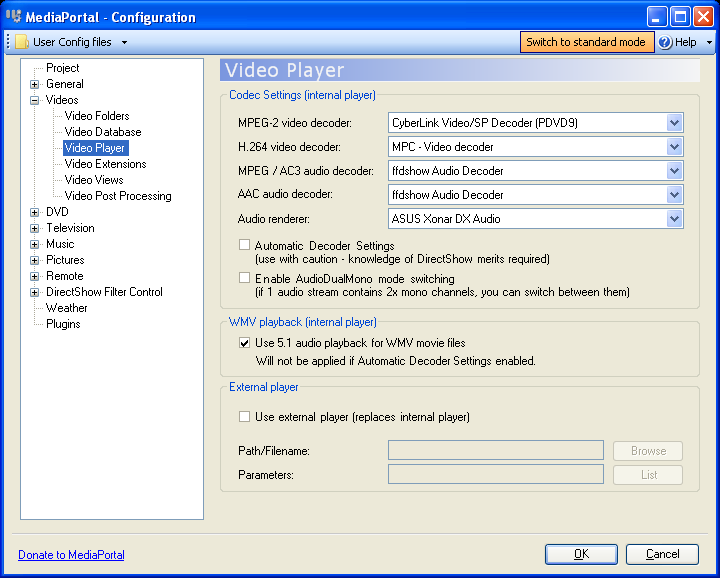
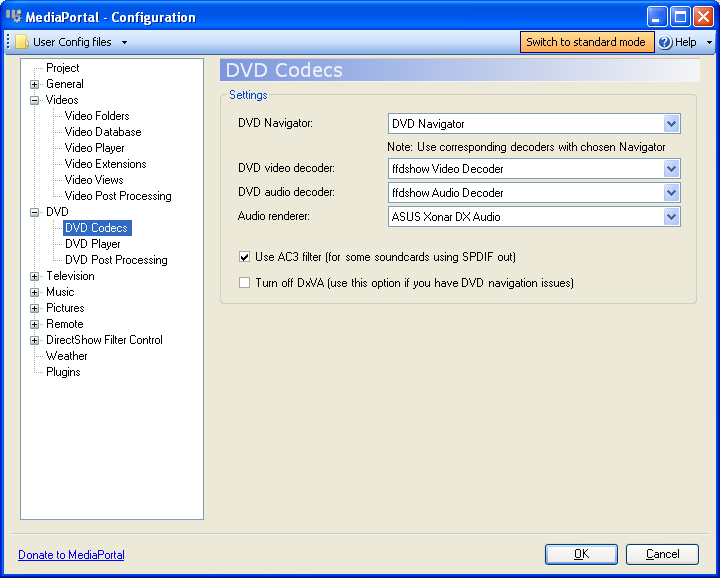
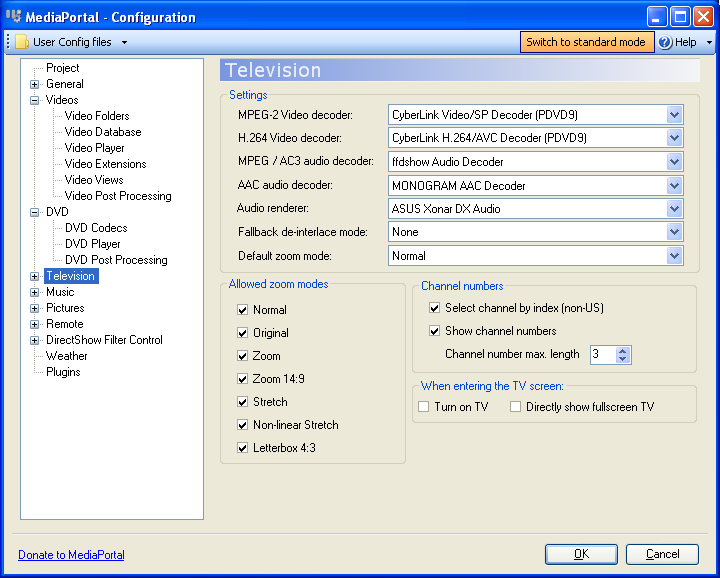
Here are some screens of the setup right after the installation of SAFbeta19 of MP/ffdshow.

MediaPortal


Video Codec


DVD Codec


TV Codec

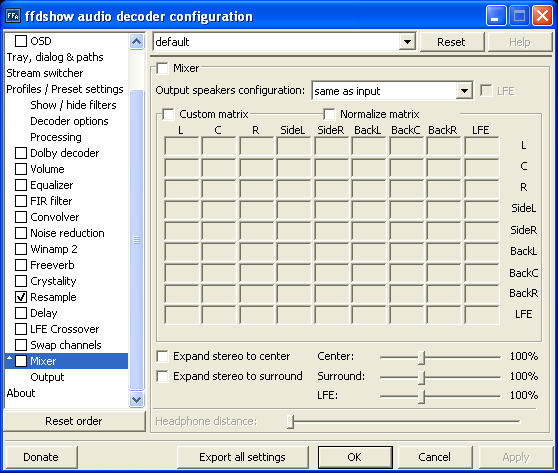
FFdshow setup


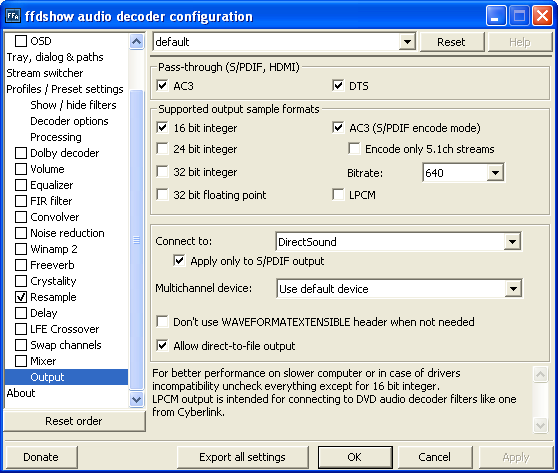
Mixer setup: I had to un-tick the mixer. It was set to 2.0 output. I always have this disabled.


Output setup

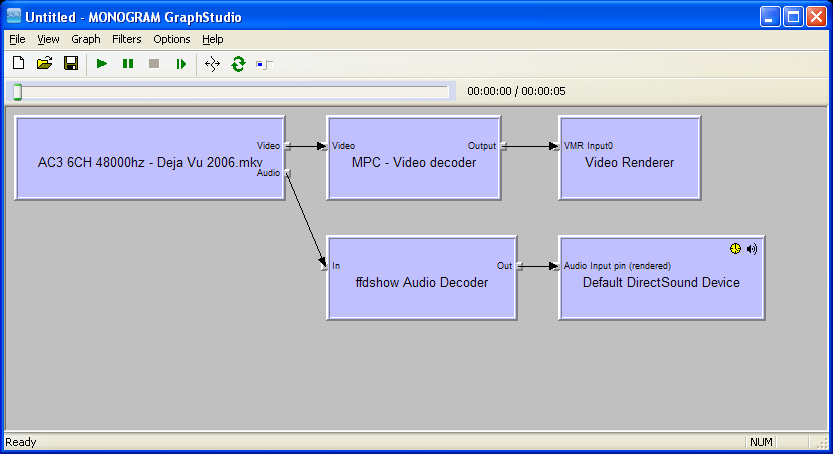
Results of GraphStudio

[Deja Vu.mkv]
Video: MPEG4 Video (H264) 1280x528 23.98fps [Video]
Audio: Dolby AC3 48000Hz 6ch [Audio] >>> OK: DolbyDigital 6CH 48000hz


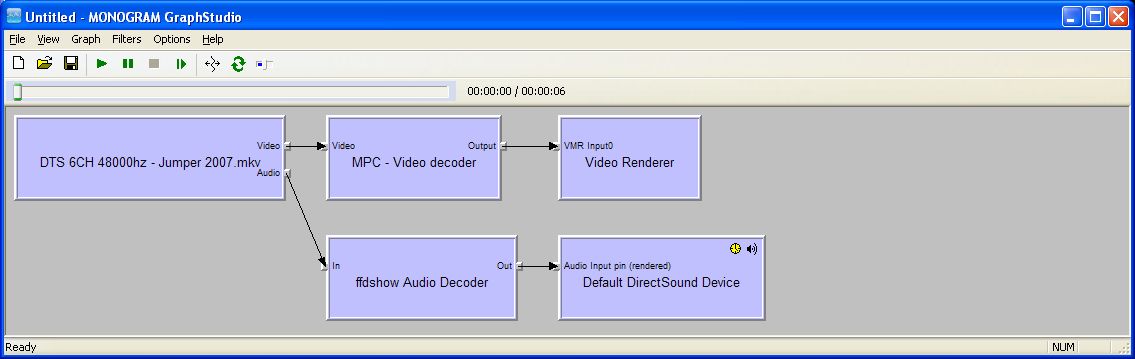
[Jumper.mkv]
Video: MPEG4 Video (H264) 1280x544 23.98fps [Video]
Audio: DTS 48000Hz 6ch [Audio] >>> OK: DTS 6CH 48000hz


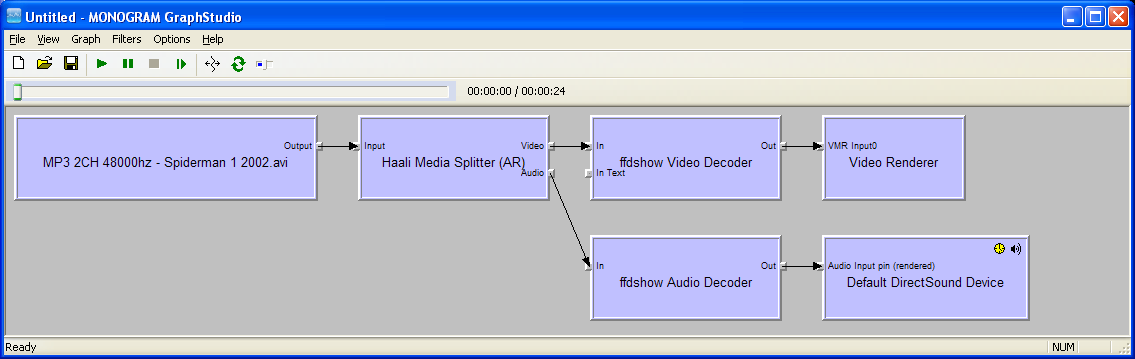
[Spiderman 1.avi]
Video: XVID 528x288 25.00fps [Video]
Audio: MPEG Audio Layer 3 48000Hz stereo 115Kbps [Audio] >>> OK: DolbyDigital 2CH 48000hz


[Alien vs Predator.avi]
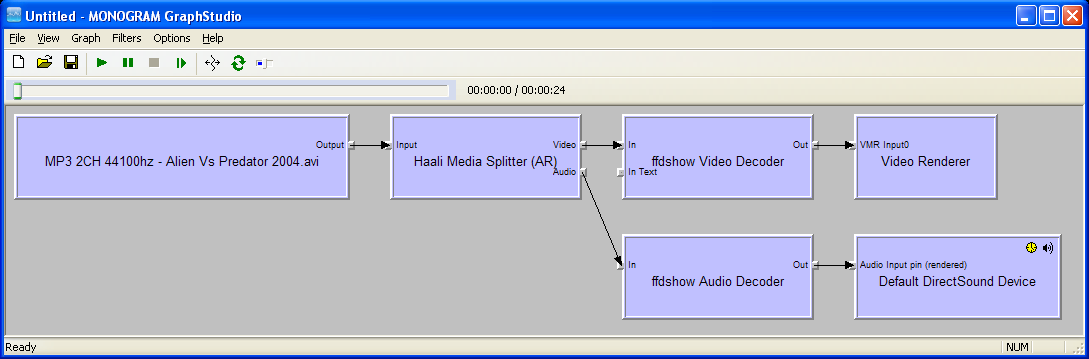
Video: DivX 5 640x360 25.00fps [Video]
Audio: MPEG Audio Layer 3 44100Hz stereo 256Kbps [Audio] >>> OK: DolbyDigital 2CH 48000hz


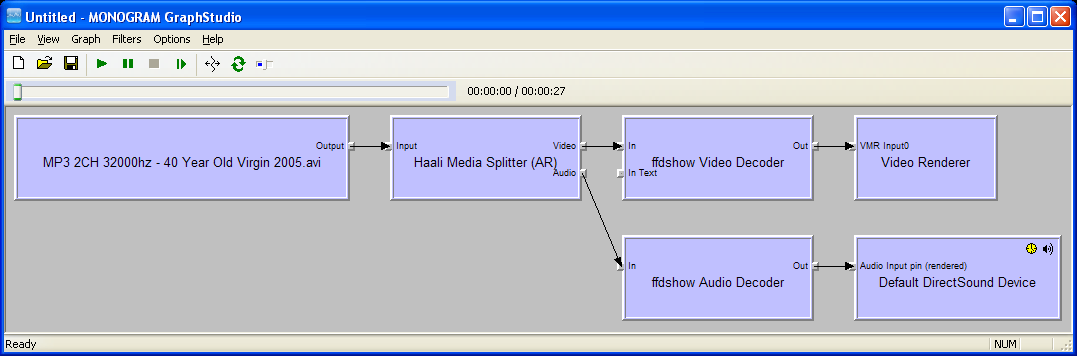
[40 Year Old Virgin.avi]
Video: XVID 640x352 25.00fps [Video]
Audio: MPEG Audio Layer 3 32000Hz stereo 99Kbps [Audio] >>> OK: DolbyDigital 2CH 48000hz


Now the files with problems:
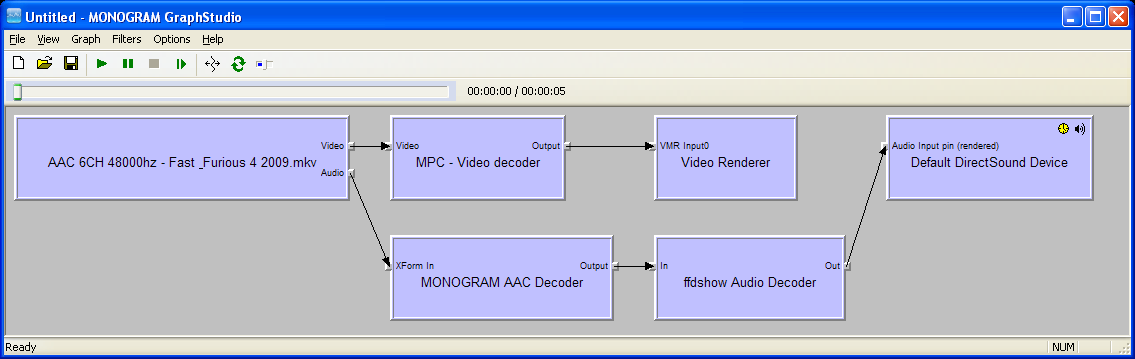
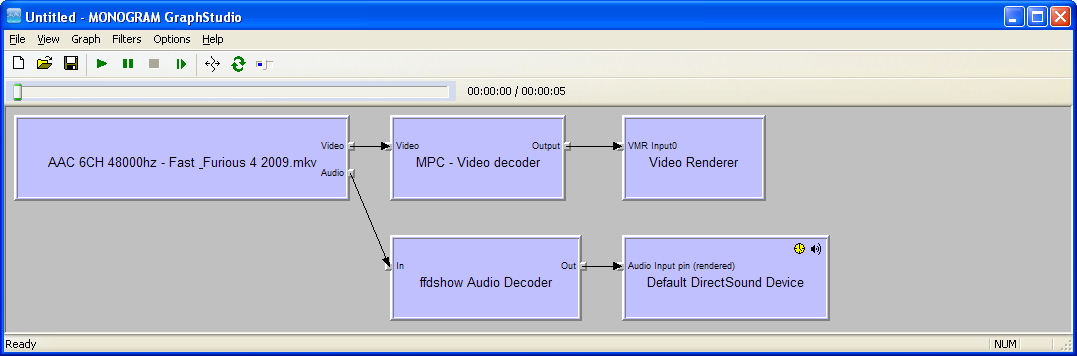
[Fast & Furious 4.mkv]
Video: MPEG4 Video (H264) 1280x544 23.98fps [Video]
Audio: AAC 48000Hz 6ch 4608Kbps [Audio] >>> Error: 2CH 44100hz PCM!


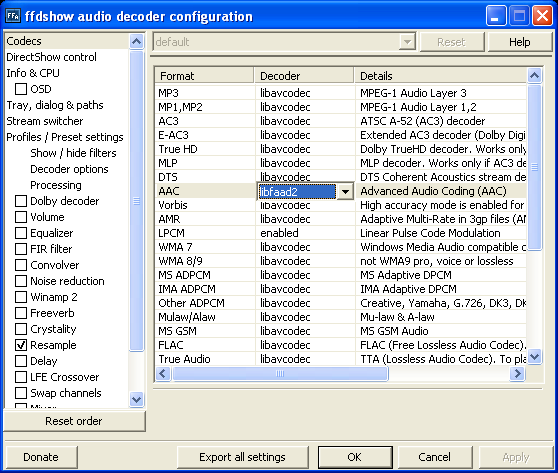
I changed in FFdshow > Codecs > AAC from "Disabled" to "libfaad2".


Resulting Graph.
After this MP plays this file OK. DolbyDigital 48000hz 6CH! :)


Next error,
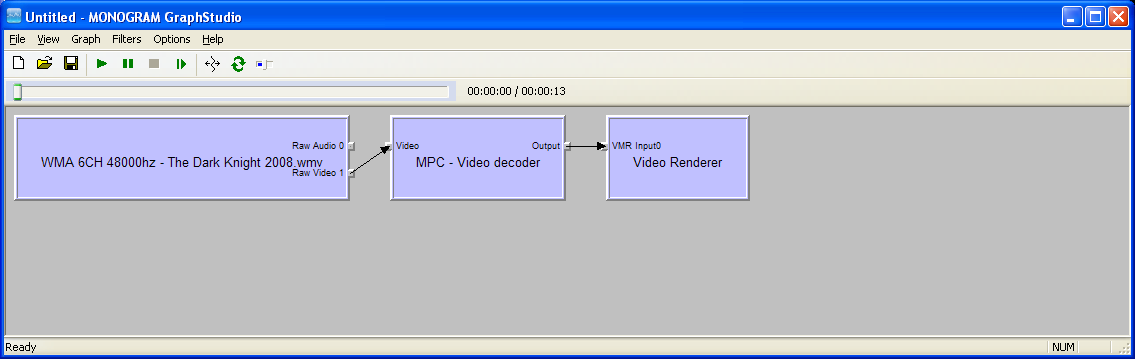
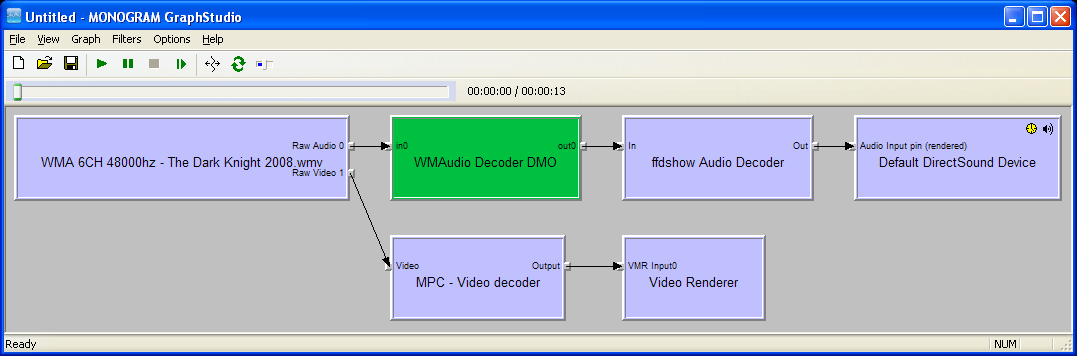
[The Dark Knight.wmv]
Video: VC1 Video () 1920x1088 23.98fps [Video]
Audio: Windows Media Audio 48000Hz 6ch 768Kbps >>> Error: No sound! (PCM) 44100hz!


I re-registered the qasf.dll file. (RUN: regsvr32 c:\windows\system32\qasf.dll)
This is the resulting graph after that.

The result in MP is still not perfect: >>> Error: 2CH 44100hz PCM! But I did hear the sound.

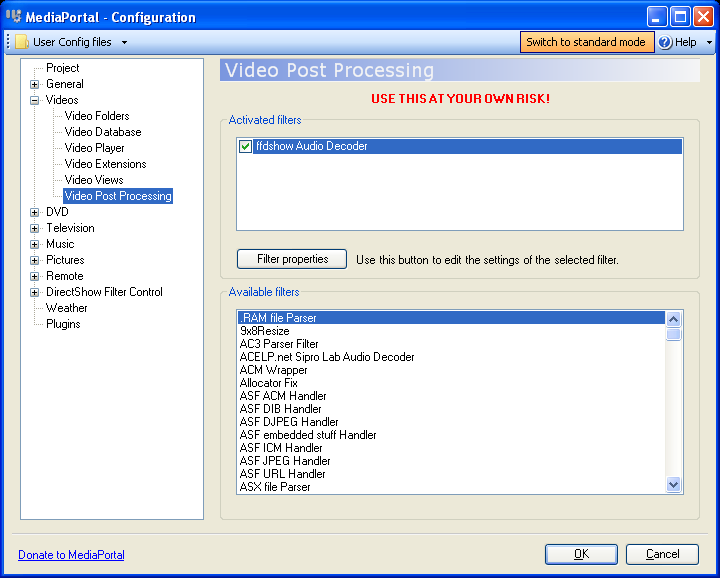
After that I added "FFdshow Audio Decoder" as a post proces in the Video section


The result in MP is now OK! DolbyDigital 6CH 48000hz :)

SO, I think now all is good with this beta19. Am I correct? :D
 

Attachments

  • MPsetup1_Video.png
    MPsetup1_Video.png
    40.7 KB
  • MPsetup1_VideoT.png
    MPsetup1_VideoT.png
    10 KB
  • MPsetup2_DVD.png
    MPsetup2_DVD.png
    35.9 KB
  • MPsetup2_DVDT.png
    MPsetup2_DVDT.png
    8 KB
  • MPsetup3_TV.png
    MPsetup3_TV.png
    41.5 KB
  • MPsetup3_TVT.png
    MPsetup3_TVT.png
    10.1 KB
  • ffdshow audio_mixer.png
    ffdshow audio_mixer.png
    29.2 KB
  • ffdshow audio_mixerT.png
    ffdshow audio_mixerT.png
    10.7 KB
  • ffdshow audio_output.png
    ffdshow audio_output.png
    31 KB
  • ffdshow audio_outputT.png
    ffdshow audio_outputT.png
    11.5 KB
  • Graphstudio1_Deja_vu.png
    Graphstudio1_Deja_vu.png
    32.4 KB
  • Graphstudio1_Deja_vuT.png
    Graphstudio1_Deja_vuT.png
    8.2 KB
  • Graphstudio3_Jumper.png
    Graphstudio3_Jumper.png
    34.2 KB
  • Graphstudio3_JumperT.png
    Graphstudio3_JumperT.png
    8.6 KB
  • Graphstudio2_FastFurious.png
    Graphstudio2_FastFurious.png
    35.8 KB
  • Graphstudio2_FastFuriousT.png
    Graphstudio2_FastFuriousT.png
    9.4 KB
  • Graphstudio4_DarkKnight.png
    Graphstudio4_DarkKnight.png
    31 KB
  • Graphstudio4_DarkKnightT.png
    Graphstudio4_DarkKnightT.png
    7.6 KB
  • Graphstudio5_Spiderman.png
    Graphstudio5_Spiderman.png
    35.3 KB
  • Graphstudio5_SpidermanT.png
    Graphstudio5_SpidermanT.png
    9.2 KB
  • Graphstudio6_AlienVSPredator.png
    Graphstudio6_AlienVSPredator.png
    34.7 KB
  • Graphstudio6_AlienVSPredatorT.png
    Graphstudio6_AlienVSPredatorT.png
    10.1 KB
  • Graphstudio7_40YOVirgin.png
    Graphstudio7_40YOVirgin.png
    34.3 KB
  • Graphstudio7_40YOVirginT.png
    Graphstudio7_40YOVirginT.png
    10.1 KB
  • ffdshow codec_workingAAC.png
    ffdshow codec_workingAAC.png
    36.2 KB
  • ffdshow codec_workingAAC_T.png
    ffdshow codec_workingAAC_T.png
    14 KB
  • Graphstudio2_FastFurious_correctedAAC.png
    Graphstudio2_FastFurious_correctedAAC.png
    33.4 KB
  • Graphstudio2_FastFurious_correctedAAC_T.png
    Graphstudio2_FastFurious_correctedAAC_T.png
    9.7 KB
  • Graphstudio4_DarkKnight_with_qasf.dll.png
    Graphstudio4_DarkKnight_with_qasf.dll.png
    35 KB
  • Graphstudio4_DarkKnight_with_qasf.dllT.png
    Graphstudio4_DarkKnight_with_qasf.dllT.png
    10.3 KB
  • MPsetup1_Video_workingWMV.png
    MPsetup1_Video_workingWMV.png
    37.3 KB
  • MPsetup1_Video_workingWMVT.png
    MPsetup1_Video_workingWMVT.png
    8.5 KB

Users who are viewing this thread

Top Bottom