SAF v4.00 ''stable'' (StandAlone Filters) - DXVA ready (H.264 and VC-1). (25 Viewers)

Should i integrate FFDshow in to SAF?

  • Yes

    Votes: 406 85.5%
  • No

    Votes: 69 14.5%

  • Total voters
    475

globaldonkey

MP Donator
  • Premium Supporter
  • April 23, 2007
    755
    79
    Home Country
    Re: SAF v4.00beta (StandAlone Filters) - DXVA ready (MPEG2, H.264 and VC-1).

    ahhh amazing what one little check box can do..... had VMR 9 mixer mode selected in MPC. Must have been messing around in there. Turn that off, and now I have exactly the same output as in MP with no / poor de-interlacing. MPC says DXVA is working (can't see it in the image as I had to pause it).

    Looks like DXVA issue, try different drivers. I had similar problem with older catalyst 8.12...

    Yeah I've noticed the problem as far back as Catalyst 9.1, and I'm on 10.1 now and I've tried everything in between along the way. I've never really bothered to try and fix it, because MPEG 2 doesn't really need GPU acceleration, so I've always just turned it off. Was just curious if others had observed the same problem, or if somebody knew of something obvious I'd missed. For me, I'm pretty sure de-interlacing is broken with MPEG 2 DXVA. I just don't know why.

    This happens on two different machines as well. Both using 4670's.

    Anyway, as I said, no biggie. H.264 DXVA and deinterlacing is working very well, and that's the main thing.

    And just to add, if I turn DXVA off in PDVD9 filter properties in MPC, the .ts recording plays without interlace artefacts (ie deinterlacing is working with DXVA off). So MPC behaviour is identical to MP.
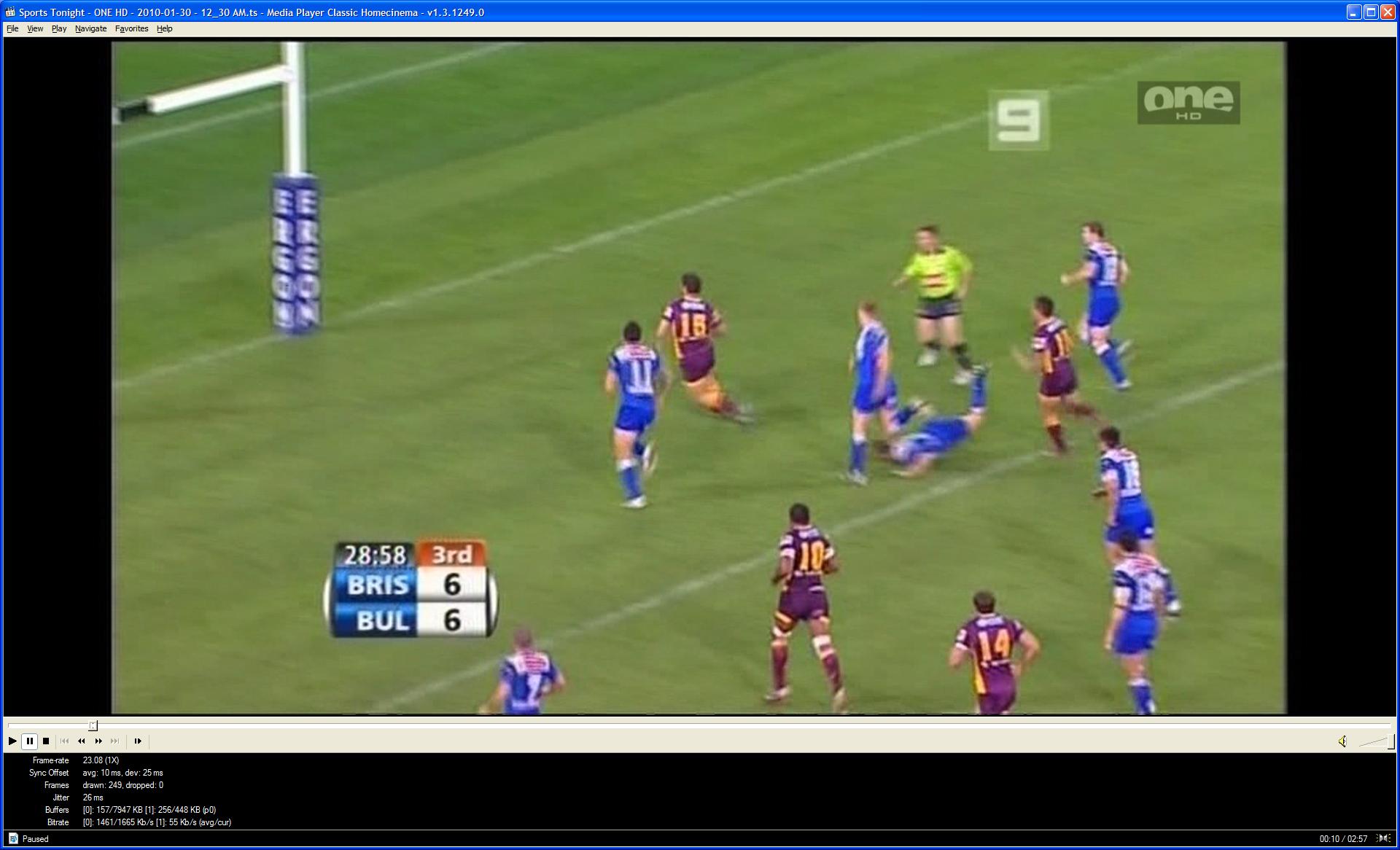
     

    Attachments

    • MPC recording no PDVD9 DXVA.JPG
      MPC recording no PDVD9 DXVA.JPG
      163.2 KB

    hoborg

    Portal Pro
    June 13, 2008
    4,413
    1,644
    Nový Jičín
    Home Country
    Czech Republic Czech Republic
    Re: SAF v4.00beta (StandAlone Filters) - DXVA ready (MPEG2, H.264 and VC-1).

    Yeah I've noticed the problem as far back as Catalyst 9.1, and I'm on 10.1 now and I've tried everything in between along the way. I've never really bothered to try and fix it, because MPEG 2 doesn't really need GPU acceleration, so I've always just turned it off. Was just curious if others had observed the same problem, or if somebody knew of something obvious I'd missed. For me, I'm pretty sure de-interlacing is broken with MPEG 2 DXVA. I just don't know why.

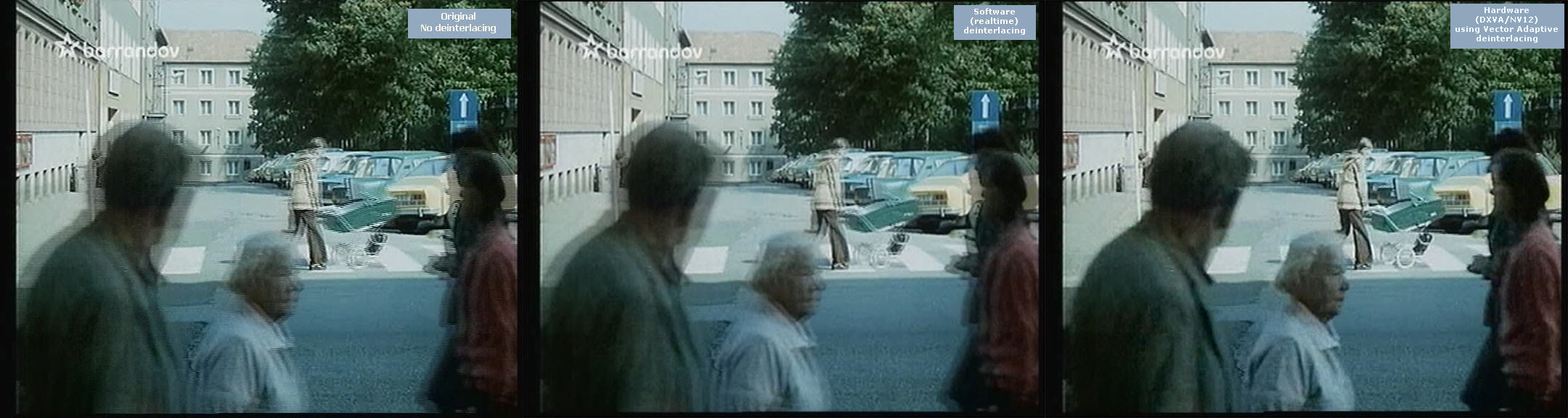
    Yes, you are right, but software deinterlacing will introduce bluring like on second picture:
    deinterlacing.jpg
     

    globaldonkey

    MP Donator
  • Premium Supporter
  • April 23, 2007
    755
    79
    Home Country
    Re: SAF v4.00beta (StandAlone Filters) - DXVA ready (MPEG2, H.264 and VC-1).

    OK, but by turning DXVA off, am I using software deinterlacing? Isn't hardware deinterlacing independent of codec acceleration? How can I tell what is doing the deinterlace?

    If I leave DXVA on and turn the deinterlace pixel shader on in MPC, I get a relatively good picture, but I'm guessing that is definitely software deinterlace?
     

    hoborg

    Portal Pro
    June 13, 2008
    4,413
    1,644
    Nový Jičín
    Home Country
    Czech Republic Czech Republic
    Re: SAF v4.00beta (StandAlone Filters) - DXVA ready (MPEG2, H.264 and VC-1).

    OK, but by turning DXVA off, am I using software deinterlacing? Isn't hardware deinterlacing independent of codec acceleration? How can I tell what is doing the deinterlace?

    If I leave DXVA on and turn the deinterlace pixel shader on in MPC, I get a relatively good picture, but I'm guessing that is definitely software deinterlace?

    "deinterlace pixel shader on in MPC" is simply MPC-HC postprocessing - it is part of MPC-HC player. Of course it have no efect outside MPC-HC player...
     

    mtjoernelund

    Portal Pro
    April 28, 2008
    102
    3
    Home Country
    Denmark Denmark
    Re: SAF v4.00beta (StandAlone Filters) - DXVA ready (MPEG2, H.264 and VC-1).

    Best ATI-driver version to use with SAF...?

    I am running MP 1.1 Beta latest SVN on a Vista machine with onboard ATI Radeon 3200HD graphic chip. When I installed latest driver from AMD, MP made the entire machine freeze when turning on tv after a resume. I then downgraded to the driver included with ccc 8.8 and it all works except that I occasionally get BSOD. I figure that I could run through every driver from 8.8 and upwards and see which one works best, but if someone has the same combination and has a working solution I guess this could save me a lot of trouble and headache...

    So the question in short: What version of AMD Catalyst is the best in combination with MP 1.1 Beta SVN, Vista, SAF and Radeon 3200HD?

    try older 8.5.

    I tried 8.5, but this did not help anything. But I fell over another thread (in German subforum) discussing the same, and through my limited German capabilities I concluded that both 9.6 and 9.8 had given other users good results. I therefore tried installing 9.8 and now everything seems to be running smooth.

    So it seems 9.8 should be the recommendation for the above setup.

    Hoborg - Thank you for a very great package. I am now able to watch all me tv-channels including a couple that has not been working previously and where I have not been able to find out why. Perfect!
     

    DePeut

    New Member
    December 26, 2009
    4
    0
    Re: SAF v4.00beta (StandAlone Filters) - DXVA ready (MPEG2, H.264 and VC-1).

    I have installed Media Portal 1.1 with saf400beta23test4.exe on Windows 7 and since I've installed SAF I can't play any WMV formats anymore. I only get a green screen when I play a WMV file. Also, when I try to play the WMV format in windows media player I get an "unknown codec" error. I didn't had any problems with WMV before I installed SAF. Does this sound familiar to anyone?
     

    hoborg

    Portal Pro
    June 13, 2008
    4,413
    1,644
    Nový Jičín
    Home Country
    Czech Republic Czech Republic
    Re: SAF v4.00beta (StandAlone Filters) - DXVA ready (MPEG2, H.264 and VC-1).

    I have installed Media Portal 1.1 with saf400beta23test4.exe on Windows 7 and since I've installed SAF I can't play any WMV formats anymore. I only get a green screen when I play a WMV file. Also, when I try to play the WMV format in windows media player I get an "unknown codec" error. I didn't had any problems with WMV before I installed SAF. Does this sound familiar to anyone?

    START - SAF - MS DMO - enable.
     

    DePeut

    New Member
    December 26, 2009
    4
    0
    Re: SAF v4.00beta (StandAlone Filters) - DXVA ready (MPEG2, H.264 and VC-1).

    I have installed Media Portal 1.1 with saf400beta23test4.exe on Windows 7 and since I've installed SAF I can't play any WMV formats anymore. I only get a green screen when I play a WMV file. Also, when I try to play the WMV format in windows media player I get an "unknown codec" error. I didn't had any problems with WMV before I installed SAF. Does this sound familiar to anyone?

    START - SAF - MS DMO - enable.

    I get the following error:

    "Regsvr32

    The module "C:\Windows\system32\WMVDECOD.dll" was loaded but the call to DLLRegisterServer failed with error code 0x80004005.

    For more information about this problem, search online using the error code as a search term."

    I have searched online for this error but unfortunately I couldn't find a solution yet.

    Sorry; I mistyped the error code on google. I fixed the problem as following:

    C:\Windows\System32 --> right click cmd.exe --> run as administrator
    Type: Regsvr32.exe "C:\Windows\system32\WMVDECOD.dll"
    Hit enter!

    Next task for me: enabling 5.1 surround on WMV formats :)
     

    hoborg

    Portal Pro
    June 13, 2008
    4,413
    1,644
    Nový Jičín
    Home Country
    Czech Republic Czech Republic
    Re: SAF v4.00beta (StandAlone Filters) - DXVA ready (MPEG2, H.264 and VC-1).

    I have installed Media Portal 1.1 with saf400beta23test4.exe on Windows 7 and since I've installed SAF I can't play any WMV formats anymore. I only get a green screen when I play a WMV file. Also, when I try to play the WMV format in windows media player I get an "unknown codec" error. I didn't had any problems with WMV before I installed SAF. Does this sound familiar to anyone?

    START - SAF - MS DMO - enable.

    I get the following error:

    "Regsvr32

    The module "C:\Windows\system32\WMVDECOD.dll" was loaded but the call to DLLRegisterServer failed with error code 0x80004005.

    For more information about this problem, search online using the error code as a search term."

    I have searched online for this error but unfortunately I couldn't find a solution yet.

    Sorry; I mistyped the error code on google. I fixed the problem as following:

    C:\Windows\System32 --> right click cmd.exe --> run as administrator
    Type: Regsvr32.exe "C:\Windows\system32\WMVDECOD.dll"
    Hit enter!

    Next task for me: enabling 5.1 surround on WMV formats :)
    ...add FFDShow audio decoder to MP postprocessing.
     

    Users who are viewing this thread

    Top Bottom